1. Introducció
The LOFREE Zero ARTZ is a 75% mechanical keyboard designed for versatile use across multiple operating systems. It features a unique terrazzo-inspired design, hot-swappable linear switches, and multiple connection options for enhanced productivity and user experience.
2. Contingut del paquet
Verifiqueu que tots els elements siguin presents al vostre paquet:
- LOFREE Zero ARTZ Mechanical Keyboard
- Marble Palm Rest
- Cable USB-C a USB-A
- Raspall de neteja
- Manual d'usuari (aquest document)
- Targeta de garantia

Image: Included accessories with the keyboard.
3. Configuració
3.1. Power On/Off & Connection Mode Selection
Locate the switches on the back edge of the keyboard:
- Interruptor d'alimentació: Slide the switch to turn the keyboard ON or OFF.
- OS Switch: Select between "Win/And" (Windows/Android) or "Mac/iOS" (Mac/iOS) to optimize key functions for your operating system.
- Interruptor de mode de connexió: Trieu el mètode de connexió que preferiu:
- WLS (Wireless/Bluetooth): Per a connexió Bluetooth.
- CAB (Cable): For wired USB-C connection.
- DESACTIVAT: Turns off the keyboard.
Image: Close-up of the USB-C port, OS switch, and connection mode switch.
3.2. Connecting via Bluetooth (WLS Mode)
- Ensure the keyboard is ON and the Connection Mode Switch is set to "WLS".
- On your device (computer, tablet, smartphone), enable Bluetooth.
- Cerca available Bluetooth devices and select "LOFREE Zero ARTZ" (or similar name).
- Seguiu les indicacions de la pantalla per completar el procés de vinculació.
3.3. Connecting via USB-C Cable (CAB Mode)
- Connect one end of the provided USB-C cable to the keyboard's USB-C port.
- Connect the other end (USB-A) to an available USB port on your computer.
- Ensure the Connection Mode Switch is set to "CAB". The keyboard will automatically connect.
4. Instruccions de funcionament
4.1. Backlighting Effects
The keyboard features customizable backlighting:
- Canvia l'efecte de la llum: Premeu Fn + Fletxa amunt to cycle through 7 distinct lighting effects.
- Ajusta la brillantor: Premeu Fn + Fletxa esquerra or Fn + Fletxa dreta to adjust between 4 brightness levels.
- Adjust Blink Frequency: Premeu Fn + Fletxa avall to change between 4 blink frequencies for dynamic effects.
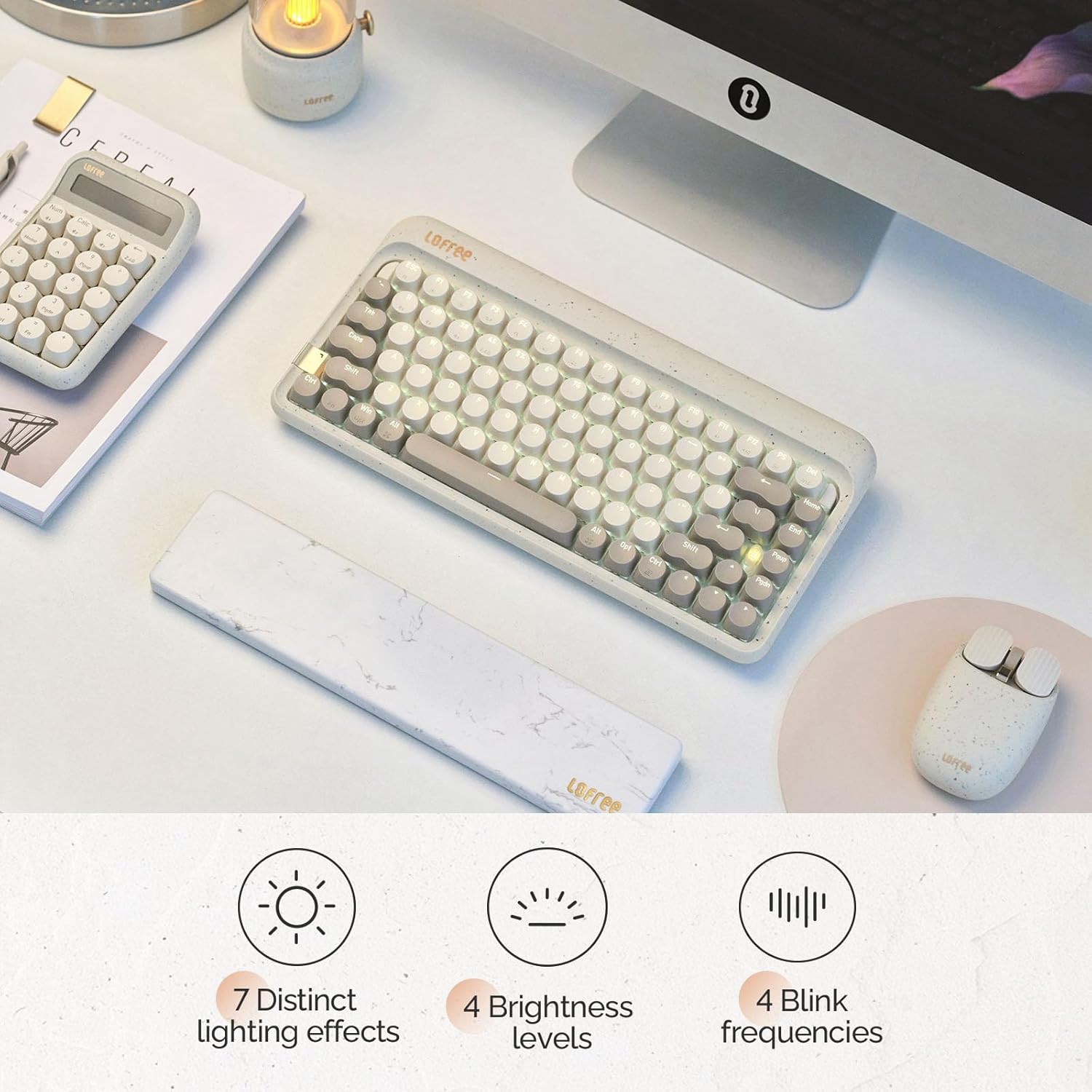
Image: The keyboard displaying its various backlighting options.
4.2. Marble Palm Rest
The included Marble Palm Rest provides ergonomic support and features a natural marble texture. It is equipped with non-slip mats for stability during use.

Image: The marble palm rest showing its non-slip mats.

Image: Close-up of the marble palm rest highlighting its natural texture.
4.3. Interruptors intercanviables en calent
The LOFREE Zero ARTZ keyboard features hot-swappable switches, allowing users to easily change switches without soldering. This enables customization of typing feel and sound.
Video: Demonstrates the hot-swappable feature of the keyboard, showing how switches can be easily removed and replaced.
Vídeo: Una breu presentacióview espectacleasing the hot-swappable switches and customizable keycaps.
5. Manteniment
Per mantenir el teclat en condicions òptimes:
- Use the provided cleaning brush to remove dust and debris from between the keycaps regularly.
- For deeper cleaning, carefully remove keycaps using a keycap puller (not included) and clean the switches and plate.
- Avoid exposing the keyboard to liquids or extreme temperatures.
6. Solució De Problemes
- El teclat no respon:
- Ensure the keyboard is powered ON.
- Check the connection mode (WLS/CAB) and ensure it matches your connection type.
- For Bluetooth, try re-pairing the device.
- For wired, try a different USB port or cable.
- La retroiluminació no funciona:
- Assegureu-vos que el teclat estigui carregat.
- Try adjusting brightness levels using Fn + Fletxa esquerra/dreta.
- Claus que no es registren:
- Ensure the OS switch is set correctly for your operating system.
- If a specific key is not working, it might be a faulty switch. Utilize the hot-swappable feature to replace it.
7. Especificacions
| Característica | Detall |
|---|---|
| Marca | LOFREE |
| Model | Zero ARTZ |
| Tipus de teclat | 75% mecànic |
| Tipus de canvi | Linear (Hot-swappable) |
| Connectivitat | Bluetooth, Wired (USB-C) |
| Dispositius compatibles | Android, Laptop, Mac, PC, Smartphone, Tablet |
| Sistemes operatius | MacOS, iOS, Windows, Android |
| Font d'alimentació | Funciona amb bateria |
| Característica especial | Ergonomic Marble Palm Rest |
8. Garantia i assistència
Your LOFREE Zero ARTZ Mechanical Keyboard comes with a manufacturer's warranty. Please refer to the included Warranty Card for details regarding coverage, terms, and conditions.
For technical support or customer service, please visit the official LOFREE website or contact their customer support channels as listed on the product packaging or warranty card.


