Introducció
This manual provides essential information for setting up, operating, maintaining, and troubleshooting your HP Envy 17-DA000 Laptop. Please read this guide thoroughly to ensure proper use and to maximize the performance and longevity of your device.

Image: The HP Envy 17-DA000 Laptop with its 17.3-inch display open, showing the Windows 11 operating system desktop.
Configuració
1. Unboxing i Inspecció Inicial
Carefully remove the laptop and all accessories from the packaging. Inspect the laptop for any physical damage. The manufacturer box may have been opened for professional customization and testing.
2. Connexió a l'alimentació
- Connecteu l'adaptador de CA al connector d'alimentació del portàtil.
- Connecteu el cable d'alimentació a una presa de corrent.
- Deixeu que la bateria es carregui durant almenys 30 minuts abans del primer ús o fins que l'indicador de la bateria mostri una càrrega suficient.
3. Initial Power On and Windows 11 Setup
- Premeu el botó d'encesa per encendre l'ordinador portàtil.
- Segueix les instruccions que apareixen a la pantalla per completar el procés de configuració del Windows 11 Home. Això inclou seleccionar la regió i l'idioma, connectar-se a una xarxa Wi-Fi i crear un compte d'usuari.
4. Connexió de perifèrics
Connect external devices such as a mouse, external keyboard, or monitor to the available ports on your laptop. Refer to the 'Ports and Connectors' section for port identification.
Instruccions de funcionament
1. Keyboard and Touchscreen
- Teclat retroil·luminat: The keyboard features backlighting for use in low-light conditions. Adjust brightness settings through the function keys or Windows settings.
- Numpad: A dedicated numeric keypad is integrated for efficient data entry.
- Pantalla tàctil: The 17.3-inch FHD display supports touch input. Use gestures for navigation and interaction within Windows 11.
2. Ports i connectors
Your HP Envy 17-DA000 laptop is equipped with various ports for connectivity:
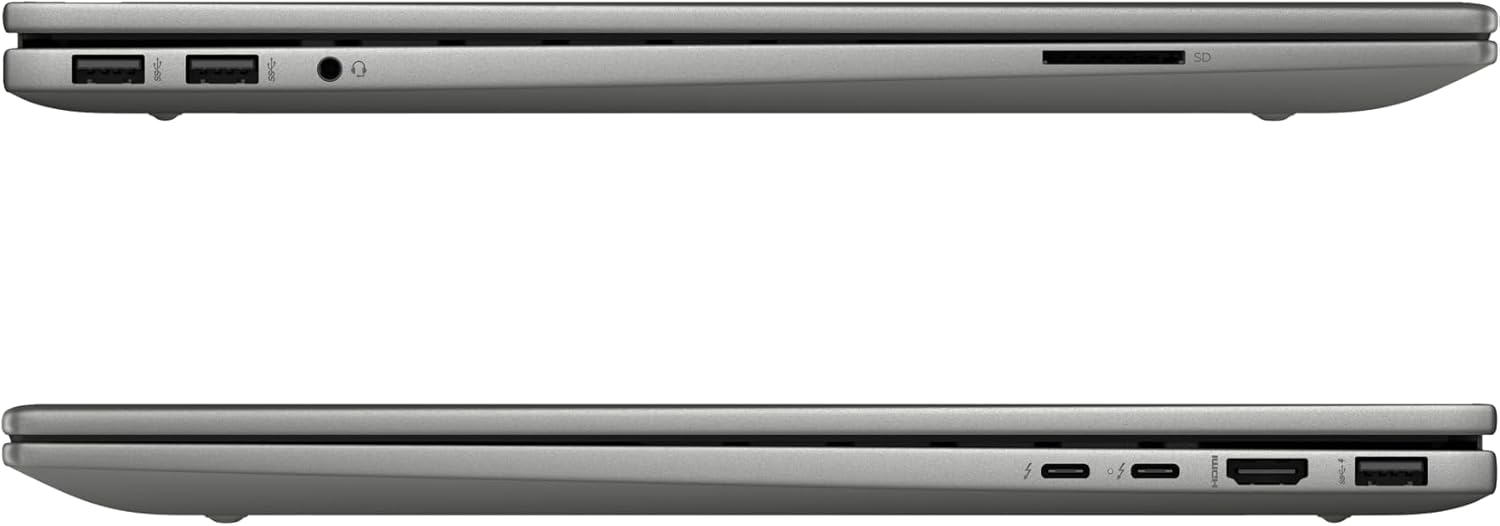
Image: Left side of the laptop, featuring two USB 3.2 Gen 2 ports, a headphone/microphone combo jack, and an SD card reader.
- Costat esquerre:
- 2x USB 3.2 Gen 2 (10 Gbps)
- 1x Presa combinada per a auriculars/micròfon
- 1x Lector de targetes SD

Image: Right side of the laptop, featuring two USB-C Thunderbolt 4 ports, an HDMI 2.1 port, and one USB 3.2 Gen 2 port.
- costat dret:
- 2x USB-C Thunderbolt 4 / USB4 40Gbps (with Power Delivery and DisplayPort 1.4, Power-off Charging)
- 1x USB 3.2 Gen 2 (10Gbps, with Power-off Charging)
- 1x HDMI v2.1
3. Connectivitat sense fil
- Wi-Fi 6E AX211 (2x2): Connecteu-vos a xarxes sense fil per accedir a Internet.
- Bluetooth 5.3: Pair with compatible Bluetooth devices such as headphones, speakers, or mice.
4. Weblleva
The HP Wide Vision 5MP IR camera includes a privacy shutter. Slide the shutter to cover the camera lens when not in use to ensure privacy.
Manteniment
1. Neteja del portàtil
- Utilitzeu un drap suau i sense pelusa dampesbandiu amb aigua o un netejador de pantalles per netejar la pantalla.
- Per al teclat i el xassís, feu servir un drap suau i sec. Eviteu productes químics agressius o materials abrasius.
- Periodically use compressed air to clear dust from vents and ports.
2. Actualitzacions de programari
Regularly check for and install updates for Windows 11 and HP drivers to ensure optimal performance and security. Access Windows Update through the Settings menu.
3. Cura de la bateria
- Eviteu descarregar completament la bateria amb freqüència.
- Guardeu el portàtil en un lloc fresc i sec si no el feu servir durant períodes prolongats.
- Feu servir només l'adaptador de CA de 100 W proporcionat per carregar.
4. Gestió de l'emmagatzematge
The 1TB NVMe M.2 SSD provides fast storage. Regularly back up important data and manage files to maintain sufficient free space for system performance.
Resolució de problemes
Problemes comuns i solucions
- El portàtil no s'encén: Ensure the AC adapter is securely connected and the battery has sufficient charge. Try a different power outlet.
- Problemes de visualització: If the screen is blank, try connecting an external monitor to check if the issue is with the laptop's display. Adjust display settings in Windows.
- Sense connexió Wi-Fi: Check if Wi-Fi is enabled in Windows settings. Restart the laptop and your wireless router. Ensure drivers are up to date.
- Rendiment lent: Close unnecessary applications, check for malware, ensure sufficient free storage space, and update drivers.
Per a problemes més complexos, consulteu el servei d'assistència d'HP weblloc o contacteu amb el servei d'atenció al client.
Especificacions
| Característica | Detall |
|---|---|
| Model | HP Envy 17-DA000 |
| Processador | Intel Core Ultra 7 155U (Up to 4.8 GHz, 12 Cores, 14 Threads) |
| Mostra | 17.3-inch FHD (1920 x 1080) LED-backlit Touchscreen, 60Hz, 300 nits, 45% NTSC |
| Gràfics | NVIDIA GeForce RTX 3050 de 4 GB de GDDR6 |
| Memòria | 32 GB de DDR5 SDRAM a 5600 MHz |
| Emmagatzematge | 1TB SSD NVMe M.2 |
| Sistema operatiu | Windows 11 Home |
| Teclat | Teclat retroil·luminat amb teclat numèric |
| Connectivitat sense fil | Intel Wi-Fi 6E AX211 (2x2), Bluetooth 5.3 |
| Ports | 2x USB-C Thunderbolt 4, 3x USB 3.2 Gen 2, 1x HDMI v2.1, 1x Headphone/microphone combo, 1x SD Card Reader |
| Weblleva | HP Wide Vision 5MP IR camera with Privacy Shutter |
| Bateria | Bateria de ions de liti de 55 Wh |
| Dimensions (LxWxH) | 15.59 x 10.18 x 0.77 polzades |
| Pes | 5.55 lliures |
| Color | Plata Platí |
Informació de la garantia
Aquest producte ve amb un 12 mesos de garantia. This warranty covers manufacturing defects and issues arising from normal use. Please retain your proof of purchase for warranty claims. The warranty does not cover damage caused by misuse, accidents, or unauthorized modifications.
Suport
If you require technical assistance, have questions about your laptop, or need to make a warranty claim, please contact our support team. You can find contact information on the official HP support weblloc web o a través de la documentació inclosa amb el producte.
Per a recursos en línia, visiteu Suport d'HP Weblloc.