1. Introducció
This manual provides comprehensive instructions for the setup, operation, and maintenance of your Cambridge Audio CXA81 MkII Integrated Stereo Amplifier. Please read this manual thoroughly before using the amplifier to ensure proper functionality and to maximize your listening experience. Keep this manual for future reference.
2. Què hi ha a la caixa
Carefully unpack your CXA81 MkII amplificador. El paquet ha de contenir els elements següents:
- CXA81 MKII Integrated Ampmés viu
- Comandament a distància (amb piles)
- Cable d'alimentació
- Guia d'inici ràpid
- Guia de seguretat
3. Característiques clau
The Cambridge Audio CXA81 MkII Integrated Stereo Amplifier offers advanced audio performance and connectivity options:
- 80 Watts Per Channel: Proporciona ample power to drive a wide range of speakers.
- ESS ES9018K2M SABRE32 DAC: High-quality digital-to-analog conversion for precise audio reproduction.
- Classe AB Amplificació: Delivers a balanced and efficient audio performance.
- Toroidal Transformer: Contributes to superior sound-staging and dynamic range.
- Entrades digitals: Includes TOSLINK, Coaxial, and USB Audio Input for versatile digital source connectivity.
- Balanced XLR Inputs: Offers premium, low-noise connection for compatible audio sources.
- Bluetooth aptX HD Input: Enables high-resolution wireless audio streaming from compatible devices.
- Roon Tested: Compatible with Roon software when connected via USB to a PC or Mac.
4. Configuració
4.1 Col·locació
Col·loca el amplifier on a flat, stable surface away from direct sunlight, heat sources, and excessive moisture. Ensure adequate ventilation around the unit to prevent overheating. Do not block the ventilation grilles on the top or sides of the ampmés viu.

Image 1: Angled top view of the CXA81 MkII, highlighting the ventilation grille.
4.2 Connectar altaveus
Connecteu els vostres altaveus al amplifier's speaker terminals. The CXA81 MkII supports two sets of speakers (A and B). Ensure correct polarity (+ to + and - to -) for each speaker. Use high-quality speaker cables for optimal performance.
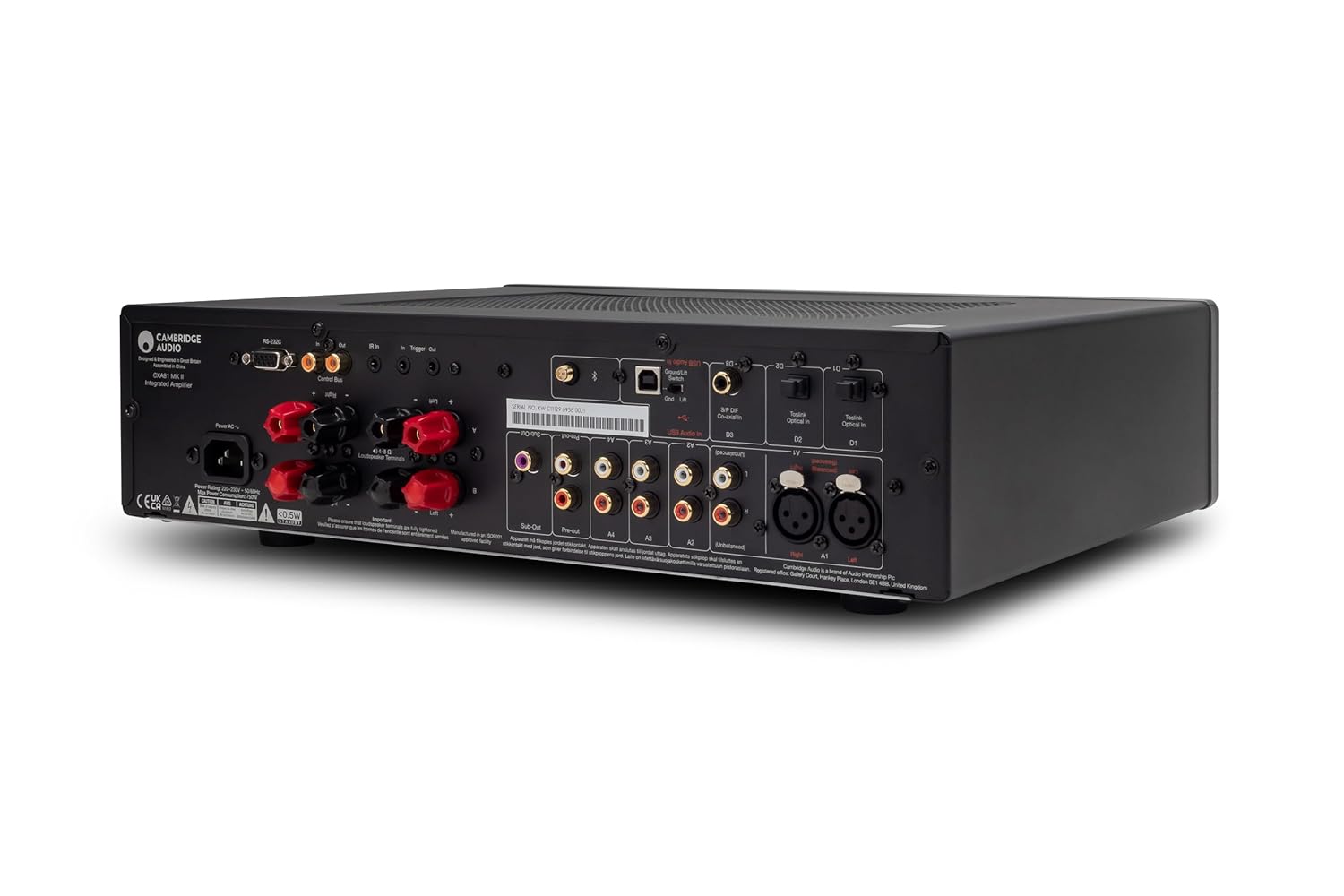
Image 2: Rear panel of the CXA81 MkII, illustrating speaker terminals and input/output ports.
4.3 Connexió de fonts d'àudio
The CXA81 MkII offers a variety of input options:
- Analog Inputs (RCA): Connect CD players, tuners, or other analog sources to inputs A1-A4.
- Entrada XLR equilibrada: For high-fidelity analog connections, use the XLR input (A1) with compatible sources.
- Digital Inputs (Optical/Coaxial): Connect digital audio sources like TVs, game consoles, or streaming devices to D1 (Coaxial) or D2 (Optical).
- Entrada d'àudio USB: Connect a computer (PC/Mac) via USB for high-resolution audio playback.
- Bluetooth: Pair your Bluetooth-enabled device for wireless audio streaming.
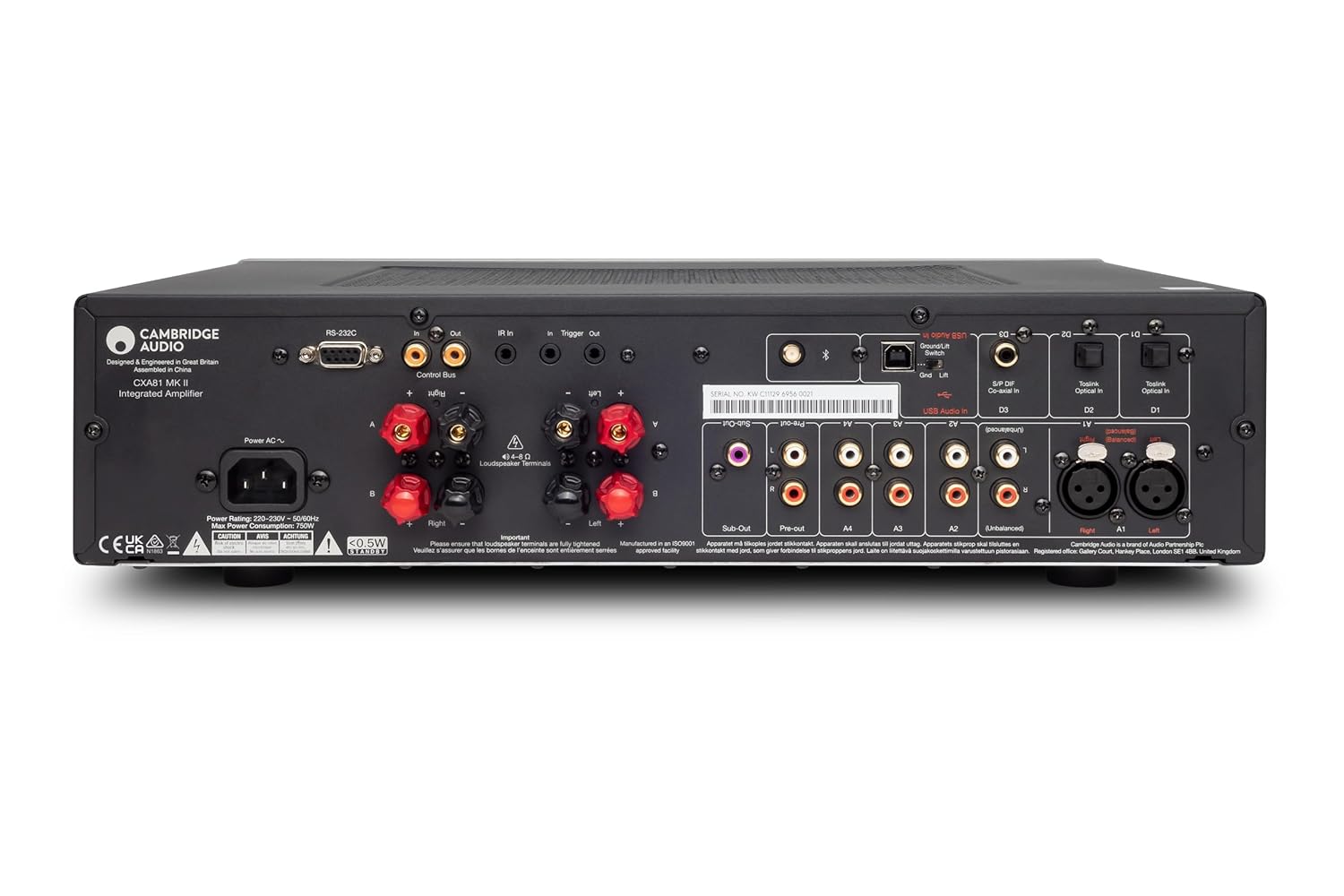
Imatge 3: Detallada view of the CXA81 MkII's rear connections.
4.4 Connexió d'alimentació
Once all audio and speaker connections are made, connect the supplied power cable to the amplifier's AC inlet and then to a suitable wall outlet.
5. Instruccions de funcionament
5.1 Engegada/apagada
Press the power button on the front panel or the remote control to turn the amplifier on or off. The power indicator will illuminate when the unit is active.

Image 4: Front panel of the CXA81 MkII, displaying controls.
5.2 Selecció d'entrada
Use the input selector buttons on the front panel (A1-A4, D1-D2, USB, Bluetooth) or the remote control to choose your desired audio source. The selected input will be indicated on the front display.
5.3 Control de volum
Adjust the volume using the large rotary knob on the front panel or the volume up/down buttons on the remote control. Rotate clockwise to increase volume and counter-clockwise to decrease.

Image 5: Adjusting the volume on the CXA81 MkII.
5.4 Selecció d'altaveus A/B
If you have two sets of speakers connected, use the A/B speaker selection button on the front panel or remote to switch between Speaker A, Speaker B, or both (A+B).
5.5 Vinculació Bluetooth
- Select the Bluetooth input on the ampmés viu.
- On your Bluetooth device, search for available devices and select "Cambridge Audio CXA81 MkII".
- Once paired, audio from your device will stream wirelessly to the ampmés viu.
5.6 Sortida d'auriculars
Connect headphones to the 3.5mm jack on the front panel. Connecting headphones will automatically mute the main speaker outputs.
6. Manteniment
6.1 Neteja
Per netejar el amplifier, use a soft, lint-free cloth. Do not use abrasive cleaning agents, waxes, or solvents. Disconnect the amplifier from the power outlet before cleaning.
6.2 Ventilació
Assegureu-vos que les obertures de ventilació de la amplifier are not obstructed. Proper airflow is crucial for maintaining optimal operating temperature and preventing damage to internal components.
7. Solució De Problemes
If you encounter issues with your CXA81 MkII, refer to the following common problems and solutions:
- Sense energia: Check that the power cable is securely connected to both the amplifier and the wall outlet. Ensure the wall outlet is active.
- Sense so:
- Verifiqueu que s'ha seleccionat la font d'entrada correcta.
- Comproveu les connexions dels altaveus per assegurar-vos que la polaritat sigui correcta i que estiguin ben ajustades.
- Ensure volume is not set to minimum or muted.
- If headphones are connected, disconnect them to enable speaker output.
- Confirm that Speaker A or B (or A+B) is selected.
- So distorsionat:
- Reduïu el nivell de volum.
- Comproveu la compatibilitat de la impedància dels altaveus amb el ampmés viu.
- Inspect speaker cables for damage or short circuits.
- Problemes de connexió Bluetooth:
- Assegureu-vos el amplifier's Bluetooth input is selected.
- Acosteu el dispositiu Bluetooth a la ampmés viu.
- Prova de desvincular i tornar a vincular el dispositiu.
- Clear Bluetooth memory on your device and the amplifier (refer to the full manual for specific steps if available).
If problems persist, consult the full product manual or contact Cambridge Audio customer support.
8. Especificacions
Technical specifications for the Cambridge Audio CXA81 MkII Integrated Stereo Ampmés viu:
| Especificació | Detall |
|---|---|
| Número de model | C11310K |
| Potència de sortida | 80 watts per canal |
| Nombre de canals | 2 |
| DAC | ESS ES9018K2M SABRE32 |
| Bluetooth | aptX HD |
| Tipus de muntatge | Muntatge en superfície |
| Dimensions del paquet | 21.75 x 16.5 x 8 polzades |
| Pes de l'article | 23.6 lliures |
9. Garantia i Suport
Your Cambridge Audio CXA81 MkII Integrated Stereo Amplifier is covered by a manufacturer's warranty. For detailed information regarding warranty terms, registration, and technical support, please refer to the warranty card included with your product or visit the official Cambridge Audio weblloc web. Conserveu el comprovant de compra per a reclamacions de garantia.


