1. Introducció i finalview
The vretti HP2 Portable Bluetooth Label Maker Machine is a compact and intelligent device designed for creating custom labels wirelessly. This thermal label printer offers high-quality, inkless printing for various organizational needs in home, office, and retail environments. Its portable design allows for convenient use anytime, anywhere.
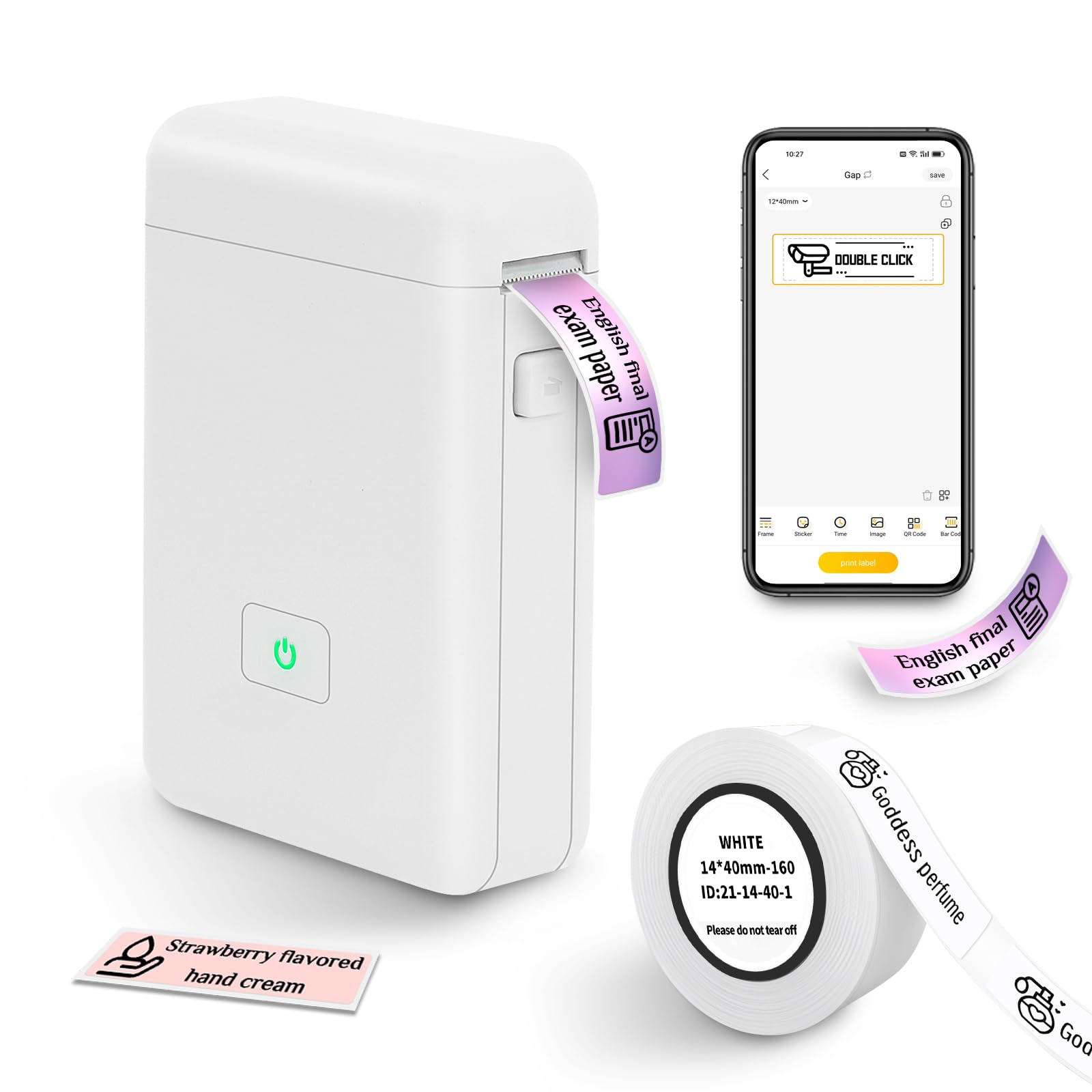
Figure 1: The vretti HP2 Portable Bluetooth Label Maker Machine, a compact white device with a power button, shown on a countertop.
2. Què hi ha a la caixa
Upon unboxing your vretti HP2 Label Maker Machine, you should find the following components:
- 1 x vretti HP2 Label Maker Machine
- 1 x Roll of 14x40mm White Label Paper
- 1 x cable de càrrega USB
- 1 x Product Usage Guide (Instruction Manual)
3. Configuració
Follow these steps to set up your vretti HP2 Label Maker Machine:
- Carregueu el dispositiu: Connect the label maker to a power source using the provided USB charging cable. The power indicator light will show charging status. Ensure the device is fully charged before first use.
- Instal·leu el rotlle d'etiquetes: Open the cover of the label maker by pressing the designated button. Insert the label paper roll into the machine, ensuring the labels feed correctly. Close the cover securely.
- Descarrega l'aplicació: The vretti HP2 operates via Bluetooth connectivity with a smartphone app. Download the "XeasyLabel" app from your device's app store (iOS or Android). This label maker does not work with computers.
- Connecteu-vos mitjançant Bluetooth: Turn on the label maker by pressing and holding the power button until the indicator light turns green. Open the "XeasyLabel" app on your smartphone and follow the in-app instructions to connect to the HP2 device via Bluetooth.

Figure 2: Visual guide for connecting the vretti HP2 label maker via Bluetooth and downloading the XeasyLabel app from app stores.
4. Instruccions de funcionament
Once your vretti HP2 is set up and connected to the "XeasyLabel" app, you can begin creating and printing labels:
- Create a New Label: In the "XeasyLabel" app, select the option to "Create a New Tag" or choose from "Label Templates."
- Customize Your Label: The app offers extensive customization options, including over 60 fonts, 12+ languages, and 400+ borders. You can add text, tables, symbols, logos, barcodes, QR codes, images, time, or import data from Excel.
- Ajustar la configuració: Before printing, you can adjust print density and the number of copies within the app.
- Imprimeix l'etiqueta: Tap the "Print" button in the app. The label maker will quickly print your customized label. Labels are of fixed length (e.g., 14x40mm) and do not support continuous label tape.
- Tear Off Label: Once printed, gently tear off the label using the serrated edge on the device.

Figure 3: A step-by-step visual of the XeasyLabel app interface, demonstrating device connection, new label creation, and print preview.

Figura 4: Un excésview of the XeasyLabel app's rich customization options, including various templates, patterns, and fonts for label design.
5. Funcions de l'aplicació
The "XeasyLabel" app is a versatile tool that enhances the functionality of your vretti HP2 label maker. Key features include:
- Personalització extensa: Access to over 60 fonts, 12+ languages, and 400+ borders to personalize your labels.
- Template Variety: Utilize templates for text, tables, symbols, logos, barcodes, QR codes, images, time, and Excel data insertion.
- Impressió d'imatges: Upload and print images directly from your phone (note: prints in monochrome).
- Barcode & QR Code Generation: Easily create and print barcodes and QR codes for inventory or product management.
- Print Density Control: Adjust the darkness of your print for optimal readability.
Video 1: Official product video from vretti-us demonstrating the HP2 Label Maker Machine with Tape, showcasing les seves característiques i facilitat d'ús.
6. Manteniment
To ensure the longevity and optimal performance of your vretti HP2 Label Maker Machine, follow these maintenance guidelines:
- Neteja: Regularly clean the print head with a soft, lint-free cloth to prevent dust and debris buildup. Do not use harsh chemicals or abrasive materials.
- Emmagatzematge: Guardeu l'etiquetadora en un lloc fresc i sec, allunyat de la llum solar directa i de temperatures extremes.
- Cura de la bateria: To maintain battery health, avoid fully discharging the device frequently. Charge it regularly, even if not in constant use.
- Manipulació del paper: Use only vretti-approved thermal label paper. Ensure the paper is loaded correctly to prevent jams and damage to the print head.
7. Solució De Problemes
If you encounter issues with your vretti HP2 Label Maker Machine, refer to the following common troubleshooting tips:
- El dispositiu no es connecta: Ensure Bluetooth is enabled on your smartphone and the label maker is powered on. Restart both the device and the app, then attempt to reconnect.
- Mala qualitat d'impressió: Check if the label paper is loaded correctly and is not running out. Clean the print head as described in the Maintenance section. Adjust print density settings in the app.
- Embussos de paper: Open the cover and carefully remove any jammed paper. Ensure the new roll is inserted properly and the cover is closed.
- El dispositiu no s'encén: Ensure the device is fully charged. If the issue persists, try using a different USB charging port or cable.
- Problemes amb l'aplicació: If the app is unresponsive, close it completely and reopen. Ensure your app is updated to the latest version.
- Compatibilitat: Note that this label maker is designed for use with smartphones (iOS & Android) and does not work with computers.
8. Especificacions
| Característica | Especificació |
|---|---|
| Dimensions del producte | 3 "P x 2" W x 1.5" H |
| Pes de l'article | 7 unces (0.2 quilograms) |
| Tecnologia de connectivitat | Bluetooth |
| Tecnologia d'impressió | Tèrmica |
| Resolució d'impressió màxima | 203 ppp |
| Mida màxima del suport | 3 x 4 polzades |
| Mides de suports admesos | 14x40 Millimeters, 50 x 30 millimeters |
| Bateria | 2000 MAH Lithium Ion (1 required) |
| Mètode de control | App (XeasyLabel) |
| Dispositius compatibles | Telèfons intel·ligents (iOS i Android) |
| Nom del model | HP2 |
9. Garantia i Suport
The vretti HP2 Portable Bluetooth Label Maker Machine comes with a 1 any de garantia des de la data de compra.
For technical support, warranty claims, or further assistance, please contact vretti customer service through the official vretti weblloc web o la informació de contacte que es proporciona a l'embalatge del producte.


