Manual d'usuari del projector WHDPETS A4300 Pro
Model: B0B93MK7WC
Brand: WHDPETS
1. Introducció
This user manual provides comprehensive instructions for setting up, operating, and maintaining your WHDPETS A4300 Pro Projector. This projector features 5G WiFi and Bluetooth connectivity, native 1080P resolution with 12000 Lumens brightness, and supports 4K content and zoom functions. It is designed for portable use, suitable for home movie theaters and outdoor entertainment, and is compatible with various devices including HDMI, USB, PC, TV Box, iOS, and Android phones.
2. Què hi ha a la caixa
En obrir el paquet, comproveu que hi hagi tots els elements següents:
- WHDPETS A4300 Pro Projector
- Control remot
- Adaptador de CA
- Cable AV
- Cable HDMI
- Trípode
- Tapa de la lent
- Projector Dust Cloth
- Protable Bag (Carry Bag)
- Manual d'usuari (aquest document)
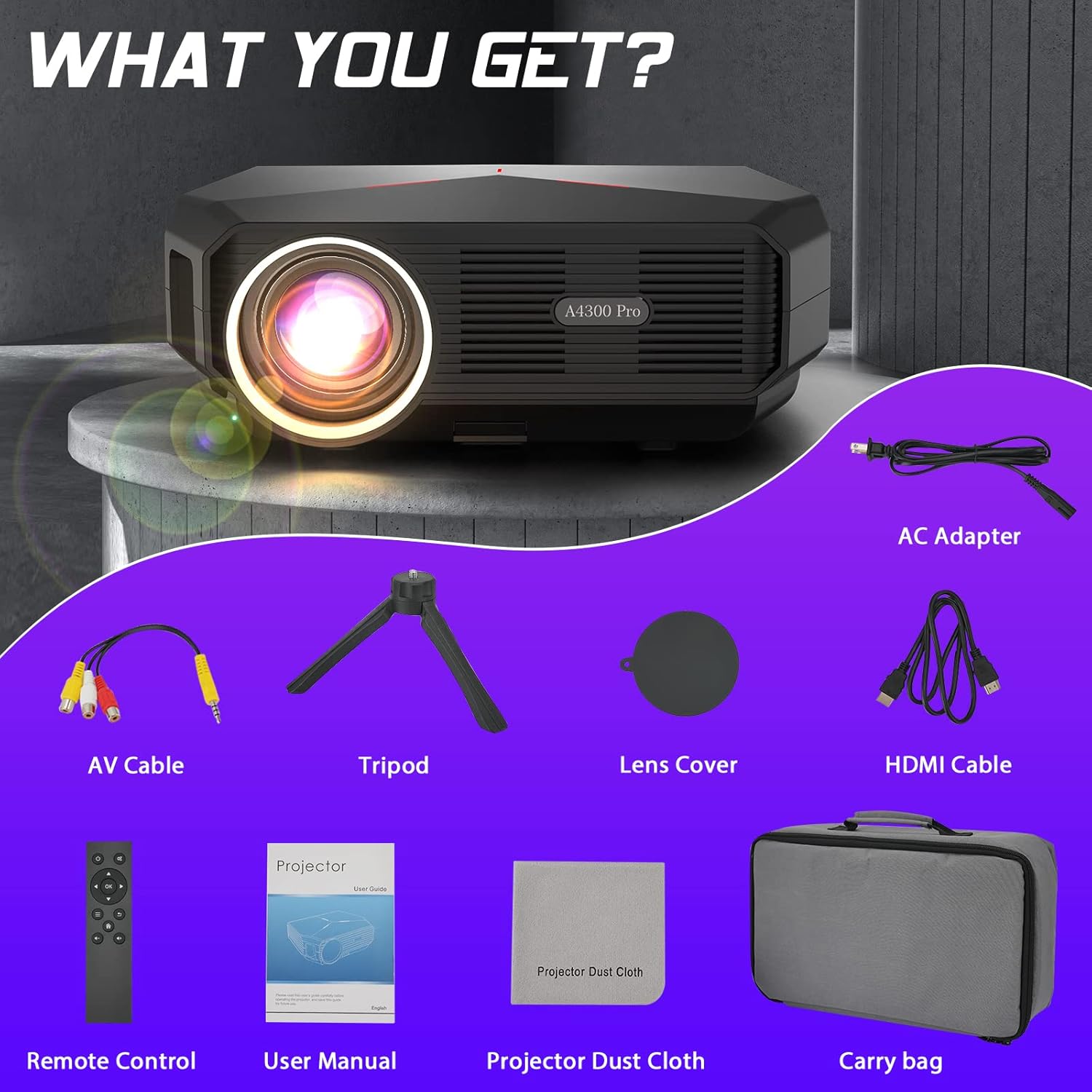
Figure 2.1: All items included in the WHDPETS A4300 Pro Projector package.
3. Característiques clau
- 5G WiFi & Bluetooth Connectivity: Supports both wired and wireless projection for iOS and Android devices, enabling seamless screen mirroring.
- High Brightness & Native 1080P: Equipped with a high light transmission glass lens, offering 12000 Lumens brightness and 10000:1 contrast ratio for sharp, clear images. Supports 4K content.
- Excellent Sound & Advanced Cooling: Integrated speaker provides clear and adjustable audio. An innovative dual-fan cooling system enhances heat dissipation by 20%, ensuring consistent performance and lamp longevitat.
- Versatile Multimedia Ports: Features USB, HDMI, VGA, and AV ports for connecting to TV sticks, TV boxes, PCs, smartphones, DVD players, USB sticks, laptops, PS4, X-Box, and more.
- Large Projection Size & Zoom: Projects a display from 45 to 200 inches with a projection distance of 4.6ft to 18.7ft. Includes a 25% zoom function for easy image size adjustment without moving the projector.
- Disseny portàtil: Lightweight and convenient, suitable for various settings including home, parties, schools, and outdoor camping.
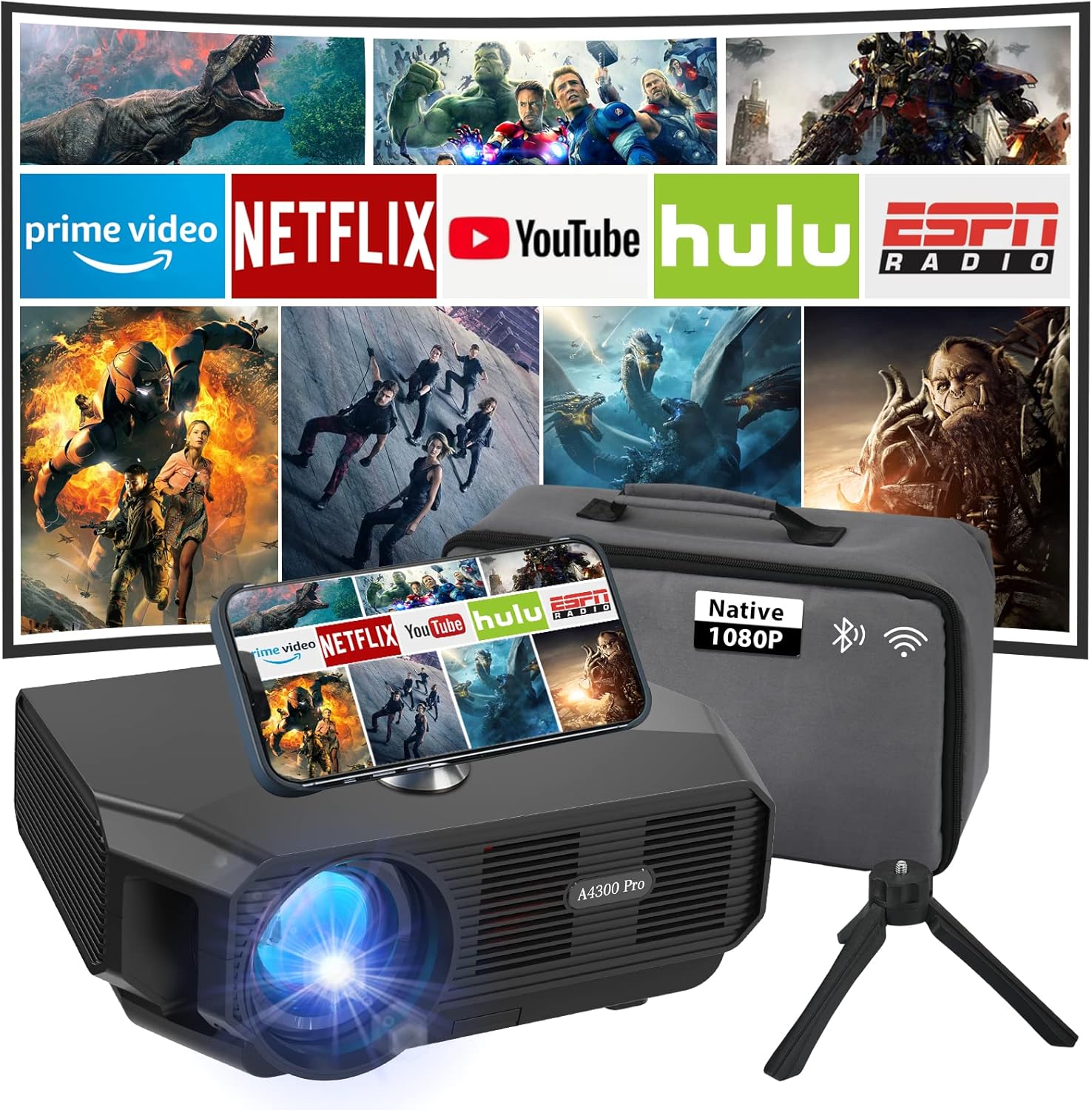
Figure 3.1: The WHDPETS A4300 Pro Projector in a home theater setup, showcasing its multimedia capabilities.

Figure 3.2: Illustration of the projector's 2.4G and 5G WiFi connection capabilities with various devices.

Figure 3.3: The projector's Bluetooth function, allowing connection to external audio devices.

Figure 3.4: The projector's ability to produce a large screen display up to 200 inches.

Figura 3.5: Examples of multiple scenarios where the projector can be effectively utilized.
4. Guia de configuració
4.1 Encès inicial
- Connect the AC adapter to the projector's power input and then to a power outlet.
- Premeu el botó d'encesa del projector o del comandament a distància per encendre el dispositiu.
- Allow a few moments for the projector to boot up and display the main interface.
4.2 Correcció de focus i trapezoide
- Adjust the focus ring on the projector lens until the projected image appears clear and sharp.
- If the image is trapezoidal, use the keystone correction feature (usually a dial or digital setting) to adjust the image shape until it is rectangular.
4.3 Network and Bluetooth Setup
To connect your projector to a wireless network or Bluetooth device:
- Navigate to the 'Settings' menu on the projector's interface using the remote control.
- Select 'Network' for WiFi setup or 'Bluetooth' for Bluetooth device pairing.
- Follow the on-screen prompts to connect to your desired network or pair a Bluetooth audio device.
Video 4.1: A demonstration on how to connect the projector to WiFi and perform screen mirroring for iOS devices. This video shows the steps to navigate the settings, select the network, enter the password, and then initiate screen mirroring from an iPhone's control center.
5. Instruccions de funcionament
5.1 Screen Mirroring (iOS & Android)
The projector supports both wired and wireless screen mirroring. For wireless mirroring:
- Ensure your smartphone and the projector are connected to the same WiFi network.
- For iOS devices, open the Control Center and tap 'Screen Mirroring'. Select the projector (e.g., "AS-A4300Pro") from the list.
- For Android devices, enable the 'Wireless Projection' or 'Screen Cast' feature in your phone's settings and select the projector.
- For wired mirroring, use an MHL/Lightning-HDMI cable or an Anycast WiFi dongle (not included) to connect your device.
5.2 Connexió de dispositius externs
El projector ofereix diverses opcions d'entrada:
- HDMI: Connect gaming consoles (PS4, X-Box), laptops, or TV boxes using an HDMI cable. Select the corresponding HDMI input source.
- USB: Insert a USB stick to play media files directly. Navigate to the 'Media' or 'File Manager' section on the projector.
- VGA: Connect older PCs or laptops using a VGA cable.
- DE: Use the provided AV cable to connect DVD players or other devices with AV output.
5.3 Funció de zoom
To adjust the image size without moving the projector:
- Access the 'Picture' or 'Projection' settings in the projector's menu.
- Locate the 'Zoom' or 'Image Scale' option.
- Ajustar el percentatgetage to reduce the image size (up to 25% reduction is supported).
6. Manteniment
- Neteja de la lent: Use the provided projector dust cloth or a soft, lint-free cloth to gently wipe the lens. Avoid abrasive materials or harsh chemicals.
- Neteja del filtre de pols: Regularly check and clean the dust filter to ensure optimal airflow and prevent overheating. Refer to the specific location of the filter in the product diagram (if available).
- Emmagatzematge: When not in use, store the projector in its portable bag in a cool, dry place to protect it from dust and damage.
- Ventilació: Assegureu-vos que les obertures de ventilació del projector no estiguin bloquejades durant el funcionament per evitar el sobreescalfament.
7. Solució De Problemes
| Problema | Causa possible | Solució |
|---|---|---|
| No es mostra cap imatge | Power cable loose, incorrect input source, device not connected properly. | Check power connection. Select correct input source (HDMI, USB, etc.). Ensure external device is properly connected and powered on. |
| Imatge borrosa | Out of focus, incorrect projection distance, keystone not adjusted. | Adjust the focus ring. Ensure projector is within optimal projection distance (4.6ft-18.7ft). Adjust keystone correction. |
| Sense so | Volume too low, external audio device not connected, incorrect audio output setting. | Increase projector volume. Check if external speakers are connected and powered. Verify audio output settings on both projector and source device. |
| Problemes de rèplica de pantalla | Not on same WiFi network, WiFi signal weak, device compatibility. | Ensure both devices are on the same 2.4G or 5G WiFi network. Move closer to the router. Try wired connection if wireless fails. |
8. Especificacions
| Característica | Detall |
|---|---|
| Marca | WHDPETS |
| Model | A4300 Pro (ASIN: B0B93MK7WC) |
| Resolució de visualització | Native 1920 x 1080P (Supports 4K) |
| Brillantor | 12000 lúmens |
| Relació de contrast | 10000:1 |
| Tecnologia de connectivitat | HDMI, USB, VGA, AV, 5G WiFi, Bluetooth |
| Mida de projecció | 45-200 polzades |
| Distància de projecció | 4.6ft - 18.7ft |
| Funció de zoom | Ajust de l'25%. |
| Pes de l'article | 5.08 lliures |
| Dimensions del producte | 10 x 7 x 4 polzades |
| Color | Negre |
| Característiques especials | Internet Built-In |
9. Garantia i Suport
For detailed warranty information and customer support, please refer to the official WHDPETS website or contact their customer service. You can also find additional support and a downloadable PDF version of the user guide at the following link:
Descarrega la Guia d'usuari oficial (PDF)
Per obtenir més ajuda, visiteu el WHDPETS Store on Amazon.

