1. Configuració
Follow these steps to install and connect your Linkind ST19 Smart Edison Bulbs.
1.1 Instal·lació física
Ensure the power is off before installation. Screw the E26 base bulb into a standard E26 light socket. These bulbs are designed for indoor use and are not compatible with dimmer switches, which may cause flickering.

Image: Easy installation into a standard E26 bulb base. Confirm bulb dimensions (2.28in x 5.04in) for proper fit before purchase.
1.2 App Connection (AiDot APP)
The Linkind Smart Edison Bulbs require the AiDot APP for smart features. Download the AiDot APP from your device's app store. Ensure your Wi-Fi network is 2.4GHz, as 5GHz networks are not supported for initial setup.
- Download the AiDot APP from the App Store or Google Play.
- Creeu un compte i inicieu la sessió.
- Toqueu la icona "+" o "Afegeix dispositiu" per iniciar el procés d'emparellament.
- Follow the in-app instructions to connect your bulbs to your 2.4GHz Wi-Fi network.
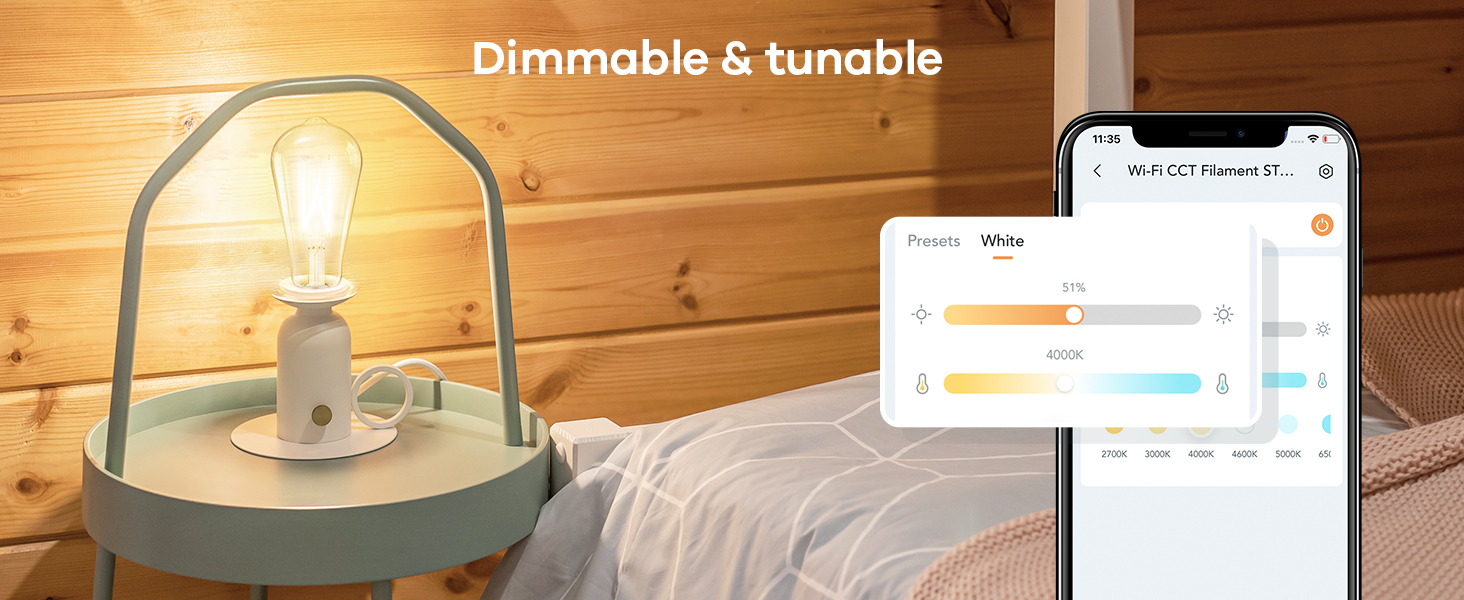
Image: Visual guide for connecting the smart bulbs using the AiDot APP, showing the device addition process and Wi-Fi setup.
1.3 Emparellament del control remot
The included remote control is pre-paired with the bulbs for immediate use. If re-pairing is needed, ensure the bulb is powered on, then press the remote's pairing button as instructed in the remote's user guide. The remote features a magnetic piece for convenient storage, such as on a refrigerator.
Video: Instructions on how to pair Linkind Smart Bulbs with the remote control. This video demonstrates the steps to establish a connection between the bulb and the remote for direct control.
2. Instruccions de funcionament
Control your Linkind Smart Edison Bulbs using the AiDot APP, voice commands, or the included remote control.
2.1 AiDot APP Control
The AiDot APP provides full control over your bulbs:
- Llum blanca sintonitzable: Adjust color temperature from 2700K (warm white) to 6500K (cool white).
- Regulable: Ajusteu la brillantor de l'1% al 100%.
- Time Schedule Function: Configura horaris per a l'encesa/apagada automàtica.
- Control de grup: Controla diverses bombetes simultàniament.
- Presets: Utilize pre-set lighting scenes.

Image: Demonstrates both app control for dimming and color temperature, and remote control functions for turning on/off, adjusting temperature, and brightness.
Video: A step-by-step guide on how to set timers and schedules for your Linkind smart bulbs using the AiDot APP, allowing for automated lighting control.
Control de veu 2.2 (Alexa i Google Home)
The bulbs are compatible with Amazon Alexa and Google Home for convenient voice control. Link your AiDot account to your Alexa or Google Home app to enable voice commands.
- Example Ordres:
- "Alexa, encén el llum de la sala d'estar."
- "Hey Google, set the bedroom light to warm white."
- "Alexa, atenua la llum de la cuina al 50%."
Video: Demonstrates the integration of Linkind smart bulbs with Alexa and Google Home, showing how to control lighting using voice commands for on/off, dimming, and color temperature adjustments.
2.3 Funcionament del control remot
The remote control offers quick access to basic functions:
- Premsa curta x1: Activa / desactiva.
- Premsa curta x2: Change color temperature.
- Premsa llarga: Ajusta la brillantor.
3. Manteniment
To ensure optimal performance and longevity of your Linkind Smart Edison Bulbs, follow these simple maintenance guidelines:
- Neteja: Ensure the bulb is off and cool before cleaning. Use a soft, dry cloth to wipe the bulb. Avoid using liquid cleaners or abrasive materials.
- Emmagatzematge: If storing the bulbs for an extended period, keep them in their original packaging in a cool, dry place.
- Substitució: With an average life of 25,000 hours, these LED bulbs are designed for long-term use. Replacement is typically not required for many years under normal usage.
4. Solució De Problemes
If you encounter issues with your Linkind Smart Edison Bulbs, refer to the following common solutions:
4.1 Problemes de connectivitat
- Bulb not connecting to Wi-Fi: Ensure your Wi-Fi network is 2.4GHz. Move the bulb closer to your router during setup. Restart your router and try connecting again.
- El comandament a distància no respon: Check if the remote's battery is properly inserted or needs replacement. If the remote is not paired, follow the pairing instructions in Section 1.3.
- El control per veu no funciona: Verify that your AiDot account is correctly linked to your Alexa or Google Home app. Ensure your voice assistant device is online and within range.
4.2 Problemes de rendiment
- Bulb flickering: These bulbs are not compatible with traditional dimmer switches. Ensure they are installed in a non-dimmable fixture or that any existing dimmer switch is set to full power (100%) or bypassed.
- Incorrect brightness or color temperature: Use the AiDot APP or remote control to adjust settings. If using voice control, specify the desired brightness percentage or color temperature (e.g., "warm white").

Image: Illustrates the ST19 (ST58) bulb shape and explicitly states incompatibility with dimmer switches to prevent flickering.
5. Especificacions
| Característica | Detall |
|---|---|
| Marca | Linkind |
| Número de model | Edison (ST19/ST58) |
| Tipus de llum | LED |
| Wattage | 8 watts |
| Equivalent incandescent | 60 watts |
| Brillantor | 800 lúmens |
| Temperatura de color | 2700K-6500K (Blanc sintonitzable) |
| Regulable | Yes (via App/Voice/Remote, NOT external dimmer switches) |
| Base del bulb | E26 |
| Mida de la forma del bulb | ST19 (ST58) |
| Mètode de control | App, Remote, Voice (Alexa, Google Home) |
| Connectivitat | Wi-Fi de 2.4 GHz |
| Ús interior/exterior | Interior |
| Vida Mitjana | 25,000 hores |
| Material | Vidre |

Imatge: Detallada view of the Linkind ST19 Smart Edison Bulb, showing its physical dimensions and highlighting key features and limitations.
6. Garantia i Suport
Linkind is committed to providing quality products and customer satisfaction.
- Garantia: This product comes with a 1-year coverage from the date of purchase.
- Atenció al client: For any questions, technical assistance, or warranty claims, please contact Linkind customer service. Live customer service is available Monday-Friday, 9 AM - 5 PM PST.
- Recursos en línia: Visita l'oficial Botiga Linkind per obtenir informació i suport addicionals sobre el producte.


