1. Introducció i finalview
The Cooler Master XG650 Plus Platinum ARGB is a fully modular 650W power supply unit designed for high-performance computing systems. It features an 80 PLUS Platinum certification for high efficiency, a 135mm silent fan, and a built-in digital display panel for real-time monitoring of performance data. This unit incorporates 100% Japanese capacitors for enhanced reliability and meets Intel ATX 12V version 2.53 guidelines.
Característiques principals:
- In-House Platform Design: Engineered for high-end performance with reduced temperature requirements.
- ARGB Fans with Digital Side Panel: Monitor real-time performance data including fan speed, temperature, power load, and customize ARGB lighting.
- Certificació 80 PLUS Platinum: Guarantees a minimum typical efficiency of 92% under normal operating conditions.
- Quiet 135mm Fan: Fluid dynamic fan bearing for low RPM operations and quiet cooling performance.
- Smart Thermal Control Mode: Fan remains inactive until the unit reaches 50% load, ensuring silent operation during normal use.
- Condensadors 100% japonesos: Used in both the platform and cables for increased efficiency and reduced ripple noise.
- Cablejat totalment modular: Reduces cable clutter, improves airflow, and enhances overall efficiency and thermal performance.
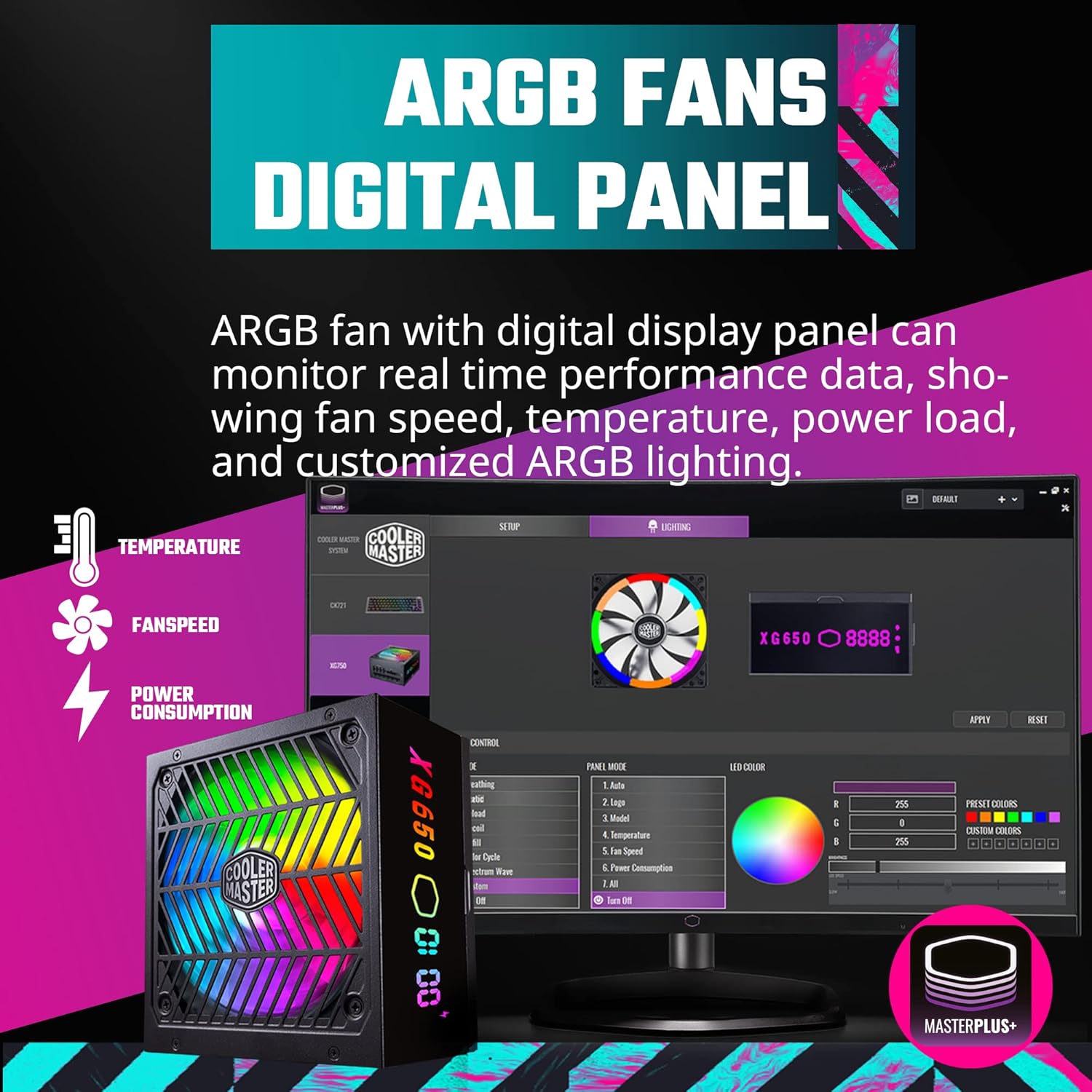
Figure 1.1: The Cooler Master XG650 Plus Platinum ARGB 650W Power Supply Unit.
2. Configuració i instal·lació
2.1 Precaucions de seguretat
- Desconnecteu sempre el cable d'alimentació de la presa de corrent abans d'instal·lar o treure la font d'alimentació.
- Assegureu-vos de posar a terra correctament per evitar descàrregues elèctriques.
- Do not open the power supply unit casing. Alt volumtagsón presents a dins.
- Instal·leu la font d'alimentació en una zona ben ventilada.
2.2 Contingut del paquet
Verifiqueu que tots els components siguin presents:
- Cooler Master XG650 Plus Platinum ARGB PSU
- Modular Cable Set (ATX 24-pin, EPS 4+4 pin, EPS 8 pin, PCIe 6+2 pin, SATA, Peripheral 4 pin)
- Cable d'alimentació CA
- Cargols de muntatge
- Manual d'usuari (aquest document)
2.3 Instal·lació física
- Muntatge de la font d'alimentació: Secure the power supply into the designated PSU bay in your computer case using the provided mounting screws. Ensure the fan is oriented correctly for optimal airflow (typically facing downwards or upwards depending on case design).
- Connexió de cables modulars: Identify the necessary cables for your motherboard, CPU, graphics card(s), and storage devices. Connect these cables to the corresponding ports on the PSU.

Figura 2.1: Ports de connexió de cable modular a la font d'alimentació.
- Motherboard Connections: Connect the 24-pin ATX power cable to your motherboard. Connect the 4+4 pin or 8-pin EPS cable(s) to the CPU power connector(s) on your motherboard.
- Graphics Card Connections: Connect the appropriate PCIe 6+2 pin cables to your graphics card(s).
- Storage and Peripherals: Connect SATA power cables to your SSDs/HDDs and other SATA-powered devices. Use Peripheral 4-pin cables for other compatible devices.
- USB Protocol Cable: Connect the included USB protocol cable from the PSU to an available USB 2.0 header on your motherboard. This enables software control and display panel functionality.
- Alimentació CA: Once all internal connections are made, connect the AC power cord to the PSU and then to a wall outlet.

Figura 2.2: Mésview of included modular cables and their lengths.
3. Instruccions de funcionament
3.1 Encès
After completing the installation, ensure the power switch on the back of the PSU is in the 'ON' position. Power on your computer system as usual.
3.2 Digital Display Panel
The XG650 Plus Platinum features a built-in digital display panel that provides real-time information about the PSU's operation. This display can show:
- Velocitat del ventilador (RPM)
- Temperatura (°C)
- Power Load (W)
- Customized ARGB Lighting effects

Figure 3.1: The ARGB digital display panel on the PSU.
3.3 MasterPlus+ Software Control
For advanced monitoring and customization of the ARGB lighting and fan behavior, install the Cooler Master MasterPlus+ software. This software allows you to:
- Monitor PSU performance data in detail.
- Adjust ARGB lighting effects and colors.
- Configure fan curves or activate Smart Thermal Control Mode.
Download the latest MasterPlus+ software from the official Cooler Master weblloc: www.coolermaster.com/downloads/

Figure 3.2: MasterPlus+ software interface for monitoring and control.
3.4 Smart Thermal Control Mode
The PSU features a Smart Thermal Control Mode where the 135mm fan will remain inactive (0 RPM) until the power load reaches 50%. This ensures silent operation during low to moderate system usage. Once the load exceeds 50%, the fan will automatically activate and adjust its speed to maintain optimal temperatures.

Figure 3.3: The quiet 135mm fan with ARGB lighting.
4. Manteniment
Proper maintenance ensures the longevity and optimal performance of your power supply unit.
- Mantingueu-lo net: Periodically clean the exterior of the PSU and the fan grille to prevent dust buildup. Use compressed air to gently remove dust from the fan blades and internal components (do not open the casing).
- Assegureu-vos el flux d'aire: Make sure there is adequate airflow around the PSU. Avoid blocking the intake or exhaust vents.
- Gestió de cables: Good cable management not only improves aesthetics but also enhances airflow within your PC case, contributing to better cooling for all components, including the PSU.
5. Solució De Problemes
If you encounter issues with your Cooler Master XG650 Plus Platinum ARGB PSU, refer to the following troubleshooting steps:
5.1 Sense poder
- Comproveu les connexions d'alimentació: Ensure the AC power cord is securely plugged into both the PSU and the wall outlet. Verify the power switch on the PSU is in the 'ON' position.
- Connexions internes: Double-check all modular cables are firmly connected to both the PSU and your components (motherboard, CPU, GPU).
- Presa de paret: Proveu la presa de corrent amb un altre dispositiu per assegurar-vos que subministra corrent.
- Motherboard Power Button: Ensure your case's power button is correctly connected to the motherboard.
5.2 Fan Not Spinning
- Smart Thermal Control: Remember that the fan operates in Smart Thermal Control Mode and will not spin until the PSU load reaches 50%. This is normal behavior for silent operation.
- Configuració del programari: If the fan is not spinning under load, check the fan settings in the MasterPlus+ software.
- Obstruccions: Ensure there are no physical obstructions preventing the fan from spinning.
5.3 Digital Display Panel Not Working / ARGB Issues
- Connexió USB: Verify that the USB protocol cable is correctly connected from the PSU to a USB 2.0 header on your motherboard.
- MasterPlus+ Software: Ensure the MasterPlus+ software is installed and running. Check for any error messages or update the software to the latest version.
- Problemes del controlador: Reinstall the MasterPlus+ software and any associated drivers.
6. Especificacions

Figure 6.1: Power supply rating label.
| Característica | Especificació |
|---|---|
| Marca | Cooler Master |
| Sèrie | XG650 Plus Platinum ARGB |
| Número de model | MPG-6501-AFBAP-XUS |
| Wattage | 650 watts |
| Certificació 80 PLUS | Platí |
| Factor de forma | ATX |
| Modularitat | Totalment Modular |
| Mida del ventilador | 135 mm |
| Mètode de refrigeració | Aire |
| Condensadors | Condensadors 100% japonesos |
| Dimensions (L x A x A) | 6.3 x 5.91 x 3.39 polzades (160 x 150 x 86 mm) |
| Pes | 6.54 lliures (2.97 kg) |
| Entrada Voltage | 100-240V~ |
| Freqüència d'entrada | 50-60 Hz |
| Vol. De sortidatage | +5 V, +3.3 V, +12 V, -12 V, +5 VSB |
| Dispositius compatibles | Ordinador personal |
7. Garantia i Suport
7.1 Informació de la garantia
The Cooler Master XG650 Plus Platinum ARGB PSU comes with a standard limited manufacturing warranty:
- Core Operating Products: Garantia de 10 anys des de la data de compra.
- ARGB LED: Garantia de 3 anys des de la data de compra.
Please retain your proof of purchase for warranty claims. The warranty covers defects in materials and workmanship under normal use. It does not cover damage caused by improper installation, accidents, misuse, abuse, natural disasters, or unauthorized modifications.
7.2 Suport tècnic
For technical assistance, product inquiries, or warranty claims, please visit the official Cooler Master support weblloc web o contacteu amb el seu servei d'atenció al client:
- Suport de Cooler Master Weblloc: www.coolermaster.com/support/
- Refer to the Cooler Master weblloc web amb informació de contacte regional.


