Introducció
This manual provides detailed instructions for the setup, operation, maintenance, and troubleshooting of your Samsung LS27AM501NWXXL 27-inch FHD Smart Monitor. Please read this manual thoroughly before using your monitor to ensure proper and safe operation. This monitor combines OTT media services, mobile connectivity, and remote PC capabilities.
Informació important de seguretat
Seguiu sempre les precaucions de seguretat bàsiques quan utilitzeu aquest producte per reduir el risc d'incendi, descàrrega elèctrica i lesions personals. Conserveu aquest manual per a futures consultes.
- No exposeu el monitor a la pluja ni a la humitat.
- No obriu el monitor casing. Demaneu totes les tasques de manteniment a personal de servei qualificat.
- Assegureu-vos una ventilació adequada. No bloquegeu les obertures de ventilació.
- Feu servir només el cable d'alimentació i l'adaptador que s'inclouen amb el monitor.
- Clean the monitor with a soft, dry cloth. Avoid liquid cleaners.
Contingut del paquet
Verifiqueu que tots els elements siguin presents a la caixa del producte:
- 1 Unit Monitor
- 1 Cable d'alimentació
- 1 cable HDMI
- 1 Control remot
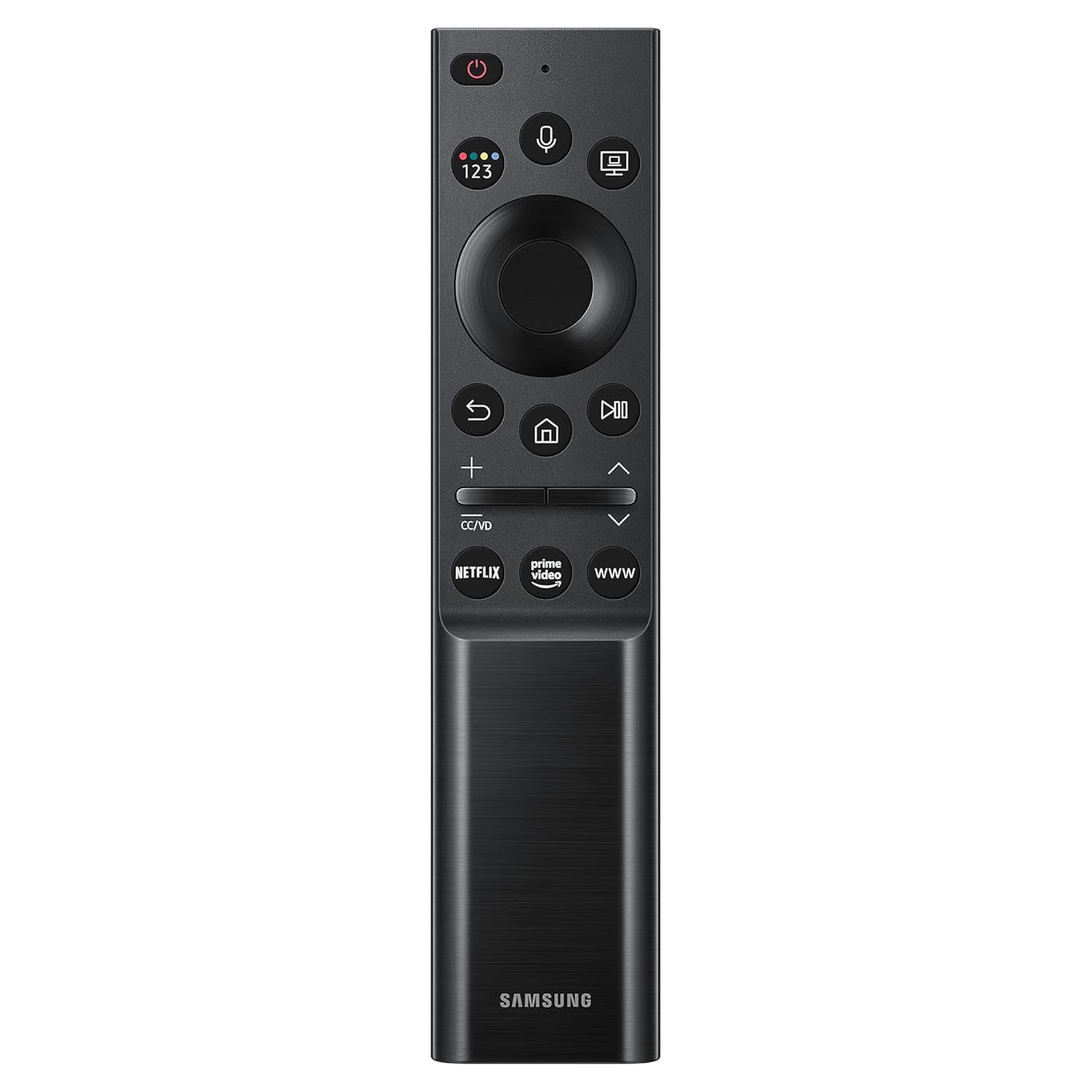
Image: The included remote control for the Samsung Smart Monitor, featuring dedicated buttons for streaming services and navigation.
Configuració
1. Muntatge del suport
Carefully attach the stand base to the stand neck, then secure the assembled stand to the back of the monitor. Ensure all screws are tightened securely.

Image: The monitor's slim metal stand and 3-sided borderless design, illustrating its aesthetic and compact form factor.
2. Cables de connexió
Connect the power cable to the monitor and a wall outlet. Use the supplied HDMI cable to connect your computer or other devices to the monitor's HDMI ports.

Imatge: Una imatge detallada view of the monitor's rear panel, highlighting the HDMI IN 1 (ARC), HDMI IN 2, USB 1, and USB 2 ports for various connections.
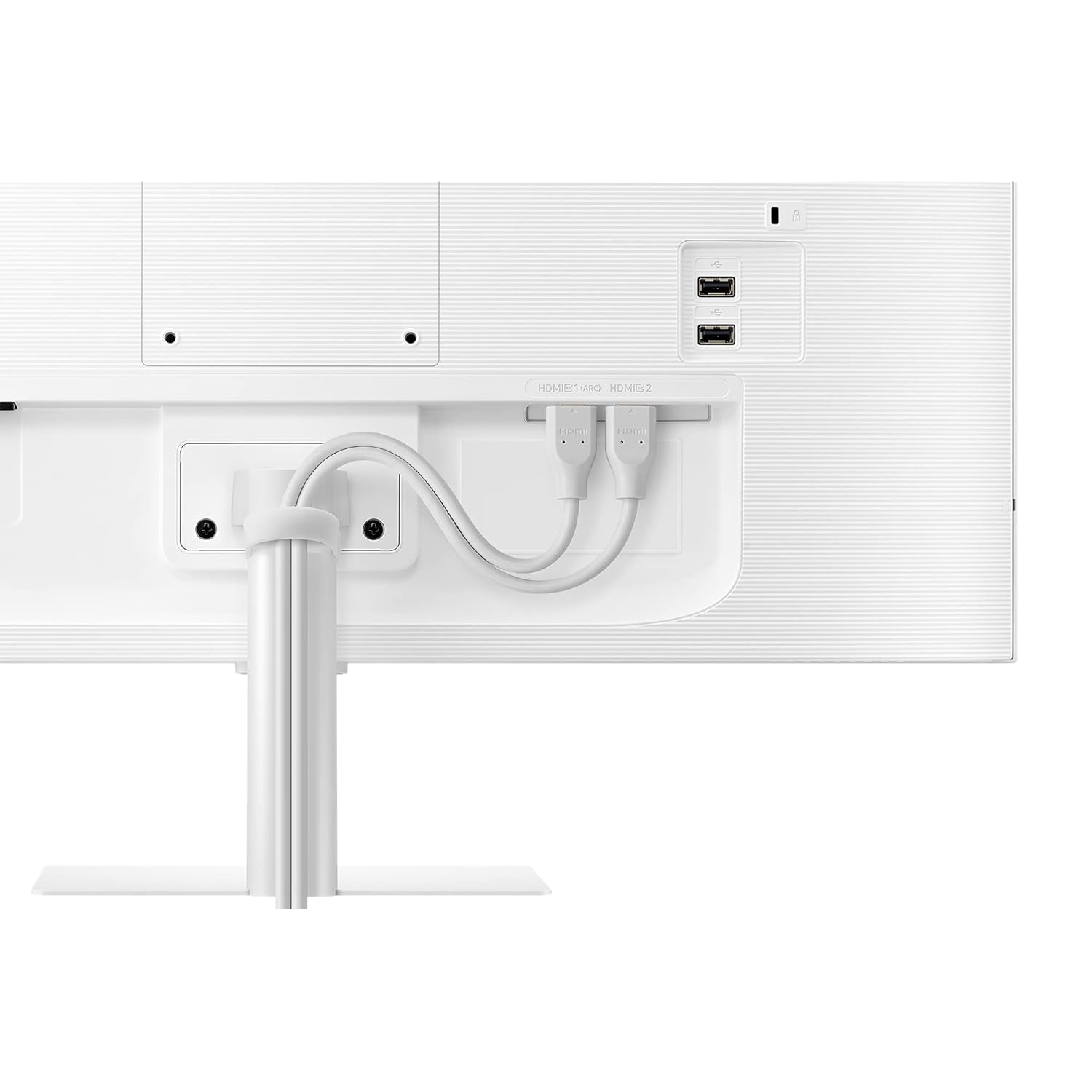
Image: The rear of the monitor with HDMI cables neatly routed through the stand, demonstrating proper cable management for a clean setup.
3. Engegada inicial
Press the power button on the monitor or the remote control to turn on the monitor. Follow the on-screen instructions for initial setup, including network connection and smart features configuration.
Instruccions de funcionament
Funcions del Smart Hub
Your Samsung Smart Monitor integrates a Smart Hub, allowing direct access to various entertainment applications without needing a separate PC. Use the remote control to navigate the Smart Hub.
- Serveis de streaming: Access pre-installed apps like Netflix, YouTube, Prime Video, and Apple TV.
- Accés remot: Connect to your office PC remotely or access Microsoft 365 applications directly from the monitor.

Image: A hand holding the monitor's remote control, pointing towards the screen displaying various streaming application icons such as Netflix, Prime Video, and YouTube.

Image: The monitor screen showing Microsoft 365 applications, illustrating the "PC on Screen" and remote access capabilities for productivity.
Connectivitat mòbil
The monitor supports wireless DeX, allowing you to use your compatible mobile device as a full PC experience. You can also mirror your mobile screen to the monitor.
- Wireless DeX: Connect your Samsung Galaxy phone wirelessly to the monitor to use mobile productivity apps in a desktop environment.
- Replica de pantalla: Cast content from your smartphone or tablet directly to the monitor.

Image: A user working at a desk with the Samsung Smart Monitor, demonstrating the Wireless DeX feature connecting a smartphone to the monitor for a desktop-like experience.
Imatge adaptativa
The monitor features Adaptive Picture technology, which automatically adjusts screen brightness based on ambient light conditions for optimal viewcomoditat.

Image: The monitor displaying a scenic image with an on-screen brightness adjustment bar, illustrating the Adaptive Picture feature that automatically optimizes display brightness.
Joc Ultrawide View
For an enhanced gaming experience, activate Ultrawide Game View to adjust the screen aspect ratio to 21:9, revealing more of the game environment.

Image: The monitor displaying a football game in a 21:9 aspect ratio, demonstrating the Ultrawide Game View feature for an expanded field of vision.
Canvi automàtic de font
The monitor can automatically detect and switch to a newly connected device, eliminating the need for manual input selection.

Image: A diagram illustrating the Auto Source Switch feature, where the Samsung M5 monitor automatically detects and displays content from a connected laptop, unlike conventional monitors that show "No Signal."
Assistent de veu
Utilize built-in voice assistants like Bixby or SmartThings for hands-free control of your monitor and connected smart home devices.

Image: A woman speaking into the remote control, demonstrating the voice assistant feature (Bixby, SmartThings) for controlling the monitor.
Manteniment
- Neteja de la pantalla: Netegeu suaument la pantalla amb un drap suau i sense borrissol. Per a marques difícils, netegeu suaument.ampNetegeu el drap amb aigua o una solució de neteja específica per a pantalles. No ruixeu líquid directament sobre la pantalla.
- Neteja de la Casing: Feu servir un drap suau i sec per netejar el monitor casing. Eviteu netejadors o dissolvents abrasius.
- Ventilació: Assegureu-vos que les obertures de ventilació del monitor no estiguin bloquejades per evitar el sobreescalfament.
- Gestió d'energia: Unplug the monitor from the power outlet during lightning storms or when it will be unused for extended periods.
Resolució de problemes
Sense poder
- Check if the power cable is securely connected to the monitor and the power outlet.
- Verify that the power outlet is functioning by plugging in another device.
- Ensure the power button on the monitor or remote control has been pressed.
Sense senyal / Pantalla en blanc
- Confirm that the HDMI cable is properly connected to both the monitor and the source device (PC, laptop, etc.).
- Select the correct input source using the monitor's remote control or OSD menu.
- Assegureu-vos que el dispositiu font estigui encès i emeti un senyal.
Picture Issues (Distorted, Flickering, Incorrect Colors)
- Check the HDMI cable for damage or loose connections. Try a different cable if available.
- Adjust the display resolution and refresh rate on your source device to match the monitor's specifications.
- Perform a factory reset of the monitor settings through the OSD menu.
El control remot no funciona
- Ensure there are no obstructions between the remote control and the monitor.
- Substituïu les piles del comandament a distància.
Especificacions
| Característica | Detall |
|---|---|
| Marca | Samsung |
| Número de model | LS27AM501NWXXL |
| Mida de la pantalla | 27 polzades (68.6 cm) |
| Resolució | 1920 x 1080 (FHD 1080p) |
| Relació d'aspecte | 16:9 |
| Tipus de panell | VA |
| Suport HDR | HDR 10 |
| Connectivitat | 2 x HDMI, 2 x USB |
| Color | Blanc |
| Dimensions (LxWxH) | 19.4 x 61.6 x 45.5 cm |
| Pes de l'article | 5 kg |
| Funcions intel·ligents | Smart Hub (Netflix, YouTube, Prime Video, Apple TV), Wireless DeX, Remote Access, Adaptive Picture, Ultrawide Game View, Voice Assistant (Bixby, SmartThings), Auto Source Switch |

Imatge: La part frontal view of the Samsung Smart Monitor, illustrating its physical dimensions: 615.5 mm width, 455.4 mm height, and 193.5 mm depth with the stand.
Garantia i Suport
Aquest producte ve amb un 3 anys de garantia from the manufacturer, Samsung.
For technical support, service, or warranty claims, please contact Samsung customer service:
- Samsung India Pvt Ltd: 180040 7267864, 1800 5 7267864
- Refer to the official Samsung weblloc web per obtenir la informació d'assistència i les dades de contacte més actualitzades.


