Producte acabatview
The Bestier L-Shaped Gaming Desk is designed for versatility and functionality, offering multiple setup configurations to suit various needs. It features integrated LED lighting, a monitor shelf, a convenient cup holder, and a headset hook. The desk's surface has a carbon fiber texture for durability and a modern aesthetic.

Image: The Bestier L-Shaped Gaming Desk configured for a multi-monitor gaming setup, illuminated by LED lights.

Imatge: Una imatge detallada view of the desk's features, including the integrated LED light strip, a cup holder, and a headset hook, designed for convenience during use.
Instruccions de configuració
This desk offers three primary assembly configurations: a 55-inch L-shaped desk, a 72-inch long desk, or two separate 36-inch small desks. The design is reversible, allowing the L-shape to be oriented to either the left or right side. Assembly is recommended for two adults and includes all necessary tools.
Assembly Video Tutorial
Video: A comprehensive assembly tutorial for the Bestier L-shaped computer desk, guiding users through each step of the setup process.
Passos de l'Assemblea General
- Desempaquetar components: Traieu amb cura totes les peces de l'embalatge i comproveu-les amb la llista de peces.
- Muntatge del marc: Connect the X-shaped legs and support bars using the provided screws and tools. Ensure all connections are secure.
- Attach Corner Piece: Secure the rounded corner piece to the frame, aligning screw holes carefully.
- Instal·leu els panells laterals: Place the two rectangular desk panels onto the assembled frame and secure them with screws from underneath.
- Attach Monitor Shelf: Assemble the monitor shelf and attach it to the designated area on the desk. This shelf is designed to elevate your monitor to an ergonomic height.
- Instal·lació d'accessoris: Secure the cup holder and headset hook to either the left or right side of the desk as preferred.
- Connecteu els llums LED: Attach the LED light strip to the underside of the monitor shelf and connect it to a USB power source.

Image: Visual guide for attaching the desk legs and horizontal support bars, forming the base structure.

Image: Illustration of how to correctly position and secure the rounded corner section of the desk.

Image: Step-by-step diagram for attaching the main rectangular desk panels to the frame, completing the primary desk surface.
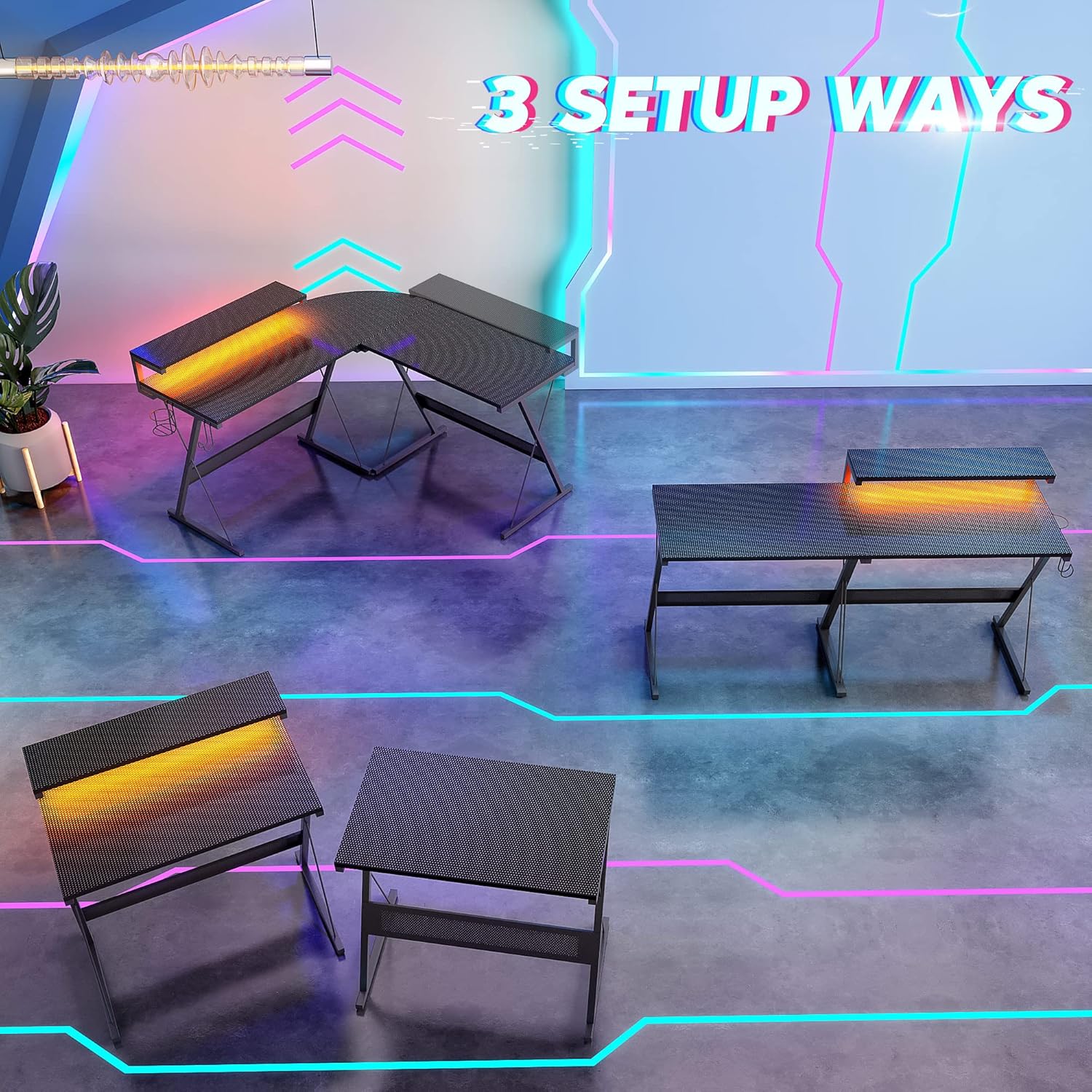
Image: This diagram visually explains the three versatile ways to configure your Bestier L-Shaped Gaming Desk: as a large L-shape, a long straight desk, or two individual desks.
Instruccions de funcionament
Sistema d'il·luminació LED
The integrated LED light strip offers 7 main colors and 20 dynamic modes to customize your environment. Control the lights using the inline controller attached to the USB cable. Press the mode button to cycle through dynamic effects, and use the speed/brightness buttons to adjust the intensity or pace of the effects.
Vídeo: Un overview of the Bestier L-shaped computer desk, highlighting its features and design, including the LED lighting.
Prestatge del monitor
The 36-inch monitor stand is designed to keep your screen at a comfortable eye-level height, promoting better posture and reducing neck strain during extended use.
Cup Holder and Headset Hook
The removable cup holder and headset hook can be attached to either side of the desk, providing convenient storage for beverages and headphones, keeping your main workspace clear.
Video: A demonstration of the Bestier 55-inch L-shaped Gaming Desk with LED, showcasing its features and how they enhance a gaming setup.
Manteniment
To maintain the quality and appearance of your Bestier L-Shaped Gaming Desk, follow these simple guidelines:
- Neteja: Netegeu la superfície de l'escriptori amb un damp cloth. Avoid using harsh chemicals or abrasive cleaners, which can damage the carbon fiber texture.
- Vessaments: Promptly clean any spills to prevent staining or damage to the engineered wood material.
- Apretar els elements de fixació: Periodically check and tighten all screws and fasteners to ensure the desk remains stable and secure.
- Distribució de pes: Distribute weight evenly across the desk surface. The desk has a maximum weight recommendation of 250 pounds.
Resolució de problemes
If you encounter any issues with your Bestier L-Shaped Gaming Desk, please refer to the following common solutions:
- Inestabilitat a l'escriptori: Ensure all screws are securely tightened. Check that the desk is placed on a flat, even surface.
- Els llums LED no funcionen: Verify that the USB cable is properly connected to a power source. Check the inline controller for any damage or loose connections.
- Peces que falten: If any parts are missing or damaged upon arrival, please contact Bestier customer service immediately for assistance.
Per obtenir més ajuda, consulteu la secció Garantia i assistència.
Especificacions
| Característica | Detall |
|---|---|
| Marca | Bestier |
| Número de model | 113-094 |
| Forma | En forma de L |
| Disseny d'escriptori | Escriptori d'ordinador |
| Dimensions del producte (P x A x A) | 55.2" x 55.2" x 36" (Height includes monitor shelf) |
| Alçada de la superfície de l'escriptori | 30 polzades |
| Color | Fibra de Carboni Negre |
| Estil | Modern |
| Material base | Fusta d'enginyeria |
| Tipus de material superior | Fusta d'enginyeria |
| Característica especial | Reversible L-Shape, LED Lighting |
| Usos recomanats | Gaming, Home Office |
| Components inclosos | Headphone Hook, Cup Holder, Monitor Shelf |
| Pes de l'article | 22.5 quilos |
| Gruix de la taula | 15 mil·límetres |
| Recomanació de pes màxim | 250 lliures |
| Muntatge requerit | Sí (es recomanen 2 adults) |
| Inclou totes les eines de muntatge | Sí |
Garantia i Suport
Bestier offers a Garantia de qualitat de 1 anys for this product. If you encounter any product issues or require assistance, please do not hesitate to contact our customer service team. We are committed to providing excellent and friendly support before and after your purchase, aiming to resolve any concerns within 24 hours to ensure your satisfaction.
Per obtenir assistència directa, visiteu el Bestier Store on Amazon or contact us through the platform.

Image: Bestier Customer Support is available to assist with any product-related inquiries.


