Introducció
This manual provides comprehensive instructions for the operation and maintenance of your NUU Mobile F4L LTE Flip Phone. Please read this manual thoroughly before using your device to ensure proper functionality and to maximize its features. The NUU F4L is a compact and reliable flip phone designed for essential communication, featuring 4G LTE connectivity, a clear internal display, and an external display for quick notifications.
Informació de seguretat
Always follow basic safety precautions when using this product to reduce the risk of injury, fire, or damage to the device. Keep the device away from water and moisture. Do not expose to extreme temperatures. Use only manufacturer-approved accessories. Do not attempt to disassemble or repair the device yourself. Dispose of batteries properly according to local regulations.
Contingut del paquet
Verifiqueu que tots els elements siguin presents al paquet:
- NUU Mobile F4L LTE Flip Phone
- Bateria (1 bateria de ions de liti inclosa)
- Cable de càrrega
- Guia d'inici ràpid (si escau)
Producte acabatview
Familiarize yourself with the physical components of your NUU F4L flip phone.

Figura 1: The NUU Mobile F4L LTE Flip Phone in its open position, displaying the internal screen with time and date, and the full alphanumeric keypad below.

Figura 2: La part posterior view of the NUU Mobile F4L LTE Flip Phone when closed, highlighting the external display which shows time and date, and the rear camera lens positioned above it.
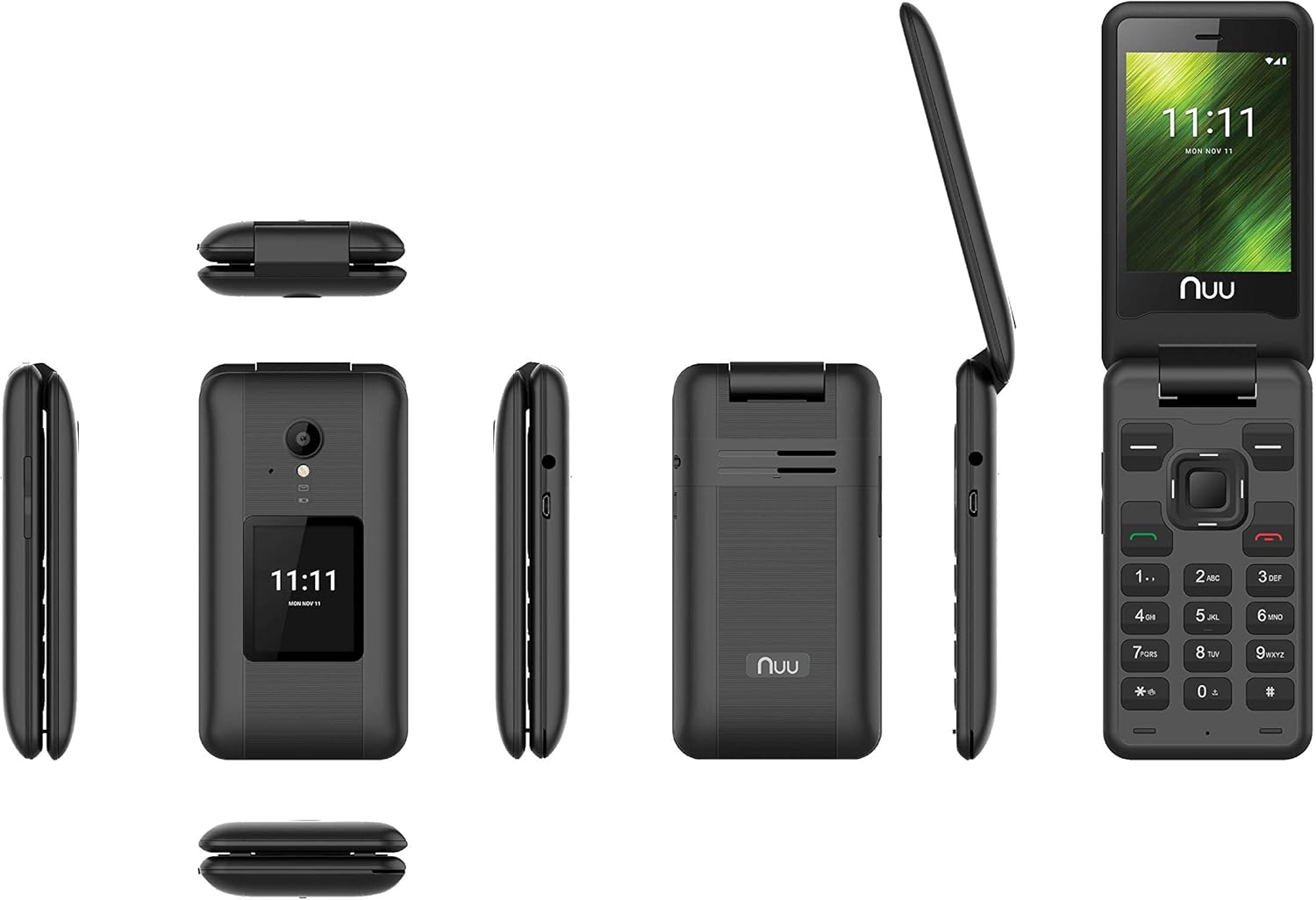
Figura 3: A composite image showing various perspectives of the NUU Mobile F4L LTE Flip Phone, including its front (open and closed), back, and side profiles, providing a comprehensive view of its design and form factor.
Configuració
1. Instal·lació de la bateria
- Traieu la tapa posterior del telèfon fent palanca suaument per obrir-la des de l'osca.
- Alineeu els contactes de la bateria amb els terminals de l'interior del compartiment de la bateria.
- Premeu la bateria fermament fins que encaixi al seu lloc.
- Replace the back cover, ensuring it snaps securely.
2. Instal·lació de la targeta SIM
The NUU F4L supports a standard SIM card. Ensure your SIM card is activated by your carrier (e.g., Verizon).
- With the battery removed, locate the SIM card slot.
- Insert the SIM card with the gold contacts facing down and the cut corner aligned with the slot.
- Gently push the SIM card until it is fully seated.
- Torneu a instal·lar la bateria i la coberta posterior.
3. Engegada i càrrega inicials
- Premeu i manteniu premut el botó d'engegada/finalització de trucada fins que la pantalla s'il·lumini.
- If the battery is low, connect the charging cable to the phone's charging port and plug the other end into a power adapter.
- Deixeu que el telèfon es carregui completament abans del primer ús.
Instruccions de funcionament
Navegació bàsica
- Tecles de navegació: Feu servir el botó direccional (amunt, avall, esquerra, dreta) per navegar pels menús i les opcions.
- Center Key: Press the center key to select an option or confirm an action.
- Tecla programada esquerra: Typically used for "Options" or "Menu" functions.
- Tecla programable dreta: Typically used for "Back" or "Cancel" functions.
- Call Key (Green): Premeu per fer una trucada o respondre a una trucada entrant.
- End Call/Power Key (Red): Press to end a call, return to the home screen, or press and hold to power the phone on/off.
Fer i rebre trucades
- Per fer una trucada: From the home screen, dial the number using the keypad and press the Green Call key. Alternatively, navigate to "Contacts," select a contact, and press the Green Call key.
- Per rebre una trucada: When the phone rings, press the Green Call key to answer.
- Per finalitzar una trucada: Press the Red End Call key.
Text Messaging (SMS)
- Navigate to "Messaging" from the main menu.
- Select "New Message" or "Write Message."
- Introduïu el número del destinatari o seleccioneu-lo dels contactes.
- Type your message using the keypad. The phone supports T9 predictive text input.
- Press the "Send" option (usually the center key or left soft key) to send the message.
Ús de la càmera
The NUU F4L features a 2.0 MP rear camera and a 0.3 MP front camera.
- From the main menu, select "Camera."
- Enquadra la teva foto utilitzant la pantalla.
- Press the center key or a designated camera button to capture the photo.
- Photos are saved to the phone's internal memory or an installed microSD card.
Connectivitat Wi-Fi
- Navigate to "Settings" from the main menu.
- Select "Wi-Fi" and turn it "On."
- The phone will scan for available networks. Select your desired network.
- If prompted, enter the Wi-Fi password and select "Connect."
Manteniment
Neteja del teu dispositiu
- Use a soft, lint-free cloth to clean the phone's screen and body.
- Eviteu utilitzar productes químics durs, dissolvents de neteja o detergents forts.
- Do not spray cleaners directly onto the phone.
Cura de la bateria
- To prolong battery life, avoid exposing the phone to extreme hot or cold temperatures.
- Charge the battery regularly, but avoid overcharging or letting it completely drain frequently.
- Si no feu servir el telèfon durant un període prolongat, carregueu-lo al 50% aproximadament abans de guardar-lo.
Resolució de problemes
| Problema | Possible solució |
|---|---|
| El telèfon no s'encén. | Assegureu-vos que la bateria estigui correctament instal·lada i carregada. Connecteu el carregador i torneu-ho a provar. |
| No es poden fer ni rebre trucades. | Check if the SIM card is correctly inserted and activated. Verify signal strength. Restart the phone. |
| Unable to send/receive text messages. | Check network connection. Verify message center settings (if applicable). Ensure sufficient credit/plan. |
| Mala qualitat de trucada. | Move to an area with better network coverage. Ensure nothing is obstructing the microphone or speaker. |
| Problemes de connexió Wi-Fi. | Ensure Wi-Fi is enabled on the phone. Restart your Wi-Fi router. Re-enter the Wi-Fi password. |
Especificacions
| Característica | Detall |
|---|---|
| Nom del model | F4L |
| Número de model de l'article | S2801L |
| Sistema operatiu | MyOS |
| Processador | MT6731 Quad-core 1.1 GHz |
| RAM | 512 MB |
| Emmagatzematge incorporat | 4GB (supports up to 64GB microSD) |
| Pantalla interna | 2.8 Inch QVGA TN 240x320 |
| Pantalla externa | 1.77 Inch QQVGA TN 120x160 |
| Càmera posterior | 2.0 MP |
| Càmera frontal | 0.3 MP |
| Capacitat de la bateria | 1,350 mAh d'ions de liti |
| Connectivitat | 4G LTE, Wi-Fi |
| Factor de forma | Telèfon Flip |
| Color | Negre |
| Dimensions del producte | 3 x 1.75 x 1 polzades |
| Pes de l'article | 10.4 unces |
Garantia i Suport
For warranty information and technical support, please refer to the documentation included with your product or visit the official NUU Mobile weblloc web. Conserveu el comprovant de compra per a reclamacions de garantia.
NUU Mobile Official Weblloc: www.nuumobile.com


