Introducció
Gràcies per la compraasing the Smart Starsat SR-90000 XTREAM HD DVB-S2 Satellite Receiver. This device is designed to provide a high-quality viewing experience with its H.265 HEVC (High Efficiency Video Coding) support and Full HD 1080P output. This manual will guide you through the setup, operation, and maintenance of your new satellite receiver, ensuring optimal performance and longevity.
Informació de seguretat
- Llegiu atentament totes les instruccions abans d'utilitzar el dispositiu.
- Do not expose the receiver to rain or moisture to prevent fire or electric shock.
- Assegureu-vos una ventilació adequada al voltant de la unitat per evitar el sobreescalfament.
- No obriu la c.asing; demaneu totes les tasques de manteniment a personal qualificat.
- Utilitzeu només l'adaptador d'alimentació subministrat amb la unitat.
- Mantingueu el dispositiu allunyat de la llum solar directa, de fonts de calor i de camps magnètics forts.
Contingut del paquet
Marqueu la casella per als elements següents:
- Smart Starsat SR-90000 XTREAM Receiver
- 2 Remote Controls (one standard, one with WiFi technology)
- Antena WiFi
- Cable AV
- Adaptador d'alimentació
- Manual d'usuari (aquest document)
- Targeta de garantia
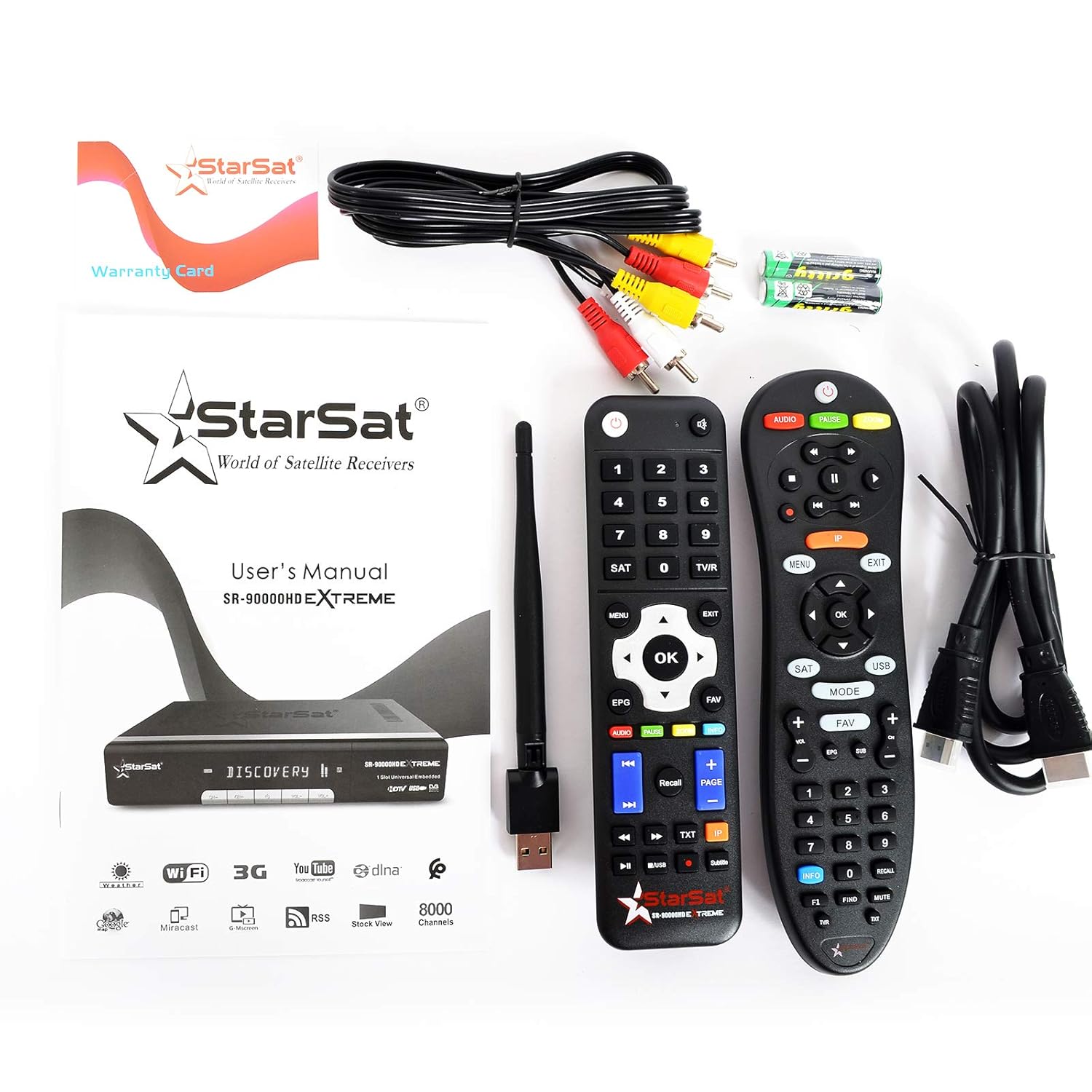
Image: All items included in the Smart Starsat SR-90000 XTREAM Receiver package.
Producte acabatview
Panell frontal
The front panel of the SR-90000 XTREAM receiver features a display for channel numbers and status indicators, along with basic control buttons for power, channel up/down, and volume. A USB port is also accessible on the front for convenient media playback or software updates.
Connexions del panell posterior
The rear panel provides all necessary ports for connecting your receiver to a television, satellite dish, and network.

Image: Rear panel connections of the SR-90000 XTREAM Receiver.
Key Ports:
- TUNER 1 IN / TUNER 2 IN: Connect your satellite dish cables here.
- USB 2.0: Two USB ports for external storage devices (e.g., USB drives for media playback or recording).
- DV OUT: Sortida HDMI per connectar-la al televisor.
- AUDIO L/R, VIDEO: RCA (AV) outputs for older televisions.
- COAXIAL: Sortida d'àudio digital.
- RS232: Port de servei.
- LAN: Port Ethernet per a connexió de xarxa amb cable.
- POTÈNCIA D'ENTRADA: Connecteu l'adaptador de corrent.
- Interruptor ON / OFF: Interruptor d'alimentació principal.
Configuració
1. Connexió al televisor
- Ensure both your TV and the receiver are powered off.
- For best quality, connect an HDMI cable from the DV OUT port on the receiver to an HDMI input on your TV.
- Alternatively, use the supplied AV cable to connect the ÀUDIO L / R i VÍDEO ports on the receiver to the corresponding inputs on your TV.
2. Connecting to Your Satellite Dish
- Connect the coaxial cable(s) from your satellite dish LNB(s) to the TUNER 1 IN i/o TUNER 2 IN ports on the receiver.
3. Connecting to the Network (Optional)
- Connexió per cable: Connecteu un cable Ethernet des del vostre encaminador al LAN port al receptor.
- Connexió sense fil: Screw the provided WiFi antenna into the designated port on the receiver. You will configure the wireless connection in the system settings after initial power-on.
4. Engegada i configuració inicial
- Connect the power adapter to the receiver and then to a power outlet.
- Gira el ON/OFF switch on the rear panel to the 'ON' position.
- Turn on your TV and select the correct HDMI or AV input source.
- Follow the on-screen instructions for initial setup, which typically includes language selection, time zone, and satellite configuration/channel scan.
Instruccions de funcionament
Funcions de control remot
The receiver comes with two remote controls. The primary remote offers comprehensive control over all receiver functions. Familiarize yourself with the button layout for easy navigation.
Image: The two remote controls provided with the receiver.
- POTÈNCIA: Encén/apaga el receptor o el posa en espera.
- MENÚ: Accesses the main menu for settings and features.
- D'acord/Entrar: Confirms selections or displays channel list.
- BOTONS DE FLETXA: Navigate through menus and channels.
- SORTIDA: Returns to the previous screen or live TV.
- VOL +/-: Ajusta el volum.
- CH +/-: Canvi de canals.
- EPG: Mostra la Guia electrònica de programes.
- USB: Accesses media files des d'un dispositiu USB connectat.
- FAV: Accesses favorite channel lists.
- ÀUDIO: Changes audio tracks or language.
- TXT: Funció de teletext.
Navegació pel menú
Premeu el botó MENÚ button on your remote to access the main menu. Use the arrow buttons to navigate through options such as Installation, Channel Manager, System Settings, Media Center, and Network Settings. Press OK per seleccionar una opció i Sortida per tornar enrere.
Gestió de canals
In the Channel Manager menu, you can perform tasks such as:
- Escaneig de canals: Cerca new satellite channels.
- Edita canals: Move, delete, or lock channels.
- Favorite Groups: Create custom lists of your preferred channels.
Reproducció multimèdia
Insert a USB storage device into one of the USB ports. Navigate to the Media Center menu to browse and play supported media files (video, audio, images). The receiver supports DLNA for streaming content from compatible devices on your local network.
Característiques d'Internet
Connect your receiver to the internet via LAN or WiFi (configure in Network Settings) to access features like YouTube and other online services.
Manteniment
- Neteja: Use a soft, dry cloth to clean the exterior of the receiver. Do not use liquid cleaners or aerosols.
- Ventilació: Ensure that the ventilation openings on the receiver are not blocked to prevent overheating.
- Actualitzacions de programari: Reviseu periòdicament el fabricant website or the receiver's system settings for available software updates to ensure optimal performance and access to new features.
Resolució de problemes
| Problema | Causa possible | Solució |
|---|---|---|
| Sense imatge ni so | Incorrect TV input selected; loose cables; receiver not powered on. | Check TV input source; ensure all cables (HDMI/AV, power) are securely connected; power on the receiver. |
| El comandament a distància no funciona | Dead batteries; obstruction between remote and receiver; remote not pointed correctly. | Replace batteries; remove obstructions; point remote directly at the receiver's IR sensor. |
| Sense senyal de satèl·lit | Dish misalignment; loose LNB cable; bad weather. | Check LNB cable connection; ensure dish is properly aligned (may require professional assistance); wait for weather to clear. |
| No es pot connectar a WiFi | Incorrect password; WiFi antenna not connected; router issues. | Verify WiFi password; ensure WiFi antenna is securely attached; restart your router. |
Especificacions
| Característica | Descripció |
|---|---|
| Model | SR-90000 |
| Descodificació de vídeo | H.265 HEVC, Full HD 1080P |
| Tipus de sintonitzador | DVB-S2 (Double Tuner) |
| Ports USB | 2 (USB 2.0) |
| Connectivitat | WiFi (via included antenna), LAN (Ethernet), IR |
| Sortida d'àudio | AC/DC, Coaxial, Audio L/R |
| Sortida de vídeo | HDMI (DV OUT), Video RCA |
| Funcions compatibles | YouTube, DLNA, EPG, Multi Language, DISEQC1.0 / 1.1, PAL/NTSC |
| Dispositius compatibles | Televisió |
| Pes de l'article | 1.46 kg |
| Dimensions (paquet) | 31.3 x 29.9 x 7.7 cm |
Garantia i Suport
Your Smart Starsat SR-90000 XTREAM Receiver comes with a 1-year service warranty. For technical support, further information, or to check for software updates, please visit the official Starsat weblloc:

Image: Product box highlighting features and the official Starsat weblloc de suport.


