Introducció
Thank you for choosing the Ksix Fitness Band GPS. This manual provides essential information for setting up, operating, and maintaining your device. Please read it carefully to ensure optimal performance and longevity of your fitness band.
The Ksix Fitness Band GPS is designed to monitor your physical activity comprehensively, featuring integrated GPS for route tracking, a dynamic 24-hour heart rate monitor, and a multi-sport mode to enhance your training sessions.
Producte acabatview
The Ksix Fitness Band GPS is a versatile smartband equipped with advanced features to support your fitness journey. Its lightweight design and 1.3-inch TFT color screen offer a comfortable and clear user experience.
- GPS integrat: Records your route during outdoor activities.
- 24-Hour Dynamic Heart Rate Monitor: Registra contínuament la teva freqüència cardíaca.
- Mode multiesportiu: Monitors various types of workouts.
- Resistència a l'aigua: IP68 rated, waterproof up to 3 meters for 1 hour.
- Connectivitat: Bluetooth 4.0 for seamless connection with your smartphone.
- Compatibilitat: Works with Android 4.4 and later, and iOS 8.0 and later.
- Durada de la bateria: Up to 7-8 hours with GPS and real-time heart rate monitoring, and up to 30 days in standby mode.

Image 1: Ksix Fitness Band GPS displaying time and date.
Guia de configuració
1. Càrrega del dispositiu
Before first use, fully charge your Ksix Fitness Band GPS. Connect the charging cable to the designated port on the device and a USB power source. The screen will indicate charging status.
2. Installing the Hi Move App
- Cerca "Hi Move" in your smartphone's app store (Google Play Store for Android or Apple App Store for iOS).
- Baixeu i instal·leu l'aplicació.
- Obre l'aplicació i segueix les instruccions que apareixen a la pantalla per crear un compte i configurar el teu profile.
3. Emparellament amb el telèfon intel·ligent
- Assegureu-vos que el Bluetooth estigui habilitat al vostre telèfon intel·ligent.
- Open the Hi Move app.
- Navegueu a la secció d'emparellament de dispositius dins de l'aplicació.
- The app will search for available devices. Select "Ksix Fitness Band GPS" from the list.
- Confirm the pairing request on both your smartphone and the fitness band, if prompted.
- Once paired, the time and date on your fitness band will synchronize with your phone.
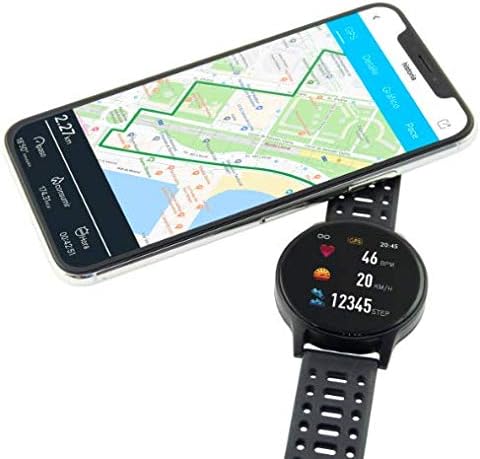
Image 2: Ksix Fitness Band GPS connected to a smartphone displaying a GPS-tracked route.
Instruccions de funcionament
Navegant per la interfície
The fitness band features a touch-sensitive screen. Swipe left/right or up/down to navigate through different functions and menus. Tap to select an option or confirm an action.
Seguiment GPS
For accurate GPS tracking, ensure you are in an open outdoor area with a clear view of the sky. Start your activity from the multi-sport mode, and the device will automatically attempt to acquire a GPS signal. Your route will be recorded and can be viewed in the Hi Move app after synchronization.
Monitorització de la freqüència cardíaca
The fitness band continuously monitors your heart rate. Wear the band snugly on your wrist, about one finger's width above your wrist bone, for accurate readings. You can view your current heart rate on the device and detailed historical data in the Hi Move app.
Mode multiesportiu
Access the multi-sport mode from the main menu to select specific activities such as running, walking, cycling, etc. Selecting an activity will initiate tracking of relevant metrics like duration, distance, calories burned, and heart rate. End the activity when finished to save the data.

Image 3: Ksix Fitness Band GPS showing a person running, highlighting features like pedometer, multi-sport mode, heart rate monitoring, and distance tracking.
Manteniment
Neteja
Regularly clean your fitness band and strap to prevent skin irritation and maintain device hygiene. Use a soft, damp drap per netejar el dispositiu. Eviteu utilitzar productes químics agressius o materials abrasius.
Resistència a l'aigua
The device is IP68 waterproof, meaning it can withstand immersion in water up to 3 meters deep for a maximum of 1 hour. It is suitable for swimming in shallow water but not recommended for diving, high-pressure water activities, or prolonged immersion. Ensure the charging port is dry before charging.
Emmagatzematge
When not in use for extended periods, store the fitness band in a cool, dry place. Avoid extreme temperatures and direct sunlight.
Resolució de problemes
- El dispositiu no s'encén: Ensure the device is fully charged. Connect it to the charger and wait a few minutes.
- No es pot emparellar amb el telèfon intel·ligent:
- Assegureu-vos que el Bluetooth estigui habilitat al vostre telèfon.
- Make sure the fitness band is within Bluetooth range of your phone.
- Restart both your phone and the fitness band.
- Try unpairing and re-pairing the device through the Hi Move app.
- Lectures de freqüència cardíaca inexactes:
- Assegureu-vos que la corretja estigui ben ajustada al canell, ni massa fluixa ni massa ajustada.
- Clean the sensor on the back of the device.
- Eviteu moviments excessius durant la mesura.
- El GPS no rep senyal:
- Assegureu-vos que esteu en una zona oberta a l'aire lliure amb una vista clara view del cel.
- Wait a few minutes for the device to acquire a signal.
- Ensure the device's firmware is up to date via the Hi Move app.
- Data not syncing to app:
- Ensure the fitness band is connected to your phone via Bluetooth.
- Open the Hi Move app and manually initiate a sync if available.
- Comprova la connexió a Internet del teu telèfon.
Especificacions
| Número de model | BXBZGPS01 |
| Marca | Ksix |
| Mida de la pantalla | 1.3 polzades |
| Tipus de pantalla | TFT Color |
| Capacitat de la bateria | 230 mAh (ió de liti) |
| Battery Life (GPS + HR) | 7-8 hores |
| Durada de la bateria (mode d'espera) | Fins a 30 dies |
| Resistència a l'aigua | IP68 (up to 3 meters for 1 hour) |
| Connectivitat | Bluetooth 4.0 |
| Compatibilitat | Android 4.4+/iOS 8.0+ |
| Pes | 38 grams |
| Material | Plàstic, PVC |
| Color | Negre |
Garantia i Suport
For warranty information and technical support, please refer to the documentation provided with your purchase or visit the official Ksix weblloc web. Conserveu el comprovant de compra per a reclamacions de garantia.
Fabricant: KSIX
Contacte: Please refer to the Ksix official weblloc web per obtenir les dades de contacte del servei d'atenció al client.


