Introducció
Thank you for choosing the NEDIS Wi-Fi Smart Fan Heater. This manual provides essential information for the safe and efficient operation of your new device. Please read these instructions carefully before use and retain them for future reference. Proper use and maintenance will ensure optimal performance and longevity of the product.
Instruccions de seguretat
Per reduir el risc d'incendi, descàrrega elèctrica o lesions, seguiu sempre aquestes precaucions de seguretat bàsiques:
- Llegiu totes les instruccions abans d'utilitzar aquest escalfador.
- No utilitzeu aquest escalfador a l'entorn immediat d'un bany, una dutxa o una piscina.
- No tapeu l'escalfador. Si el tapeu, podeu sobreescalfar-lo i provocar un incendi.
- Mantingueu els materials combustibles com ara mobles, coixins, roba de llit, papers, roba i cortines a almenys 1 metre (3 peus) de la part frontal de l'escalfador i allunyats dels costats i la part posterior.
- Desconnecteu sempre l'escalfador quan no l'utilitzeu.
- No feu funcionar cap escalfador amb un cable o endoll danyats ni després que l’escalfador funcioni malament, s’hagi caigut o s’hagi danyat de qualsevol manera.
- No passeu el cable sota la catifa. No cobriu el cable amb catifes, corredors o revestiments similars. Col·loqueu el cable lluny de la zona de trànsit i on no s'ensopegui.
- Cal extremar la precaució quan l'escalfador és utilitzat per o a prop de nens o persones invàlides i sempre que l'escalfador es deixi en funcionament i sense vigilància.
- This heater is equipped with a tip-over protection switch that automatically shuts off the heater if it is accidentally knocked over.
- Assegureu-vos que l'escalfador estigui col·locat en una superfície estable i plana.
- Només per a ús interior.
Producte acabatview
Familiarize yourself with the main components of your NEDIS Wi-Fi Smart Fan Heater.
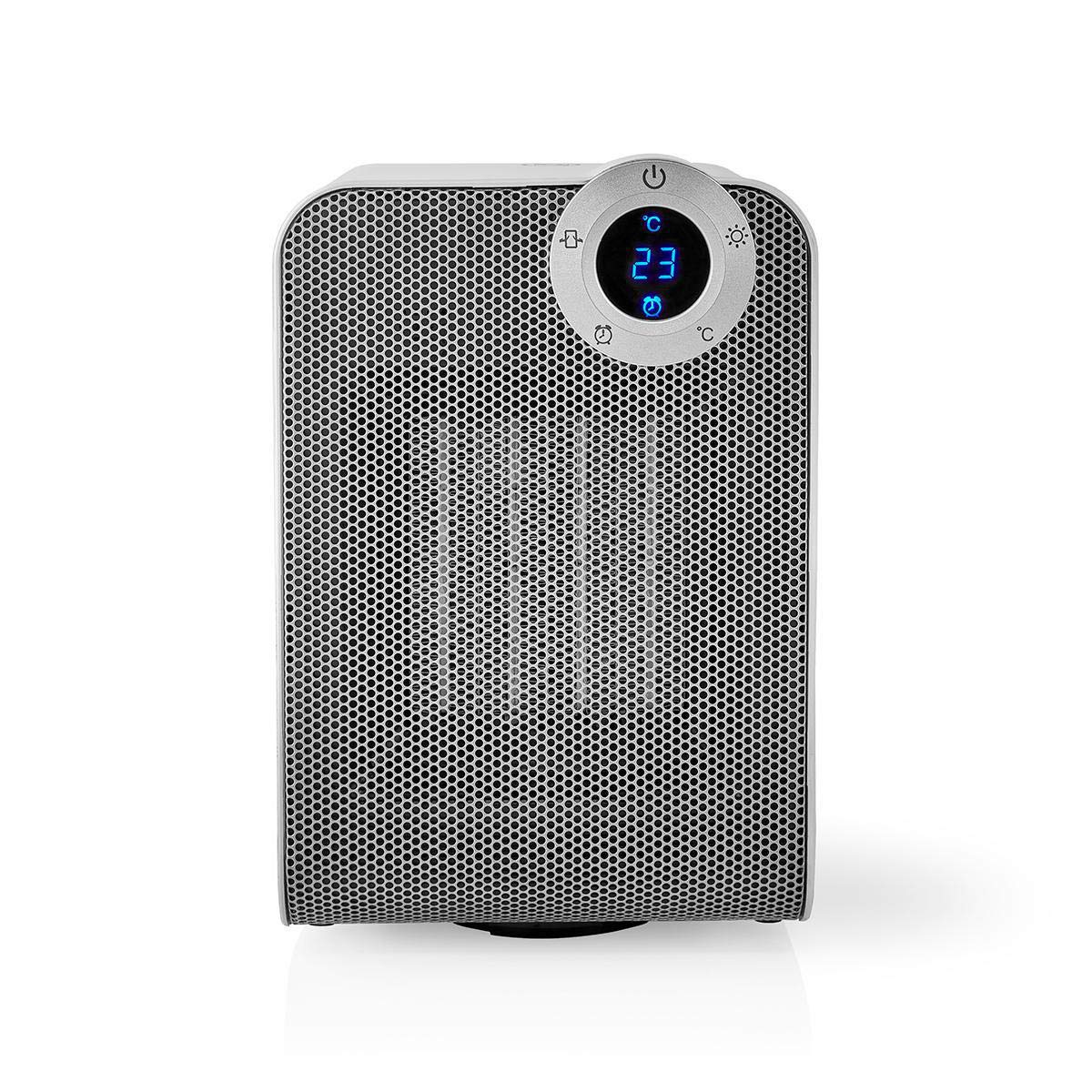
The front panel features a digital display that shows the current temperature and settings. Surrounding the display are touch-sensitive buttons for power, mode selection, oscillation, and timer functions.

The rear of the heater includes the main power switch (often a rocker switch) and the air intake grille. Ensure this area is not obstructed for proper airflow.

The compact design of the heater allows for easy placement in various indoor settings.
Configuració
Desembalatge
- Traieu amb cura l'escalfador del seu embalatge.
- Comproveu si hi ha hagut danys durant el transport. Si hi ha danys, no l'utilitzeu i poseu-vos en contacte amb el servei d'atenció al client.
- Conserveu l'embalatge per a futurs emmagatzematges o transports.
Col·locació
- Col·loqueu l'escalfador sobre una superfície ferma i plana.
- Ensure there is at least 1 meter (3 feet) of clear space around the heater to allow for proper air circulation and to prevent fire hazards.
- Do not place the heater near curtains, drapes, or other loose fabrics that could block the air intake or outlet.
- Assegureu-vos que el cable d'alimentació no estigui pinçat ni col·locat sota objectes pesants.
Encès inicial
- Plug the heater into a suitable electrical outlet (220-240V AC, 50/60Hz).
- Flip the main power switch on the back of the unit to the 'ON' position.
- The digital display on the front will illuminate, indicating the heater is in standby mode.
Wi-Fi Connection & App Setup
The NEDIS Wi-Fi Smart Fan Heater can be controlled via the Nedis SmartLife app, offering advanced features and remote control.
- Descarrega't el Nedis SmartLife aplicació des de l'App Store (iOS) o Google Play Store (Android).
- Registra't per obtenir un compte nou o inicia la sessió si ja en tens un.
- Assegureu-vos que el vostre telèfon intel·ligent estigui connectat a una xarxa Wi-Fi de 2.4 GHz.
- A l'aplicació, toca la icona "+" per afegir un dispositiu nou.
- Follow the on-screen instructions in the app to connect your heater to your Wi-Fi network. This usually involves putting the heater into pairing mode (refer to the app for specific instructions, often by pressing and holding a button on the heater).
- Once connected, you can control the heater from anywhere using the app.
Instruccions de funcionament
Control manual
The heater can be operated directly using the touch buttons on the front panel:
- Botó d'encesa: Premeu per encendre o apagar l'escalfador.
- Botó de mode: Cycle through heating modes (e.g., High Heat 1800W, Low Heat 900W, Fan Only).
- Ajust de temperatura: Use the '+' and '-' buttons (or similar) to set the desired temperature. The heater will operate at 1800W for rapid heating and automatically switch to 900W once the set temperature is approached.
- Botó d'oscil·lació: Press to activate or deactivate the horizontal oscillation feature, distributing heat across a wider area.
- Botó del temporitzador: Set a timer for the heater to automatically turn off after a specified duration.
Control d'aplicacions SmartLife
Once connected to the Nedis SmartLife app, you can access advanced control features:
- Remote Power On/Off: Control the heater from anywhere.
- Ajust de temperatura: Precisely set and monitor the room temperature.
- Selecció del mode: Choose between different heating levels or fan-only mode.
- Control d'oscil·lació: Activa o desactiva la funció d'oscil·lació.
- Programació: Create custom heating schedules for different times of the day or week.
- Funció de temporitzador: Set a countdown timer for automatic shutdown.
Control de veu
The heater supports voice control through popular smart assistants. To enable this, link your Nedis SmartLife account with your preferred voice assistant (Google Home or Amazon Alexa) via their respective apps. Once linked, you can use voice commands such as:
- "Hey Google, turn on the heater."
- "Alexa, set the heater to 22 degrees."
- "Hey Google, turn off the heater."
Manteniment
Neteja
Regular cleaning helps maintain the heater's efficiency and extends its lifespan.
- Desendolleu sempre l'escalfador i deixeu-lo refredar completament abans de netejar-lo.
- Netegeu les superfícies exteriors amb un damp tela. No utilitzeu netejadors abrasius ni dissolvents.
- Feu servir un aspirador amb un accessori de raspall per eliminar la pols de les reixetes d'entrada i sortida d'aire.
- Assegureu-vos que no entri aigua a l'interior de l'escalfador.
Emmagatzematge
Quan no s'utilitza durant períodes prolongats:
- Unplug the heater and clean it as described above.
- Store the heater in its original packaging or a suitable box to protect it from dust and damage.
- Keep it in a cool, dry place, away from direct sunlight and moisture.
Resolució de problemes
Si teniu problemes amb el vostre escalfador, consulteu els següents problemes i solucions habituals:
| Problema | Causa possible | Solució |
|---|---|---|
| L'escalfador no s'encén. | No power, main switch off, tip-over switch activated. | Check power outlet, ensure main switch is ON, place heater upright on a stable surface. |
| Sense sortida de calor. | Incorrect mode, thermostat setting too low. | Select a heating mode (High/Low), increase the thermostat setting above the current room temperature. |
| La connexió Wi-Fi falla. | Contrasenya Wi-Fi incorrecta, xarxa de 5 GHz, distància des del router. | Verify Wi-Fi password, ensure you are on a 2.4GHz network, move heater closer to the router, try re-pairing. |
| L'escalfador s'apaga inesperadament. | Overheating protection, tip-over protection, timer activated. | Ensure heater is not covered, clear obstructions, place upright, check timer settings. Allow to cool before restarting. |
Especificacions
| Característica | Especificació |
|---|---|
| Número de model | WIFIFNH20CWT |
| Font d'alimentació | Elèctric amb cable |
| Potència de sortida | 1800 W (alt), 900 W (baix) |
| Mètode de calefacció | Convecció |
| Dimensions (L x A x A) | 16.5 x 14.5 x 25 cm |
| Pes de l'article | 1.8 kg |
| Color | Blanc / Plata |
| Característiques especials | On/Off Timer, Oscillation, Tip-over Protection, Thermostat, Wi-Fi, App Control, Voice Control (Alexa, Google Home) |
| Tipus d'instal·lació | Muntatge al terra |
| Ús recomanat | Indoor, Home, Study Room |
| Piles necessàries | No |
Garantia i Suport
Your NEDIS Wi-Fi Smart Fan Heater is covered by a manufacturer's warranty. Please refer to the warranty card included with your purchase for specific terms and conditions, including the warranty period and coverage details.
For technical support, troubleshooting assistance, or warranty claims, please contact NEDIS customer service. Contact information can typically be found on the product packaging, the NEDIS weblloc web o el vostre rebut de compra.