1. Introducció
The Zenec Z-E1010 is an advanced 10.1-inch infotainment system designed for vehicle integration. This system provides a wide range of features including digital radio (DAB+), FM radio, Bluetooth connectivity, USB media playback, and smartphone integration capabilities. It is part of the ZENEC E>GO CORE series, offering a large display and intuitive operation for an enhanced in-car experience. This manual provides essential information for the proper installation, operation, and maintenance of your Z-E1010 unit.
2. Informació de seguretat
- Llegiu atentament totes les instruccions abans de la instal·lació i el funcionament.
- Installation should be performed by a qualified professional to prevent damage to the unit or vehicle.
- No feu servir el dispositiu de manera que us distregui de la conducció. Prioritzeu sempre la seguretat viària.
- Eviteu exposar la unitat a temperatures extremes, a la llum solar directa durant períodes prolongats o a una humitat excessiva.
- Use only approved accessories and parts with the Z-E1010.
3. Contingut del paquet
Verifiqueu que tots els elements siguin presents al paquet:
- Zenec Z-E1010 Infotainment Unit
- Arnès de cablejat principal
- USB Extension Cables (2x)
- Antena GPS
- Micròfon
- Manual d'usuari (aquest document)
- Note: Vehicle-specific mounting kits and DAB+ antenna are optional and sold separately.
4. Configuració i instal·lació
The Z-E1010 is designed for integration into specific vehicle models using dedicated installation kits. These kits typically include mounting frames and necessary components for vehicle connection.
4.1. Comprovacions prèvies a la instal·lació
- Assegureu-vos que el vehicle estigui apagat i que la bateria estigui desconnectada abans de començar la instal·lació.
- Confirm compatibility with your vehicle model and that you have the correct vehicle-specific mounting kit.
4.2. Connexions de cablejat
Connect the main wiring harness to the vehicle's electrical system. The Z-E1010 features an integrated CAN BUS adapter for automatic vehicle model detection and simplified connection. Connect the GPS antenna, microphone, and USB extension cables to the designated ports on the unit.
4.3. Muntatge de la unitat
Follow the instructions provided with your vehicle-specific mounting kit to securely install the Z-E1010 into the dashboard. Ensure all cables are routed safely and do not interfere with vehicle operation.
5. Instruccions de funcionament
The Zenec Z-E1010 features a 10.1-inch capacitive touchscreen for intuitive control. The main interface provides access to various functions via distinct icons.
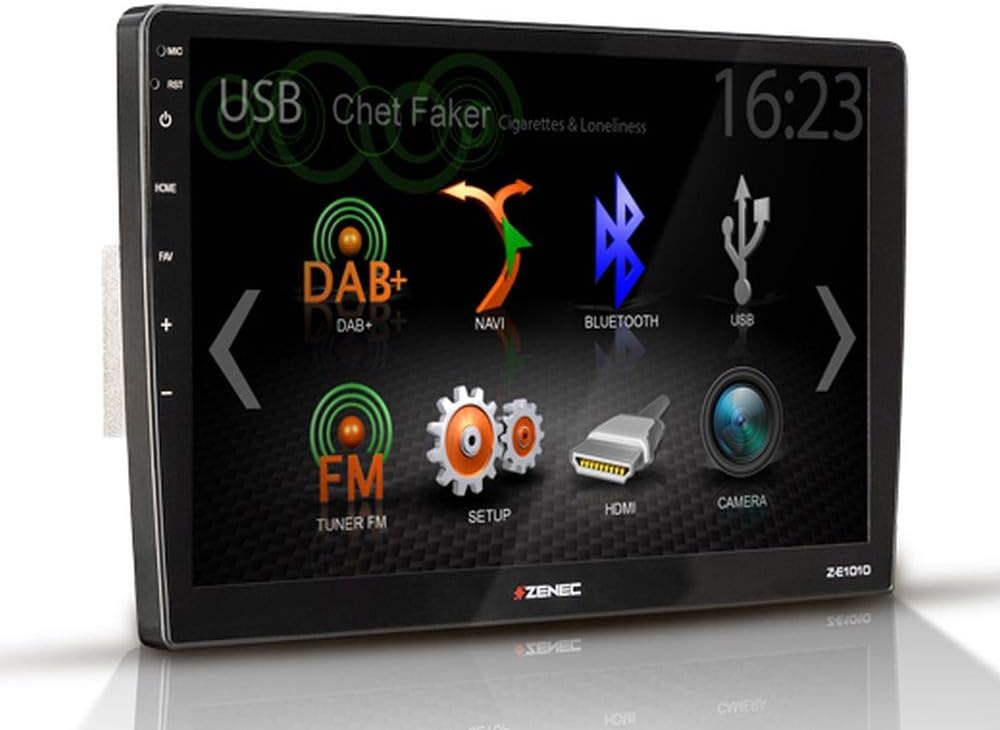
Figura 5.1: Zenec Z-E1010 Infotainment System main screen. This image illustrates the primary user interface of the Zenec Z-E1010 Infotainment System. The screen shows various selectable icons for core functions such as USB media playback, DAB+ digital radio, navigation, Bluetooth connectivity, FM radio, system setup, HDMI input, and camera view. The current time '16:23' is visible in the top right corner, and 'Chet Faker - Cigarettes & Loneliness' is displayed as the currently playing track via USB.
5.1. Funcionament general
- Encès/apagat: Press and hold the power button (usually on the left side) to turn the unit on or off. A short press may mute audio or switch modes.
- Pantalla tàctil: Navigate through menus and select functions by tapping the corresponding icons on the capacitive touchscreen.
- Control de volum: Use the physical volume buttons or on-screen controls to adjust audio levels.
5.2. Funcions d'àudio
- DAB+ Tuner: Select the 'DAB+' icon to access digital radio. Features include service following, MOT Slideshow, DLS (Dynamic Label Segment), and DLS text. The tuner provides clear digital radio reception.
- Sintonitzador FM: Select the 'FM Tuner' icon for analog radio. It supports RDS (Radio Data System) functions.
- Reproducció USB: Connect USB storage devices to the two USB 2.0 ports for audio and video file reproducció.
- Equalitzador: The unit includes a 3-band equalizer for audio customization.
5.3. Connectivitat
- Bluetooth 4.1: Access the 'Bluetooth' function for hands-free calling with good voice quality and A2DP music streaming. Pair your smartphone via the Bluetooth settings menu.
- SmartLink: This feature allows direct connection for Apple CarPlay and Android Auto, making smartphone applications available on the infotainment screen.
- WebEnllaç 2.0: Extends integration of online content such as YouTube, ShoutCast, and various audio/video players, controllable via the Z-E1010.
5.4. Navegació
The Z-E1010 can be upgraded to a fully equipped GPS receiver with the optional Z-EMAP-CORE navigation package. Once installed, select the 'NAVI' icon to access navigation functions.
5.5. RealDash Application
The RealDash application provides a virtual dashboard display. This feature requires an optional OBDII dongle to connect to your vehicle's diagnostic port and display various vehicle data on the Z-E1010 screen.
5.6. System Settings ('SETUP')
Access the 'SETUP' menu to configure various system parameters, including audio settings, display preferences, Bluetooth pairing, and general device settings.
5.7. Camera Function
If a compatible rearview camera is connected, select the 'CAMERA' icon to view the camera feed. This function is typically activated automatically when the vehicle is put into reverse gear.
6. Manteniment
- Neteja de la pantalla: Use a soft, lint-free cloth to gently wipe the touchscreen. For stubborn marks, slightly dampRenta el drap amb aigua o una solució netejadora de pantalles. Evita productes químics agressius o materials abrasius.
- Neteja general: Keep the unit free from dust and debris. Use a soft brush or compressed air to clean crevices.
- Actualitzacions de programari: Periodically check the Zenec official website for available software updates to ensure optimal performance and access to new features.
7. Solució De Problemes
This section addresses common issues you might encounter with your Z-E1010 unit.
- Sense energia: Check all power connections and vehicle fuses. Ensure the ignition is on.
- Sense àudio: Verifiqueu la configuració del volum, comproveu les connexions dels altaveus i assegureu-vos que s'ha seleccionat la font d'àudio correcta.
- Problemes de vinculació de Bluetooth: Ensure Bluetooth is enabled on both the Z-E1010 and your smartphone. Delete previous pairings and attempt to pair again.
- Pantalla tàctil que no respon: Try restarting the unit. If the issue persists, a factory reset might be necessary (refer to the 'SETUP' menu).
- DAB+ Reception Poor: Ensure the DAB+ antenna is correctly installed and positioned. Check for signal strength in your area.
If you experience persistent issues not covered here, please contact Zenec customer support or a qualified service technician.
8. Especificacions
| Característica | Especificació |
|---|---|
| Marca | Zenec |
| Número de model | Z-E1010 |
| Mida de la pantalla | 10.1 polzades (25.7 cm) |
| Resolució de pantalla | 1024 x 600 píxels |
| Tipus de visualització | Pantalla tàctil capacitiva |
| Connectivitat | USB (2x), Bluetooth 4.1 |
| Característiques especials | DAB+, RDS, SmartLink (Apple CarPlay, Android Auto), WebLink 2.0, RealDash App, Integrated CAN BUS Adapter |
| Dispositius compatibles | Telèfons intel·ligents |
| Mode de sortida d'àudio | estèreo |
| Configuració de so envoltant | 4.0 |
| Ports HDMI totals | 1 |
| Potència de sortida | 4 x 50 W |
9. Garantia i Suport
For detailed warranty information, please refer to the warranty card included with your product or visit the official Zenec website. For technical support, troubleshooting assistance beyond this manual, or inquiries about spare parts, please contact your authorized Zenec dealer or Zenec customer service directly. Keep your proof of purchase for warranty claims.


