1. Introducció
Gràcies per la compraasing the Sony Signature Series Audio Component Amplifier TA-ZH1ES. This high-resolution headphone amplifier is designed to deliver exceptional audio quality, featuring advanced technologies such as Sony's enhanced S-Master HX digital amplifier and DSD Remastering Engine. This manual provides essential information for the proper setup, operation, and maintenance of your device.
2. Informació de seguretat
Please read all safety instructions carefully before using the amplificador. Conserveu aquest manual com a referència futura.
- Font d'alimentació: Connect the unit only to the AC power outlet specified in the specifications.
- Ventilació: Assegureu-vos que hi hagi una ventilació adequada al voltant de la unitat per evitar el sobreescalfament. No bloquegeu les obertures de ventilació.
- Humitat: No exposeu la unitat a la pluja ni a la humitat per reduir el risc d'incendi o descàrrega elèctrica.
- Objectes estrangers: No introduïu cap objecte a les obertures de la unitat.
- Manteniment: Demaneu totes les tasques de manteniment a personal de servei qualificat. No intenteu obrir ni reparar la unitat vosaltres mateixos.
- Col·locació: Col·loqueu la unitat sobre una superfície estable i plana, allunyada de la llum solar directa, de fonts de calor i de pols o vibracions excessives.
3. Producte acabatview
3.1 Tauler frontal
The front panel provides various headphone output connections and essential controls for operation.

Figura 3.1: Disseny del panell frontal
This image displays the front panel of the TA-ZH1ES amplifier, highlighting the various headphone output jacks and the volume control knob. From left to right, you can see the XLR4 balanced output, multiple 4.4mm and 3.5mm balanced outputs, and 6.3mm and 3.5mm unbalanced outputs. The large rotary knob on the right is for volume control, and a Walkman/Xperia USB input is also visible.
- Botó d'encesa: Encén o apaga la unitat.
- Selector d'entrada: Passa ciclicament per les fonts d'entrada disponibles.
- Output Selector: Selects the desired output mode.
- Visualització: Shows current settings and status.
- Botó menú/enrere: Navigates menu options or returns to the previous screen.
- Botó Enter: Confirma les seleccions.
- Gain Button: Adjusts the output gain for different headphone impedances.
- Pom de volum: Controla el volum de sortida.
- Sortides d'auriculars:
- Balanced Connections: 4.4mm, 3.5mm x 2, XLR4
- Unbalanced Connections: 6.3mm, 3.5mm
- Walkman/Xperia USB Input: For connecting compatible portable devices.
3.2 Panell posterior
The rear panel houses various input and output terminals for connecting to other audio components and the power supply.
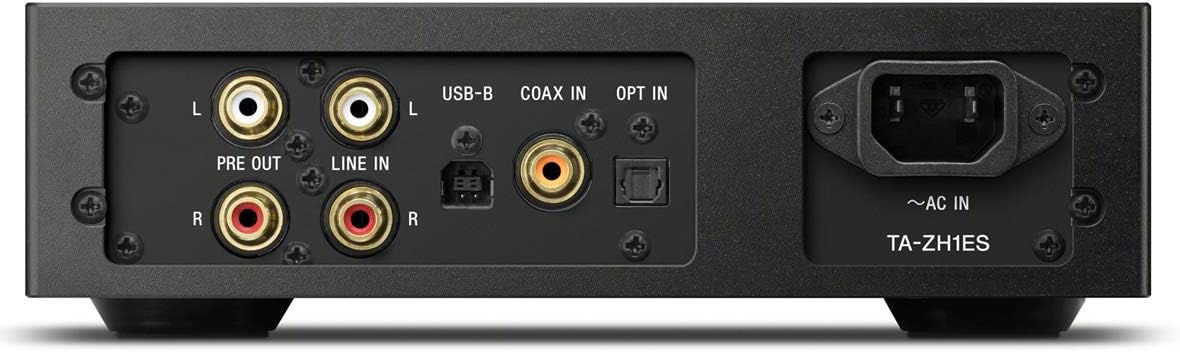
Figura 3.2: Disseny del panell posterior
This image illustrates the rear panel of the TA-ZH1ES amplifier, detailing the various connectivity options. Visible ports include RCA Line In (L/R), RCA Pre Out (L/R), USB-B input, Coaxial input, Optical input, and the AC power inlet. Each port is clearly labeled for easy identification.
- LINE IN (RCA L/R): Analog audio input for connecting external devices.
- PRE OUT (RCA L/R): Analog audio output for connecting to a power amplifier o altaveus actius.
- Entrada USB-B: For connecting to a computer or other digital audio sources.
- COAX IN: Coaxial digital audio input.
- OPTAR A: Entrada d'àudio digital òptica.
- ~AC IN: Power input for the AC power cord.
4. Configuració
Follow these steps to set up your TA-ZH1ES ampmés viu.
4.1 Col·locació
Col·loca el amplifier on a flat, stable surface with adequate space for ventilation. Avoid placing it near heat sources or in direct sunlight.

Figura 4.1: AmpCol·locació de lifier
This image shows the Sony TA-ZH1ES amplifier positioned on a flat surface, demonstrating a typical setup environment. Ensure the unit has sufficient space around it for proper airflow.
4.2 Connexió de fonts d'àudio
Connect your audio sources to the appropriate input terminals on the rear panel.
- Digital Sources (Computer, CD Player, etc.):
- For a computer, connect a USB-B cable from your computer to the Entrada USB-B.
- For a CD player or other digital audio device, use a coaxial cable for the COAX IN or an optical cable for the OPTAR A.
- Analog Sources (Turntable with pre-amp, etc.): Connect RCA cables from your analog source to the LINE IN (RCA L/R) terminals.
- Portable Devices (Walkman/Xperia): Connect compatible portable devices to the Walkman/Xperia USB Input on the front panel. This input also supports charging for Walkman devices.
4.3 Connexió d'auriculars o dispositius externs Ampmés viu
- Auriculars: Connect your headphones to the appropriate balanced (4.4mm, 3.5mm x 2, XLR4) or unbalanced (6.3mm, 3.5mm) output jacks on the front panel.
- Alimentació externa Amplifier/Active Speakers: If using the TA-ZH1ES as a DAC or pre-amplifier, connect RCA cables from the PRE OUT (RCA L/R) terminals on the rear panel to your power amplifier o altaveus actius.
4.4 Connexió d'alimentació
Connecteu el cable d'alimentació de CA subministrat a ~AC IN terminal on the rear panel, then plug the other end into a wall outlet.
5. Instruccions de funcionament
5.1 Funcionament bàsic
- Encès: Press the Power button on the front panel.
- Seleccioneu l'entrada: Use the Input Selector button to choose the desired audio source (e.g., USB-B, COAX, OPT, LINE IN).
- Connecteu els auriculars: Plug your headphones into the appropriate jack.
- Ajustar el volum: Slowly turn the Volume knob clockwise to increase the volume to a comfortable listening level.

Figura 5.1: Controls del panell superior
Aquesta imatge ofereix una vista de dalt a baix view of the TA-ZH1ES amplifier, clearly showing the power button, input/output selectors, display screen, menu navigation buttons (Menu/Back, Enter), and the Gain button. These controls are used for basic operation and feature adjustments.
5.2 DSD Remastering Engine
The DSD Remastering Engine converts all PCM audio sources to DSD 11.2MHz, aiming to provide a more natural and analog-like sound experience. This feature can be enabled or disabled through the unit's menu settings.
5.3 DSEE HX
DSEE HX (Digital Sound Enhancement Engine HX) upscales compressed audio files to near high-resolution quality. This feature is particularly effective for improving the sound of lower-resolution files, such as those from streaming services or older recordings. Access DSEE HX settings via the unit's menu.
5.4 Configuració del guany
El amplifier features adjustable gain settings to optimize performance with various headphone impedances. Press the Guanyar button on the front panel to cycle through available gain levels (e.g., Low, Mid, High). Select the setting that provides sufficient volume without distortion for your specific headphones.
6. Manteniment
Proper care ensures the longevity and optimal performance of your ampmés viu.
- Neteja: Wipe the unit with a soft, dry cloth. Do not use abrasive pads, scouring powder, or solvents such as alcohol or benzene.
- Ventilació: Periodically check that the ventilation openings are free from dust and obstructions.
- Emmagatzematge: If storing the unit for an extended period, disconnect it from the power outlet and store it in a clean, dry place.
7. Solució De Problemes
Si teniu problemes amb el vostre amplificador, consulteu els següents problemes i solucions habituals.
| Problema | Possible causa/solució |
|---|---|
| Sense poder | Ensure the AC power cord is securely connected to both the unit and the wall outlet. Check if the power outlet is functional. |
| Sense so |
|
| So distorsionat |
|
| Unit becomes hot | Ensure adequate ventilation around the unit. Do not block the ventilation openings. If overheating persists, discontinue use and contact service. |
Si el problema persisteix després de provar aquestes solucions, poseu-vos en contacte amb el servei d'atenció al client de Sony.
8. Especificacions
| Característica | Detall |
|---|---|
| Número de model | TA-ZH1ES |
| Dimensions del producte (W x H x D) | 2.56 x 12.36 x 8.27 polzades (aprox. 65 x 314 x 210 mm) |
| Pes de l'article | 1 lliures (aprox. 0.45 kg) |
| Impedància dels auriculars | 12-600 ohms |
| Sortides d'auriculars | Balanced: 4.4mm, 3.5mm x 2, XLR4 Unbalanced: 6.3mm, 3.5mm |
| Entrades digitals | USB-B, Coaxial, Optical, Walkman/Xperia USB |
| Entrades analògiques | RCA Line In (L/R) |
| Sortides analògiques | RCA Pre Out (L/R) |
| Fabricant | Sony |
| Data de primera disponibilitat | 1 de setembre de 2016 |
Nota: Les especificacions estan subjectes a canvis sense previ avís.
9. Garantia i Suport
Per obtenir informació detallada sobre la garantia, consulteu la targeta de garantia inclosa amb el producte o visiteu el lloc web d'assistència oficial de Sony. website for your region. For technical assistance, product registration, or service inquiries, please contact Sony customer support.
Suport de Sony Weblloc: https://www.sony.com/electronics/support