1. Introducció
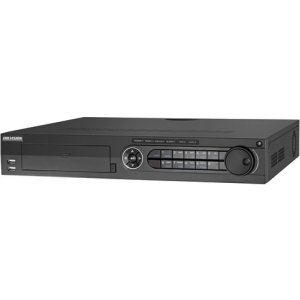
The Hikvision DS-7316HQHI-SH is a 16-channel Tribrid Digital Video Recorder (DVR) designed for advanced surveillance systems. This DVR supports Turbo HD, analog, and 1080P IP cameras, offering versatile compatibility for various security setups. It features H.264 video compression for efficient storage and supports auto-detection of camera types. This manual provides essential information for the proper installation, operation, and maintenance of your DVR system.
2. Instruccions de seguretat
Please read these safety instructions carefully before operating the device to prevent injury or damage.
- Assegureu-vos que la font d'alimentació voltage is stable and meets the device's requirements.
- Do not place the device in direct sunlight, near heat sources, or in environments with high humidity or dust.
- Eviteu col·locar objectes pesats a sobre del DVR.
- Utilitzeu només accessoris i adaptadors d'alimentació aprovats per Hikvision.
- Desconnecteu l'alimentació abans de realitzar qualsevol procediment de manteniment o instal·lació.
- Connecteu correctament a terra el dispositiu per evitar descàrregues elèctriques.
3. Contingut del paquet
Verifiqueu que tots els articles siguin presents al paquet. Si falta algun article o està malmès, poseu-vos en contacte amb el vostre proveïdor.
- Hikvision DS-7316HQHI-SH DVR Unit
- Adaptador d'alimentació
- Ratolí USB
- SATA Cables (for HDD connection)
- Screws (for HDD installation)
- Guia d'inici ràpid
4. Producte acabatview
4.1 Tauler frontal

The front panel of the DVR provides access to essential controls and indicators. It typically includes:
- Ports USB: For connecting a mouse, USB flash drive, or external storage.
- Indicadors d'estat: LEDs for power, HDD activity, and network status.
- Botons de control: Navigation and selection buttons for menu operation.
- Receptor IR: For remote control (if applicable).
4.2 Connexions del panell posterior
The rear panel houses all the necessary ports for connecting cameras, monitors, network, and power. Key connections include:
- Entrada de vídeo: BNC connectors for 16 Turbo HD/Analog cameras.
- Sortida de vídeo: HDMI and VGA ports for monitor connection.
- Entrada/sortida d'àudio: RCA connectors for audio devices.
- Port LAN: RJ45 Ethernet port for network connection.
- Ports USB: Ports USB addicionals per a perifèrics.
- E/S d'alarma: Terminal blocks for alarm input and output devices.
- Entrada d'alimentació: DC 12V power jack.
5. Configuració
5.1 Instal·lació de maquinari
- Hard Disk Drive (HDD) Installation:
- Desenrosqueu i retireu la coberta superior del DVR.
- Connect the SATA data cable and power cable to the HDD.
- Align the HDD with the screw holes at the bottom of the DVR chassis and secure it with the provided screws.
- Torneu a col·locar la coberta superior i fixeu-la amb cargols.
- Connexions de la càmera: Connect your Turbo HD, analog, or IP cameras to the corresponding video input ports on the rear panel using BNC connectors. For IP cameras, ensure they are connected to the same network as the DVR.
- Connexió del monitor: Connect a monitor to the HDMI or VGA output port on the rear panel.
- Connexió del ratolí: Connect the USB mouse to a USB port on the front or rear panel.
- Connexió de xarxa: Connect an Ethernet cable from your router/switch to the LAN port on the DVR.
- Connexió d'alimentació: Connect the power adapter to the DVR's power input and then plug it into a power outlet.
5.2 Engegada i configuració inicials
After connecting all hardware, power on the DVR. The system will boot up, and you will be prompted to set up basic configurations.
- Create Admin Password: Follow the on-screen prompts to create a strong administrator password.
- Activate HDD: The newly installed HDD will need to be initialized or formatted by the DVR. Navigate to Menu > HDD > HDD Management per formatar la unitat.
- Configuració de la xarxa: Configure network parameters (IP address, subnet mask, gateway, DNS) to enable remote access and IP camera integration. You can use DHCP or static IP.
- Data i hora: Estableix la data, l'hora i la zona horària correctes.
- Detecció de càmera: The DVR will automatically detect connected Turbo HD and analog cameras. For IP cameras, you may need to add them manually via Menu > Camera > IP Camera.
6. Instruccions de funcionament
6.1 Navegació per la interfície d'usuari
Use the connected USB mouse to navigate the DVR's graphical user interface (GUI). Right-click to access the main menu, and left-click to select options.
- Viu View: Displays real-time video feeds from all connected cameras.
- Menú principal: Provides access to all system settings, recording, playback, and advanced features.
- Reproducció: Permet reviewing gravat footage.
- Còpia de seguretat: For exporting recorded video to a USB device.
6.2 Configuració de gravació
Per configurar els paràmetres d'enregistrament:
- Vés a Main Menu > Record > Parameters.
- Select the desired camera and configure settings such as resolution, frame rate, and bit rate.
- Navega a Menú principal > Gravació > Programació to set up continuous, motion-detection, or alarm-triggered recording schedules for each camera.
6.3 Reproducció
To play back recorded footage:
- Del directe view, feu clic amb el botó dret i seleccioneu Reproducció, o aneu a Menú principal > Reproducció.
- Select the camera(s) and the date/time range you wish to review.
- Use the timeline and control buttons (play, pause, fast forward, rewind) to navigate through the footage.
6.4 Accés remot
To access your DVR remotely:
- Ensure the DVR is connected to the internet and network settings are correctly configured.
- Download and install the Hik-Connect app on your mobile device or the iVMS-4200 client software on your computer.
- Register an account and add your DVR using its serial number or QR code.
- Follow the app/software instructions to view live feeds, play back recordings, and manage settings remotely.
7. Manteniment
7.1 Gestió del disc dur
Regularly check the status of your hard drive to ensure optimal recording performance. Go to Main Menu > HDD > HDD Management a view disk status, remaining capacity, and perform formatting if necessary. It is recommended to format the HDD periodically (e.g., every 6-12 months) to maintain performance, after backing up any critical data.
7.2 actualitzacions de microprogramari
Keep your DVR's firmware updated to benefit from new features, security enhancements, and bug fixes. Download the latest firmware from the official Hikvision website. Update the firmware via USB or network through Main Menu > Maintenance > Upgrade.
7.3 Neteja
Periodically clean the exterior of the DVR with a soft, dry cloth. Ensure ventilation openings are free from dust to prevent overheating. Do not use liquid cleaners or aerosols directly on the device.
8. Solució De Problemes
| Problema | Causa possible | Solució |
|---|---|---|
| No hi ha sortida de vídeo al monitor | Loose HDMI/VGA cable; Incorrect monitor input; DVR not powered on. | Check cable connections; Select correct input on monitor; Verify DVR power. |
| Sense imatge de càmera | Camera not powered; Loose BNC cable; Incorrect camera type selected; IP camera not configured. | Check camera power and connections; Verify camera type in DVR settings; Add/configure IP camera. |
| Sense enregistrament | HDD not initialized/formatted; Recording schedule not set; HDD full. | Inicialitzar/formatar el disc dur; configurar la programació d'enregistrament; comprovar la capacitat del disc dur. |
| No es pot accedir al DVR de forma remota | Network cable disconnected; Incorrect network settings; Router firewall blocking ports. | Check network cable; Verify DVR network settings (IP, DNS); Configure port forwarding on router or enable UPnP. |
9. Especificacions
| Característica | Detall |
|---|---|
| Número de model | DS-7316HQHI-SH-2TB |
| Entrades de vídeo | 16 Channels (Turbo HD/Analog) + 2 IP Cameras (1080P) |
| Compressió de vídeo | H.264 |
| Sortida de vídeo | HDMI, VGA |
| Entrada/sortida d'àudio | Sí |
| E/S d'alarma | Sí |
| Interfície de xarxa | 1 interfície Ethernet RJ45 10M/100M/1000M |
| Interfície USB | 2 x USB 2.0 (front), 1 x USB 3.0 (rear) |
| Unitat de disc dur | 2TB pre-installed (supports up to 2 SATA HDDs) |
| Font d'alimentació | 12V DC |
| Dimensions del producte | 390 x 445 x 70 inches (Note: This dimension appears unusually large and may be a unit conversion error in the source data. Please refer to official product documentation for accurate dimensions.) |
| Pes de l'article | 1 lliures |
10. Garantia i Suport
Hikvision products typically come with a limited warranty. For detailed warranty information, please refer to the warranty card included with your product or visit the official Hikvision website. For technical support, product registration, or service inquiries, please contact Hikvision customer support or your authorized dealer.
Oficial Weblloc: www.hikvision.com