Introducció
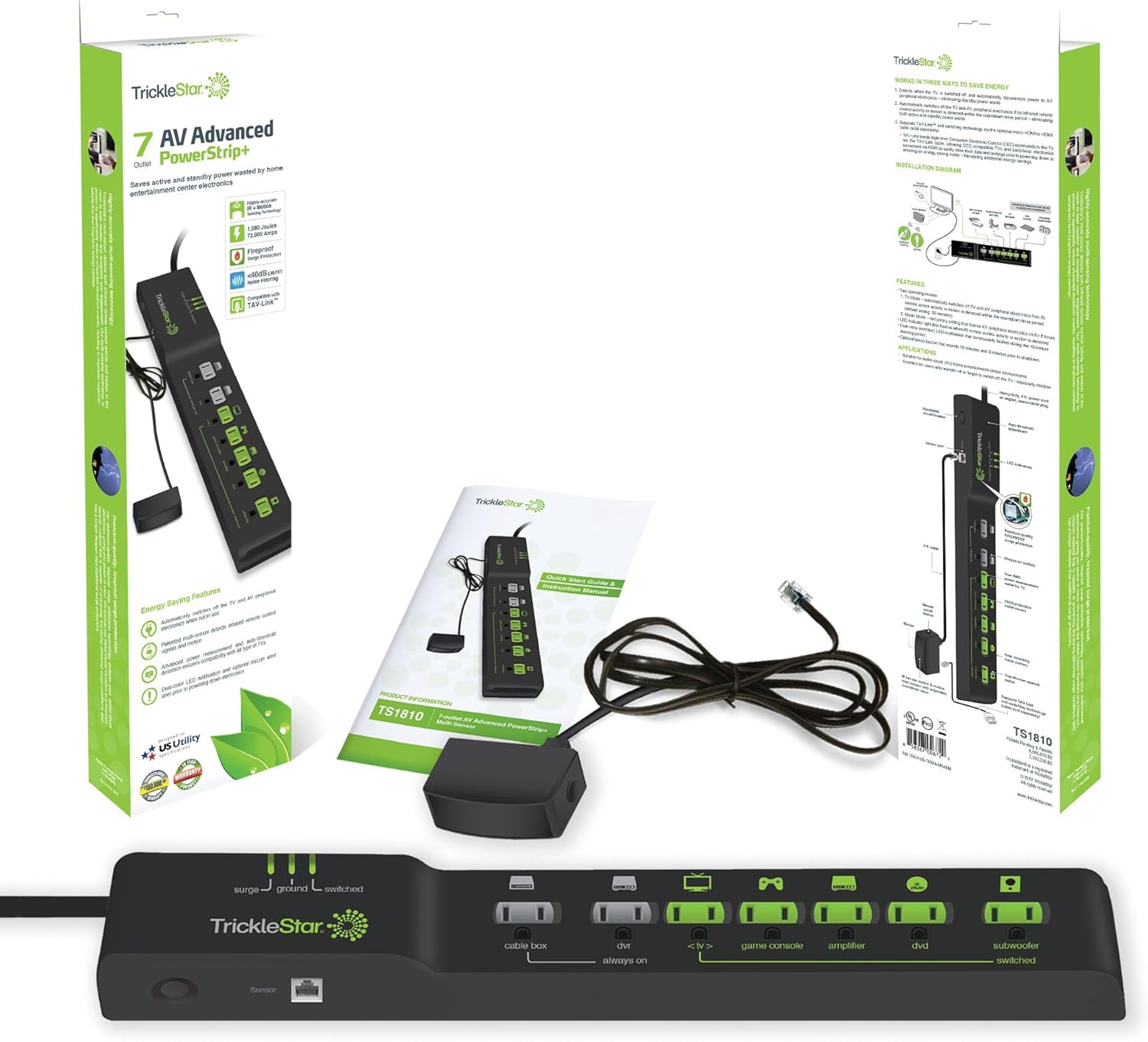
The TrickleStar 7-Outlet Advanced PowerStrip is designed to provide surge protection and reduce standby power consumption for your home theater or computer setup. By intelligently managing power to connected devices, it helps save energy and protect your electronics.
Informació de seguretat
- Do not exceed the electrical ratings of the power strip.
- Use indoors only and in dry locations.
- No connecteu a una altra aixeta d'alimentació reubicable.
- Assegureu-vos que el reglet d'endolls estigui connectat a una presa de corrent amb connexió a terra.
- Mantenir allunyat dels nens.
Característiques del producte
- 7 punts de venda: Includes 2 'Always On' outlets and 5 'Switched' outlets.
- Sortida de control: One dedicated outlet for your primary device (TV or PC) to manage the 'Switched' outlets.
- Ceramic Surge Protection: Provides robust protection against power surges (72,000 Amps / 1080 Joules).
- Indicació d'estat LED: Lights for Ground, Surge Status, and Switched outlet status.
- Adjustable Threshold Switch: Allows customization for TV or PC power consumption levels.
- Noise Filtering: Less than 40dB noise filtering for clean power.
- Entrada RJ11: 1 baix voltage optically isolated RJ11 input.
- Tallacircuits: 15A resettable circuit breaker for overload protection.
- Angled Space Saver Plug: Designed for convenient placement.

Instruccions de configuració
- Connect Primary Device: Plug your main device (TV or PC) into the outlet labeled 'Control'. This device will regulate the power to the 'Switched' outlets.
- Connect Always On Devices: Plug any electronics that require continuous power (e.g., cable box, DVR, router, modem) into the outlets labeled 'Always On'. These outlets remain powered regardless of the control device's status.
- Connect Switched Devices: Plug any peripherals that only need power when your primary device is on (e.g., DVD player, game console, printer, subwoofer) into the outlets labeled 'Switched'. These outlets will turn on or off with your control device.
- Adjust Threshold Switch (if applicable): If your power strip has an adjustable threshold switch (located on the side), set it according to your primary device's power consumption. Refer to the suggested settings below for optimal performance:
- TV Setup:
- LCD/LED 50" or Larger: High
- LCD/LED Less than 50": Med
- Tube/CRT TV: High
- Configuració del PC:
- Desktop: High
- Laptop: Low
- TV Setup:
- Plug in Power Strip: Plug the power strip's main cord into a grounded wall outlet. The 'Surge' and 'Ground' LED indicators should illuminate, confirming protection and proper grounding.
Guia de vídeo de configuració
Video 1: A step-by-step guide on setting up your TrickleStar Tier 1 Advanced PowerStrip with a TV or PC, demonstrating how to connect devices to the 'Control', 'Always On', and 'Switched' outlets, and how to adjust the threshold switch.
Instruccions de funcionament
Once properly set up, the TrickleStar Advanced PowerStrip operates automatically:
- When your primary device (TV or PC) plugged into the 'Control' outlet is turned ON, the 'Switched' outlets will receive power, allowing connected peripherals to operate. The 'Switched' LED indicator will illuminate.
- When your primary device (TV or PC) is turned OFF, the 'Switched' outlets will automatically cut power to connected peripherals, eliminating standby power draw. The 'Switched' LED indicator will turn off.
- The 'Always On' outlets provide continuous power to devices that should not be turned off.

Manteniment
- Keep the power strip clean and free from dust. Use a dry cloth for cleaning.
- Assegureu-vos una ventilació adequada al voltant de la regleta per evitar el sobreescalfament.
- Regularly check the 'Surge' and 'Ground' LED indicators. If the 'Surge' indicator is off, the surge protection may have expired, and the unit should be replaced.
- Do not attempt to open or repair the power strip. Refer to qualified service personnel.
Resolució de problemes
| Problema | Causa possible | Solució |
|---|---|---|
| Switched outlets do not turn on/off with control device. | Incorrect threshold setting; control device not properly connected or drawing insufficient power. | Adjust the threshold switch (High/Med/Low) to match your control device's power draw. Ensure the control device is fully plugged into the 'Control' outlet. |
| No hi ha corrent a cap endoll. | Power strip circuit breaker tripped; wall outlet has no power. | Check the resettable circuit breaker on the power strip and press to reset if tripped. Verify the wall outlet is functioning by plugging in another device. |
| 'Surge' LED indicator is off. | La protecció contra sobretensions s'ha vist compromesa o ha caducat. | The power strip's surge protection may no longer be active. Replace the power strip to ensure continued protection. |
| 'Ground' LED indicator is off. | Connexió a terra incorrecta de la presa de corrent. | Ensure the power strip is plugged into a properly grounded 3-prong outlet. Consult an electrician if the outlet is not grounded. |
Especificacions
- Fabricant: TrickleStar
- Número de model: 188LV-US-7XX
- Dimensions del producte: 39.37 x 6.35 x 3.81 cm
- Pes de l'article: 748 g
- Color: Negre
- Material: Metall
- Voltage: 120 Volts
- AmpCapacitat d'edat: 15 Amps
- Total de preses de corrent: 7 (2 Always On, 5 Switched)
- Protecció contra sobretensions: 1080 Joules / 72,000 Amps
- Noise Filtering: <40dB
- Característiques especials: On And Off Switch, Surge Protection, Optically Isolated RJ11 Input
Garantia i suport
For warranty information, technical support, or any questions regarding your TrickleStar 7-Outlet Advanced PowerStrip, please contact TrickleStar directly:
- Weblloc: www.tricklestar.com
- Telèfon: 1-888-700-1098
- Correu electrònic: customer.service@tricklestar.com


