Introducció
The TP-Link Archer C7 AC1750 is a high-performance wireless router designed to provide fast and reliable Wi-Fi connectivity for your home or office network. Featuring dual-band technology and Gigabit Ethernet ports, it supports the 802.11ac Wi-Fi standard, offering a combined bandwidth of up to 1750 Mbps (450 Mbps on 2.4 GHz and 1300 Mbps on 5 GHz). This manual provides essential information for setting up, operating, maintaining, and troubleshooting your Archer C7 router.
Contingut del paquet
- TP-Link Archer C7 AC1750 Wireless Dual Band Gigabit Router
- Adaptador d'alimentació
- Cable Ethernet
- Guia d'instal·lació ràpida

Image: The retail packaging box for the TP-Link Archer C7 AC1750 router, showing the product features and design.
Configuració
1. Connexió física
- Encès: Connect the provided power adapter to the router's power port and plug it into a power outlet. Press the Power On/Off button if necessary.
- Connectar-se al mòdem: Connect your modem's Ethernet cable to the blue WAN port on the back of the Archer C7 router.
- Connectar dispositius (opcional): For wired connections, connect your computers or other network devices to the yellow LAN ports (Ethernet 1-4) using Ethernet cables.
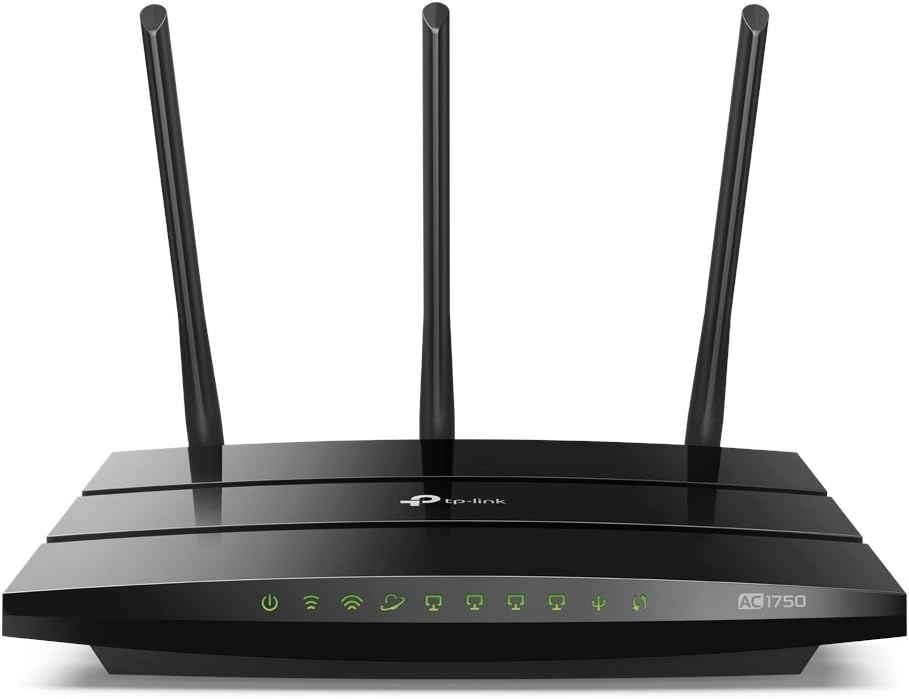
Image: The rear panel of the Archer C7 router, highlighting the power input, USB ports, blue WAN port, and four yellow LAN ports.
2. Configuració Inicial
Podeu configurar el vostre encaminador mitjançant un web navegador o l'aplicació TP-Link Tether.
- Utilitzant a Web Navegador:
- Connect your computer to the router either wirelessly (using the default Wi-Fi name and password found on the router's label) or via an Ethernet cable to a LAN port.
- Obre a web navegador i tipus
http://tplinkwifi.netorhttp://192.168.0.1a la barra d'adreces. - Inicieu la sessió amb el nom d'usuari i la contrasenya predeterminats (normalment
adminper a tots dos, o tal com s'especifica a l'etiqueta del router). - Follow the on-screen Quick Setup Wizard to configure your internet connection and wireless settings.
- Ús de l'aplicació TP-Link Tether:
- Baixeu l'aplicació TP-Link Tether des de l'App Store o Google Play.
- Connecteu el dispositiu mòbil a la xarxa Wi-Fi predeterminada del router.
- Obre l'aplicació Tether i segueix les instruccions per configurar el teu encaminador.
Funcionament del router
Wi-Fi de doble banda
The Archer C7 operates on two separate Wi-Fi bands: 2.4 GHz and 5 GHz. This allows for greater flexibility and performance.
- Banda de 2.4 GHz: Ideal for basic internet use like browsing and email, and for devices that are further away from the router.
- Banda de 5 GHz: Provides faster speeds and less interference, suitable for bandwidth-intensive activities such as online gaming and HD video streaming.
Accés a la xarxa de convidats
The router supports creating a separate guest network, providing secure Wi-Fi access for visitors without sharing your main network's password or resources. This enhances network security and privacy.
Control d'ample de banda basat en IP
Utilize the IP-based Bandwidth Control feature to manage the bandwidth allocated to individual devices connected to your network. This helps ensure fair bandwidth distribution and prevents a single device from monopolizing the connection.
Ports USB per compartir
The dual USB ports allow you to share files, media, and even a printer across your network. You can access shared content locally or remotely via an FTP server, turning your router into a versatile media and file servidor.

Image: The front panel of the Archer C7 router, displaying the LED indicators for power, internet, 2.4 GHz Wi-Fi, 5 GHz Wi-Fi, LAN activity, and USB activity.
Manteniment
- Actualitzacions de firmware: Revisa regularment el TP-Link website for firmware updates. Updating your router's firmware can improve performance, add new features, and enhance security. Follow the instructions provided with the firmware update carefully.
- Reinicis regulars: Periodically restarting your router can help clear its memory and resolve minor connectivity issues, ensuring optimal performance.
- Neteja física: Keep the router clean and free from dust to prevent overheating. Ensure proper ventilation around the device.
Resolució de problemes
- Sense accés a Internet:
- Check all cable connections, especially the Ethernet cable from your modem to the router's WAN port.
- Verifiqueu que el vostre mòdem funciona correctament.
- Reinicieu tant el mòdem com el router.
- Velocitat Wi-Fi lenta:
- Ensure your devices are connected to the appropriate Wi-Fi band (5 GHz for faster speeds).
- Reduïu les interferències allunyant el router d'altres dispositius electrònics.
- Comproveu si hi ha actualitzacions de firmware.
- Consider using IP-based Bandwidth Control to prioritize certain devices.
- Forgotten Wi-Fi Password or Router Login Password:
- Locate the label on the bottom of your router for default Wi-Fi credentials.
- If you changed the password and forgot it, you may need to perform a factory reset. Use a pin to press and hold the Reset button on the back of the router for about 10 seconds until the LEDs flash. This will restore the router to its factory default settings.
Especificacions
| Característica | Detall |
|---|---|
| Número de model | Archer C7 |
| Wi-Fi estàndard | 802.11ac |
| Classe de banda de freqüència | Doble banda (2.4 GHz i 5 GHz) |
| Ample de banda total disponible | 1750 Mbps (450 Mbps at 2.4GHz, 1300 Mbps at 5GHz) |
| Ports Ethernet | 4 Gigabit LAN Ports, 1 Gigabit WAN Port |
| Ports USB | Dual USB Ports (for file, media, and printer sharing) |
| Dimensions | 9.57 x 6.32 x 1.28 polzades |
| Pes de l'article | 1.12 lliures |
| Components inclosos | Encaminador, adaptador de corrent, cable Ethernet |
Garantia
Els productes TP-Link solen incloure una garantia estàndard del fabricant. Consulteu la targeta de garantia inclosa a l'embalatge del producte o visiteu el lloc web oficial de TP-Link. website for detailed warranty terms and conditions specific to your region and product model. Keep your purchase receipt as proof of purchase for warranty claims.
Suport
Per obtenir més ajuda, assistència tècnica o per descarregar els controladors i el firmware més recents, visiteu el lloc web oficial de suport de TP-Link. weblloc. També podeu trobar preguntes freqüents i fòrums comunitaris per a problemes i solucions comuns.
- Suport de TP-Link Weblloc: https://www.tp-link.com/support
- Aplicació TP-Link Tether: Available on App Store and Google Play for easy management.


