1. Introducció
This manual provides detailed instructions for the installation, configuration, operation, and maintenance of your D-Link DNS-320L Cloud Storage 2-Bay Network Attached Storage (NAS) device. Please read this manual thoroughly before using the device to ensure proper setup and optimal performance. The DNS-320L is designed to provide a centralized storage solution for your home or small office network, offering data redundancy, remote access, and media streaming capabilities.
2. Informació de seguretat
- Assegureu-vos que el dispositiu estigui col·locat sobre una superfície estable i plana per evitar caigudes accidentals.
- No exposeu el dispositiu a l'aigua, la humitat ni a temperatures extremes.
- Use only the power adapter supplied with the device. Using an incorrect adapter may damage the device and void the warranty.
- No obriu el dispositiu casing. Demaneu totes les tasques de manteniment a personal qualificat.
- Mantingueu les obertures de ventilació netes per evitar el sobreescalfament.
- Disconnect the power cable before cleaning or moving the device.
3. Contingut del paquet
Comproveu que el vostre paquet contingui els elements següents:
- D-Link DNS-320L Cloud Storage 2-Bay NAS Enclosure
- Adaptador d'alimentació
- Cable Ethernet
- Guia d'instal·lació ràpida
- Resource CD (may include software and full manual)
Si falta algun element o hi ha algun dany, poseu-vos en contacte amb el vostre distribuïdor o amb el servei d'assistència de D-Link.
4. Sobrecàrrega físicaview
Familiarize yourself with the ports, buttons, and indicators on your DNS-320L device.
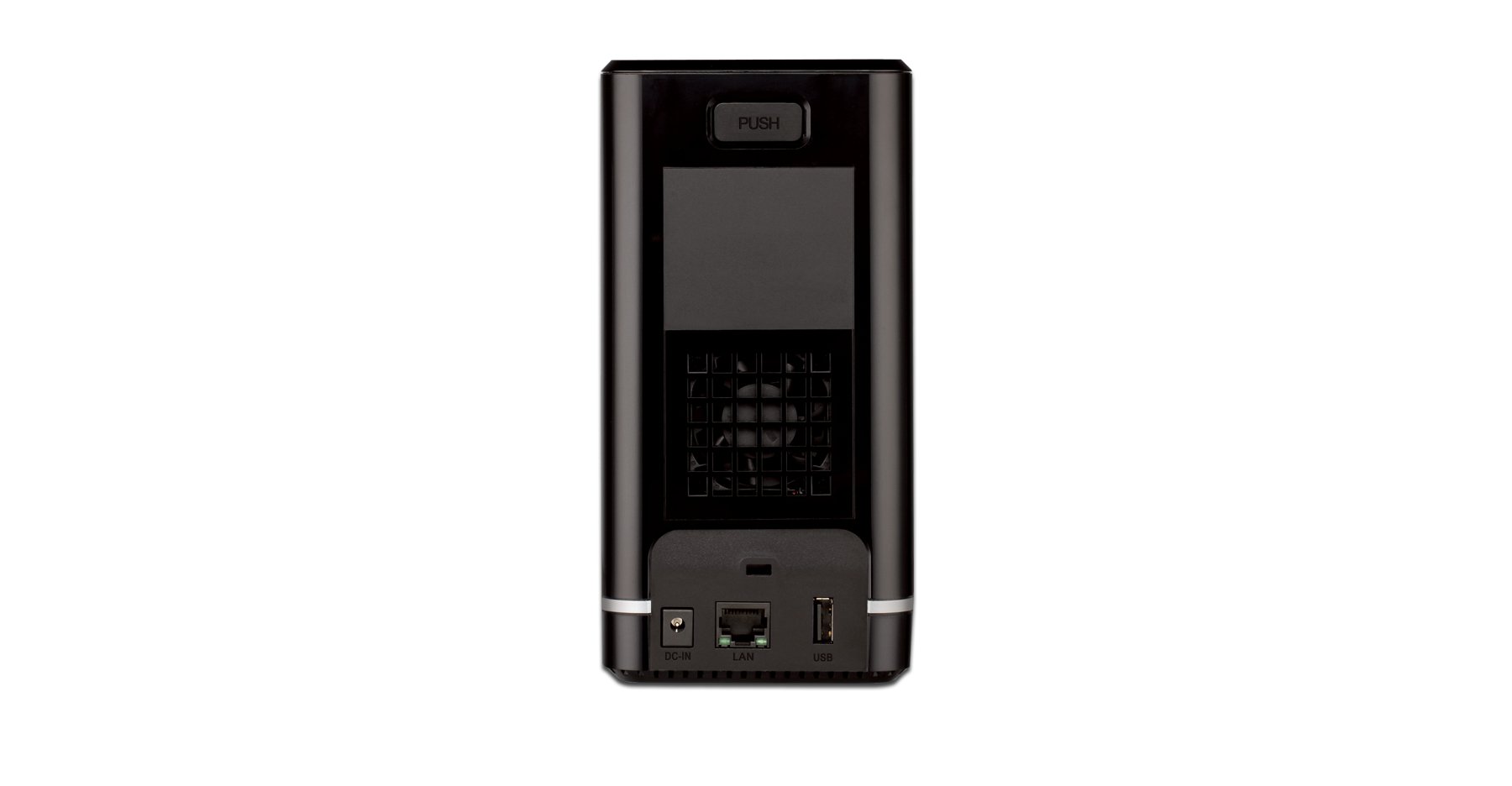
Figura 4.1: Frontal View of D-Link DNS-320L. This image displays the front panel of the DNS-320L, typically showing LED indicators for power, network activity, and hard drive status. It may also feature a power button and a USB port for quick access.
4.1 Tauler frontal
- LED d'alimentació: Indica l'estat d'alimentació.
- HDD 1/2 LEDs: Indicate hard drive activity and status for each bay.
- Port USB: For connecting external USB storage devices or printers.
- Botó d'encesa: Per encendre/apagar el dispositiu.
4.2 Panell posterior
- Port Gigabit Ethernet: Connects the NAS to your network router or switch.
- Connector d'alimentació: Per connectar l'adaptador de corrent.
- Botó de restabliment: S'utilitza per restaurar la configuració predeterminada de fàbrica (requereix un clip o un objecte punxegut similar).
- Ranura de bloqueig Kensington: Per a la seguretat física.
5. Instal·lació de maquinari
This section guides you through installing hard drives and connecting the DNS-320L to your network.
5.1 Instal·lació de discs durs
The DNS-320L supports two 3.5-inch SATA hard drives. Ensure your drives are compatible and unformatted for initial setup.
- Ensure the DNS-320L is powered off and disconnected from the power outlet.
- Gently slide open the front cover of the NAS enclosure.
- Slide each hard drive into an available bay until it clicks into place, ensuring the SATA connectors align properly. No screws are typically required for tool-less installation.
- Tanqueu la coberta frontal de manera segura.
Figure 5.1: Hard Drive Installation. This image illustrates the process of inserting a 3.5-inch SATA hard drive into one of the bays of the DNS-320L, highlighting the tool-less design.
5.2 Connecting the NAS to Your Network
- Connect one end of the Ethernet cable to the Gigabit Ethernet port on the rear of the DNS-320L.
- Connecteu l'altre extrem del cable Ethernet a un port LAN disponible del vostre encaminador o commutador de xarxa.
- Connect the power adapter to the power connector on the rear of the DNS-320L, then plug the adapter into a power outlet.
- Press the Power button on the front panel to turn on the device. The Power LED will illuminate, and the HDD LEDs will flash during startup.
6. Configuració inicial
After hardware installation, you will need to configure the DNS-320L using its webinterfície de gestió basada en
6.1 Accés a Web Interfície
- Ensure your computer is connected to the same network as the DNS-320L.
- Obre a web navegador (per exemple, Chrome, Firefox, Edge).
- The DNS-320L typically obtains an IP address automatically via DHCP. You can use the D-Link ShareCenter Utility (if provided on the Resource CD or D-Link website) to discover its IP address. Alternatively, try accessing
http://dlinksharecenterorhttp://dlinksharecenter.local. - Introduïu el nom d'usuari per defecte (normalment
admin) and leave the password blank (oradmin) to log in for the first time. You will be prompted to change the password.
6.2 Running the Setup Wizard
Upon first login, a setup wizard will guide you through essential configurations:
- Disk Volume Creation: You will be prompted to create a disk volume. Options typically include:
- Estàndard: Each drive is treated as a separate volume.
- RAID 0 (striping): Combines drives for maximum capacity and performance, but offers no data redundancy. If one drive fails, all data is lost.
- RAID 1 (mirall): Mirrors data across both drives, providing data redundancy. If one drive fails, data is preserved on the other. Capacity is limited to the size of one drive.
- JBOD (Només un grapat de discs): Combines drives into a single large volume sequentially. No performance or redundancy benefits.
Choose RAID 1 for data protection. RAID 0 offers speed but no protection.
- User Account Creation: Create at least one user account with administrative privileges.
- Configuració de la xarxa: Confirm or adjust network settings (DHCP or static IP).
- Zona horària: Estableix la data i l'hora correctes.
7. Operating the DNS-320L
This section covers common operational tasks for your NAS.
7.1 Accessing Shared Folders
After setup, shared folders will be accessible from your network:
- Windows: Obert File Explorer, type
\DNS-320L(or its IP address) in the address bar, and press Enter. - macOS: In Finder, go to Aneu> Connecteu-vos al servidor, tipus
smb://DNS-320L(or its IP address), and click Connect. - Linux: Utilitza el teu file manager's network browsing feature or mount the share using SMB/CIFS.
7.2 User and Group Management
Manage who can access your NAS and what permissions they have:
- Inicieu sessió al web interface as an administrator.
- Navega a Management > User Management or similar section.
- Create new users, assign passwords, and add them to groups.
- Configure folder permissions for users and groups (Read/Write, Read Only, No Access).
7.3 Cloud Access and Remote Management
The DNS-320L supports D-Link's Cloud features for remote access.
- Register your device with the D-Link Cloud service (if applicable, refer to D-Link's official documentation for specific steps).
- Use the D-Link mobile app (e.g., mydlink ShareCenter) to access files remotely from your smartphone or tablet.
- Configure port forwarding on your router if direct remote access to the web interface is desired (advanced users only, consult your router manual).
7.4 USB Device Functionality
The USB 2.0 port on the front panel can be used for:
- Emmagatzematge extern: Connect USB hard drives or flash drives to expand storage or for backup purposes. These devices will appear as shared folders.
- USB Printer: Connect a compatible USB printer to share it across your network.
8. Manteniment
Regular maintenance ensures the longevity and reliability of your DNS-320L.
8.1 actualitzacions de microprogramari
Periodically check for and install firmware updates from the D-Link support website. Firmware updates can provide new features, performance improvements, and security patches.
- Baixeu l'últim firmware file for your DNS-320L model from the official D-Link support site.
- Log in to the NAS web interface as an administrator.
- Navega a Management > Firmware Upgrade or a similar section.
- Navegueu fins al firmware descarregat file and initiate the upgrade process. Do not power off the device during the update.
8.2 Còpia de seguretat de dades
While RAID 1 provides redundancy against a single drive failure, it is not a substitute for a comprehensive backup strategy. Regularly back up critical data from your NAS to an external drive or another storage location.
8.3 Neteja
Keep the device clean to ensure proper airflow and prevent dust buildup.
- Apagueu i desconnecteu el dispositiu abans de netejar-lo.
- Feu servir un drap suau i sec per netejar l'exterior.
- Feu servir aire comprimit per treure la pols de les obertures de ventilació.
9. Solució De Problemes
This section addresses common issues you might encounter with your DNS-320L.
| Problema | Possible solució |
|---|---|
| El dispositiu no s'encén. | Ensure the power adapter is securely connected to both the device and a working power outlet. Test the outlet with another device. |
| Cannot access the NAS on the network. | Verify the Ethernet cable is properly connected. Check network settings on your computer and router. Ensure the NAS has an IP address (use the D-Link utility). Try restarting the NAS and your router. |
| Hard drive LED is red or flashing abnormally. | This may indicate a drive error or failure. Check the NAS web interface for drive status. If a drive has failed in a RAID 1 configuration, replace the faulty drive and rebuild the array. |
| He oblidat la contrasenya de l'administrador. | Use the reset button on the rear panel to restore factory default settings. Warning: This will erase all configurations, but typically not data on the drives. You will need to reconfigure the NAS. |
| Lenta file velocitats de transferència. | Ensure all network components (NAS, router, computer) support Gigabit Ethernet. Check for network congestion or faulty cables. |
10. Especificacions
Key technical specifications for the D-Link DNS-320L:
| Característica | Detall |
|---|---|
| Número de model | DNS-320L |
| Drive Bays | 2 x 3.5-inch SATA I/II/III HDD |
| Suport RAID | Standard, JBOD, RAID 0, RAID 1 |
| Interfície de xarxa | 1 x Gigabit Ethernet (10/100/1000 Mbps) |
| Ports USB | 1 x USB 2.0 |
| Plataforma de maquinari | Mac, PC |
| Dimensions (LxWxH) | 3.54 x 5.68 x 7.61 polzades |
| Pes de l'article | 1.39 pounds (without drives) |
| Color | Negre |
| Material | Metall |
| Dispositius compatibles | CPU, Desktop, Laptop, Server |
11. Garantia i Suport
Per obtenir informació sobre la garantia, consulteu la targeta de garantia inclosa amb el producte o visiteu el lloc web oficial de D-Link. website. D-Link provides technical support and resources to assist you with your DNS-320L.
- Assistència en línia: Visita www.dlink.com/support for FAQs, troubleshooting guides, firmware downloads, and product documentation.
- Suport tècnic: Contact D-Link technical support for assistance with installation, configuration, or troubleshooting issues that cannot be resolved using this manual or online resources. Contact details are available on the D-Link support weblloc per a la vostra regió.


