1. Introducció
The HP 1910-8G-PoE+ 180W Switch (Model JG350A) is an advanced smart-managed, fixed-configuration Gigabit Ethernet Layer 3 switch. Designed for small businesses, it offers enhanced features in an easy-to-administer solution, providing reliable network connectivity and Power over Ethernet Plus (PoE+) capabilities.
2. Característiques clau
- Ports Gigabit Ethernet: Provides 8 Gigabit Ethernet ports for high-speed network connections.
- PoE+ Capability: Supports Power over Ethernet Plus (802.3at) to power compatible devices such as IP phones, wireless access points, and IP cameras directly through the network cable.
- Ports SFP: Includes additional true Gigabit SFP ports for fiber connectivity, extending network reach.
- Desplegament flexible: Supports both rack mounting and desktop operation.
- Funcionament silenciós: Utilizes variable-speed fans to minimize noise.
- Suport IPv6: Operates at full wire-speed IPv6.
- Qualitat de servei (QoS): Supports traffic prioritization for optimal performance of critical applications.
- Característiques de seguretat: Includes 802.1X network login, access control lists (ACLs), and denial-of-service (DoS) prevention.
- Funcions avançades de la capa 3: Customizable features such as VLANs, link aggregation trunking, static routing, and Spanning Tree Protocols (STP, RSTP, MSTP).
3. Contingut del paquet
Comproveu que el vostre paquet contingui els elements següents:
- HP 1910-8G-PoE+ 180W Switch (JG350A)
- Cable d'alimentació
- Kit de muntatge en bastidor (si escau)
- Guia d'inici ràpid i informació de garantia
Si falta algun article o està malmès, contacteu immediatament amb el vostre venedor.
4. Descripció física
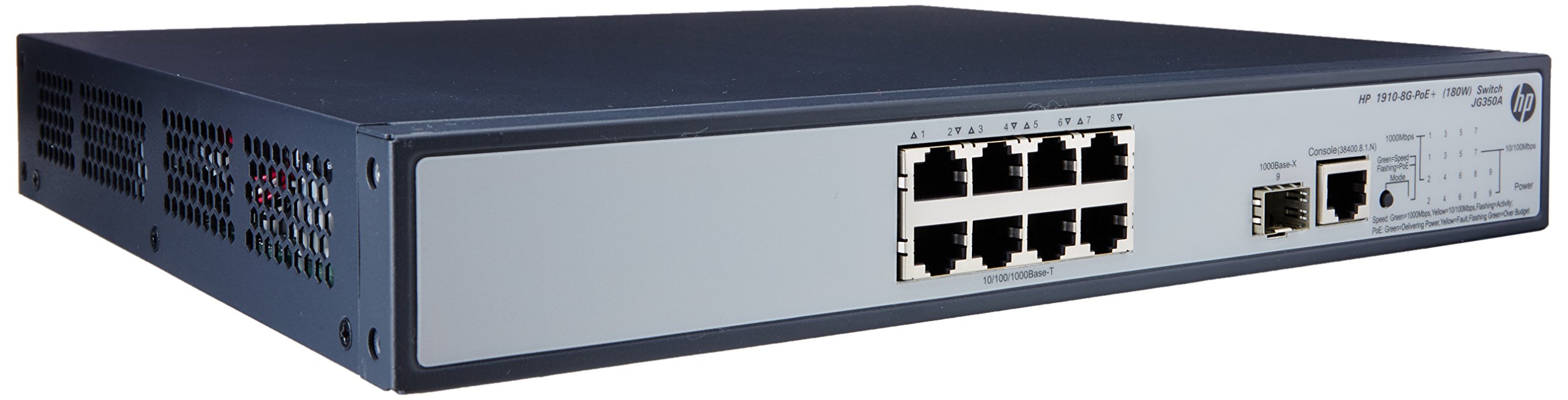

4.1 Tauler frontal
The front panel of the switch includes:
- 8 x RJ45 Gigabit Ethernet Ports: These ports support 10/100/1000 Mbps connections and are PoE+ enabled, providing power to connected devices.
- 2 x SFP Ports: Dedicated slots for Gigabit fiber optic transceivers, allowing for long-distance connections.
- Indicadors LED: Status lights for power, system, and individual port activity/PoE status.
4.2 Panell posterior
The rear panel typically contains the AC power input connector and ventilation openings.
5. Configuració
5.1 Precaucions de seguretat
- Assegureu-vos d'una ventilació adequada al voltant de l'interruptor per evitar el sobreescalfament.
- No obstruïu cap obertura de ventilació.
- Utilitzeu només el cable d'alimentació subministrat amb el dispositiu.
- Eviteu col·locar l'interruptor a la llum solar directa o a prop de fonts de calor.
5.2 Muntatge de l'interruptor
The HP 1910-8G-PoE+ 180W Switch can be deployed in two ways:
- Ubicació d'escriptori: Place the switch on a flat, stable surface, ensuring adequate space for ventilation.
- Muntatge en bastidor: Use the provided rack-mount kit to install the switch into a standard 19-inch equipment rack. Follow the instructions included with the rack-mount kit for proper installation.
5.3 Connexió de potència
- Connect one end of the power cord to the AC power input on the rear panel of the switch.
- Connecteu l'altre extrem del cable d'alimentació a una presa de corrent amb connexió a terra.
- El LED d'alimentació del panell frontal s'hauria d'il·luminar, indicant que l'interruptor està rebent alimentació.
5.4 Connexió de dispositius de xarxa
- Ports RJ45: Connect your network devices (computers, servers, IP phones, wireless access points) to the RJ45 ports using standard Ethernet cables. For PoE-powered devices, ensure they are PoE+ compatible.
- Ports SFP: Insert compatible SFP transceivers into the SFP slots, then connect fiber optic cables to the transceivers for fiber uplinks or long-distance connections.
5.5 Configuració inicial
The HP 1910 switch is a smart-managed device, typically configured via a web-based graphical user interface (GUI). Refer to the Quick Start Guide for the default IP address, username, and password to access the management interface. It is recommended to change default credentials immediately after initial access for security purposes.
6. Funcionament de l'interruptor
6.1 Encès
Once connected to power, the switch will automatically power on. Observe the system LED for boot-up status. A steady green light typically indicates normal operation.
6.2 Connectivitat de xarxa
When a device is connected to an RJ45 port, the corresponding port LED will illuminate. A blinking LED indicates network activity. Ensure the link LED is solid green for a stable connection.
6.3 PoE+ Functionality
For devices requiring Power over Ethernet, connect them to the PoE+ enabled RJ45 ports. The switch will automatically detect and provide power to compatible devices. The PoE status LED for the port will indicate power delivery.
7. Manteniment
7.1 Neteja
Netegeu periòdicament l'exterior de l'interruptor amb un drap suau i sec. No utilitzeu netejadors líquids ni en aerosol. Assegureu-vos que les obertures de ventilació estiguin lliures de pols i deixalles per mantenir un flux d'aire adequat.
7.2 actualitzacions de microprogramari
Consulteu regularment el suport tècnic d'HP website for firmware updates. Keeping the switch firmware up-to-date ensures optimal performance, security, and access to new features. Follow the instructions provided with the firmware update package carefully.
7.3 Consideracions ambientals
Operate the switch within its specified temperature and humidity ranges to ensure longevity and stable performance. Avoid extreme conditions.
8. Solució De Problemes
8.1 Sense poder
- Verifiqueu que el cable d'alimentació estigui connectat correctament tant a l'interruptor com a la presa de corrent.
- Comproveu si la presa de corrent funciona connectant-hi un altre dispositiu.
- Ensure the power switch (if present) is in the ON position.
8.2 Sense connectivitat de xarxa
- Check the Ethernet cable connections between the switch and the device.
- Verify that the port LED on the switch is illuminated for the connected device.
- Ensure the device's network adapter is enabled and configured correctly.
- Try connecting the device to a different port on the switch or using a different Ethernet cable.
8.3 El PoE no funciona
- Confirm that the connected device is PoE+ compatible.
- Comproveu el LED d'estat PoE del port específic.
- Assegureu-vos que no se superi el pressupost total d'energia del commutador.
- Try connecting the PoE device to a different PoE+ port.
8.4 Restabliment de l'interruptor
If the switch is unresponsive or experiencing persistent issues, a factory reset may be necessary. Refer to the device's management interface or the full user guide for instructions on performing a factory reset. Avís: A factory reset will erase all custom configurations and restore the switch to its default settings.
9. Especificacions
| Característica | Especificació |
|---|---|
| Número de model | JG350A |
| Tipus d'interfície | PoE+, SFP |
| Nombre de Ports | 8 (Gigabit Ethernet PoE+) |
| Velocitat de transferència de dades | 1000 megabits per segon |
| RAM | 128 MB |
| Pes de l'article | 8.35 lliures (3.79 kg) |
| Dimensions del producte (LxWxH) | 17.5 x 13.12 x 3.5 polzades (44.45 x 33.32 x 8.89 cm) |
| Dispositius compatibles | Càmera, escriptori, portàtil, impressora |
| Fabricant | HP |
10. Garantia i Suport
For detailed warranty information and technical support, please refer to the documentation included with your product or visit the official HP support weblloc. El website provides access to drivers, firmware updates, troubleshooting guides, and contact information for customer service.