1. Producte acabatview
The D-Link DIR-655 Xtreme N Gigabit Router is an IEEE 802.11n (draft) compliant device designed to deliver faster speeds and extended range compared to IEEE 802.11g, while maintaining backward compatibility with IEEE 802.11g and IEEE 802.11b devices. This router enables high-speed internet access for multiple computers, game consoles, and media players when connected to a cable or DSL modem. It facilitates the creation of a secure wireless network for sharing photos, files, music, videos, printers, and network storage.
2. Guia de configuració
Follow these steps to set up your D-Link DIR-655 Xtreme N Wireless Router:
2.1. Desembalatge i col·locació
- Traieu amb cura tots els articles de l'embalatge.
- Place the router in a central location in your home or office for optimal wireless coverage. Avoid placing it near large metal objects, concrete walls, or devices that emit radio frequency interference (e.g., microwave ovens, cordless phones).
- Ensure proper ventilation around the router.
2.2. Connexió de maquinari
- Connecteu les antenes: Attach the three external antennas to the connectors on the back of the router. Ensure they are securely tightened.
- Connectar-se al mòdem:
- Power off your cable or DSL modem.
- Connect one end of an Ethernet cable to the Internet (WAN) port on the back of the DIR-655 router.
- Connect the other end of this Ethernet cable to the Ethernet port on your cable or DSL modem.
- Power on your modem and wait for its indicator lights to stabilize (usually indicating an active internet connection).
- Connectar l'alimentació: Plug the power adapter into the power port (12V===2A) on the back of the router, then plug the other end into a wall outlet or power strip. The power LED on the front of the router should illuminate.
- Connectar dispositius (amb cable opcional): For wired connections, connect Ethernet cables from your computers or other network devices to any of the four LAN ports (1-4) on the back of the router.
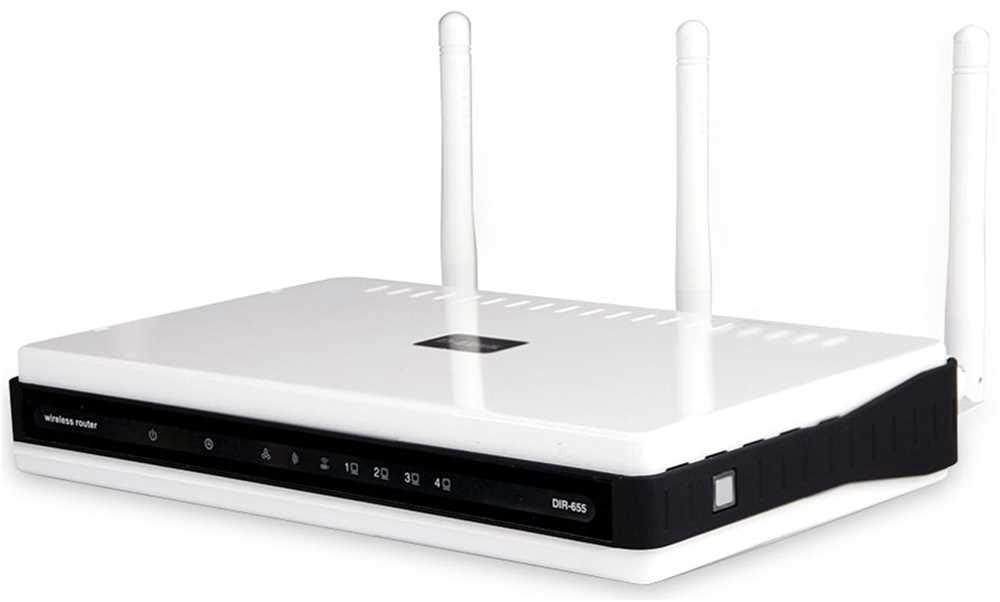
Figura 1: posterior view of the D-Link DIR-655 router, highlighting the LAN, Internet, USB, Reset, and Power ports, along with the three external antennas.

Figura 2: Frontal view of the D-Link DIR-655 router, displaying the D-Link logo and various status indicator lights.
2.3. Initial Configuration (Wireless)
To connect wirelessly and configure your router:
- Cerca el nom de la xarxa (SSID): Look for the Wi-Fi network name (SSID) printed on a label on the bottom or back of your router.
- Connecta't a Wi-Fi: On your computer or mobile device, search for available Wi-Fi networks and select the SSID of your D-Link DIR-655.
- Introduïu la contrasenya: Enter the Wi-Fi password (also known as the network key or passphrase) found on the same label as the SSID.
- Accés a la interfície del router: Obre a web navegador i tipus
http://dlinkrouter.localor192.168.0.1(default IP address) into the address bar. - Inici de sessió: Introduïu el nom d'usuari per defecte (normalment
admin) and password (often blank oradmin). Refer to your router's label for default login credentials. - Executa l'assistent de configuració: Follow the on-screen instructions of the D-Link setup wizard to configure your internet connection and personalize your Wi-Fi network name and password.
3. Instruccions de funcionament
The D-Link DIR-655 is designed for high-performance wireless networking:
- Wireless N Technology: Utilizes IEEE 802.11n (draft) for enhanced speed and range, ideal for streaming HD video, online gaming, and large file transferències.
- Ports Gigabit Ethernet: Four LAN ports provide 10x faster wired connections than standard Ethernet, ensuring high-speed data transfer for connected devices.
- Suport de doble banda: The router supports dual-band operation, allowing for flexible network configurations and reduced interference.
- Multiple Antennas: Three external antennas help to optimize wireless signal strength and coverage throughout your home or office.
- USB SharePort: The USB port allows you to connect a USB storage device or printer and share it across your network.
4. Manteniment
Per garantir un rendiment òptim i una llarga durada del vostre encaminador:
- Actualitzacions de firmware: Comproveu regularment el suport de D-Link weblloc web per a actualitzacions de firmware. L'actualització del firmware pot millorar el rendiment, afegir noves funcions i solucionar vulnerabilitats de seguretat.
- Neteja física: Mantingueu el router net i lliure de pols. Feu servir un drap suau i sec per netejar l'exterior. Assegureu-vos que els forats de ventilació no estiguin bloquejats.
- Reiniciar periòdicament: Restarting your router every few weeks can help clear its memory and resolve minor network issues, improving overall performance.
- Col·locació segura: Ensure the router is placed in a secure location where it won't be easily knocked over or exposed to extreme temperatures or moisture.
5. Solució De Problemes
If you encounter issues with your D-Link DIR-655 router, try these common troubleshooting steps:
- Sense connexió a Internet:
- Check all cable connections (power, Ethernet to modem, Ethernet to devices).
- Restart your modem, then your router, and then your connected devices.
- Verifiqueu que la connexió del vostre proveïdor de serveis d'Internet (ISP) estigui activa.
- Velocitat sense fil lenta:
- Assegureu-vos que els vostres dispositius estiguin dins de l'abast òptim del router.
- Minimitzar les interferències d'altres dispositius electrònics.
- Consider changing your Wi-Fi channel in the router settings to avoid congestion.
- Actualitza els controladors sense fil del teu dispositiu.
- No es pot accedir a la configuració del router:
- Assegureu-vos que el dispositiu estigui connectat a la xarxa del router (amb cable o sense fil).
- Try using the default IP address
192.168.0.1orhttp://dlinkrouter.local. - Esborra la memòria cau i les galetes del navegador o prova un altre navegador.
- If you forgot your password, perform a factory reset (see below).
- Restabliment de fàbrica: To restore the router to its factory default settings, locate the "Reset" button on the back of the router. With the router powered on, use a paperclip or similar pointed object to press and hold the reset button for about 10 seconds. Release the button and wait for the router to restart. Nota: This will erase all custom settings, including your Wi-Fi name and password.
6. Especificacions
| Característica | Detall |
|---|---|
| Nom del model | DIR-655 |
| Tipus sense fil | 802.11n |
| Marca | D-Link |
| Número de model de l'article | DIR-655/E |
| Sistema operatiu | ZyNOS |
| Pes de l'article | 2.65 unces (75 grams) |
| Dimensions del producte | 47.44 x 77.95 x 12.6 polzades |
| Voltage | 110 Volts |
| Característica especial | WPS |
| Classe de banda de freqüència | Doble banda |
| Comunicació sense fils estàndard | 802.11n |
| Dispositius compatibles | Gaming Console, Printer |
| Usos recomanats | Negocis, Jocs, Llar |
| Tecnologia de connectivitat | Ethernet |
| Tipus d'antena | Arreglat |
7. Garantia i Suport
For detailed warranty information and technical support, please refer to the official D-Link website or the documentation included with your product. You can also visit the D-Link support portal for FAQs, firmware downloads, and contact options.
Assistència en línia: www.dlink.com/support


