1. Introducció
This manual provides comprehensive instructions for the installation, operation, and maintenance of your ZENEC ZE-NC620DMH 2-DIN Navigation Receiver. Designed specifically for motorhomes and caravans, this device integrates advanced navigation with multimedia functionalities. Please read this manual thoroughly before using the product to ensure correct operation and to prevent damage.
2. Informació de seguretat
- Instal·lació: Ensure installation is performed by a qualified technician to avoid damage to the vehicle or the device. Incorrect installation can lead to malfunction or accidents.
- Font d'alimentació: Connect the device only to a 12V DC vehicle power supply with a negative ground.
- Funcionament durant la conducció: No feu servir el dispositiu de manera que us distregui de la conducció. Prioritzeu sempre la seguretat viària.
- Neteja: Utilitzeu un drap suau i sec per netejar. No utilitzeu netejadors abrasius ni dissolvents.
- Temperatura: Eviteu exposar el dispositiu a temperatures extremes o a la llum solar directa durant períodes prolongats.
3. Producte acabatview
The ZENEC ZE-NC620DMH is a versatile 2-DIN navigation and multimedia system. It features a 6.2-inch touchscreen display and various input/output options.
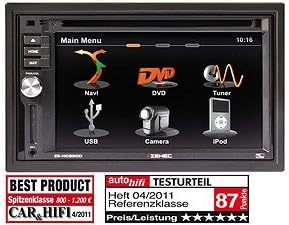
Figura 3.1: Interfície del menú principal. This image displays the primary menu screen of the ZENEC ZE-NC620DMH. Key functions are accessible via touch icons, including Navigation (Navi), DVD playback, Radio Tuner, USB media, Camera input, and iPod connectivity. The top right corner shows the current time (10:16).
3.1 Main Menu Functions
- Navi: Access the integrated navigation system with specialized POIs for campers
- DVD: Play DVDs and CDs via the built-in optical drive.
- Sintonitzador: Select and listen to radio stations.
- USB: Connecteu dispositius d'emmagatzematge USB per a la reproducció de contingut multimèdia.
- Càmera: View input from a connected rearview or front camera.
- iPod: Connect and control compatible iPod/iPhone devices for audio playback.
4. Configuració
4.1 Instal·lació
The ZE-NC620DMH is designed for dashboard mounting in vehicles with a 2-DIN slot. Professional installation is highly recommended. Ensure all wiring connections (power, ground, speakers, antenna, GPS antenna, external microphone, camera inputs, USB) are secure and correctly polarized according to the wiring diagram provided in the separate installation guide.
4.2 Configuració inicial
- Encès: Turn on your vehicle's ignition. The device should power on automatically.
- Selecció d'idioma: Segueix les instruccions que apareixen a la pantalla per seleccionar l'idioma que prefereixis.
- Hora i data: Set the correct time zone, date, and time.
- Configuració GPS: Ensure the GPS antenna is installed in a location with a clear view of the sky. The system will acquire satellite signals automatically.
- Emparellament Bluetooth: To pair your mobile phone, navigate to the Bluetooth menu, enable pairing mode on your phone, and select the ZE-NC620DMH from the list of available devices.
5. Instruccions de funcionament
5.1 Sistema de navegació
- Tap the "Navi" icon on the main menu to launch the navigation software.
- Enter your destination using the on-screen keyboard.
- Select route preferences (e.g., fastest, shortest, avoid tolls).
- The system provides turn-by-turn voice guidance and visual map display.
- Access specialized POIs (Points of Interest) for campers, such as campsites, service stations, and parking areas.
5.2 Multimedia Playback (DVD/CD, USB, iPod)
- DVD/CD: Insert a disc into the slot. The device will automatically switch to DVD/CD mode. Use the on-screen controls for playback.
- USB: Connect a USB flash drive to the designated USB port. Tap the "USB" icon to browse and play media files (àudio, vídeo, imatges).
- iPod: Connect your iPod/iPhone using a compatible cable. Tap the "iPod" icon to access your music library and control playback.
5.3 Sintonitzador de ràdio
- Tap the "Tuner" icon to access the radio.
- Feu servir la funció d'escaneig per trobar emissores disponibles o sintonitzar manualment una freqüència.
- Desa les teves emissores preferides com a predefinides per accedir-hi ràpidament.
5.4 Entrada de càmera
- Si una darreraview la càmera està connectada, la pantalla canviarà automàticament a la càmera view quan el vehicle es posa en marxa enrere.
- Tap the "Camera" icon to manually view the camera feed (if supported by your camera setup).
6. Manteniment
- Neteja de pantalla: Gently wipe the touchscreen with a soft, lint-free cloth. For stubborn smudges, slightly dampen the cloth with water or a screen-safe cleaner. Do not spray liquids directly onto the screen.
- Actualitzacions de programari: Periodically check the ZENEC website for available software and map updates to ensure optimal performance and the latest navigation data.
- Disc Drive: Keep the disc slot free from dust and debris. Avoid inserting damaged or dirty discs.
7. Solució De Problemes
| Problema | Causa possible | Solució |
|---|---|---|
| Sense poder | Blown fuse, incorrect wiring, loose connection. | Check vehicle fuses. Verify power and ground connections. Consult an installer. |
| Sense senyal GPS | Antena GPS obstruïda o desconnectada. | Ensure antenna has a clear view del cel. Comproveu la connexió de l'antena. |
| Sense àudio | Volum massa baix, silenci activat, problema de cablejat de l'altaveu. | Increase volume. Check mute status. Verify speaker connections. |
| La pantalla tàctil no respon | Error temporal de programari. | Perform a soft reset (refer to installation guide for reset button location, usually a small pinhole). |
If problems persist after attempting these solutions, please contact ZENEC customer support or a qualified service center.
8. Especificacions
- Marca: Zenec
- Nom del model: ZENEC ZE-NC620DMH
- Tipus de servei de vehicles: camió (Note: Optimized for Motorhome/Caravan use)
- Mida de la pantalla: 6.2 polzades
- Característica especial: Adaptation for motorhomes and caravans
- Tecnologia de connectivitat: Bluetooth, USB
- Tipus de mapa: Europa
- Components inclosos: CD/DVD player, external microphone
- Mode de sortida d'àudio: estèreo
- Tipus de muntatge: Muntatge al quadre de comandament
9. Garantia i Suport
For warranty information, please refer to the warranty card included with your product or visit the official ZENEC website. Technical support and service inquiries should be directed to your authorized ZENEC dealer or the ZENEC customer service department.
Conserveu el vostre comprovant de compra per a reclamacions de garantia.