1. Introducció
Gràcies per la compraasing the Onkyo C-7030 CD Player. This manual provides essential information for the proper setup, operation, and maintenance of your device. Please read it thoroughly before use to ensure optimal performance and longevity of your CD player.
2. Producte acabatview
The Onkyo C-7030 is a high-quality CD player designed for music enthusiasts, featuring robust construction and advanced audio technology for excellent sound reproduction. It supports standard audio CDs and offers various connectivity options.
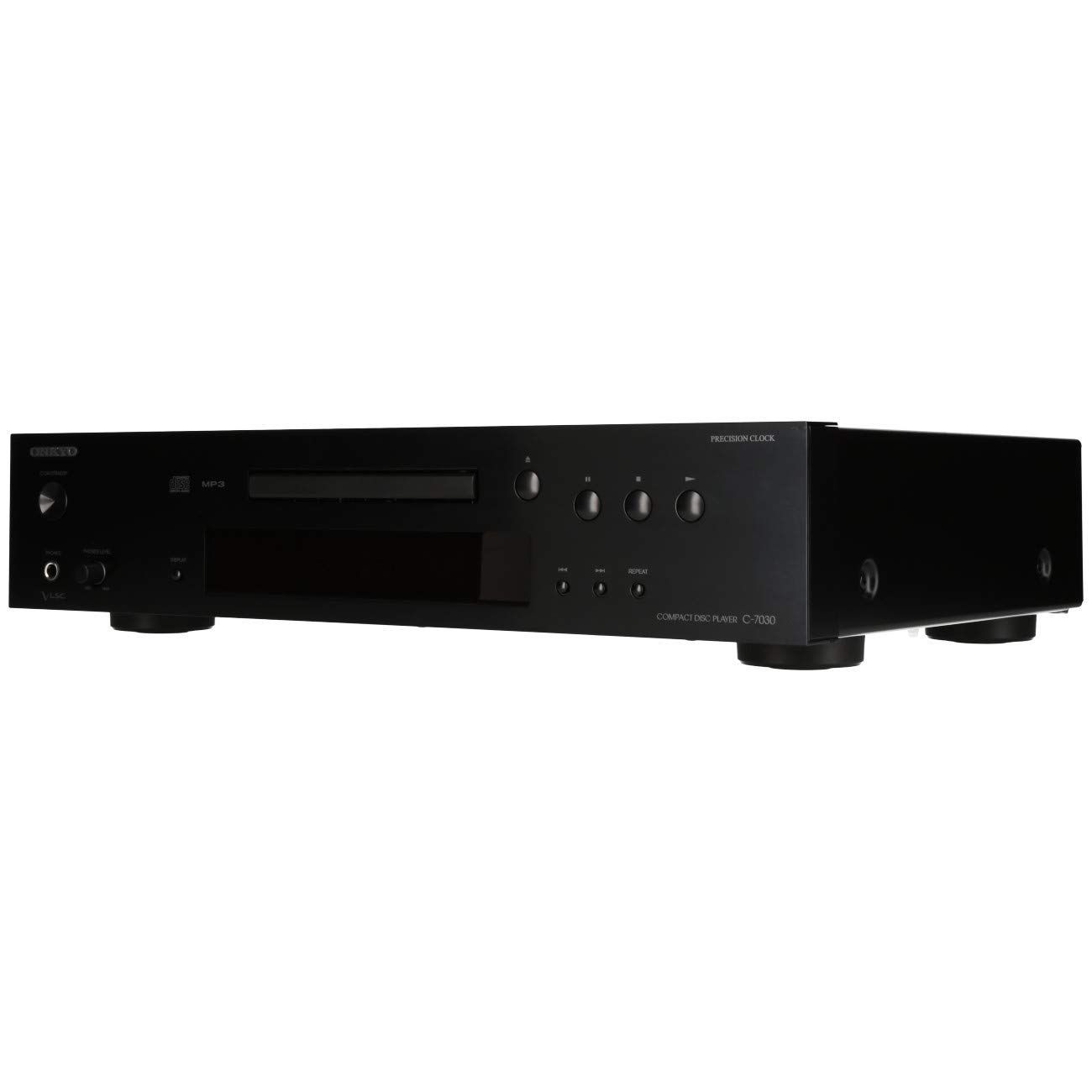
Figura 1: Frontal view of the Onkyo C-7030 CD Player. This image shows the sleek black finish, disc tray, display, and control buttons.

Figura 2: Front inclinat view of the Onkyo C-7030 CD Player, highlighting the power button, headphone jack, and volume control.

Figura 3: posterior view of the Onkyo C-7030 CD Player, displaying the analog RCA, coaxial digital, and optical digital audio output ports, along with the remote control input.

Figure 4: The remote control for the Onkyo C-7030 CD Player, featuring various playback and function buttons.
3. Configuració
- Desembalatge: Carefully remove the CD player and all accessories from the packaging. Retain the packaging for future transport or storage.
- Col·locació: Place the CD player on a stable, level surface away from direct sunlight, heat sources, and excessive dust or moisture. Ensure adequate ventilation around the unit.
- Connexions:
- Sortida d'àudio: Connect the CD player to your amplifier or receiver using one of the following methods:
- Analog (RCA): Use RCA cables (red for right, white for left) to connect the AUDIO OUTPUT ANALOG jacks on the CD player to the corresponding input jacks on your ampmés viu.
- Coaxial digital: Use a digital coaxial cable to connect the COAXIAL DIGITAL AUDIO OUTPUT jack on the CD player to a coaxial digital input on your amplificador/receptor.
- Òptica digital: Use an optical digital cable to connect the OPTICAL DIGITAL AUDIO OUTPUT jack on the CD player to an optical digital input on your amplificador/receptor.
- Potència: Connect the power cord to the AC inlet on the rear of the CD player, then plug it into a suitable wall outlet.
- Comandament a distància (opcional): If using an Onkyo system with RI (Remote Interactive) compatibility, connect the RI cable from the CD player to your amplifier/receiver for integrated control.
- Sortida d'àudio: Connect the CD player to your amplifier or receiver using one of the following methods:
4. Instruccions de funcionament
- Encès/apagat: Premeu el botó STANDBY/ON botó del panell frontal o del comandament a distància per encendre o apagar la unitat.
- Carregant un CD: Premeu el botó OBRIR/TANCAR button to open the disc tray. Place a CD with the label side up in the tray. Press OBRIR/TANCAR de nou per tancar la safata.
- Reproducció: After loading a CD, the player will automatically begin playback. If not, press the JUGAR botó.
- Pausa: Premeu el botó PAUSA button to temporarily stop playback. Press it again to resume.
- Atura: Premeu el botó STOP botó per aturar la reproducció.
- Omet les pistes: Utilitza el SKIP (▶▶| / |◀◀) botons per navegar entre pistes.
- Avançar/rebobinar ràpid: Manteniu premuda la SKIP (▶▶| / |◀◀) botons durant la reproducció per avançar o rebobinar ràpidament dins d'una pista.
- Repetició de reproducció: Premeu el botó REPETIR button to cycle through repeat modes (e.g., repeat current track, repeat all tracks).
- Reproducció aleatòria: Premeu el botó ALEATÒRIA botó per reproduir pistes en ordre aleatori.
- Visualització: Premeu el botó VISUALITZACIÓ button to change the information shown on the front panel display (e.g., track number, elapsed time, remaining time).
- Atenuador: Utilitza el DIMMER button to adjust the brightness of the front panel display.
Nota sobre els vídeos: No official product videos specifically for the Onkyo C-7030 CD Player from a 'Seller' creator type were available in the provided data. The videos found were for different brands or models, and thus are not included to maintain relevance and accuracy for this specific instruction manual.
5. Manteniment
- Neteja de la unitat: Use a soft, dry cloth to wipe the exterior of the unit. For stubborn stains, dampen the cloth with a mild, non-abrasive cleaner. Avoid using harsh chemicals or abrasive materials.
- Discs de neteja: Wipe CDs with a soft, lint-free cloth from the center outwards. Do not use solvents or abrasive cleaners.
- Safata de disc: Keep the disc tray clean and free of dust. Avoid placing heavy objects on the tray or forcing it open/closed.
- Ventilació: Assegureu-vos que les obertures de ventilació de la unitat no estiguin bloquejades per evitar el sobreescalfament.
6. Solució De Problemes
| Problema | Causa possible | Solució |
|---|---|---|
| Sense poder | Cable d'alimentació no connectat o presa de corrent no activa. | Comproveu la connexió del cable d'alimentació. Proveu una altra presa de corrent. |
| Sense so | Incorrect audio cable connection or wrong input selected on ampmés viu. | Verify audio cable connections. Select the correct input on your ampvidador. Comprovació ampvolum de lificació. |
| Disc not playing/Disc error | El disc està brut, ratllat o inserit incorrectament. | Clean the disc. Try a different disc. Ensure the disc is inserted correctly with the label side up. |
| El comandament a distància no funciona | Batteries are dead or remote is not aimed at the unit. | Replace batteries (2 AA required). Point the remote directly at the CD player's sensor. |
7. Especificacions
- Dimensions del producte: 17.13 x 12.05 x 3.98 polzades
- Pes de l'article: 11.66 lliures
- Fabricant: ONKYO
- Nom del model: C-7030
- Tecnologia de connectivitat: Auxiliar
- Nombre de discos: 1
- Bateries: 2 AA batteries required (for remote control)
- Data de primera disponibilitat: 7 d'agost de 2012
8. Garantia i Suport
Per obtenir informació sobre la garantia i assistència tècnica, consulteu la targeta de garantia inclosa amb el producte o visiteu el lloc web oficial d'Onkyo. weblloc web. Conserveu el rebut de compra com a comprovant de compra per a reclamacions de garantia.


