1. Introducció
This instruction manual provides essential information for the proper installation, operation, and maintenance of your Cooler Master DK9-7E52A-0L-GP CPU Cooler. Please read this manual thoroughly before installation to ensure correct usage and optimal performance.
The Cooler Master DK9-7E52A-0L-GP is designed to provide efficient cooling for CPUs with a thermal design power (TDP) of up to 65 watts, specifically compatible with AMD Socket AM2 and AM3 platforms. Its compact design makes it suitable for systems with height restrictions, such as MITX and MATX cases.
2. Informació de seguretat
Observeu les següents precaucions de seguretat durant la instal·lació i el funcionament:
- Ensure your computer system is powered off and unplugged from the wall outlet before beginning installation.
- Handle the CPU cooler and other components with care to prevent damage.
- Eviteu tocar les aspes del ventilador mentre el sistema està engegat.
- Keep the cooler away from liquids and excessive moisture.
- This product contains small parts; keep out of reach of children.
3. Contingut del paquet
Verifiqueu que tots els elements siguin presents al vostre paquet:
- Cooler Master DK9-7E52A-0L-GP CPU Cooler (Heatsink with integrated 80mm fan)
- Pre-applied thermal paste on the heatsink base.
If any components are missing or damaged, contact your retailer or Cooler Master support.
4. Configuració i instal·lació
Follow these steps to install the CPU cooler:
- Prepareu la placa base: Ensure your motherboard is compatible with AMD Socket AM2 or AM3. If an old cooler is present, carefully remove it. Clean any existing thermal paste from the CPU surface using isopropyl alcohol and a lint-free cloth.
- Col·locació del refrigerador: Align the cooler's retention clips with the mounting brackets on your motherboard. The heatsink base, with pre-applied thermal paste, should be centered over the CPU.
- Assegureu la nevera: Attach one side of the retention clip to the motherboard bracket. Apply firm, even pressure to the top of the cooler while pushing down the lever on the opposite side of the retention clip until it locks into place on the motherboard bracket. Ensure the cooler is securely seated and does not wobble.
- Connecteu el ventilador: Locate the 3-pin fan header on your motherboard (typically labeled "CPU_FAN"). Connect the cooler's 3-pin power cable to this header.
- Comprovació final: Double-check all connections and ensure no cables are obstructing the fan blades or other components.
Refer to the image below for product dimensions, which may be helpful for clearance checks within your PC case.
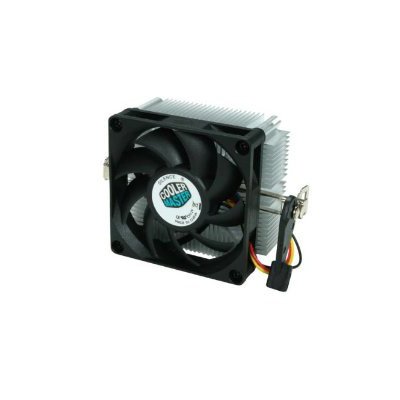
Image: Cooler Master DK9-7E52A-0L-GP CPU Cooler with indicated dimensions (3.03"L x 1.61"W x 2.68"H). This image illustrates the physical size of the cooler, including the fan and heatsink, and the mounting mechanism.
5. Instruccions de funcionament
Once installed, the Cooler Master DK9-7E52A-0L-GP operates automatically. The fan speed is typically controlled by the motherboard based on CPU temperature, ensuring optimal cooling performance while minimizing noise.
- Upon system startup, the fan should begin spinning.
- Monitor CPU temperatures using system monitoring software to ensure effective cooling.
- The cooler is designed for continuous operation within specified environmental conditions.
6. Manteniment
Un manteniment regular ajuda a garantir la longevitat i el rendiment del refrigerador de la CPU:
- Eliminació de pols: Periodically (e.g., every 3-6 months), power off and unplug your computer. Use compressed air to gently blow dust out of the heatsink fins and fan blades. Hold the fan blades to prevent them from spinning rapidly during cleaning, which can damage the fan motor.
- Pasta tèrmica: The pre-applied thermal paste is designed for long-term use. Reapplication is generally not necessary unless the cooler is removed and reinstalled. If reapplication is required, clean both the CPU and heatsink surfaces thoroughly before applying a new, thin, even layer of high-quality thermal paste.
7. Solució De Problemes
Si teniu problemes amb el refrigerador de la CPU, consulteu els següents problemes i solucions habituals:
| Problema | Causa possible | Solució |
|---|---|---|
| Sobreescalfament de la CPU |
|
|
| El ventilador no gira |
|
|
| Soroll del ventilador excessiu |
|
|
If problems persist after attempting these solutions, contact Cooler Master customer support or your retailer.
8. Especificacions
| Número de model | DK9-7E52A-0L-GP |
| Marca | Cooler Master |
| Endolls compatibles | Socket AMD AM2/AM3 |
| Wat màxtage (TDP) | 65 watts |
| Mètode de refrigeració | Aire |
| Mida del ventilador | 80mm (Slim) |
| Velocitat de rotació màxima | 3200 RPM |
| Nivell de soroll | 25.17 decibels |
| Tipus de connector d'alimentació | 3-pins |
| Voltage | 12 Volts |
| Dimensions del producte (L x A x A) | 3.03" x 1.61" x 2.68" |
| Pes de l'article | 3.2 unces |
| Material | Metall, plàstic |
| Certificacions | RoHS, UL Certified |
9. Garantia i Suport
Cooler Master products are manufactured to high quality standards. For warranty information, technical support, or service inquiries, please visit the official Cooler Master weblloc web o poseu-vos en contacte amb el vostre distribuïdor local.
Conserveu el vostre comprovant de compra per a reclamacions de garantia.