1. Introducció
The LOFREE TOUCH Mechanical Keyboard is a versatile input device designed for enhanced typing experience and personalization. It features triple-mode connectivity, hot-swappable switches, and compatibility with multiple operating systems. This manual provides essential information for setting up, operating, and maintaining your keyboard.

Figure 1: LOFREE TOUCH 68-key Mechanical Keyboard
2. Contingut del paquet
Marqueu la casella per als elements següents:
- LOFREE TOUCH Keyboard (68-key or 100-key) x 1
- Manual d'usuari x 1
- Targeta de garantia x 1
- Receptor sense fil 2.4G x 1
- AAA Battery x 3 (pre-installed or included separately)
- Cable tipus C x 1
- Accessory Box x 1
- Extractor de tecles x 1
- Holder x 1 (for figurines/extra keycaps)

Figure 2: Battery compartment and 2.4G receiver storage
3. Configuració
3.1. Engegada i instal·lació de la bateria
- Localitzeu el compartiment de la bateria a la part inferior del teclat.
- Inseriu 3 piles AAA, assegurant la polaritat correcta.
- The keyboard can also be powered via the Type-C cable for wired mode and charging (if rechargeable batteries are used).
3.2. Connexió del teclat
The LOFREE TOUCH keyboard supports three connection modes: Bluetooth 5.0, 2.4G Wireless, and Wired (Type-C).

Figura 3: Opcions de connectivitat
3.2.1. Connexió sense fil 2.4G
- Locate the 2.4G wireless receiver, usually stored in the battery compartment or a dedicated slot on the keyboard.
- Connecteu el receptor 2.4G a un port USB disponible de l'ordinador.
- Slide the mode switch on the keyboard to the '2.4G' position. The keyboard should connect automatically.
3.2.2. Connexió Bluetooth 5.0
- Feu lliscar el selector de mode del teclat a la posició "BT".
- On your device (computer, tablet, phone), go to Bluetooth settings and enable Bluetooth.
- The keyboard can store up to 3 Bluetooth device pairings. To pair with a new device, press and hold Fn + 1, Fn + 2, or Fn + 3 until the indicator light flashes, indicating pairing mode.
- Select "LOFREE TOUCH" from the list of available Bluetooth devices on your device.
- Once paired, the indicator light will stop flashing. You can switch between paired devices by pressing Fn + 1, Fn + 2, or Fn + 3.
3.2.3. Wired (Type-C) Connection
- Connect one end of the provided Type-C cable to the keyboard's Type-C port.
- Connecteu l'altre extrem del cable a un port USB disponible de l'ordinador.
- The keyboard will automatically switch to wired mode. This mode also charges the batteries if they are rechargeable.
4. Ús del teclat
4.1. Compatibilitat multisistema
The LOFREE TOUCH keyboard is compatible with Windows, macOS/iOS, and Android operating systems. It features dedicated media keys for both Mac and Windows layouts.
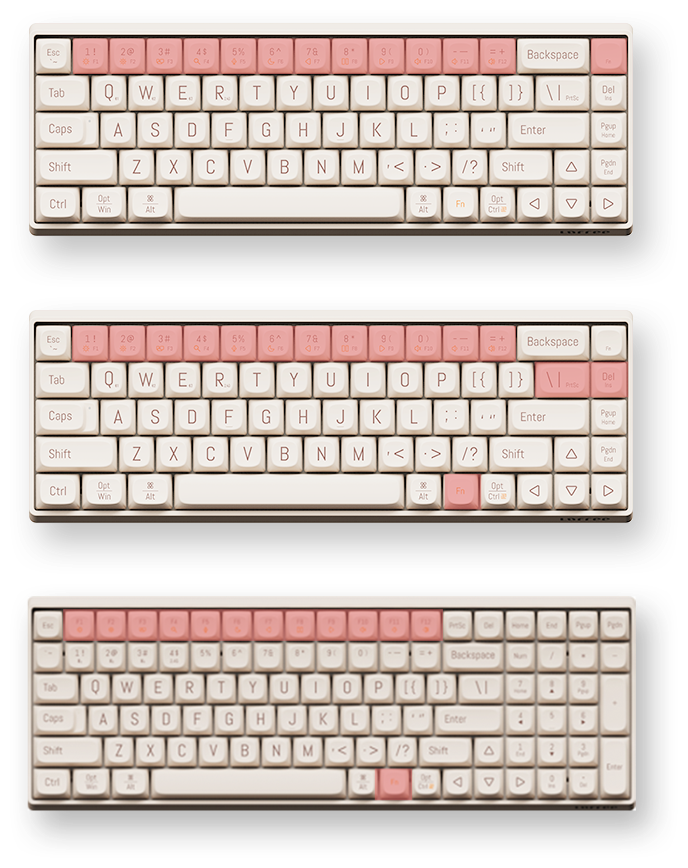
Figure 4: Mac and Windows Layouts
4.1.1. Switching Layouts
To switch between Mac and Windows functional key layouts, press Fn + N (for Mac) or Fn+M (for Windows).
4.2. Tecles de funció (combinacions Fn)
The keyboard utilizes an Fn key for accessing secondary functions printed on the keycaps. Common functions include:
- Fn + F1-F12: Media controls (play/pause, volume, mute, etc.), screen brightness, search, task switch, etc. (functions may vary slightly between 68-key and 100-key models).
- Fn + 1/2/3: Canvia entre dispositius Bluetooth emparellats.
- Fn + Q/W/E: (Specific to some models) Switch between 2.4G and Bluetooth modes or specific Bluetooth channels.
4.3. N-Key Rollover (NKRO)
The LOFREE TOUCH keyboard supports N-Key Rollover (NKRO), ensuring that every key press is registered, even when multiple keys are pressed simultaneously. This is beneficial for fast typists and gamers.
5. Manteniment
5.1. Commutadors intercanviables en calent
The keyboard features hot-swappable sockets, allowing you to change mechanical switches without soldering. It is compatible with standard 3-pin and 5-pin mechanical switches.
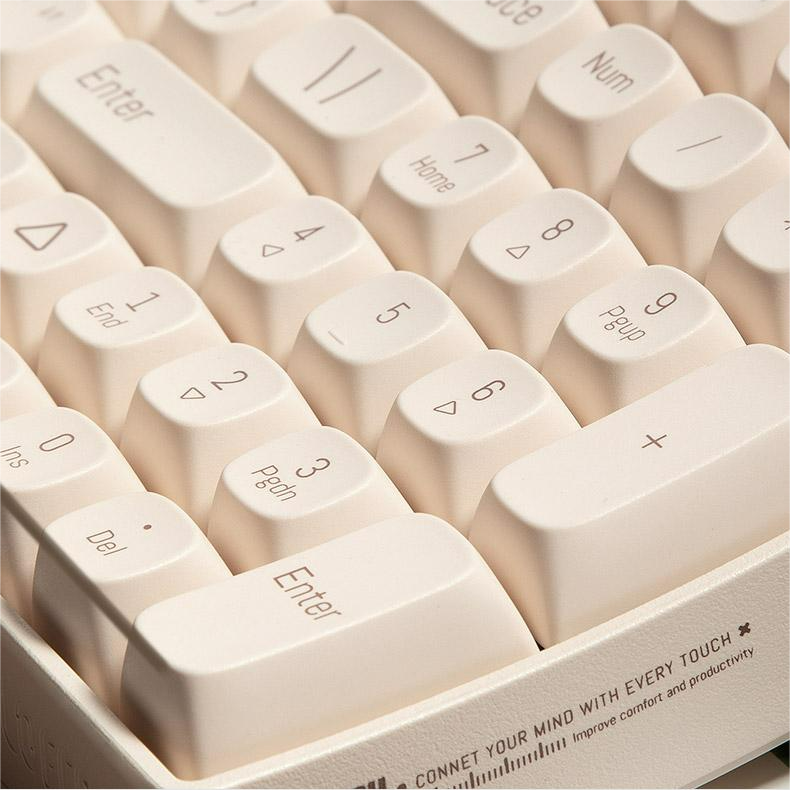
Figure 5: Hot-swappable switches with keycap and switch pullers
5.1.1. Changing Switches
- Amb l'extractor de tecles proporcionat, retireu suaument la tecla desitjada.
- Using a switch puller (often included in the accessory box), carefully grip the switch and pull it straight up to remove it from the PCB.
- Alineeu els pins del nou interruptor amb els forats de la placa de circuit imprès i premeu-lo fermament fins que encaixi al seu lloc. Assegureu-vos que els pins no estiguin doblegats.
- Substitueix la tapa de les tecles.
5.2. Keycaps
The keyboard comes with durable Dye-Sub PBT keycaps, which are resistant to shine and wear over time. You can customize your keyboard with various PBT keycap sets available from LOFREE.
5.3. Neteja
- Feu servir un raspall suau o aire comprimit per eliminar la pols i les restes que hi ha entre les tecles.
- For deeper cleaning, remove the keycaps using the keycap puller and clean them with a mild soap solution and a soft cloth. Ensure they are completely dry before reattaching.
- Wipe the keyboard surface with a damp, drap sense borrissol. Eviteu productes químics agressius.
6. Especificacions
6.1. Especificacions generals
- Marca: LOFREE
- Estil d'operació: Mecànica
- Interruptors: Gateron G Pro (Red), Linear, Pre-lubed
- Switches Hot Swap: Yes (Standard 3-pin and 5-pin compatible)
- Material de la tecla: Dye-Sub PBT
- Tipus d'interfície: USB (tipus C)
- Connectivitat: Bluetooth 5.0, 2.4G sense fil, tipus C amb cable
- Aplicació: Ordinador de sobretaula, portàtil, tauleta
- Idioma: Anglès
- Potència: 3 x piles AAA
- Durada de la bateria: Approximately 30 days of typing
- Sistemes operatius: Windows, macOS/iOS, Android
- Substitució de la clau N (NKRO): Sí
- Ergonomia: 9° Curved Shape for reduced finger fatigue
6.2. 68-Key Model (OE902)
- Keyboard Standard: 68 claus
- Dimensions: 310 x 109 x 51.5 mm
- Pes del teclat: 720 g
6.3. 100-Key Model (OE903)
- Keyboard Standard: 100 claus
- Dimensions: 367 x 129 x 54.5 mm
- Pes del teclat: 1010 g

Figure 6: 68-key vs. 100-key models
7. Solució De Problemes
| Problema | Causa possible | Solució |
|---|---|---|
| El teclat no respon | Low battery, incorrect connection mode, Bluetooth not paired, 2.4G receiver not plugged in. | Check/replace batteries. Ensure mode switch is set correctly (BT, 2.4G, or Wired). Re-pair Bluetooth or re-insert 2.4G receiver. Try wired connection. |
| Claus que no es registren | Interruptor defectuós, deixalles sota la tapa de la tecla. | Remove keycap and clean. If hot-swappable, try replacing the switch. |
| Connexió Bluetooth inestable | Interference, distance from device, low keyboard battery. | Move closer to the device. Ensure no other devices are causing interference. Check battery level. Re-pair the Bluetooth connection. |
| Keyboard not recognized by OS | Driver issue, OS compatibility. | Ensure OS is supported. Try a different USB port or cable. Restart computer. |
8. Consells d'usuari
- Personalize Your Keyboard: Avançanttage of the hot-swappable switches and PBT keycaps to customize the feel and look of your keyboard. Experiment with different switch types for a unique typing experience.
- Maximitzar la connectivitat: Utilize the triple-mode connectivity to seamlessly switch between your desktop, laptop, and tablet. Remember to pair your devices to different Bluetooth channels (Fn+1, Fn+2, Fn+3) for quick switching.
- Confort ergonòmic: The 9° curved shape is designed for comfort. Ensure proper wrist posture to further enhance your typing experience and reduce strain.
- Decorative Holder: Use the included holder plate to display your favorite figurines, extra keycaps, or LOFREE's IP mascot, LONELY, adding a personal touch to your workspace.
9. Garantia i Suport
Your LOFREE TOUCH Mechanical Keyboard comes with a manufacturer's warranty. Please refer to the included Warranty Card for details regarding warranty coverage, terms, and conditions. For technical support, product inquiries, or service requests, please visit the official LOFREE weblloc o poseu-vos en contacte amb el seu servei d'atenció al client.
10. Vídeo de demostració del producte
Video: Demonstration of the LOFREE TOUCH keyboard in use, showcasing typing and design elements.


