1. Introducció
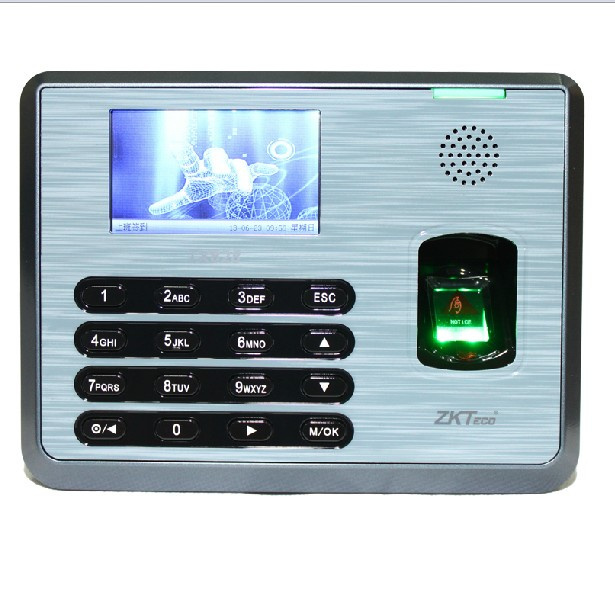
The ZKTeco TX628 is an advanced biometric fingerprint time attendance terminal designed for efficient employee management. It features a color TFT screen with a user-friendly GUI interface, offering quick and accurate user recognition. This manual provides essential information for setting up, operating, maintaining, and troubleshooting your TX628 device.

2. Configuració
2.1 Desembalatge i inspecció
Carefully unpack the TX628 device and verify that all components are present and undamaged. Retain the packaging for future transport or storage.
2.2 Dispositiu acabatview


2.3 Connexió d'alimentació
- Connect the provided DC 5V 2A power adapter to the power input port on the back of the device.
- Connecteu l'adaptador d'alimentació a una presa de corrent estàndard.
- El dispositiu s'encendrà automàticament.
2.4 Network and Data Transfer
The TX628 supports multiple communication methods:
- TCP/IP: For network connectivity and real-time data transfer to a server. Connect an Ethernet cable to the device's LAN port and to your network router/switch.
- RS232/485: For serial communication with other devices or systems.
- Client USB: Per a la connexió directa a un ordinador.
- Interfície de disc USB: For manual data transfer using a USB flash drive. This is useful when network connectivity is not available.

3. Instruccions de funcionament
3.1 Interfície d'usuari
The TX628 features a 3-inch color TFT screen with a graphical user interface (GUI). Navigate through menus using the keypad and the M/OK button.

3.2 Registre d'usuaris
Per registrar un nou usuari:
- Access the 'User Mgt' menu from the main screen.
- Seleccioneu "Nou usuari" i introduïu l'ID d'usuari.
- Register the user's fingerprint by placing their finger on the ZK Optical Sensor. Follow the on-screen prompts to capture multiple scans for accuracy.
- Optionally, register a PIN for verification.
- Desa la informació de l'usuari.
3.3 Control de presència horària
Users can clock in/out using their registered fingerprint or PIN. The device offers 1-touch a-second user recognition for quick processing.
- Verificació d'empremta digital: Place a registered finger on the optical sensor. The device will provide audio-visual indications for acceptance or rejection.
- PIN Verification: Enter the registered PIN using the keypad and press M/OK.
3.4 Scheduled Bell
The TX628 includes a built-in bell scheduling function to remind users to clock in or out at specific times.
3.5 Gestió de dades
- Real-time Data Export: Attendance records can be exported in real-time to third-party hosted or non-hosted applications via TCP/IP.
- Transferència de dades USB: Use the USB disk interface to manually download attendance data to a USB flash drive. Navigate to 'Data Mgt' -> 'USB Manager' to perform this operation.
4. Manteniment
4.1 Neteja del dispositiu
- Regularly clean the ZK Optical Sensor with a soft, dry, lint-free cloth to ensure optimal performance.
- Wipe the device's exterior with a slightly damp tela. Eviteu utilitzar productes químics o materials abrasius.
4.2 Còpia de seguretat de dades
It is recommended to regularly back up attendance data to prevent loss. Utilize the USB data transfer function or ensure your network connection is stable for real-time data synchronization.
4.3 Condicions ambientals
Assegureu-vos que el dispositiu funciona dins dels rangs ambientals especificats:
- Temperatura de funcionament: De 0 °C a 45 °C (de 32 °F a 113 °F)
- Humitat de funcionament: 20% a 80% (sense condensació)
5. Solució De Problemes
5.1 Empremta digital no reconeguda
- Assegureu-vos que el dit estigui net i sec.
- Place the finger flat on the optical sensor, covering the entire surface.
- Try re-registering the fingerprint if the issue persists.
- Check the audio-visual indications for specific error messages.
5.2 Problemes de connectivitat de xarxa
- Verifiqueu la connexió del cable Ethernet.
- Check network settings (IP address, gateway) in the device's communication menu.
- Ensure the network router/switch is functioning correctly.
5.3 Data Transfer Problems
- For USB transfer, ensure the USB flash drive is formatted correctly and has sufficient space.
- For network transfer, verify network connectivity and server configuration.
5.4 El dispositiu no s'encén
- Check the power adapter connection to both the device and the electrical outlet.
- Assegureu-vos que la presa de corrent funcioni.
6. Especificacions
| Característica | Especificació |
|---|---|
| Número de model | TX628 |
| Origen | Xina continental |
| Plataforma Smart Home | Cap |
| Capacitat d'empremta digital | 3000 (1:N) |
| Capacitat de la targeta d'identificació | 10,000 (opcional) |
| Capacitat de registre | 100,000 |
| Mostra | Pantalla TFT color de 3 polzades |
| Comunicació | TCP/IP, RS232/485, USB Client |
| Font d'alimentació | DC 5V 2A |
| Humitat de funcionament | 20%-80% |
| Temperatura de funcionament | 0 °C - 45 °C |
| Verification Speed | ≤1 segons |
| Sensor | Sensor òptic ZK |
6.1 Dimensions

7. Garantia i Suport
For technical support, warranty claims, or further assistance, please contact your vendor or the manufacturer directly. An SDK (Software Development Kit) is available for OEM customers and software developers who wish to integrate the TX628 with custom applications.
8. Consells d'usuari
- Clean Fingers: Always ensure fingers are clean and dry before attempting a fingerprint scan for optimal recognition accuracy.
- Consistent Placement: Try to place your finger on the sensor in a consistent manner each time for better recognition.
- Regular Data Export: Perform regular data backups or ensure continuous network synchronization to prevent loss of attendance records.
- Administrator Access: Keep administrator passwords secure and limit access to critical settings to authorized personnel only.


