1. Uvod
Thank you for choosing the HBN Digital Outdoor Timer Socket. This device is designed to provide flexible and reliable control over your outdoor electrical appliances, such as garden lighting, pool pumps, and holiday decorations. With its 8 programmable settings, random function, and IP44 weather resistance, it offers convenience and energy efficiency. Please read this manual thoroughly before use to ensure proper operation and safety.
2. Sigurnosna uputstva
- Ensure the timer is correctly installed and connected to a suitable power outlet.
- Do not exceed the maximum load capacity of 16A/3680W. Overloading can cause damage or fire.
- The timer is rated IP44 for outdoor use, meaning it is protected against splashing water from any direction. However, do not immerse the device in water or expose it to direct, heavy rainfall for extended periods.
- Ne otvarajte niti pokušavajte popraviti uređaj. Za sve servisne radove obratite se kvalifikovanom osoblju.
- Keep children away from the device. The integrated child lock provides additional safety.
- Always unplug the timer from the power outlet before cleaning.
3. Sadržaj paketa
Vaš paket bi trebao sadržavati sljedeće stavke:
- HBN Digital Outdoor Timer Socket (x2)
- Uputstvo za upotrebu (ovaj dokument)
4. Proizvod je gotovview
The HBN Digital Outdoor Timer Socket features a clear digital display and intuitive buttons for easy programming. Below is an illustration of the device and its main components.
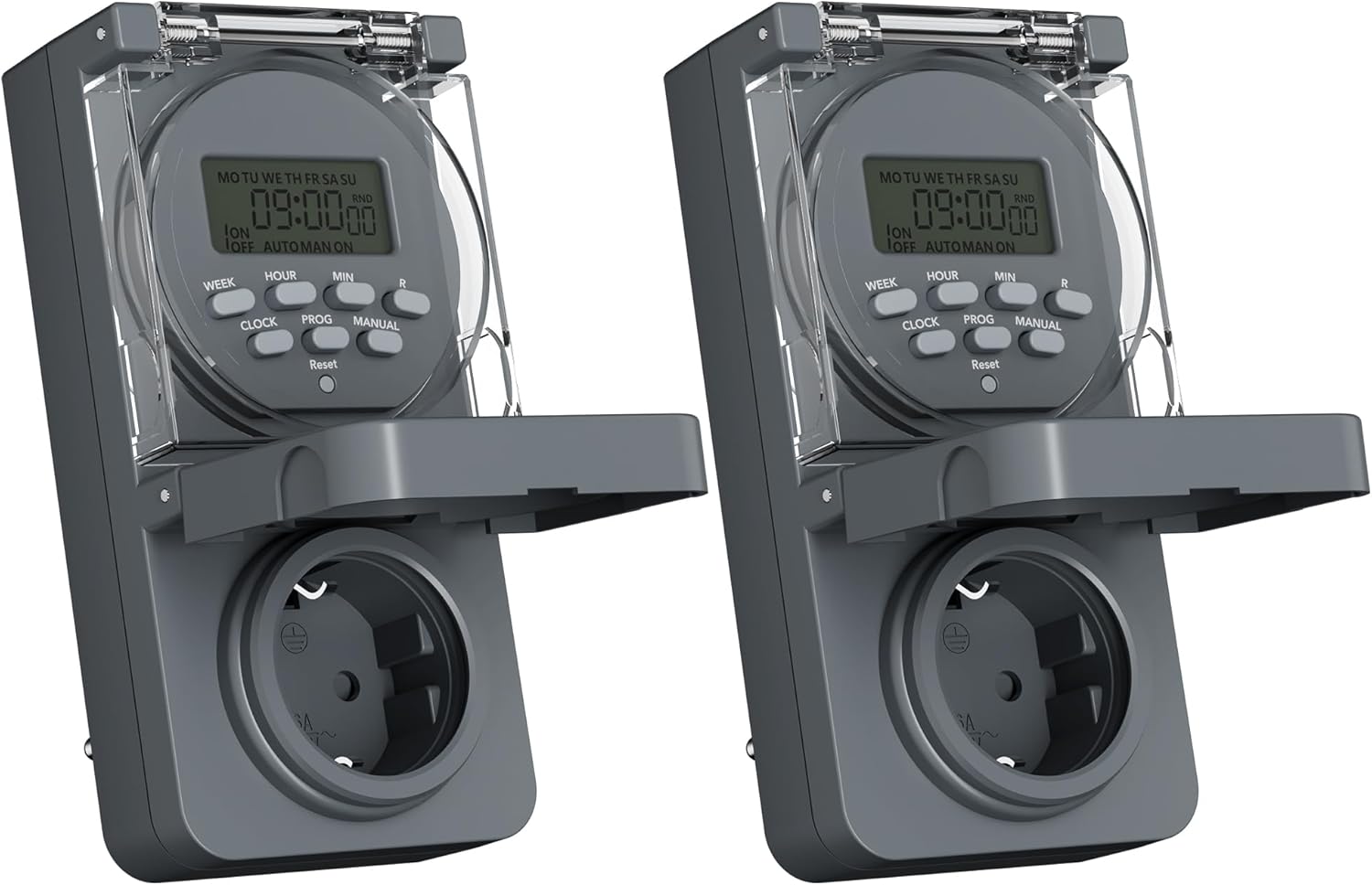
Image 1: Two HBN Digital Outdoor Timer Sockets, front view.

Image 2: Close-up of the timer's display and control buttons.
Funkcije dugmadi:
- SEDMICA: Selects the day(s) of the week for programming.
- SAT: Adjusts the hour setting.
- MIN: Adjusts the minute setting.
- SAT: Exits programming mode and displays the current time. Used to set the current time.
- PROG: Enters and cycles through the 8 ON/OFF program settings.
- PRIRUČNIK: Prebacuje se između načina rada UKLJUČENO, AUTOMATSKI i ISKLJUČENO.
- RND (Slučajno): Aktivira ili deaktivira funkciju slučajnog reproduciranja.
- Resetovati: Clears all settings and returns the timer to factory defaults. Use a pointed object (e.g., a pen tip) to press.
5. Podešavanje
5.1 Initial Charging and Reset
Before first use, or after a long period of inactivity, plug the timer into a live power outlet for at least 30 minutes to charge the internal backup battery. This ensures that settings are retained during power outages.
After charging, press the Reset button using a pointed object to clear any pre-existing settings and ensure a fresh start.
5.2 Podešavanje trenutnog vremena i dana
- Pritisnite i držite CLOCK dugme.
- Dok drži CLOCK, pritisnite WEEK repeatedly to set the current day of the week (MO, TU, WE, TH, FR, SA, SU).
- Dok drži CLOCK, pritisnite HOUR repeatedly to set the current hour (12-hour or 24-hour format).
- Dok drži CLOCK, pritisnite MIN više puta da biste podesili trenutni minut.
- Otpustite CLOCK dugme. Trenutno vrijeme i dan su sada podešeni.
6. Uputstvo za upotrebu
6.1 Podešavanje programa UKLJUČENO/ISKLJUČENO
The timer allows you to set up to 8 ON/OFF programs. Each program consists of an ON time and an OFF time, along with specific days of the week.

Slika 3: Primjeramples of setting ON and OFF times for different programs.
- Pritisnite PROG jednom pritisnite dugme. Na displeju će se prikazati "1 UKLJUČENO". Ovo služi za podešavanje prvog vremena uključivanja.
- Pritisnite WEEK repeatedly to select the desired day(s) for this program. Options include individual days, weekdays (MO TU WE TH FR), weekends (SA SU), all days (MO TU WE TH FR SA SU), or various combinations.
- Pritisnite HOUR da biste podesili željeni sat za vrijeme uključivanja.
- Pritisnite MIN da biste podesili željeni minut za vrijeme uključivanja.
- Pritisnite PROG again. The display will show "1 OFF". This is for setting the first OFF time.
- Repeat steps 2-4 to set the day(s), hour, and minute for the OFF time. Ensure the day selection matches the ON time if you want the program to apply to the same days.
- Nastavite pritiskati PROG to cycle through programs 2 ON, 2 OFF, up to 8 ON, 8 OFF. Repeat the setting process for each program as needed.
- Nakon što podesite sve željene programe, pritisnite dugme CLOCK dugme za izlazak iz režima programiranja i povratak na prikaz trenutnog vremena.
6.2 Slučajna funkcija
The random function is designed to simulate presence by randomly turning the connected appliance ON and OFF within a specific time window, typically around your programmed ON/OFF times. This can deter potential intruders.

Image 4: The random function (RND) activated on the timer display.
- To activate the random function, press the RND button. The display will show "RND".
- Da biste deaktivirali, pritisnite dugme RND button again. "RND" will disappear from the display.
6.3 Ručno upravljanje (UKLJ./AUTO/ISKL.)
You can manually override the programmed settings using the MANUAL dugme.
- Pritisnite MANUAL once: The timer switches to ON mode (output is continuously ON).
- Pritisnite MANUAL again: The timer switches to AUTO mode (follows programmed settings).
- Pritisnite MANUAL a third time: The timer switches to OFF mode (output is continuously OFF).
6.4 Summer/Winter Time Adjustment
Za podešavanje ljetnog računanja vremena:
- Pritisnite i držite CLOCK dugme.
- Dok drži CLOCK, pritisnite MANUAL button. The display will show "+1h" for summer time or revert to normal for winter time.
7. Održavanje
7.1 Čišćenje
To clean the timer, unplug it from the power outlet. Wipe the exterior with a soft, damp krpu. Ne koristite abrazivna sredstva za čišćenje, rastvarače ili uranjajte uređaj u vodu.
7.2 Skladištenje
Kada se tajmer ne koristi duži period, čuvajte ga na hladnom i suhom mjestu, dalje od direktne sunčeve svjetlosti i ekstremnih temperatura.
8. Otkrivanje problema
- Tajmer se ne uključuje/isključuje kako je programirano:
- Provjerite je li tajmer uključen AUTO način rada (ne UKLJUČUJE se ili ISKLJUČUJE ručno).
- Verify that the programmed ON/OFF times and days are set correctly.
- Ensure the connected appliance is working and properly plugged into the timer.
- Ekran je prazan:
- Provjerite je li tajmer uključen u aktivnu utičnicu.
- The internal backup battery might be completely drained. Plug the timer in for at least 30 minutes to charge it.
- Postavke se gube nakon nestanka strujetage:
- The internal backup battery may not be sufficiently charged. Ensure the timer is regularly connected to power. If settings are lost, re-enter them after charging.
- Random function not working:
- Osigurajte RND function is activated (RND icon visible on display).
- The random function operates around programmed times; ensure at least one program is set.
9. Specifikacije

Image 5: Back of the timer showing electrical specifications.
| Feature | Specifikacija |
|---|---|
| Model | CP-GOE22-1 |
| Napajanje | 230V~, 50Hz |
| Max Load | 16A / 3680W |
| Zaštitna klasa | IP44 (otporan na prskanje) |
| Broj programa | 8 programa za uključivanje/isključivanje |
| Minimalno vrijeme prebacivanja | 1 minuta |
| Kontrolni režimi | UKLJUČENO, AUTO, ISKLJUČENO |
| Posebne funkcije | Random function, Summer/Winter time, 24-hour mode |
| Backup Battery | Integrated (retains settings during power outagje) |
| Dimenzije (cca.) | 5.5D x 8.5Š x 12V cm |
| Težina artikla | 160 grama |
| Materijal | Plastika |
| UPC | 810079587476 |
| Proizvođač | Ergo I&E CO.,LTD |
10. Garancija i podrška
Za informacije o garanciji ili tehničku podršku, molimo pogledajte dokumentaciju koja je dostavljena prilikom kupovine ili se obratite prodavaču. Sačuvajte dokaz o kupovini za bilo kakve reklamacije u vezi s garancijom.