Uvod
This manual provides comprehensive instructions for the setup, operation, and maintenance of your Doubc C8X Wireless Earbuds. Designed for comfort and high-fidelity audio, these earbuds offer a seamless listening experience for various activities. Please read this manual thoroughly to ensure optimal performance and longevity of your device.

Slika: Prekoview of the C8X True Wireless Earbuds, highlighting key features like Bluetooth 5.0, IPX7 Waterproofing, Super Stereo Sound, Crystal Clear Call, 48H Playtime, and Touch Control.
Šta je u kutiji
Provjerite da li su sve komponente prisutne u vašem paketu:
- Doubc C8X Wireless Earbuds (Left and Right)
- Futrola za punjenje
- USB-C kabl za punjenje
- Uputstvo za upotrebu
- Multiple Eartip Sizes (Small, Medium, Large)

Image: The complete package contents, including the charging case, earbuds, USB-C cable, user manual, and various eartip sizes.
Setup
1. Punjenje slušalica i kutijice
Before first use, fully charge both the earbuds and the charging case. The charging case features a smart LED display that shows the battery percentage from 1% to 100%, reminding you when it needs to be charged to prevent unexpected shutdowns.
- Punjenje slušalica: Place the earbuds into the charging case. They will automatically begin charging. The LED indicators on the earbuds will show charging status. A full charge for the earbuds typically takes 1-2 hours, providing up to 8 hours of listening time on a single charge.
- Punjenje kućišta: Connect the provided USB-C cable to the charging port on the back of the case and plug the other end into a compatible USB power source. The LED display will show the charging progress. The case takes approximately 1.5 hours to fully charge. A fully charged case provides up to 48 hours of total playtime for the earbuds.

Image: Illustration of the earbuds and charging case, highlighting the 8 hours of playtime on a single charge and 48 hours with the charging case.

Image: Close-up of the charging case's smart LED display showing battery percentage and the fast Type-C charging port.
2. Uključivanje / isključivanje napajanja
- Automatsko paljenje: Open the lid of the charging case. The earbuds will automatically power on, and the red and blue indicator lights will flash.
- Automatsko isključivanje: Place the earbuds back into the charging case and close the lid. The earbuds will automatically power off and begin charging.
- Ručno uključivanje: Long press the touch control area on both earbuds for 3 seconds.
- Ručno isključivanje: Long press the touch control area on both earbuds for 5 seconds.

Image: Visual guide demonstrating how to boot up, use, and shut down the earbuds by interacting with the charging case.
3. Uparivanje
The earbuds support one-step pairing and will automatically connect to the last paired device when removed from the charging case. For first-time pairing or pairing with a new device:
- Provjerite jesu li slušalice napunjene i uključene.
- Open the Bluetooth settings on your device (smartphone, tablet, laptop).
- Traži “C8X” in the list of available devices and select it to connect.
- Nakon povezivanja, glasovna poruka će potvrditi uspješno uparivanje.
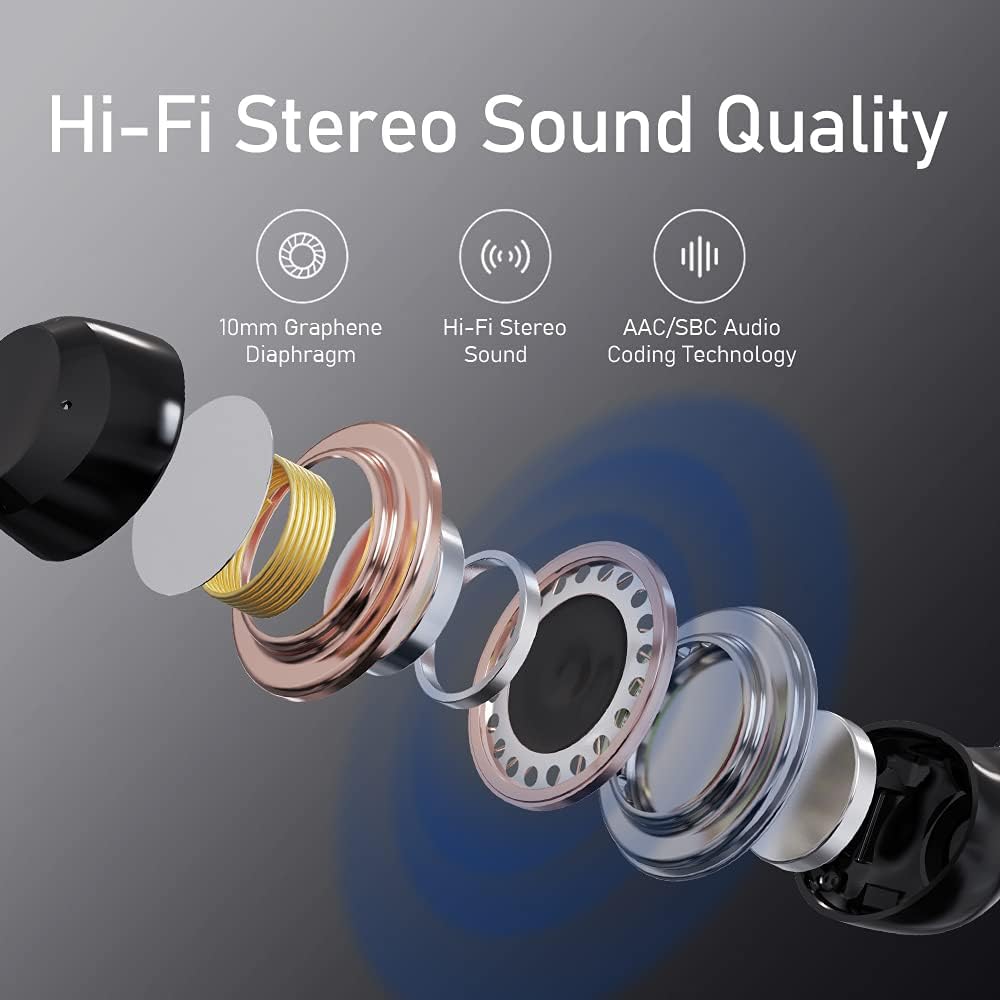
Image: Depiction of the earbuds and charging case next to a smartphone with Bluetooth settings open, showing the 'C8X' device ready for pairing.
Upravljanje slušalicama
1. Dodirnite Kontrole
The Doubc C8X earbuds feature intuitive touch controls for managing audio playback and calls:
- Pusti/pauza: Jednim dodirom na bilo koju slušalicu.
- Sljedeća pjesma: Dvaput dodirnite desnu slušalicu.
- Prethodni zapis: Dvaput dodirnite lijevu slušalicu.
- Odgovori/Završi poziv: Jednostruki dodir na bilo koju slušalicu tokom dolaznog ili aktivnog poziva.
- odbiti poziv: Long press on either earbud for 2 seconds during an incoming call.
- Aktivirajte glasovnog asistenta: Triput dodirnite bilo koju slušalicu.

Image: Diagram illustrating the touch control functions for answering calls, ending calls, playing, and pausing audio.
2. Upute za nošenje
For optimal sound quality and a secure fit, choose the eartip size that best suits your ears. The earbuds are ergonomically designed to fit snugly and stay secured in the ear canal, making them suitable for various activities including workouts and running.
- Nežno umetnite slušalicu u ušni kanal.
- Rotate it slightly until it feels secure and comfortable.
- Test the fit by gently shaking your head. If the earbud feels loose, try a different eartip size.

Image: A person wearing the earbuds, with diagrams showing the ergonomic design for a secure and comfortable in-ear fit.
3. Mono/Binaural Mode
The Doubc C8X earbuds can be used in either mono (single earbud) or binaural (both earbuds) mode:
- Mono način rada: Use a single earbud for calls or listening while remaining aware of your surroundings. This is ideal for driving or working.
- Binauralni način rada: Use both earbuds for a full stereo sound experience, perfect for music and immersive audio.

Slika: Visual examples of using the earbuds in mono mode (single earbud for working/driving) and binaural mode (both earbuds for stereo sound enjoyment).
4. Hi-Fi Stereo Sound Quality
The earbuds deliver high-fidelity stereo sound quality, enhanced by a 10mm Graphene Diaphragm and AAC/SBC Audio Coding Technology, providing rich bass and clear audio across all frequencies.

Slika: Eksplodirano view diagram showing the internal components contributing to the Hi-Fi Stereo Sound Quality, including the 10mm Graphene Diaphragm and AAC/SBC Audio Coding Technology.
Održavanje
Proper care ensures the longevity and performance of your Doubc C8X earbuds:
- čišćenje: Regularly clean the earbuds and charging case with a soft, dry cloth. Do not use abrasive cleaners or solvents.
- uši: Silikonske nastavke za uši povremeno uklanjajte i čistite vodom i blagim sapunom. Prije ponovnog pričvršćivanja provjerite jesu li potpuno suhi.
- Skladištenje: Kada se ne koriste, uvijek čuvajte slušalice u kutijici za punjenje kako biste ih zaštitili od prašine, oštećenja i kako bi ostale napunjene.
- Otpornost na vodu: The earbuds are IPX7 waterproof, meaning they can resist the penetration from splashes and water. However, they are not designed for swimming or prolonged submersion. Ensure the charging port is dry before charging.

Image: Visual representation of the earbuds being splashed with water, illustrating their IPX7 waterproof capability.
Rješavanje problema
If you encounter any issues with your Doubc C8X Wireless Earbuds, refer to the following common problems and solutions:
- Nema zvuka iz jedne slušalice: Ensure both earbuds are properly charged. Place both earbuds back into the charging case, close the lid, wait a few seconds, then open the lid and try again. Check your device's Bluetooth settings to ensure both earbuds are connected.
- Slušalice se ne uparuju: Make sure Bluetooth is enabled on your device. Ensure the earbuds are powered on and in pairing mode (flashing red and blue lights). If issues persist, try forgetting the device in your Bluetooth settings and re-pairing.
- Problemi s punjenjem: Verify the USB-C cable is securely connected to both the charging case and the power source. Check if the charging port is clean and free of debris. Ensure the power source is functioning correctly.
- Niska jačina zvuka/loš kvalitet zvuka: Adjust the volume on both your device and the earbuds. Ensure the eartips are properly seated in your ear canal to create a good seal. Try different eartip sizes for a better fit.
- Earbuds Keep Disconnecting: Ensure the earbuds are within the effective Bluetooth range of your device (typically 10 meters/33 feet). Avoid obstacles or strong electromagnetic interference.
For further assistance, please consult the full user manual available as a PDF or contact Doubc customer support.
Specifikacije
| Feature | Specifikacija |
|---|---|
| Brand | Doubc |
| Broj modela | C8X |
| Tehnologija povezivanja | Bežično (Bluetooth 5.0) |
| Postavljanje uha | U uhu |
| Form Factor | U uhu |
| Nivo vodootpornosti | IPX7 vodootporan |
| Vrijeme reprodukcije (jedno punjenje) | Do 8 sati |
| Ukupno vrijeme reprodukcije (s kućištem za punjenje) | Do 48 sati |
| Port za punjenje | Tip-C |
| Dimenzije proizvoda | 0.79 x 0.39 x 0.79 inča |
| Težina artikla | 4.2 unce |
Garancija i podrška
Your Doubc C8X Wireless Earbuds come with a standard manufacturer's warranty. For detailed information regarding warranty coverage, terms, and conditions, please refer to the full user manual PDF provided with your product or visit the official Doubc website.
For technical support, troubleshooting assistance, or any product-related inquiries, please contact Doubc customer service through the channels specified in your user manual or on the Doubc brand store page on Amazon.
Korisnički priručnik (PDF): Preuzmite ovdje

