1. Uvod
This manual provides essential information for the safe and effective use of your Canon EOS Rebel T5 Digital SLR Camera Kit. The Canon EOS Rebel T5 is designed for capturing high-quality still images and Full HD video, featuring an 18.0 Megapixel CMOS sensor and a DIGIC 4 image processor. Its intuitive design makes it suitable for both beginners and experienced photographers.
2. Šta se nalazi u kutiji
Your Canon EOS Rebel T5 kit typically includes the following components:
- Canon EOS Rebel T5 Camera Body
- Canon EF-S 18-55mm f/3.5-5.6 IS II Standard Zoom Lens
- Baterija
- Punjač baterija
- Interfejs kabl (USB)
- Široki remen
- EOS Digital Solution Disk (Software)
- Uputstvo za upotrebu

Figure 2.1: Typical contents of the Canon EOS Rebel T5 kit.
3. Podešavanje
3.1 Pričvršćivanje objektiva
- Skinite poklopac tijela s fotoaparata i stražnji poklopac objektiva s objektiva.
- Poravnajte crvenu indeksnu oznaku na objektivu s crvenom indeksnom oznakom na kućištu fotoaparata.
- Okrenite objektiv u smjeru kazaljke na satu dok ne klikne na svoje mjesto.
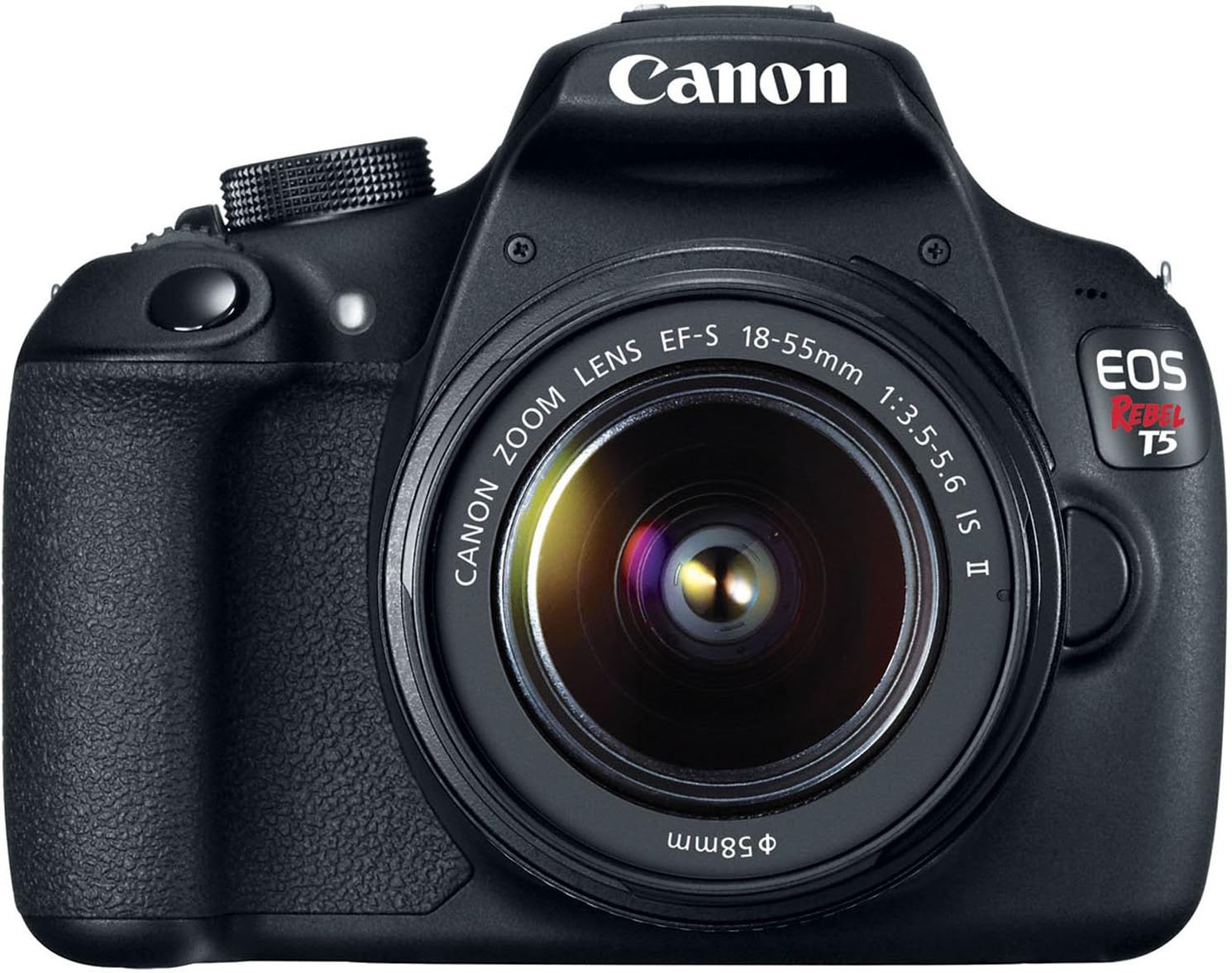
Slika 3.1: Prednja strana view of the Canon EOS Rebel T5 with the EF-S 18-55mm lens.
3.2 Umetanje baterije
- Otvorite poklopac pretinca za bateriju na dnu kamere.
- Insert the charged battery pack with the electrical contacts facing inward, ensuring it clicks into place.
- Zatvorite poklopac odeljka za baterije.
3.3 Umetanje SD kartice
An SD card is required to store photos and videos. The SD card is not included with the kit and must be purchased separately. Open the SD card slot cover on the side of the camera and insert the SD card until it clicks. Ensure the card is inserted correctly to avoid damage.
Video 3.1: This video provides a visual guide on unboxing and basic setup, including attaching the lens and inserting the battery into the Canon EOS Rebel T5 Digital Camera.
4. Uputstvo za upotrebu
4.1 Uključivanje/isključivanje napajanja
To power on the camera, rotate the power switch to the 'ON' position. To power off, rotate it to 'OFF'.
4.2 Birač načina rada
Birač načina rada na vrhu fotoaparata omogućava vam odabir različitih načina snimanja:
- Basic Zone Modes: Fully automatic modes for simple point-and-shoot operation (e.g., Scene Intelligent Auto, Flash Off, Creative Auto, Portrait, Landscape, Close-up, Sports, Night Portrait).
- Creative Zone Modes: Provide more control over settings (e.g., Program AE (P), Shutter-priority AE (Tv), Aperture-priority AE (Av), Manual Exposure (M)).
- Movie Shooting Mode: For recording Full HD videos.

Slika 4.1: Pozadi view of the Canon EOS Rebel T5, highlighting the LCD and control layout.
4.3 Fotografisanje
- Odaberite željeni način snimanja pomoću kotačića za odabir načina rada.
- Pogledaj kroz viewfinder or use the LCD screen for Live View pucanje.
- Press the shutter button halfway to activate the 9-point autofocus system and achieve focus.
- Pritisnite dugme zatvarača do kraja da biste snimili sliku.
4.4 Snimanje video zapisa
Switch the mode dial to the movie shooting mode. Press the Live View shooting/Movie shooting button to start and stop recording. The camera supports Full HD video recording.
4.5 Korištenje ugrađenog blica
In low-light conditions or when backlighting is present, the built-in flash can be used. In Basic Zone modes, the flash may pop up automatically. In Creative Zone modes, you can manually raise the flash by pressing the flash button.
Video 4.1: This video offers an honest review of the Canon T5, demonstrating various features and operational aspects of the camera.
5. Održavanje
5.1 Njega sočiva
- Always keep the lens cap on when not in use to protect the front element.
- Koristite četkicu za objektive ili puhaljku za uklanjanje prašine, a zatim nježno obrišite krpom od mikrovlakana za objektive. Izbjegavajte dodirivanje površine objektiva prstima.
- For stubborn smudges, use a small amount of lens cleaning solution on a clean cloth.
5.2 Camera Body Care
- Obrišite kućište fotoaparata mekom, suhom krpom.
- Izbjegavajte izlaganje kamere ekstremnim temperaturama, vlazi ili prašini.
- Ne koristite organske rastvarače ili jaka sredstva za čišćenje.
5.3 Njega baterija
- Charge the battery fully before first use and whenever the battery indicator is low.
- Čuvajte baterije na hladnom i suvom mestu kada nisu u upotrebi.
- Izvadite bateriju iz fotoaparata ako ga nećete koristiti duži period.
6. Otkrivanje problema
- "No card in camera" message: Ensure an SD card is inserted correctly and is not full or damaged.
- Autofocus is slow: In very low light or with subjects lacking contrast, autofocus may be slower. Try using the built-in flash or switching to manual focus.
- Kamera se ne uključuje: Provjerite da li je baterija napunjena i ispravno umetnuta.
- Slike su mutne: Ensure the lens is clean, the camera is stable (use a tripod if necessary), and the correct focus mode is selected.
7. Specifikacije
| Tip senzora | CMOS |
| Rezolucija foto senzora | 18 MP |
| Video Rezolucija | FHD 1080p |
| Objektiv | EF-S 18-55mm f/3.5-5.6 IS II standard zoom lens |
| Tačke autofokusa | 9-point AF System |
| Brzina kontinuiranog snimanja | 3 FPS |
| Veličina ekrana | 3 inča |
| Podržano File Format | JPEG, RAW |
| Tehnologija povezivanja | Žičano, bežično (Wi-Fi) |
| Težina artikla | 1 funti |
8. Garancija i podrška
8.1 Informacije o garanciji
This Canon EOS Rebel T5 camera kit comes with a 90-day limited warranty. Please retain your proof of purchase for any warranty claims.
8.2 Korisnička podrška
For further assistance, technical support, or service inquiries, please refer to the official Canon support website or contact their customer service department. Detailed contact information can typically be found in the included warranty card or on the manufacturer's website.


