Uvod
Welcome to the Mohu Leaf 50 Amplified Indoor HDTV Antenna user manual. This guide provides detailed instructions for installing, operating, and maintaining your antenna to receive free over-the-air television broadcasts. The Mohu Leaf 50 is designed to deliver clear high-definition picture and sound, utilizing a Jolt in-line amplifier for enhanced signal reception up to a 60-mile range.
Šta je uključeno
- Mohu Leaf 50 Amplified Antenna
- 12 ft. Detachable High-Performance Coaxial Cable
- Jolt Switch 18 dB In-Line Amplifier with 6 ft. USB Cable
- USB adapter za napajanje
- Hook & Loop jezičci
- Push Pins
- Uputstvo za upotrebu (ovaj dokument)

Image: The Mohu Leaf 50 antenna and all its included components, including the flat antenna, coaxial cable, Jolt Switch amplifier, and power adapter.
Vodič za postavljanje
Step 1: Plan Antenna Placement
Use a free antenna signal locator app (e.g., Antenna Point) to identify the location of broadcast towers relative to your home. This will help determine the optimal placement for your antenna.
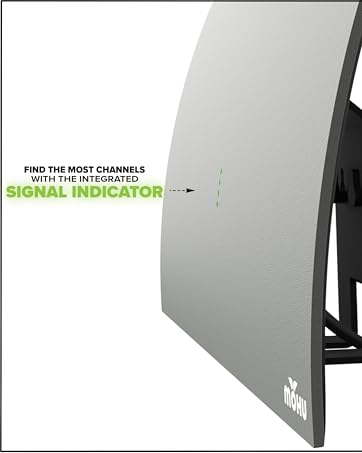
Image: A black Mohu Leaf 50 antenna mounted on a window, overlooking a city skyline, illustrating optimal placement for signal reception.
Korak 2: Spojite antenu
Connect the 12 ft. coaxial cable to the antenna's F-connector port.
Step 3: Connect the Jolt Switch Amplifier
Attach the other end of the coaxial cable to the Jolt Switch 18 dB in-line amplifier. Ovo amplifier boosts the signal for better reception.
Step 4: Power the Amplifier
Connect the USB cable from the Jolt Switch amplifier to a USB port on your television or to the included USB power adapter, then plug the adapter into a wall outlet.
Korak 5: Povežite se s televizorom
Povežite amplifier's coaxial output to the "Antenna In" or "Cable In" port on the back of your television.
Korak 6: Montirajte antenu
Position the antenna in the location identified in Step 1. The antenna can be mounted on a wall or window using the provided hook & loop tabs or push pins. Optimal placement is often near a window and as high as possible.

Image: A black Mohu Leaf 50 antenna is mounted on a light-colored wall to the right of a large flat-screen television, which is displaying a green screen with the Mohu logo.
Uputstvo za upotrebu
Skeniranje kanala
After connecting the antenna, you must perform a channel scan on your television to find available over-the-air broadcasts.
- Uključite televizor i odaberite ispravan ulazni izvor (obično "TV" ili "Antena").
- Navigate to your TV's "Settings" or "Setup" menu.
- Look for an option like "Channel Scan," "Auto Program," "Auto Tune," or "Antenna Setup."
- Select "Antenna" or "Air" as the signal source, not "Cable."
- Pokrenite skeniranje kanala. Ovaj proces može potrajati nekoliko minuta.
- Once the scan is complete, your TV will display the channels it found.
Za detaljne upute o skeniranju kanala pogledajte korisnički priručnik vašeg televizora.
Placement Tips for Optimal Reception
- Više je bolje: Place the antenna as high as possible, ideally on an upper floor or attic.
- Blizu prozora: Windows often provide the best line of sight to broadcast towers.
- Experiment with Orientation: Try different positions and orientations (flat on a wall, behind the TV, on a window) and re-scan for channels after each adjustment to find the best signal.
- Izbjegavajte prepreke: Large metal objects, concrete walls, and other electronic devices can interfere with the signal.
- Provjerite jačinu signala: Some TVs have a signal strength meter in their settings menu, which can help you fine-tune placement.
Rješavanje problema
Nisu pronađeni kanali ili slab prijem
- Re-scan for Channels: Always perform a channel scan after moving the antenna or if you experience reception issues.
- Provjerite veze: Provjerite da li su svi kablovi sigurno povezani sa antenom, ampuređaj za spašavanje i TV.
- Premještanje antene: Try moving the antenna to a different location, especially higher up or closer to a window. Re-scan after each move.
- Provjeri Ampsnaga dizalice: Verify that the Jolt Switch amplifier is powered (either via TV USB or wall adapter).
- Verify TV Input: Make sure your TV is set to the correct input (Antenna/Air).
- Vanjske smetnje: Large appliances, LED lights, or other electronic devices can cause interference. Try moving the antenna away from such sources.
- Vremenski uslovi: Neprimjereni vremenski uvjeti mogu privremeno utjecati na prijem signala.
Pixelated Picture or Audio Dropouts
- This often indicates a weak signal. Try repositioning the antenna and re-scanning for channels.
- Osigurajte amplifier is correctly connected and powered.
Nedostaju određeni kanali
- Some channels may broadcast from different directions. Try rotating the antenna slightly and performing another channel scan.
- Use an antenna locator app to confirm the direction of the missing channel's broadcast tower.
Specifikacije
| Feature | Detalj |
|---|---|
| Brand | Mohu |
| Broj modela | MH-110584 |
| Težina artikla | 9 unce |
| Dimenzije proizvoda | 0.04 x 11.5 x 10 inča |
| Boja | White, Black (Reversible) |
| Posebne karakteristike | Dual Band, Full HD, Low Profile, Multidirectional, Signal Booster, Wall Mount |
| Impedansa | 75 Ohm |
| Maksimalni domet | 60 milje |
| Antenna Type | Unutrašnja TV antena |
| Frekvencijska podrška | UHF, VHF |
| Amplifier | Jolt Switch 18 dB In-Line Amplifier |
| Dužina koaksijalnog kabla | 12 ft. |
Održavanje
- čišćenje: Wipe the antenna gently with a soft, dry cloth. Do not use harsh chemicals or abrasive cleaners.
- Održavanje kablova: Izbjegavajte uvijanje ili oštro savijanje koaksijalnog kabla, jer to može oštetiti unutrašnje ožičenje i uticati na kvalitet signala.
- Samo za unutrašnju upotrebu: This antenna is designed for indoor use. Exposure to outdoor elements can damage the unit and void the warranty.
Garancija i podrška
The Mohu Leaf 50 Amplified Indoor HDTV Antenna comes with a one-year manufacturer warranty. For warranty claims, technical support, or additional assistance, please visit the official Mohu webstranice ili kontaktirajte njihovu korisničku službu.
Official Mohu Webstranica: www.gomohu.com


