Uvod
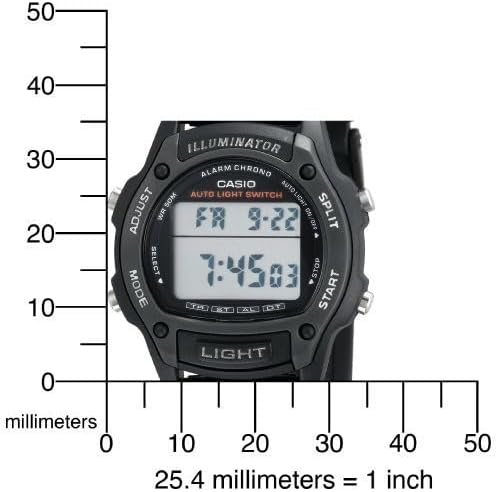
This manual provides detailed instructions for the setup, operation, maintenance, and troubleshooting of your Casio W93H-1AV Multifunction Sport Watch. Designed for durability and functionality, this digital watch is water-resistant and features a resin case, polyurethane band, and mineral dial window. It includes a digital display with day and date calendars, and a quartz movement for precise timekeeping.

Setup
Početno podešavanje vremena i datuma
- U načinu rada za mjerenje vremena, pritisnite i držite ADJUST dugme (gore lijevo) dok cifre sekundi ne počnu treptati. Ovo označava režim podešavanja.
- Pritisnite MODE dugme (dolje lijevo) za cikličko prebacivanje kroz postavke: Sekunde → Sat → Minute → Godina → Mjesec → Dan.
- Koristite START button (bottom right) to increase the flashing value. Use the PODIJELITI button (top right) to decrease the flashing value (for time and date settings).
- Nakon što su sve postavke podešene, pritisnite dugme ADJUST ponovo dugme da biste izašli iz režima podešavanja.
Format 12/24 sata
U načinu rada za mjerenje vremena pritisnite 12/24HR button (top left, labeled ADJUST) to toggle between 12-hour and 24-hour time formats.

Unboxing and Initial Overview
Video 1: Raspakivanje i početni prikazview of the Casio W93H-1AV watch, demonstrating its appearance and basic functions right out of the box.
Uputstvo za upotrebu
Navigacija načina rada
Pritisnite MODE button (bottom left) to cycle through the different modes: Timekeeping, Stopwatch, Alarm, and Dual Time.
Light Funkcija
Pritisnite LIGHT dugme (dolje u sredini) za osvjetljavanje ekrana radi lakšeg viewing in low-light conditions. The watch features an Auto EL Backlight with Afterglow.
Štoperica
- Idite na način rada štoperice pomoću MODE dugme.
- Pritisnite START (dolje desno) za početak mjerenja vremena.
- Pritisnite PODIJELITI (top right) to record lap times without stopping the main timer.
- Pritisnite START again to pause the timer. Press START nastaviti.
- Pritisnite ADJUST (gore lijevo) za resetiranje štoperice na nulu.
Alarm Mode
- Idite na način rada alarma pomoću MODE dugme.
- Pritisnite ADJUST dugme dok cifre vremena alarma ne zatrepću.
- Koristite MODE dugme za odabir između podešavanja sati i minuta.
- Koristite START dugme za podešavanje vremena alarma.
- Pritisnite ADJUST da potvrdite i izađete.
- Pritisnite START to toggle the alarm on/off. An alarm indicator will appear on the display when active.
Dvostruki način rada
This mode allows you to keep track of a second time zone. Navigate to the Dual Time Mode using the MODE dugme. Pritisnite i držite ADJUST to enter setting mode, then use START i MODE da biste postavili drugu vremensku zonu.
Održavanje
Zamjena baterije
The Casio W93H-1AV uses one Lithium Metal battery (CR1616). To replace the battery, carefully remove the four screws on the stainless steel back cover using a small screwdriver. Replace the battery, ensuring correct polarity, and then reattach the back cover securely. It is recommended to have the water resistance seal checked by a professional after battery replacement to maintain its integrity.
Vodootporna njega
This watch is water resistant to 165 feet (50 meters). This means it is suitable for short periods of recreational swimming, but not for diving or snorkeling. Avoid operating buttons while the watch is wet or submerged to prevent water intrusion.
Čišćenje
Redovno čistite sat mekom, suhom krpom. Za tvrdokornu prljavštinu, laganoamp cloth can be used, followed by drying. Avoid using harsh chemicals or abrasive cleaners.
Rješavanje problema
- Ekran je prazan ili taman: The battery may be low or depleted. Refer to the "Battery Replacement" section.
- Vrijeme je netačno: Ensure the time and date settings are correctly configured as per the "Initial Time and Date Setting" section. Check if the 12/24 hour format is set as desired.
- Light function not working: This could indicate a low battery. If the battery has been recently replaced and the issue persists, contact customer support.
- Dugmad ne reagiraju: Ensure the watch is not in a locked mode (if applicable, though this model does not feature a lock). If the watch is wet, dry it thoroughly before attempting to use buttons. If the issue persists, a reset may be necessary.
- To perform a full reset: In some cases, removing and reinserting the battery can perform a hard reset. Note that this will erase all settings, and you will need to reconfigure the time and date.
Specifikacije
| Feature | Specifikacija |
|---|---|
| Broj modela | W93H-1AV (930102) |
| Display Type | Digital |
| Pokret | Japanski kvarc |
| Otpornost na vodu | 165 stopa (50 metara) |
| Materijal kućišta | Smola |
| Band Material | Smola |
| Vrsta baterije | 1 litijum metalna baterija (CR1616) |
| Prečnik kućišta | 36 milimetara |
| Case Thickness | 10 milimetara |
| Težina artikla | 95 grama |

Garancija i podrška
Garancija proizvođača
This Casio watch is covered by a manufacturer's warranty. Please refer to the warranty card included with your purchase for specific terms, conditions, and duration. Keep your proof of purchase for warranty claims.
Korisnička podrška
Za dodatnu pomoć, tehničku podršku ili upite o servisiranju, posjetite službenu Casio stranicu webweb-mjesto ili kontaktirajte njihov odjel za korisničku podršku. Također možete posjetiti Casio trgovina na Amazonu za informacije o proizvodu i resurse.
Casio Brand Overview
Video 2: A brief brand video from Casio, highlighting their commitment to innovation and quality in timepieces.


