ভূমিকা
This manual provides detailed instructions for the setup, operation, and maintenance of your Zebronic ZEB-250JP USB Vibration Game Pad. Please read this manual carefully before using the product to ensure proper functionality and longevity.
পণ্য বৈশিষ্ট্য
- Dual vibration and shock function for immersive gaming.
- Ergonomic slip-proof handle design for comfortable grip.
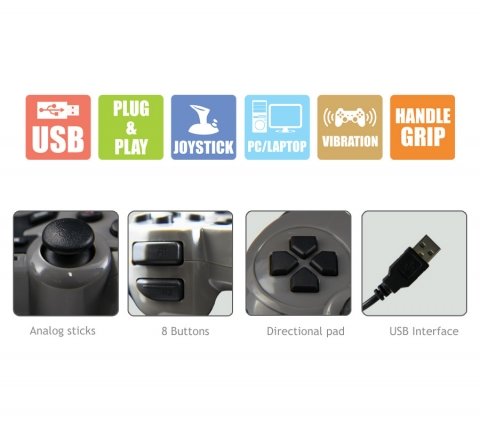
- Equipped with a directional pad, 8 fire buttons, and 2 analog sticks.
- Compatible with Windows XP, Vista, and Windows 7 operating systems.
- Supports both digital and analog modes.
প্যাকেজ বিষয়বস্তু
- Zebronic ZEB-250JP Game Pad
- Installation CD (for drivers, if required)
সেটআপ নির্দেশাবলী
- Connect the Game Pad: Locate an available USB port on your computer (Desktop or Laptop). Insert the USB connector of the ZEB-250JP Game Pad into the USB port. The device is designed for plug-and-play functionality.
- ড্রাইভার ইনস্টলেশন: For optimal performance, especially on older operating systems like Windows XP or Vista, it is recommended to install the drivers from the provided installation CD. Insert the CD into your computer's optical drive and follow the on-screen instructions. For Windows 7 and newer, drivers may install automatically.
- সিস্টেম সামঞ্জস্যতা: Ensure your computer is running a compatible operating system (Windows XP, Vista, Windows 7).
অপারেটিং নির্দেশাবলী
নিয়ন্ত্রণ শেষview
- দিকনির্দেশক প্যাড (ডি-প্যাড): Used for directional movement or menu navigation.
- অ্যানালগ স্টিক: Two analog sticks provide 360-degree movement for finer control in games.
- Fire Buttons (8 buttons): ইন-গেম কমান্ডের জন্য অ্যাকশন বোতাম।
- কম্পন ফাংশন: The game pad features dual vibration motors that provide tactile feedback during gameplay, enhancing immersion. This function is automatically activated by compatible games.
মোড নির্বাচন
The game pad supports both digital and analog modes. The mode can typically be switched using a dedicated button on the game pad (often labeled 'Mode' or 'Analog') or is automatically detected by the game. Refer to your game's settings for specific controller configurations.
রক্ষণাবেক্ষণ
- Keep the game pad clean by wiping it with a soft, dry cloth.
- ডিভাইসটিকে চরম তাপমাত্রা, সরাসরি সূর্যালোক বা আর্দ্রতার সংস্পর্শে আনা এড়িয়ে চলুন।
- কঠোর রাসায়নিক বা ঘর্ষণকারী ক্লিনার ব্যবহার করবেন না।
- Store the game pad in a safe place when not in use to prevent damage to the cable or buttons.
সমস্যা সমাধান
- Game Pad Not Detected:
- Ensure the USB cable is securely connected to both the game pad and the computer.
- Try connecting the game pad to a different USB port.
- আপনার কম্পিউটার পুনরায় চালু করুন.
- Verify that the necessary drivers are installed from the provided CD or through Windows Update.
- কম্পন ফাংশন কাজ করছে না:
- নিশ্চিত করুন যে আপনি যে গেমটি খেলছেন তা ভাইব্রেশন ফিডব্যাক সমর্থন করে।
- কম্পন সক্রিয় আছে কিনা তা নিশ্চিত করতে গেমের সেটিংস পরীক্ষা করুন।
- ড্রাইভারগুলি সঠিকভাবে ইনস্টল করা আছে কিনা তা নিশ্চিত করুন।
- Buttons or Analog Sticks Unresponsive:
- Test the game pad on another computer or in a different game to isolate the issue.
- Ensure the game pad is in the correct mode (digital/analog) for the game.
- ডিভাইস ড্রাইভারগুলি পুনরায় ইনস্টল করুন।
স্পেসিফিকেশন
| ব্র্যান্ড | জেব্রোনিকস |
| মডেল | ZEB-250JP |
| সংযোগ প্রযুক্তি | ইউএসবি |
| কন্ট্রোলার টাইপ | গেমপ্যাড |
| সামঞ্জস্যপূর্ণ ডিভাইস | Windows (Desktop, Laptop) |
| অপারেটিং সিস্টেম সমর্থন | উইন্ডোজ এক্সপি, ভিস্তা, উইন্ডোজ ৭ |
| বিশেষ বৈশিষ্ট্য | Handle Grip, Joystick, Plug and Play, Vibration |
| পণ্যের মাত্রা | 24.1 x 18.3 x 6.4 সেমি |
| আইটেম ওজন | 290 গ্রাম |
ওয়ারেন্টি তথ্য
This product is covered by a standard manufacturer's warranty. Please refer to the warranty card included in your package or contact Zebronic's customer support for specific warranty terms and conditions. Keep your purchase receipt as proof of purchase.
সমর্থন
For further assistance, technical support, or service inquiries, please visit the official Zebronics webওয়েবসাইট অথবা তাদের গ্রাহক পরিষেবা বিভাগের সাথে যোগাযোগ করুন। আপনি আরও তথ্য এবং যোগাযোগের বিবরণ পেতে পারেন Zebronics Store on Amazon.