ভূমিকা
This manual provides instructions for the installation, operation, and maintenance of your AOPEN AGP 32MB Video Card, model TNT2 M64-AGP 9005210874. This video card is designed to provide graphics output for compatible computer systems, utilizing the NVIDIA Riva TNT2 M64 chipset and 32MB of SDRAM.
নিরাপত্তা তথ্য
Please read and follow these safety guidelines to prevent damage to the product or injury to yourself.
- Always power off and unplug your computer from the electrical outlet before installing or removing any internal components.
- Discharge static electricity from your body by touching a grounded metal object (such as the computer chassis) before handling the video card.
- Handle the video card by its edges to avoid touching sensitive electronic components.
- Keep the video card away from moisture, dust, and extreme temperatures.
প্যাকেজ বিষয়বস্তু
আপনার প্যাকেজে নিম্নলিখিত জিনিসটি অন্তর্ভুক্ত আছে কিনা তা নিশ্চিত করুন:
- AOPEN AGP 32MB Video Card (Model: TNT2 M64-AGP 900510874)
সেটআপ এবং ইনস্টলেশন
1. হার্ডওয়্যার ইনস্টলেশন
- Power off your computer and disconnect all power cables and peripherals.
- মাদারবোর্ড অ্যাক্সেস করতে কম্পিউটার কেস খুলুন।
- Locate an available AGP slot on your motherboard. This slot is typically brown and distinct from PCI slots.
- Carefully insert the AOPEN AGP 32MB Video Card into the AGP slot, ensuring it is fully seated. Apply even pressure until the card clicks into place or is firmly secured.
- Secure the video card to the computer chassis using a screw or the case's retention clip.
- Close the computer case and reconnect all power cables and peripherals.
- Connect your monitor to the VGA port (15-pin HD D-Sub HD-15) on the video card.
2। ড্রাইভার ইনস্টলেশন
After hardware installation, power on your computer. The operating system may automatically detect the new hardware and attempt to install generic drivers.
To ensure optimal performance and access to all features, install the appropriate display drivers. These drivers were typically provided on a CD with the video card at the time of purchase or can be downloaded from the AOPEN support website (if available). Follow the on-screen instructions provided by the driver installation utility.
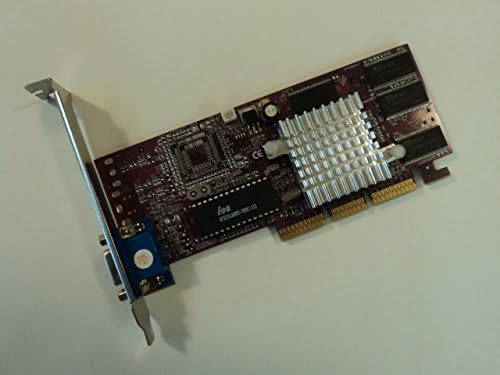
একটি ওভারহেড view of the AOPEN AGP 32MB Video Card. The card features a purple circuit board, a silver heatsink over the main chip, and gold-plated AGP connectors. A blue VGA port is visible on the left side.
অপারেটিং নির্দেশাবলী
Once the AOPEN AGP 32MB Video Card is correctly installed and its drivers are configured, your computer will automatically utilize it to render graphics and display output on your connected monitor. No specific user interaction is required for the card's basic operation beyond system startup and shutdown. The card functions as the primary display adapter for your system.
রক্ষণাবেক্ষণ
Proper maintenance helps ensure the longevity and performance of your video card.
- ধুলো অপসারণ: Periodically clean the interior of your computer case to prevent dust buildup on the video card's heatsink and components. Dust can impede airflow and lead to overheating. Use compressed air for this purpose, ensuring the system is powered off.
- পরিবেশগত অবস্থা: Operate your computer in a well-ventilated area with stable room temperature. Avoid exposing the system to excessive heat or humidity.
সমস্যা সমাধান
If you encounter issues with your AOPEN AGP 32MB Video Card, refer to the following common troubleshooting steps.
কোন ডিসপ্লে আউটপুট নেই
- Verify that the monitor is correctly connected to the video card's VGA port.
- নিশ্চিত করুন যে মনিটরটি চালু আছে এবং সঠিক ইনপুট উৎসে সেট করা আছে।
- Confirm the video card is fully seated in the AGP slot. Re-seat the card if necessary.
- Check if the computer's power supply is functioning correctly and providing adequate power to the system.
Display Artifacts or Incorrect Colors
- Reinstall the display drivers. Ensure you are using the correct drivers for your operating system and video card model.
- Check for any physical damage to the video card or its connectors.
- Ensure the monitor cable is securely connected and not damaged. Try a different monitor cable if available.
স্পেসিফিকেশন
| বৈশিষ্ট্য | বিস্তারিত |
|---|---|
| ব্র্যান্ড | AOPEN |
| মডেল নম্বর | TNT2 M64-AGP 9005210874 |
| চিপসেট | NVIDIA Riva TNT2 M64 |
| স্মৃতি | 32MB SDRAM |
| ইন্টারফেস | এজিপি |
| ভিডিও আউটপুট | 1 x VGA (15-pin HD D-Sub HD-15) |
| পণ্যের মাত্রা | 6.25 x 4.75 x 1 ইঞ্চি |
| আইটেম ওজন | ১.৬২ আউন্স (০.১ পাউন্ড) |
| সামঞ্জস্যপূর্ণ ডিভাইস | ডেস্কটপ কম্পিউটার |
| উৎপাদনের দেশ | চীন |
| ইউপিসি | 750519068144 |
ওয়্যারেন্টি এবং সমর্থন
For warranty information and technical support regarding your AOPEN AGP 32MB Video Card, please refer to the documentation provided with your original purchase. You may also visit the official AOPEN website for updated support resources, drivers, and contact information.
You can visit the AOPEN store for more information: AOPEN Store.


