1. Въведение
This manual provides essential information for the safe and efficient operation of your VIZIO 50-inch 4K UHD LED Smart TV, model V4K50C-08. Please read this manual thoroughly before using your television and retain it for future reference.
The VIZIO V4K50C-08 Smart TV delivers vivid 4K picture quality with Dolby Vision HDR, enhancing detail, contrast, and color. It features WiFi 6 for faster streaming and gaming, and built-in VIZIO Home for instant access to applications, free channels, and on-demand titles.

Изображение 1.1: Предна част view of the VIZIO 50-inch 4K UHD LED Smart TV.
2. Информация за безопасност
Винаги спазвайте основните предпазни мерки, когато използвате този телевизор, за да намалите риска от пожар, токов удар и нараняване. Дръжте това ръководство под ръка за справка.
- Не излагайте този уред на дъжд или влага.
- Не блокирайте вентилационните отвори. Монтирайте в съответствие с инструкциите на производителя.
- Не инсталирайте в близост до източници на топлина като радиатори, отоплителни уреди, печки или други уреди (включително amplifiers), които произвеждат топлина.
- Пазете захранващия кабел от настъпване или прищипване, особено при щепселите, удобните контакти и точката, където излизат от устройството.
- Използвайте само приставки/аксесоари, посочени от производителя.
- Отнесете всички услуги към квалифициран сервизен персонал.
3. Какво има в кутията
Your VIZIO 50-inch 4K UHD LED Smart TV package includes the following items:
- VIZIO 50-inch 4K UHD LED Smart TV
- Гласово дистанционно
- 2 батерии AAA (за дистанционното)
- Захранващ кабел
- ТВ стойка (2 броя)

Image 3.1: Included components and TV dimensions.
4. Настройка
4.1 Прикрепване на стойката
- Carefully place the TV face-down on a soft, clean surface to prevent damage.
- Подравнете всяка част от стойката със съответните слотове в долната част на телевизора.
- Закрепете всяка част от стойката с предоставените винтове. Уверете се, че са здраво затегнати.
4.2 Свързване на периферни устройства
Connect your external devices to the appropriate ports on the back or side of your VIZIO TV.
- HDMI: For high-definition video and audio devices (e.g., Blu-ray players, gaming consoles). Your TV features multiple HDMI ports, including HDMI 1 (eARC) for enhanced audio return channel functionality.
- USB: За свързване на USB устройства за съхранение.
- Антена: For connecting an over-the-air antenna.
- Audio Out Optical (S/PDIF): За свързване към саундбар или аудио приемник.
- Ethernet: За кабелна мрежова връзка.
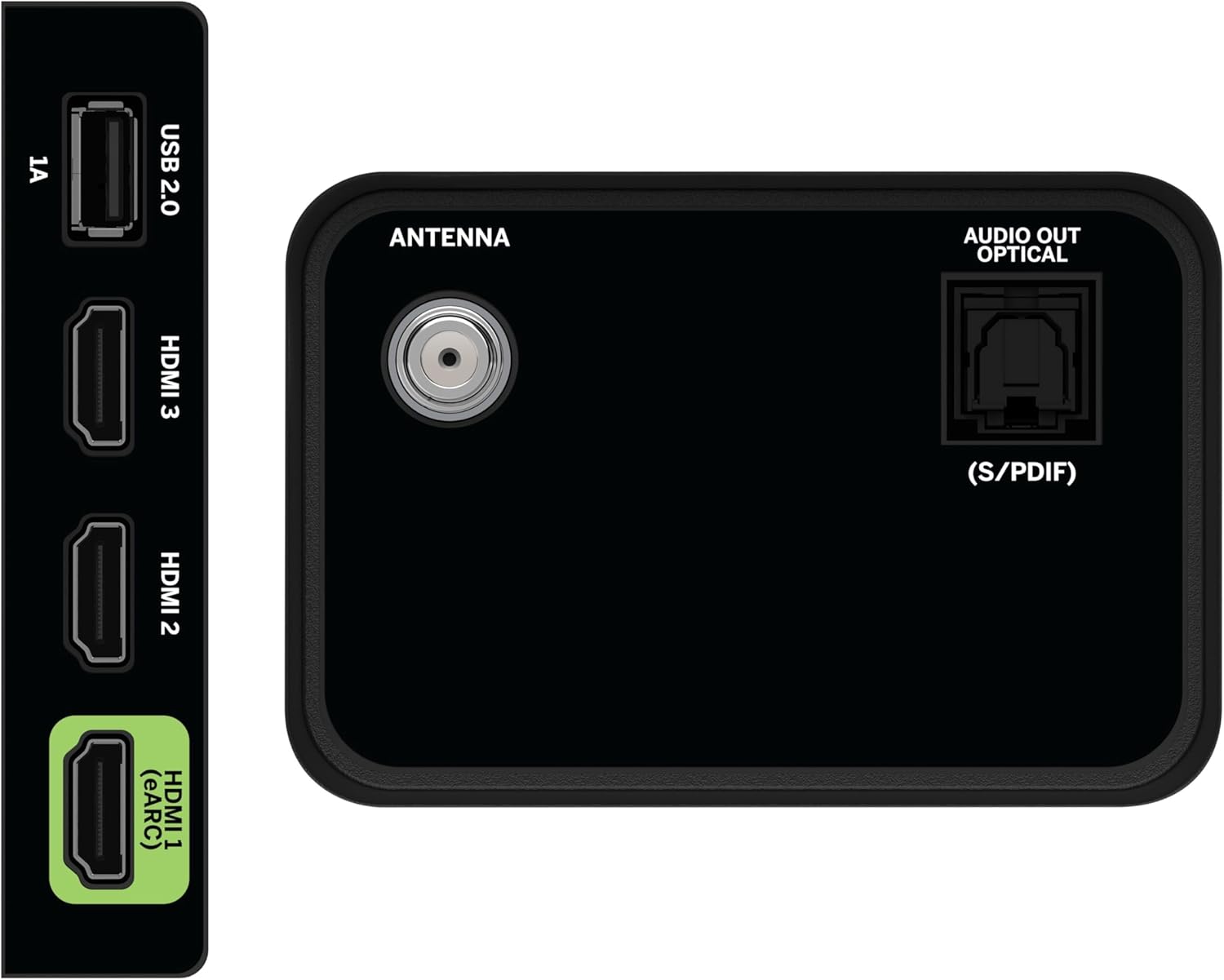
Image 4.1: Rear and side input/output ports.
4.3 Първоначално включване и мрежова връзка
- Включете захранващия кабел в телевизора и след това в контакта.
- Натиснете бутона за захранване на дистанционното управление или на телевизора.
- Follow the on-screen prompts to select your language, country, and connect to your Wi-Fi network (WiFi 6 supported for faster performance).
4.4 VIZIO Account Setup
A VIZIO Account is required for Smart TV functionality and product updates. Follow the on-screen instructions to create or log in to your VIZIO Account. This allows access to VIZIO Home, app subscriptions, and free channels.

Image 4.2: VIZIO Account setup via mobile device.
5. Работа с вашия телевизор
5.1 Дистанционно управлениеview
The included Voice Remote provides intuitive control over your TV. It features dedicated buttons for popular streaming apps and voice assistance integration.
- вход: Превключване между свързани устройства.
- мощност: Включете/изключете телевизора.
- Навигационна подложка: Use the directional buttons and OK button to navigate menus.
- Начало: Access the VIZIO Home screen.
- WatchFree+: Direct access to VIZIO's free streaming service.
- Бутон за глас: Активиране на гласови команди.
- Сила на звука/Канал: Регулиране на силата на звука и смяна на каналите.
- Преки пътища за приложения: Quick access to pre-installed streaming applications.

Image 5.1: VIZIO Voice Remote and mobile app functionality.
5.2 Navigating VIZIO Home
The VIZIO Home screen is your central hub for all entertainment. It provides quick access to:
- Приложения и входни данни: Browse and launch your favorite streaming apps (Netflix, Prime Video, Hulu, Disney+, etc.) and switch between connected inputs.
- Телевизия на живо: Access hundreds of free channels and thousands of free On Demand titles with the built-in WatchFree+ app.
- Trending Now: Discover popular movies and shows.

Image 5.2: The VIZIO Home screen, your destination for easy streaming.
5.3 Настройки на картината
Your VIZIO TV features Dolby Vision HDR, HDR10+, HDR10, and HLG for a true-to-life picture with a wider range of color and detail. Adjust picture modes (e.g., Calibrated, Vivid, Game) in the settings menu to optimize your viewопит.

Image 5.3: Breathtaking details for a crystal-clear 4K picture with Dolby Vision.
5.4 Аудио настройки
Experience immersive sound with DTS Virtual:X setting. You can also connect Bluetooth headphones for private listening.

Image 5.4: Pair your wireless Bluetooth headphones for uninterrupted audio.
5.5 Интелигентни функции
The VIZIO Smart TV supports Apple AirPlay and Google Cast Built-in, allowing you to stream content directly from your compatible devices. WiFi 6 ensures better streaming and gaming performance in a congested smart home environment.
5.6 Функции за игри
For gamers, the TV offers Dolby Vision HDR Gaming for enhanced in-game color. When a console or PC is detected, Auto Low Latency Mode is automatically enabled to reduce input lag.

Image 5.5: Venture into game realism with Dolby Vision HDR.
6. Поддръжка
6.1 Почистване на вашия телевизор
- Винаги изключвайте телевизора от контакта преди почистване.
- Използвайте мека кърпа без власинки, за да избършете внимателно екрана и корпуса.
- Do not use liquid or aerosol cleaners directly on the TV.
6.2 Софтуерни актуализации
Your VIZIO TV will automatically receive software updates when connected to the internet. Ensure your TV is connected to a network for optimal performance and access to the latest features.
7. Отстраняване на проблеми
If you encounter issues with your VIZIO TV, try the following common solutions:
- Без захранване: Уверете се, че захранващият кабел е здраво свързан както към телевизора, така и към контакта. Опитайте с друг контакт.
- Няма картина/звук: Check all cable connections (HDMI, audio). Ensure the correct input source is selected.
- Дистанционното не работи: Сменете батериите. Уверете се, че няма препятствия между дистанционното и телевизора.
- Проблеми с мрежовата връзка: Restart your router and modem. Reconnect the TV to the Wi-Fi network via the settings menu.
- Лошо качество на картината: Check the source content resolution. Adjust picture settings in the TV menu.
For further assistance, refer to the VIZIO support webсайт или се свържете с отдела за обслужване на клиенти.
8. Спецификации
| Характеристика | Спецификация |
|---|---|
| Марка | ВИЗИО |
| Номер на модела | V4K50C-08 |
| Размер на екрана | 50 инча |
| Технология на дисплея | LED |
| Резолюция | 4K UHD |
| Поддръжка на HDR | Dolby Vision HDR, HDR10+, HDR10, HLG |
| Честота на опресняване | HDMI VRR |
| Технология за свързване | Bluetooth, HDMI, Wi-Fi (WiFi 6) |
| Специални функции | Apple AirPlay, Bluetooth Headphone compatibility, Built-in apps with VIZIO Home, Closed Captioning, Google Chromecast, Sleep Timer, Voice Assistance Integration, Voice Remote |
| Размери на продукта | 9.68" Д x 43.69" Ш x 27.57" В |
| Тегло на артикула | 28.4 паунда |
| Съотношение на страните | 16:9 |
9. Гаранция и поддръжка
For warranty information and customer support, please visit the official VIZIO website or refer to the warranty card included with your product. VIZIO provides award-winning customer support to assist with any questions or issues you may have.