1. Въведение
This manual provides essential information and instructions for operating your Sony ZV-E10 II Mirrorless Vlogging Camera Kit with the 16-50mm OSS Lens. Designed for content creators and vloggers, this camera combines a 26 MP APS-C sensor with advanced features for high-quality video and stills. Please read this manual thoroughly before using the camera to ensure proper and safe operation.
2. Какво има в кутията
Your Sony ZV-E10 II kit includes the following items:
- Sony Alpha ZV-E10 II Mirrorless Camera (Black)
- Sony E PZ 16-50mm f/3.5-5.6 OSS II Lens
- Акумулаторна литиево-йонна батерия Sony NP-FZ100 (2280 mAh)
- Капачка за тяло на Sony ALC-B1EM за фотоапарати с E-байонет
- Презрамка
- Вятърен екран
- 64GB карта с памет
- Мека чанта
- Четец на карти памет
- Микро HDMI кабел
- 12-инчов гъвкав статив
- Каишка за ръка
- Портфейл с карта с памет
- Комплект за почистване
3. Продуктът свършиview
The Sony ZV-E10 II is a compact and lightweight mirrorless camera designed for ease of use and high-quality content creation. It features a 26 MP APS-C Exmor R CMOS sensor and a BIONZ XR processor for stunning image and video performance.

Фигура 3.1: Отпред view of the Sony ZV-E10 II camera with the 16-50mm lens and an external microphone attached.
Ключови компоненти:
- Монтаж на обектива: E-mount for interchangeable lenses.
- LCD екран с променлив ъгъл: A 3-inch touchscreen that can be articulated for flexible framing, especially useful for vlogging.
- Вграден микрофон: Features a 3-capsule microphone with an included windscreen for clear audio.
- Многоинтерфейсен чехъл: Allows attachment of external accessories like microphones and lights.
- Control Buttons and Dials: Ergonomically placed for intuitive operation.

Фигура 3.2: Задна част view of the Sony ZV-E10 II camera, showing the fully articulating LCD touchscreen and control buttons.

Фигура 3.3: Отгоре view of the Sony ZV-E10 II camera, highlighting the power switch, shutter button, and mode dial.
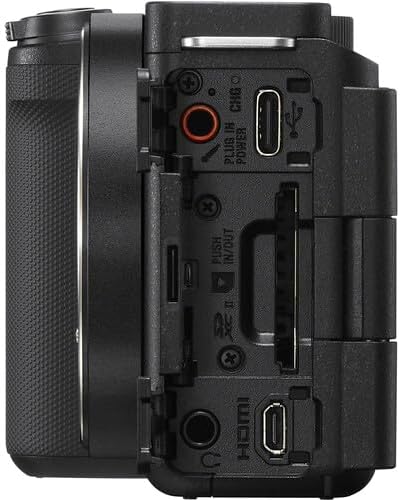
Фигура 3.4: Страна view of the Sony ZV-E10 II camera, displaying the various ports including USB-C, HDMI, and microphone/headphone jacks.
4. Настройка
4.1. Поставяне на батерията и картата с памет
- Open the battery/memory card cover located at the bottom of the camera.
- Insert the NP-FZ100 battery with the arrow pointing into the camera until it locks into place.
- Insert the memory card (SD card) into the slot with the contacts facing the correct direction until it clicks.
- Затворете здраво капака.

Фигура 4.1: Отдолу view of the camera with the battery and memory card compartment open.
4.2. Поставяне на обектива
- Свалете капачката на тялото от фотоапарата и задната капачка на обектива от обектива.
- Подравнете белия индексен знак на обектива с белия индексен знак на тялото на фотоапарата.
- Монтирайте обектива, като го завъртите по посока на часовниковата стрелка, докато щракне на мястото си.

Фигура 4.2: Отпред view of the camera body with the lens removed, showing the E-mount sensor.
5. Работа с камерата
5.1. Включване/изключване
To turn the camera on or off, slide the ВКЛ./ИЗКЛ switch located on the top plate.
5.2. Основни режими на снимане
The camera offers various shooting modes accessible via the mode dial or menu. Common modes include:
- Интелигентен автоматичен режим: Автоматично разпознава сцената и настройва настройките.
- Програма Автоматично (P): Фотоапаратът задава блендата и скоростта на затвора, докато вие контролирате другите настройки.
- Приоритет на блендата (A): Вие задавате блендата, камерата задава скоростта на затвора.
- Приоритет на затвора (S): Вие задавате скоростта на затвора, камерата задава блендата.
- Ръчно (M): Пълен контрол върху блендата и скоростта на затвора.
- Режим на филм: Специален режим за видеозапис.
5.3. Система за автофокус
The ZV-E10 II features an advanced autofocus system with 759 phase-detection points and Real-Time Eye AF for both humans and animals, ensuring sharp focus on your subjects during photos and videos.
- Проследяване в реално време: Изберете обект на екрана и камерата ще следи непрекъснато движението му.
- Touch Focus: Tap on the LCD screen to set the focus point.
6. Разширени функции
6.1. Product Showcase Setting
This mode is ideal for product reviews. When activated, the camera automatically shifts focus from your face to a product held up to the lens, then back to your face when the product is removed.
6.2. Background Defocus
Achieve a professional-looking blurred background (bokeh) with a single button press. This feature is perfect for isolating your subject and adding a cinematic touch to your content.
6.3. Cinematic Vlog Setting
This setting optimizes video capture for a cinematic look by automatically adjusting frame rate to 24fps and adding black letterbox bars. You can also choose from various "Looks" (e.g., Clean, Chic, Fresh) and "Moods" (e.g., Auto, Gold, Ocean, Forest) to customize the aesthetic.
Video 6.1: This video demonstrates the Cinematic Vlog Setting, showcasing how it locks the frame rate to 24fps, adds letterbox bars, and allows selection of various "Looks" and "Moods" for a cinematic video aesthetic (from 8:57 to 9:30 in the comparison video).
6.4. Creative Looks and S-Cinetone
The camera offers 10 Creative Look presets (e.g., FL, IN, SH, VV2) that allow you to fine-tune saturation, contrast, sharpness, and clarity directly in-camera. Additionally, the S-Cinetone picture profile (PP11) provides a cinematic look optimized for skin tones without extensive post-production grading.
6.5. In-Camera Time-lapse
Create stunning time-lapse videos directly within the camera without needing external intervalometers or complex software. You can set the frame rate and interval time to capture dynamic scenes like moving clouds or changing light conditions.
Video 6.2: This video demonstrates the in-camera time-lapse feature, showing how to access settings for frame rate and interval time to create time-lapse sequences (from 5:16 to 5:34 in the comparison video).
7. Аудио функции
7.1. Internal Microphone and Directivity
The ZV-E10 II features an improved internal 3-capsule microphone with adjustable directivity. You can select between Отпред, Задна, или Всички посоки to optimize audio pickup based on your shooting scenario, effectively isolating your voice from ambient noise.
7.2. Multi-Interface Shoe for External Microphones
For enhanced audio quality, the camera's Multi-Interface (MI) Shoe allows for direct digital audio input from compatible Sony microphones (e.g., Sony ECM-M1) without the need for additional cables. This provides a clean, high-quality audio signal.
Video 7.1: This video illustrates the audio capabilities of the Sony ZV-E10 II, including the internal microphone's directivity settings (Front, Rear, All Directions) and the use of the Multi-Interface Shoe for external microphones like the Sony ECM-M1 (from 11:41 to 14:17 in the comparison video).
8. Стабилизация на изображението
The ZV-E10 II incorporates Optical SteadyShot image stabilization, particularly effective with the bundled 16-50mm OSS lens. This feature helps to reduce camera shake, resulting in smoother and more stable footagд, особено при снимане от ръка.
Video 8.1: This video compares the image stabilization performance between the original Sony ZV-E10 and the ZV-E10 II, demonstrating the improved stability of the newer model's Active SteadyShot (from 14:18 to 15:10 in the comparison video).
9. Поддръжка
9.1. Почистване на камерата и обектива
- Използвайте мека кърпа без власинки, за да почистите корпуса на фотоапарата.
- For the lens, use a lens brush to remove dust, then a lens cleaning solution and a microfiber cloth. Avoid touching the lens surface with your fingers.
- Never use organic solvents such as alcohol, benzene, or thinner to clean the camera.
9.2. Грижа за батерията
- Заредете батерията напълно преди първата употреба.
- Съхранявайте батериите на хладно и сухо място, когато не ги използвате.
- Избягвайте излагането на батерията на екстремни температури.
10. Отстраняване на проблеми
Ако срещнете проблеми с фотоапарата си, вижте следните често срещани решения:
- Камерата не се включва: Уверете се, че батерията е напълно заредена и правилно поставена.
- Батерията не се зарежда: Check the charging cable and adapter. If the charging indicator light is yellow, it may indicate a fault with the battery or charging system. Try a different charging cable or contact support.
- Изображенията са размазани: Check focus settings (autofocus mode, focus area). Ensure the lens is clean and properly attached.
- Записът на видео спира неочаквано: Ensure the memory card has sufficient space and is of a high-speed class suitable for 4K recording. Check battery level.
- Menu navigation issues: The ZV-E10 II features an updated, fully touchscreen-enabled menu. Ensure touch operation is enabled in settings if you prefer it.
For more detailed troubleshooting, please visit the Sony support webсайт или се свържете с отдела за обслужване на клиенти.
11. Спецификации
| Характеристика | детайл |
|---|---|
| Размери на продукта | 1.8 x 4.5 x 2.5 инча |
| Тегло на артикула | 4.4 паунда |
| ASIN | B0DFJTWDK6 |
| Номер на модела на артикула | ZVE10M2KB |
| Батерии | 1 нестандартна батерия (включена) |
| Дата на първа наличност | 28 август 2024 г |
| производител | Sony |
| Съвместими монтажи | Sony E |
| Съотношение на страните | 4:3 |
| Технология на фотосензора | BSI CMOS |
| Поддържа се File формат | JPEG, MP4 |
| Стабилизация на изображението | Хибрид |
| Максимално фокусно разстояние | 50 милиметра |
| Марка | Sony |
| Име на модела | ZVE10M2KB |
| Максимум Webкамера Резолюция на изображението | 26 MP |
| Размер на фото сензора | 23.6 х 15.6 мм |
12. Гаранция и поддръжка
Your Sony ZV-E10 II camera is covered by a manufacturer's warranty. For specific warranty terms and conditions, please refer to the documentation included with your product or visit the official Sony support webсайт.
For technical support, product registration, or service inquiries, please contact Sony Customer Support through their official channels.


