1. Въведение
This manual provides essential information for the safe and efficient operation of your HYUNDAI Smart TV 42-inch Full HD. Please read this manual thoroughly before using the television and retain it for future reference. This television features a 42-inch Full HD (1920x1080p) display, VIDAA operating system, and integrated smart applications such as Netflix, YouTube, and Prime Video. It also supports Screencast functionality for content sharing from mobile devices.
2. Информация за безопасност
Always follow basic safety precautions when using this television to reduce the risk of fire, electric shock, and injury. Ensure the television is placed on a stable surface. Do not block ventilation openings. Avoid exposing the television to rain or moisture. Disconnect the power cord during lightning storms or when unused for long periods. Refer to the full safety guidelines in the included safety sheet.
3. Настройка
3.1 Разопаковане и монтаж на стойката
Carefully remove the television from its packaging. Attach the included stands to the bottom of the television using the provided screws. Ensure the stands are securely fastened before placing the TV upright.

Отпред view of the HYUNDAI 42-inch Smart TV with its stand, displaying the VIDAA smart interface.
3.2 Свързване на външни устройства
Your television is equipped with multiple ports for connecting various devices:
- HDMI портове (3x): Свържете Blu-ray плейъри, игрови конзоли или цифрови приемници.
- USB портове (2x): Свържете USB устройства за съхранение за възпроизвеждане на мултимедия.
- CI+ слот: Insert a CI+ module for encrypted digital channels.
- RJ45 (Етернет): Свържете се с домашната си мрежа за достъп до интернет.
- Оптичен изход: Свържете се с външна аудио система.
- Изход за слушалки: Свържете слушалки за лично слушане.

отстрани view of the HYUNDAI 42-inch Smart TV, showing various input and output ports including HDMI and USB.
3.3 Съветник за първоначална настройка
Upon first power-on, the TV will guide you through an initial setup process. This includes selecting your language, connecting to a Wi-Fi network, and scanning for available channels.
4. Работещи
4.1 Основни функции на телевизора
- мощност: Натиснете бутона за захранване на дистанционното управление, за да включите или изключите телевизора.
- Обем: Използвайте бутоните VOL +/-, за да регулирате нивото на звука.
- Канали: Use the CH +/- buttons to change channels or the number buttons for direct channel selection.
- Входен източник: Press the SOURCE button to select between HDMI, USB, TV, and other inputs.
4.2 Функции на Smart TV (VIDAA OS)
Your HYUNDAI Smart TV runs on the VIDAA operating system, providing access to a variety of applications and features.

The HYUNDAI Smart TV displaying the VIDAA smart interface with various streaming app icons like Netflix, YouTube, Prime Video, and Disney+.
- Предварително инсталирани приложения: Access popular streaming services like Netflix, YouTube, and Prime Video directly from the home screen.
- App Store: Explore and download additional applications from the VIDAA App Store.
- Екранна програма: Use the Screencast feature to mirror content from your compatible smartphone or tablet to the TV screen.

A smartphone displaying a city skyline next to the HYUNDAI Smart TV, which is mirroring the same image, illustrating the Screencast feature.
5. Поддръжка
5.1 Почистване на телевизора
Before cleaning, unplug the power cord from the wall outlet. Use a soft, dry cloth to wipe the screen and cabinet. For stubborn marks, lightly dampen the cloth with water or a mild, non-abrasive cleaner specifically designed for electronics. Never spray liquid directly onto the screen or cabinet.
5.2 Софтуерни актуализации
Телевизорът може да получава актуализации на софтуера, за да подобри производителността и да добави нови функции. Уверете се, че телевизорът ви е свързан с интернет, за да получава автоматични актуализации. Можете също да проверите за актуализации ръчно чрез менюто с настройки на телевизора.
6. Отстраняване на проблеми
Ако срещнете проблеми с телевизора си, вижте следните често срещани решения:
- Без захранване: Check if the power cord is securely plugged into both the TV and the wall outlet. Ensure the power outlet is functional.
- Няма картина/звук: Verify the correct input source is selected. Check all cable connections (HDMI, antenna). Try another channel or input device.
- Няма интернет връзка: Ensure your Wi-Fi router is on and functioning. Reconnect to the Wi-Fi network in the TV settings. For wired connections, check the Ethernet cable.
- Дистанционното управление не работи: Сменете батериите в дистанционното управление. Уверете се, че няма препятствия между дистанционното и инфрачервения сензор на телевизора.
- Проблеми с качеството на картината: Регулирайте настройките на картината (яркост, контраст, острота) в менюто на телевизора. Уверете се, че входният източник осигурява висококачествен сигнал.
If problems persist, consider performing a factory reset through the TV's settings menu (note: this will erase all personalized settings and data). For further assistance, contact customer support.
7. Спецификации
| Характеристика | Спецификация |
|---|---|
| Номер на модела | HY-TV42SFHD-001 |
| Размер на екрана | 42 инча (105 см) |
| Резолюция | Full HD (1920 x 1080p) |
| Операционна система | VIDAA |
| HDMI портове | 3 (version 1.4, 1x ARC) |
| USB портове | 2 (версия 2.0) |
| Свързаност | Wi-Fi, RJ45 (Ethernet) |
| Специални функции | Smart TV, Netflix, YouTube, Prime Video, Screencast, CI+ |
| Voltage | 230 волта |
| Размери на продукта (Ш x Д x В) | 96.8 x 23.1 x 62.2 см (със стойка) |
| Тегло | 6.15 кг |
| Клас на енергийна ефективност | E |
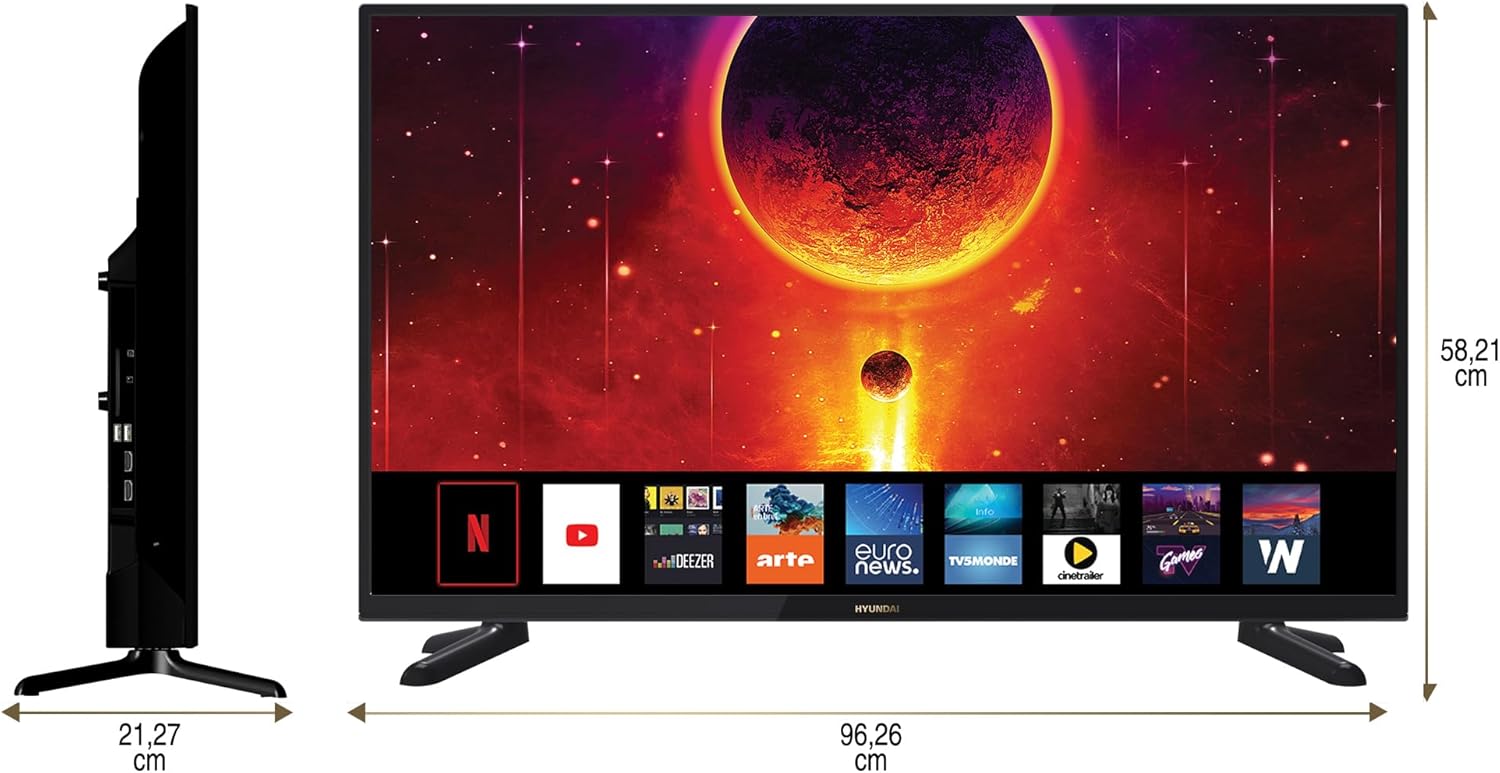
Diagram showing the dimensions of the HYUNDAI 42-inch Smart TV, with a width of 96.26 cm and a height of 58.21 cm.
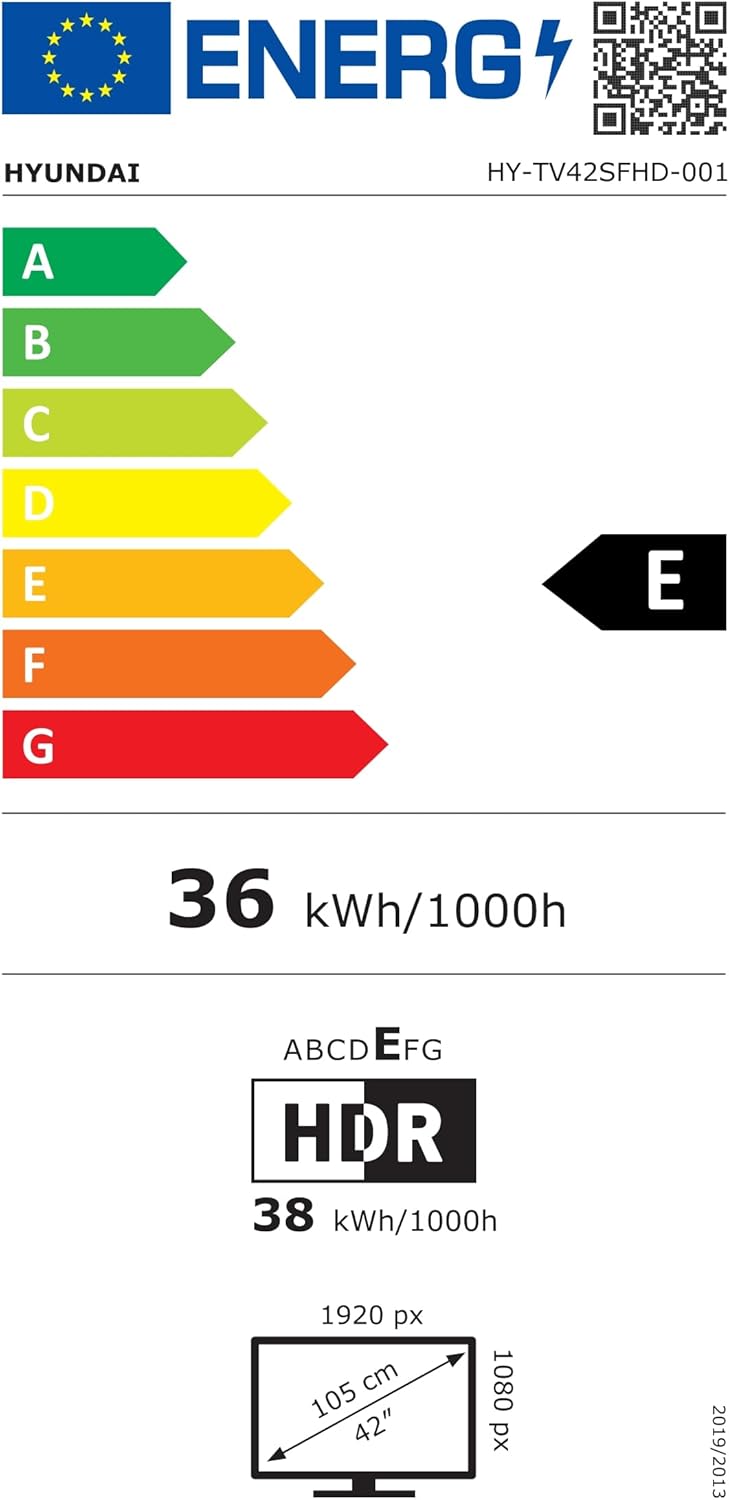
EU Energy Label for the HYUNDAI HY-TV42SFHD-001 television, showing an energy efficiency class of E and energy consumption of 36 kWh/1000h. For more details, visit eprel.ec.europa.eu/qr/1598831.
8. Гаранция и поддръжка
8.1 Гаранционна информация
Your HYUNDAI Smart TV is covered by a manufacturer's warranty. The specific terms and duration of the warranty may vary by region. Please refer to the warranty card included with your product or visit the official HYUNDAI webсайт за подробна информация за гаранцията.
8.2 Поддръжка на клиенти
For technical assistance, troubleshooting not covered in this manual, or warranty claims, please contact HYUNDAI customer support. Contact details can typically be found on the official HYUNDAI webсайта или в документацията, предоставена с вашия телевизор.


