1. Продуктът свършиview
The ION Audio Highlander is a high-powered, all-weather portable Bluetooth speaker designed to deliver rich sound and deep bass even at high volumes. Its durable construction makes it suitable for various environments, ensuring your music can accompany you wherever you go.
Ключови характеристики:
- Мощен звук: Delivers 120 Watts of speaker maximum output power for impactful sound.
- Усилване на басите: Enhances low frequencies for maximum impact.
- Bluetooth 5.0 Enabled: Allows wireless streaming and control of your music from compatible devices.
- IPX5 Водоустойчивост: Designed to withstand splashes and rain, making it safe for outdoor use.
- Rechargeable 50-Hour Battery: Provides extended playtime on a single charge.
- Built-in Handles and Wheels: Facilitates easy transportation.
2. Съдържание на пакета
Уверете се, че всички изброени по-долу елементи са налични във вашия пакет:
- ION Audio Highlander Portable Speaker
- Захранващ кабел
3. Ръководство за настройка
3.1 Зареждане на батерията
Before first use, fully charge the Highlander speaker. The battery life is approximately 50 hours, but initial charging may take several hours.
- Connect the included power cable to the power input on the back of the Highlander speaker.
- Включете другия край на захранващия кабел в стандартен стенен контакт.
- The charging indicator light will illuminate. The light will change or turn off once charging is complete.
3.2 Включване/изключване
To power the speaker on or off, locate the power button on the control panel.
- За включване: Press and hold the Power button for a few seconds until the display illuminates.
- За изключване: Press and hold the Power button again for a few seconds until the display turns off.
3.3 Bluetooth сдвояване
Follow these steps to connect your Bluetooth device to the Highlander speaker:
- Ensure the Highlander speaker is powered on and in Bluetooth mode. The Bluetooth indicator on the display will flash, indicating it's ready to pair.
- On your Bluetooth device (smartphone, tablet, laptop), go to its Bluetooth settings.
- Търсене на available devices. Select "ION Highlander" from the list.
- Once paired, the Bluetooth indicator on the speaker will stop flashing and remain solid. You can now play audio through the speaker.
- To disconnect, turn off Bluetooth on your device or select "Forget This Device" in your device's Bluetooth settings.
4. Инструкции за работа
4.1 Контролен панел надview
The top panel of the Highlander speaker features various controls for managing audio playback and settings.

- Бутон за захранване: Включва или изключва високоговорителя.
- Копче за сила на звука: Регулира общото ниво на звука.
- Bluetooth бутон: Инициира режим на Bluetooth сдвояване.
- Бутон за усилване на басите: Активира или деактивира функцията за усилване на басите.
- Екран на дисплея: Shows current mode, battery status, and other information.
4.2 Adjusting Volume and Bass Boost
- Обем: Rotate the main volume knob clockwise to increase volume and counter-clockwise to decrease it.
- Усилване на басите: Press the "Bass Boost" button to enhance the bass output. Press it again to return to normal audio.
4.3 Функции за преносимост
The Highlander is designed for easy transport:
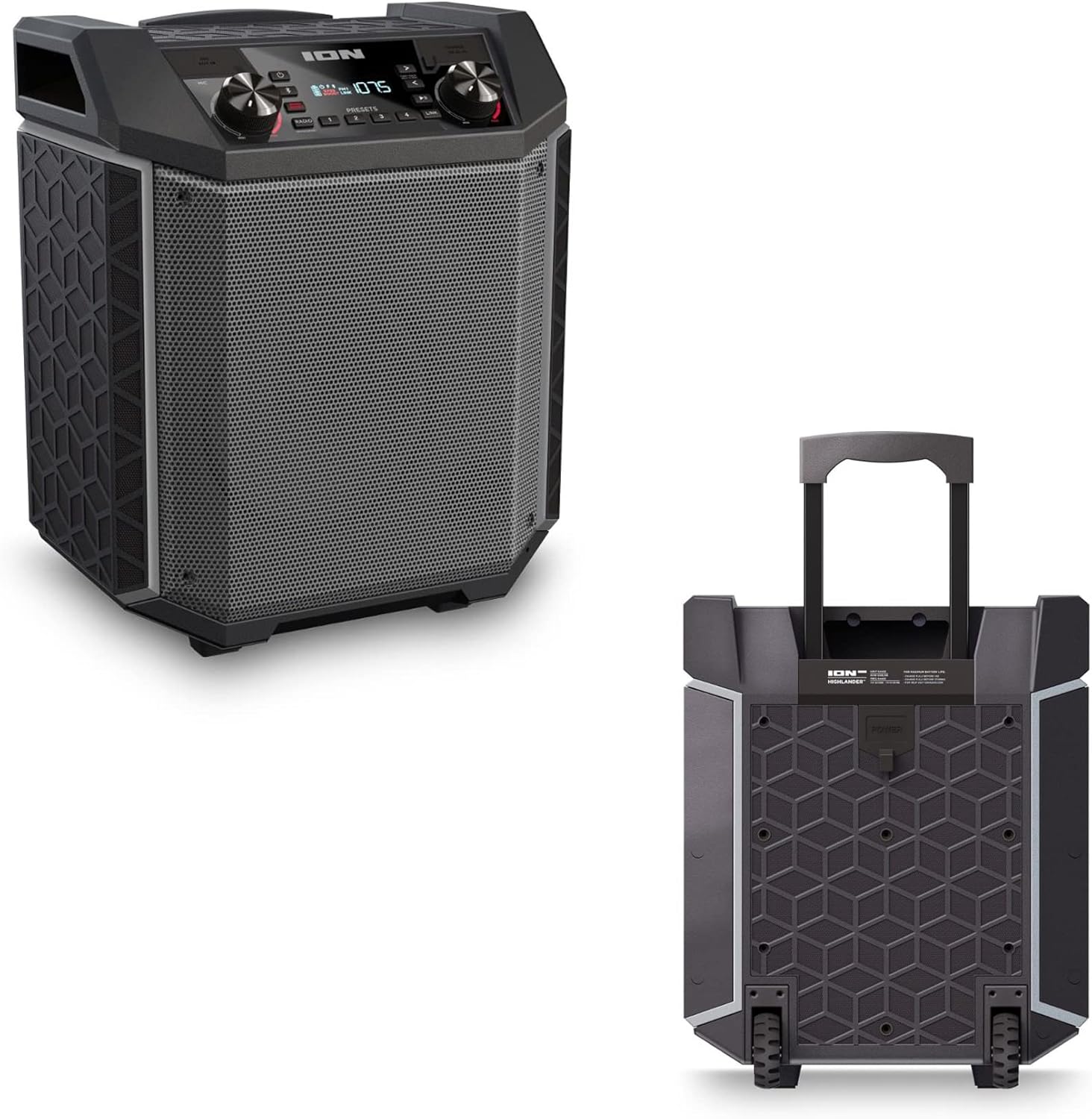

- Прибираща се дръжка: Pull up the integrated handle to roll the speaker like luggage.
- Колела: Use the built-in wheels for smooth movement across various surfaces.
4.4 Водоустойчивост (IPX5)
The Highlander speaker is IPX5 water-resistant, meaning it can withstand splashes of water from any direction. It is suitable for use by the pool or in light rain.

Важно: Do not submerge the speaker in water. Ensure all port covers are securely closed when exposed to water.
5. Поддръжка
5.1 Почистване
- Винаги изключвайте високоговорителя и го изваждайте от захранването преди почистване.
- Използвайте мека, суха кърпа, за да избършете външните повърхности.
- За упорити замърсявания, леко dampИзплакнете кърпата с вода. Избягвайте употребата на агресивни химикали, разтворители или абразивни почистващи препарати.
- Не пръскайте почистващи течности директно върху високоговорителя.
5.2 Съхранение
- Съхранявайте високоговорителя на хладно и сухо място, далеч от пряка слънчева светлина и екстремни температури.
- If storing for an extended period, ensure the battery is partially charged (around 50%) to maintain battery health. Recharge every few months if not in use.
5.3 Грижи за батерията
- Избягвайте честото пълно изтощаване на батерията.
- Не излагайте батерията на прекомерна топлина или студ.
- If the battery performance significantly degrades, contact customer support for assistance.
6. Отстраняване на проблеми
If you encounter issues with your Highlander speaker, refer to the table below for common problems and solutions.
| проблем | Възможно решение |
|---|---|
| Високоговорителят не се включва. |
|
| Не може да се сдвои с Bluetooth устройство. |
|
| Няма звук или силата на звука е ниска. |
|
| Изкривяване на звука. |
|
7. Спецификации
| Характеристика | детайл |
|---|---|
| Име на модела | Highlander |
| Марка | ION |
| Тип високоговорител | На открито |
| Технология за свързване | Bluetooth 5.0 |
| Източник на захранване | Захранван от батерия |
| Живот на батерията | 50 часа |
| Ниво на водоустойчивост | IPX5 (водоустойчив) |
| Максимална изходна мощност на високоговорителя | 120 вата |
| Размери на продукта | 19.5" Д x 19.5" Ш x 14" В |
| Тегло на артикула | 23.2 паунда |
| Материал | Water-resistant plastic or rubber, with a black coating |
| Включени компоненти | Захранващ кабел |
| UPC | 657768542732 |
8. Гаранция и поддръжка
The ION Audio Highlander speaker comes with a Limited Warranty. For specific details regarding warranty coverage, duration, and terms, please refer to the warranty information provided with your purchase or visit the official ION Audio webсайт.
For technical support, troubleshooting assistance beyond this manual, or warranty claims, please contact ION Audio customer support through their official channels. Keep your proof of purchase handy when contacting support.


