1. Въведение
The ION Audio Boombox Deluxe Stereo is a versatile audio system designed to provide a range of listening experiences. It combines classic audio playback options with modern connectivity, featuring an AM/FM radio, a cassette player, Bluetooth streaming, and USB/Micro SD card playback. This manual provides detailed instructions for setting up, operating, and maintaining your device.

Фигура 1: Отпред view of the ION Audio Boombox Deluxe Stereo, showcasing its dual speakers, cassette deck, and radio tuner display.
2. Какво има в кутията
- Boombox Deluxe Unit
- Захранващ кабел
- Ръководство за бърз старт
3. Настройка
3.1 Захранване на устройството
The Boombox Deluxe can be powered using the included AC power cable or by batteries for portable use. Insert the AC power cable into the AC IN port on the back of the unit and plug it into a standard wall outlet. For battery operation, open the battery compartment (typically on the bottom or back) and insert the required D-cell batteries (not included), ensuring correct polarity.
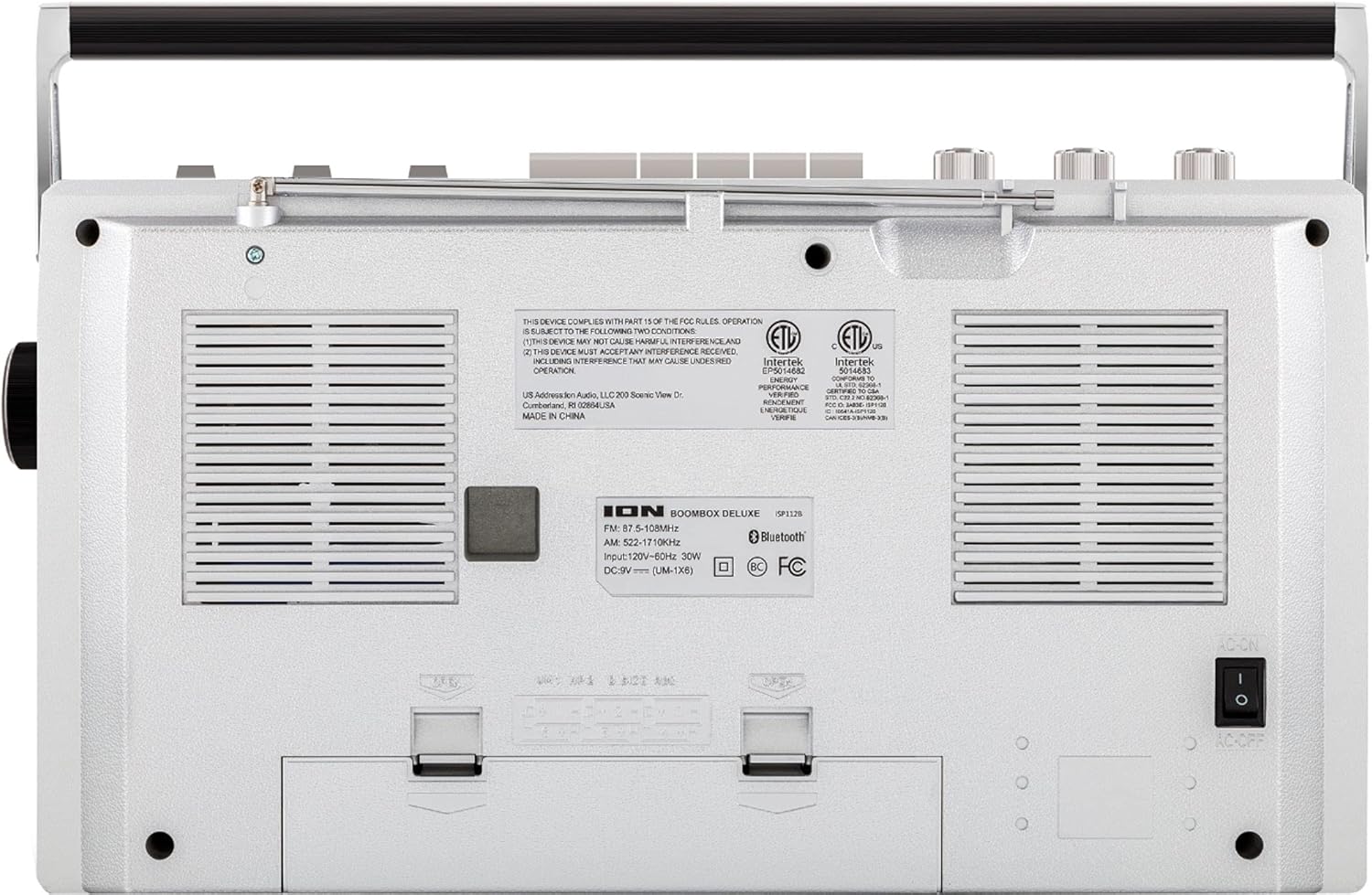
Figure 2: Rear panel of the Boombox Deluxe, highlighting the AC power input and battery compartment location.
3.2 Регулиране на антената
For optimal AM/FM radio reception, extend the telescopic antenna located on the top of the unit. Adjust its position for the clearest signal.
4. Инструкции за работа
4.1 Общи контроли
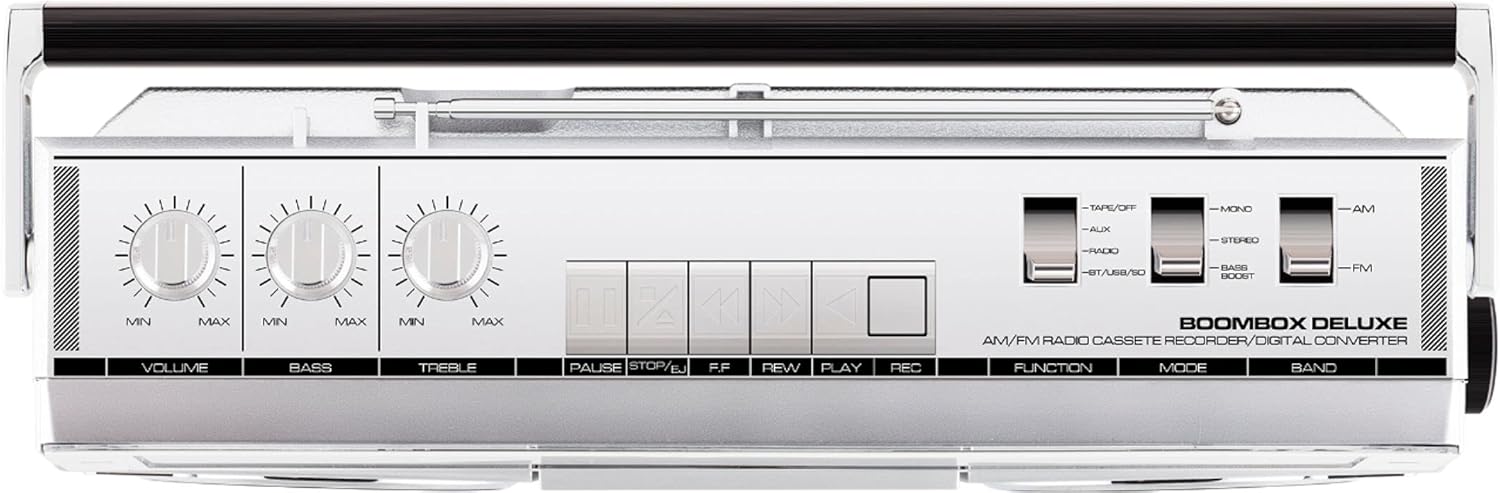
Figure 3: Top panel controls, including Volume, Bass, Treble knobs, and cassette playback buttons.
- Копче за сила на звука: Регулира общото ниво на изходния звук.
- Бас копче: Регулира нискочестотния аудио изход.
- Копче за високи честоти: Регулира високочестотния аудио изход.
- Функционален превключвател: Selects between Tape/Off, Aux, Radio, and BT/USB/SD modes.
- Превключвател на режима: Selects between Mono, Stereo, and Bass Boost audio modes.
- Превключвател на лентата: Selects between AM and FM radio bands.
4.2 Работа на радиото
- Задайте Function Switch to 'Radio'.
- Задайте Превключвател на лента to 'AM' or 'FM'.
- Използвайте Настройка на копчето to select your desired radio station. The frequency will be displayed on the tuner scale.
4.3 Работа с касетофон
- Задайте Function Switch to 'Tape/Off'.
- Натиснете Стоп/Изваждане бутон за отваряне на отделението за касети.
- Insert a cassette tape with the open edge facing upwards. Close the compartment.
- Натиснете Играйте бутон, за да започнете възпроизвеждане.
- Използвайте Rewind (REW) и Бързо превъртане напред (FF) бутони за навигация в лентата.
- Натиснете Пауза за временно спиране на възпроизвеждането. Натиснете отново, за да го възобновите.
- Натиснете Стоп/Изваждане to stop playback and eject the tape.
- To record, ensure the Function Switch is set to 'Tape/Off' and press the Record (REC) бутон едновременно с Играйте бутон.
4.4 Bluetooth връзка

Figure 4: Side panel with USB and Micro SD card slots, and playback controls for digital media.
- Задайте Function Switch to 'BT/USB/SD'. The unit will enter Bluetooth pairing mode, indicated by a flashing LED.
- On your Bluetooth-enabled device (e.g., smartphone, tablet), search for 'ION Boombox Deluxe' in the Bluetooth settings.
- Select 'ION Boombox Deluxe' to pair. Once connected, a confirmation tone will sound, and the LED will stop flashing.
- You can now stream audio from your device to the Boombox Deluxe. Use your device's controls or the boombox's playback buttons (Play/Pause, Next/Previous Track) for media control.
4.5 Възпроизвеждане от USB/Micro SD
- Задайте Function Switch to 'BT/USB/SD'.
- Insert a USB flash drive or Micro SD card (with compatible audio files) into the respective slot on the side of the unit.
- The unit will automatically detect and begin playing audio files.
- Use the playback control buttons (Play/Pause, Next/Previous Track, Delete) on the side panel to manage your music.
4.6 Допълнителен вход

Figure 5: Side panel with headphone output and auxiliary input jacks.
- Задайте Function Switch to 'Aux'.
- Свържете външно аудио устройство (напр. MP3 плейър, CD плейър) към AUX IN жак с помощта на 3.5 мм аудио кабел (не е включен).
- Audio from the connected device will play through the boombox speakers. Control playback from your external device.
5. Характеристики
- Integrated Stereo System with Dual Speakers
- Bluetooth безжично поточно предаване
- AM/FM Radio Tuner
- Cassette Player/Recorder
- Възпроизвеждане на USB и Micro SD карта
- Auxiliary Input for External Devices
- Adjustable Bass and Treble Controls
- Portable Design with Carry Handle
6. Спецификации
| Спецификация | детайл |
|---|---|
| Марка | ION Аудио |
| Модел | Boombox Deluxe |
| Технология за свързване | Bluetooth, USB |
| Тип високоговорител | Стерео |
| Източник на захранване | Battery Powered (D-cell), AC Power |
| Цвят | Черно, сребристо |
| Тегло на артикула | 8.93 паунда |
| Размери на опаковката | 18.1 x 11.1 x 7.6 инча |
7. Отстраняване на проблеми
- Без захранване:
Ensure the AC power cable is securely connected to both the unit and a working power outlet. If using batteries, check that they are inserted correctly and are not depleted. - Слаб радиоприем:
Fully extend the telescopic antenna and adjust its position. Try relocating the unit to an area with better signal reception, away from potential interference sources like other electronic devices. - Cassette Tape Not Playing/Recording:
Ensure the tape is inserted correctly and the cassette compartment is fully closed. Check that the tape is not tangled or damaged. For recording, ensure both Play and Record buttons are pressed simultaneously. - Bluetooth не се свързва:
Make sure the Boombox Deluxe is in 'BT/USB/SD' mode and in pairing mode (flashing LED). Ensure Bluetooth is enabled on your external device and it is within range (typically 30 feet). Try unpairing and re-pairing the device. - No Sound from USB/Micro SD:
Verify that the USB drive or Micro SD card is inserted correctly and contains compatible audio files (e.g., MP3). Ensure the volume is turned up on the boombox.
8. Поддръжка
- Почистване: Използвайте мека, суха кърпа за почистване на външната част на устройството. Не използвайте течни почистващи препарати или разтворители.
- Грижа за касетъчния дек: Периодично почиствайте главите на лентата и притискащите ролки с памучен тампон, леко намокренampened with isopropyl alcohol to ensure optimal playback and recording quality.
- Съхранение на батерията: Ако устройството няма да се използва за продължителен период от време, извадете батериите, за да предотвратите протичане и повреда.
9. Гаранция и поддръжка
This product is offered as an Amazon Renewed item. Amazon Renewed products are professionally inspected and tested to work and look like new. If you are not satisfied with your purchase, renewed products are eligible for replacement or refund under the Amazon Renewed Guarantee. For specific details regarding the Amazon Renewed Guarantee, please refer to the Amazon Renewed program terms and conditions on the Amazon webсайт.
For further assistance or technical support, please contact ION Audio customer service or refer to their official webсайт за ресурси за поддръжка.


