1. Уводзіны
This manual provides comprehensive instructions for the setup, operation, and maintenance of your GOBOULT Mustang Racer Smart Watch. Please read this manual thoroughly before using the device to ensure proper functionality and to maximize your user experience. Keep this manual for future reference.
2. Што ў скрынцы
Праверце наяўнасць усіх прадметаў у камплекце:
- GOBOULT Mustang Racer Smart Watch
- Зарадны кабель
- Кіраўніцтва карыстальніка (гэты дакумент)
- Гарантыйны талон
3. Прадукт скончыўсяview
Familiarize yourself with the key components of your GOBOULT Mustang Racer Smart Watch.
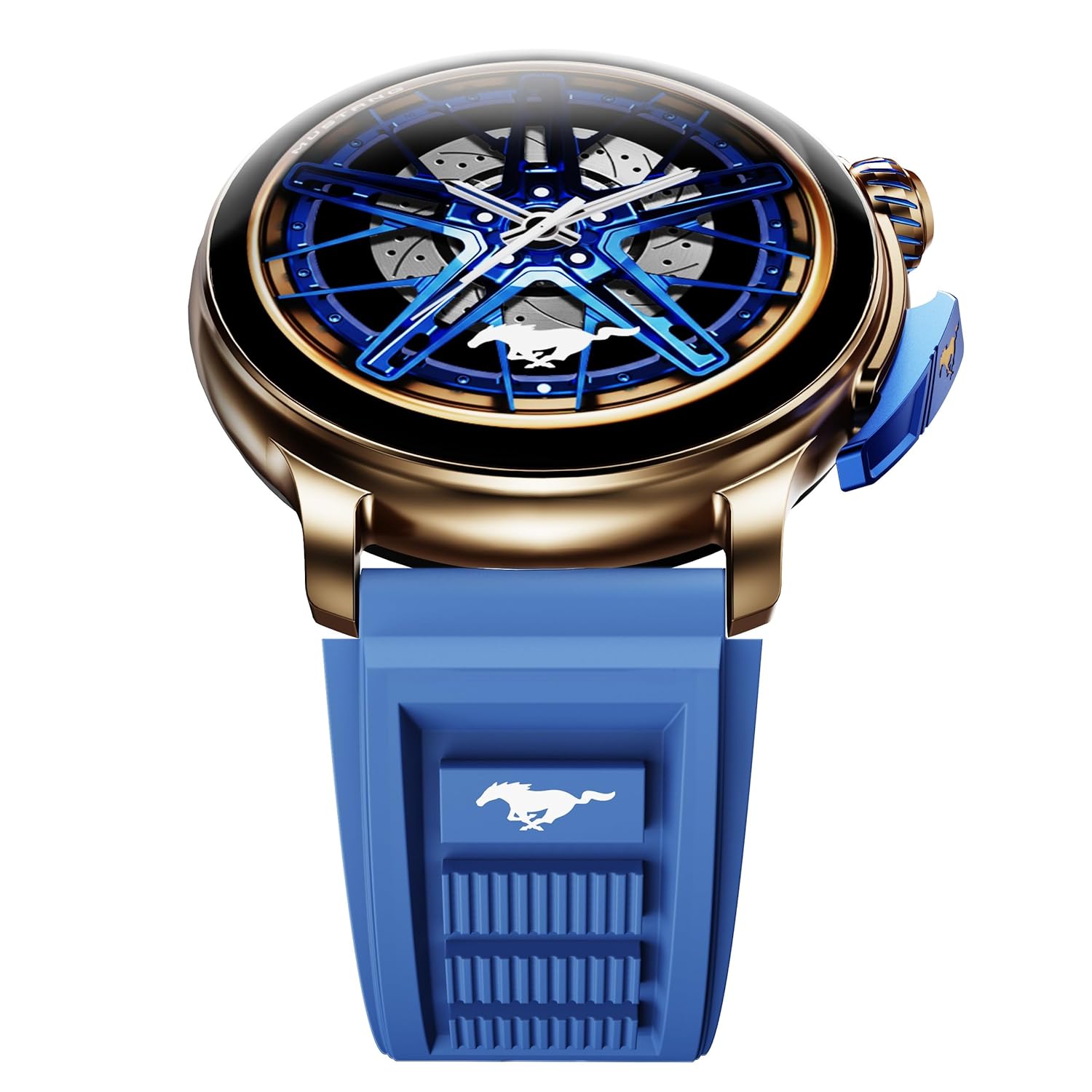
Image: The GOBOULT Mustang Racer Smart Watch, showcasing its 1.43-inch AMOLED display and overall design.
Display and Bezel
The watch features a 1.43-inch AMOLED display with 500 Nits brightness for clear visibility. The functional rotating bezel allows for intuitive navigation through menus and features.

Выява: Падрабязны view of the smartwatch's 1.43-inch AMOLED display and the rotating bezel, highlighting its design and brightness.
Buttons and Crown
The watch includes a rotating tyre-tread crown for navigation and selection, along with a functional paddle shifter button for quick access to features.

Image: The smartwatch featuring its functional paddle shifter and rotating crown, designed for enhanced control.
4. Настройка
4.1. Зарадка разумнага гадзінніка
Before initial use, fully charge your smartwatch. Connect the magnetic charging cable to the charging pins on the back of the watch and plug the USB end into a compatible power adapter (not included) or a computer's USB port. The watch will display a charging indicator. A full charge takes approximately 120 minutes.
4.2. Уключэнне / выключэнне харчавання
- Уключэнне: Press and hold the main power button (crown) for a few seconds until the GOBOULT logo appears.
- Выключэнне: From the watch face, swipe down to access quick settings, or navigate to the settings menu. Select "Power Off" and confirm. Alternatively, press and hold the main power button until the power-off option appears.
4.3. Спалучэнне са смартфонам
To unlock all features, pair your GOBOULT Mustang Racer Smart Watch with the companion app on your smartphone via Bluetooth.
- Download the official GOBOULT app from your smartphone's app store (iOS App Store or Google Play Store).
- Пераканайцеся, што Bluetooth уключаны на вашым смартфоне.
- Open the GOBOULT app and follow the on-screen instructions to create an account or log in.
- In the app, select "Add Device" or similar option.
- Select "GOBOULT Mustang Racer" from the list of available devices.
- Пацвердзіце запыт на спалучэнне як на смартфоне, так і на разумным гадзінніку.
Пасля спалучэння гадзіннік сінхранізуе дадзеныя з вашым тэлефонам, і вы зможаце наладзіць параметры праз праграму.

Image: The smartwatch highlighting its Bluetooth V5.3 connectivity for quick syncing and IP67 water resistance.
5. Інструкцыя па эксплуатацыі
5.1. Навігацыя
- Правядзенне пальцам уверх/уніз/налева/направа: Navigate through menus, notifications, and quick access panels.
- Націсніце: Выберыце элемент або пацвердзіце дзеянне.
- Rotating Bezel/Crown: Rotate to scroll through lists or adjust settings. Press to select or return to the home screen.
- Paddle Shifter Button: Customizable shortcut for frequently used functions (e.g., sports modes).
5.2. Bluetooth-званкі
With integrated speaker and microphone, you can make and receive calls directly from your wrist after pairing with your smartphone.
- Пераканайцеся, што ваш гадзіннік падключаны да тэлефона праз Bluetooth.
- To make a call: Access the dialer or contacts list on your watch.
- To receive a call: An incoming call notification will appear on your watch. Tap to answer or decline.
5.3. Цыферблаты
Customize your watch's appearance with over 150 watch faces, including exclusive Mustang designs. Long-press the watch face to change it, or use the companion app for more options.

Выява: Прэзентацыя разумных гадзіннікаўasing multiple watch face options, including exclusive Mustang designs.
5.4. Спартыўныя рэжымы
The watch supports over 120 sports modes to track your physical activities. Access sports modes from the main menu or via the paddle shifter shortcut (if configured).
- Select your desired sport.
- Start the activity. The watch will record metrics such as duration, calories burned, and heart rate.
- End the activity to save data. Review your performance in the app.

Image: The smartwatch displaying a sports tracking interface, indicating its capability to monitor various physical activities.
5.5. Маніторынг здароўя
The GOBOULT Mustang Racer Smart Watch provides comprehensive health tracking features:
- 24x7 Heart Rate Monitor: Пастаянна адсочвае ваш пульс.
- SpO2 Blood Oxygen Saturation Monitor: Вымярае ўзровень кіслароду ў крыві.
- Маніторынг сну: Analyzes sleep patterns (deep sleep, light sleep, awake time).
- Манітор стрэсу: Дае ўяўленне аб вашым узроўні стрэсу.
- Артэрыяльны ціск: (Note: Smartwatch blood pressure measurements are for reference only and should not be used for medical diagnosis.)
Access these features from the watch's health menu or view падрабязныя справаздачы ў суправаджальным дадатку.

Выява: Унутраная view of the smartwatch highlighting its health tracking sensors, with text indicating features like heart rate, SpO2, sleep, and stress monitoring.
5.6. Галасавы памочнік са штучным інтэлектам
Activate the AI Voice Assistant on your watch to perform tasks, set reminders, or get information using voice commands. Ensure your watch is connected to your phone for this feature to function.
5.7. Разумныя апавяшчэнні
Receive notifications for calls, messages, and app alerts directly on your watch. Manage notification settings through the GOBOULT app.
5.8. Always On Display
The Always On Display feature allows the time and essential information to remain visible on the screen without needing to raise your wrist or press a button. This feature can be enabled or disabled in the watch settings to manage battery consumption.

Image: The smartwatch displaying the time and a car image, illustrating the Always On Display functionality.
6. Асаблівасці і характарыстыкі
Асноўныя характарыстыкі:
- 1.43" AMOLED Display with 500 Nits Brightness
- Bluetooth Calling (BT V5.3)
- Rotating Bezel for intuitive control
- 150+ Watch Faces, including exclusive Mustang designs
- ІІ Галасавы памочнік
- Health Monitoring: SpO2, Heart Rate, Sleep, Stress, Blood Pressure
- 120+ спартыўных рэжымаў
- Воданепранікальнасць IP67
- Up to 7-day battery runtime with fast charging
Тэхнічныя характарыстыкі:
| Марка | ГОБАЛТ |
| Нумар мадэлі | GOBOULT Mustang Racer |
| Памер дысплея | 1.43 цалі |
| Бесправадны тып | Bluetooth V5.3 |
| Час зарадкі акумулятара | 120 хвілін |
| Энергетычная каштоўнасць батарэі | 1.11 Вт гадзін |
| Воданепранікальнасць | IP67 |
| Вага прадмета | 55 г |
| Краіна паходжання | Кітай |
7. Тэхнічнае абслугоўванне
7.1. Чыстка разумнага гадзінніка
Рэгулярная чыстка дапамагае падтрымліваць знешні выгляд і функцыянальнасць гадзінніка:
- Працярыце экран і корпус мяккай тканінай без ворса.
- Для ўстойлівых плям злёгкуampпрамыйце тканіну вадой. Пазбягайце выкарыстання агрэсіўных хімічных рэчываў або абразіўных матэрыялаў.
- Clean the charging contacts periodically with a dry cloth to ensure proper charging.
7.2. Воданепранікальнасць (IP67)
The GOBOULT Mustang Racer Smart Watch is IP67 water resistant, meaning it can withstand immersion in up to 1 meter of fresh water for up to 30 minutes. It is suitable for daily use and light splashes. However, it is not recommended for swimming, showering with hot water, or diving. Avoid exposure to saltwater or chemicals, as this may damage the device.
7.3. Сыход за батарэяй
- Пазбягайце частай поўнай разрадкі акумулятара.
- Захоўвайце гадзіннік у прахалодным, сухім месцы, калі ён не выкарыстоўваецца працяглы час.
- Выкарыстоўвайце толькі кабель для зарадкі, які ўваходзіць у камплект.
8. Выпраўленне непаладак
| праблема | Магчымае рашэнне |
|---|---|
| Гадзіннік не ўключаецца. | Пераканайцеся, што гадзіннік цалкам зараджаны. Падключыце яго да зараднай прылады як мінімум на 30 хвілін. |
| Немагчыма спалучыць са смартфонам. |
|
| Недакладныя дадзеныя пра здароўе. |
|
| Кароткі тэрмін службы батарэі. |
|
9. Гарантыя і падтрымка
Your GOBOULT Mustang Racer Smart Watch comes with a warranty as specified on the included Warranty Card. Please refer to the card for details regarding warranty period, coverage, and terms and conditions.
For technical support, product inquiries, or warranty claims, please contact GOBOULT customer service through the contact information provided on your Warranty Card or visit the official GOBOULT webсайт.
Уключаныя кампаненты: Charging Cable, Mustang Racer Apex Blue Smart watch, User Manual, Warranty Card


