1. Уводзіны і большview
The VEVOR ET-7A is a 7-day programmable thermostat designed for precise temperature control in various heating systems, including radiant underfloor heating and heat pumps. It features a 3.5-inch TFT color touchscreen display, a sensitive temperature sensor, and an integrated Ground Fault Circuit Interrupter (GFCI) for enhanced safety. This thermostat allows for flexible temperature scheduling to optimize energy efficiency and maintain a comfortable indoor environment.

The VEVOR ET-7A thermostat provides convenient and precise temperature control.
2. Інфармацыя па бяспецы
ПАПЯРЭДЖАННЕ: Electrical shock hazard. Installation must be performed by a qualified electrician in accordance with local electrical codes. Disconnect power at the circuit breaker before installation or servicing.
- Ensure the power supply is completely off before handling any wiring.
- This thermostat is designed for 120V/240V AC systems. Verify your system's voltagэлектронная сумяшчальнасць.
- The integrated GFCI provides protection against ground faults. Test the GFCI monthly as described in the maintenance section.
- Не выкарыстоўвайце тэрмастат мокрымі рукамі.
- Трымайце тэрмастат далей ад вады і празмернай вільготнасці.

The thermostat includes a reliable GFCI protection device for electrical safety.
3. Змесціва ўпакоўкі
Перад пачаткам усталёўкі пераканайцеся, што ў камплекце ёсць усе неабходныя рэчы:
- 1 x VEVOR ET-7A Programmable Thermostat (Main Unit)
- 1 х Кіраўніцтва карыстальніка
- 1 x Temperature Probe (Floor Sensor)
- 2 х крапежных шруб
- 1 x Warning Label Pad

Included components with the VEVOR ET-7A thermostat.
4. Настройка і ўстаноўка
This thermostat is designed for wall-mount installation and requires a wired connection to your heating system. Professional installation is recommended to ensure proper wiring and compliance with electrical codes.
4.1 Інструкцыі па падключэнні
- Адключыць харчаванне: Turn off power to the heating system at the main circuit breaker before starting any wiring.
- Мантаж: Securely mount the thermostat base to the wall using the provided mounting screws.
- Падключыце правады: Connect the power supply wires (120V/240V AC), heating load wires, and the temperature probe wires to the appropriate terminals on the thermostat. Refer to the wiring diagram provided in the full user manual for specific terminal connections. Ensure all connections are tight and secure.
- Install Temperature Probe: If using for underfloor heating, install the temperature probe in the floor according to your heating system's instructions.
- Падключэнне тэрмастата: Carefully attach the thermostat main unit to its base, ensuring no wires are pinched.
- Аднавіць сілу: Once all connections are secure and the thermostat is properly mounted, restore power at the circuit breaker.

Follow the wiring instructions carefully to ensure correct installation.
4.2 Сумяшчальнасць сістэмы
The VEVOR ET-7A thermostat is compatible with high/low voltage systems (120V/240V AC) and can be used with radiant underfloor heating, snow melting systems, and heat pumps. It utilizes floor and/or indoor sensors for accurate temperature control.

The thermostat is compatible with various heating systems, including underfloor heating.
5. Інструкцыя па эксплуатацыі
The VEVOR ET-7A thermostat features a user-friendly 3.5-inch TFT color touchscreen for easy operation.
5.1 Уключэнне/выключэнне сілкавання
Once installed and power is restored, the thermostat will power on automatically. There is no separate power button on the unit for daily operation.
5.2 Рэгуляванне тэмпературы
On the main display, use the up and down arrows (▲ / ▼) to adjust the desired temperature setpoint. The current room temperature and setpoint will be displayed clearly.
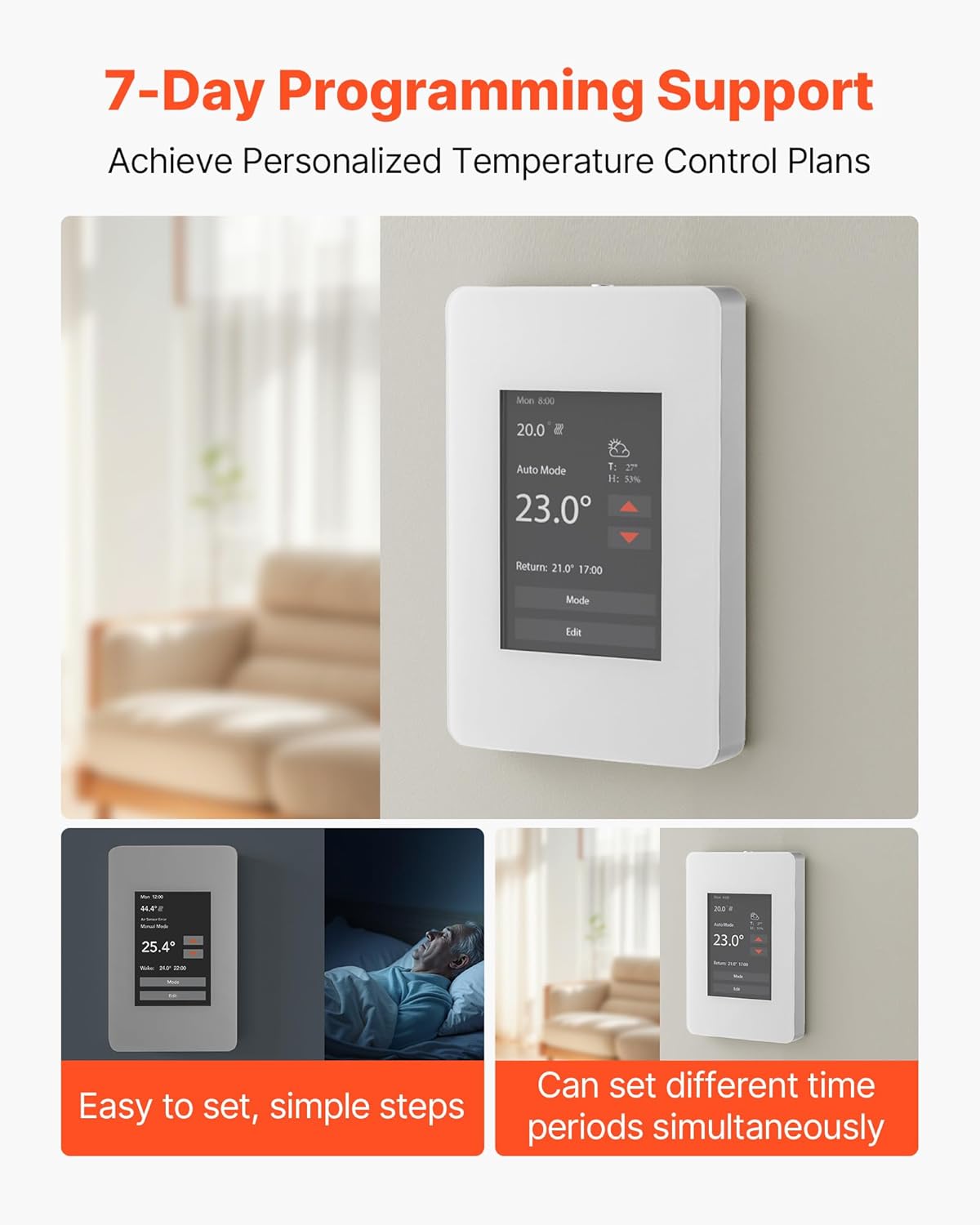
The main display shows current temperature and allows for easy adjustment.
5.3 Праграмаванае раскладанне на 7 дзён
The thermostat supports 7-day programming, allowing you to set different temperature schedules for weekdays and weekends, or customize each day individually. This feature helps in energy saving by adjusting temperatures when you are away or asleep.
- Access the programming menu by touching the 'Mode' or 'Edit' button on the screen.
- Follow the on-screen prompts to set desired temperatures for different time periods (e.g., Wake, Day, Evening, Sleep) for each day of the week.
- Save your settings before exiting the programming menu.

Customize your heating schedule with 7-day programming.
5.4 Выбар рэжыму
The thermostat typically offers different operating modes, such as 'Auto Mode' for programmed schedules and 'Manual Mode' for continuous temperature setting. Use the 'Mode' button on the touchscreen to switch between available modes.

Select from multiple operating modes to suit your comfort needs.
5.5 Функцыі дысплея
The 3.5-inch TFT color display provides comprehensive information at a glance, including:
- Current temperature and setpoint
- Operating mode (Auto, Manual)
- Дата і час
- Heating/Cooling status (if applicable)
- GFCI status
- Weather/Humidity information (if sensor is connected)
The display is designed for clear readability, even in dim conditions, with an integrated backlight.

The 3.5-inch TFT color display offers comprehensive information and is easy to read.

The touchscreen provides sensitive response for various controls.
6. Тэхнічнае абслугоўванне
6.1 Ачыстка
To clean the thermostat, gently wipe the screen and casinг з мяккім, дamp тканіна. Не выкарыстоўвайце абразіўныя ачышчальнікі, растваральнікі або ачышчальнікі ў выглядзе спрэю непасрэдна на прыладзе, бо гэта можа пашкодзіць дысплей або ўнутраныя кампаненты.
6.2 GFCI Self-Test
It is recommended to perform a GFCI self-test monthly to ensure proper functioning of the ground fault protection. Refer to the full user manual for specific instructions on how to initiate the GFCI test on your ET-7A thermostat. Typically, this involves pressing a 'Test' button on the unit or through the touchscreen interface.
7. Выпраўленне непаладак
If you encounter issues with your VEVOR ET-7A thermostat, refer to the following common troubleshooting steps:
- Няма дысплея/няма харчавання: Check the circuit breaker for the heating system. Ensure all wiring connections are secure.
- Няправільныя паказанні тэмпературы: Verify that the temperature probe is correctly installed and not damaged. Ensure the thermostat is not exposed to direct sunlight or drafts that could affect its internal sensor.
- Сістэма ацяплення не рэагуе: Check the operating mode (ensure it's not in 'Off' or 'Manual' mode with a low setpoint). Verify wiring connections to the heating system.
- Паездка GFCI: If the GFCI trips, it indicates a ground fault. Disconnect power, inspect the heating system and wiring for any damage or moisture, and consult a qualified electrician if the issue persists after resetting.
- Праблемы праграмавання: Ensure you have saved your programmed schedule. Review the programming steps in the operating instructions.
For more detailed troubleshooting or persistent issues, please consult the comprehensive user manual or contact VEVOR customer support.
8. Тэхнічныя характарыстыкі
| Асаблівасць | Спецыфікацыя |
|---|---|
| Марка | ВЕВОР |
| Назва мадэлі | 7-дзённы праграмуемы тэрмастат |
| Нумар мадэлі | ЭТ-7А |
| Тып кантролера | Сэнсарны экран |
| Асаблівасць | Праграмуемы |
| Колер | Gray-white |
| Тып кантролю тэмпературы | Праграмуемы |
| Тэхналогія падлучэння | Правадная |
| Крыніца харчавання | Corded Electric (120V/240V AC) |
| Вага прадмета | 11.7 унцый (0.33 кг) |
| Тып дысплея | LCD Touchscreen (3.5-inch TFT Color) |
| Метад кантролю | Кнопка, дотык |
| Тып мацавання | Насценнае мацаванне |
| Памеры прадмета (Д х Ш х У) | 5.1 х 3.2 х 2.1 цалі (130 х 82 х 53 мм) |
| UPC | 197988699453 |

Physical dimensions and key specifications of the VEVOR ET-7A thermostat.
9. Гарантыя і падтрымка
Прадукцыя VEVOR распрацавана для трываласці і прадукцыйнасці. Каб атрымаць інфармацыю аб гарантыйным пакрыцці, звярніцеся да гарантыйнага талона, які ўваходзіць у камплект прадукту, або наведайце афіцыйны сайт VEVOR. website. If you require technical assistance, troubleshooting guidance, or have questions about your ET-7A thermostat, please contact VEVOR customer support through their official channels.
Інтэрнэт-падтрымка: Visit the VEVOR official webсайт з часта задаванымі пытаннямі, рэсурсамі падтрымкі і кантактнай інфармацыяй.
Кантактная інфармацыя: Refer to the contact details provided in your product packaging or on the VEVOR webсайт для атрымання непасрэднай дапамогі.


