Уводзіны
This manual provides essential information for the setup, operation, and maintenance of your Hisense 100U8Q Mini LED Pro Smart TV. Please read it thoroughly to ensure proper use and to maximize your viewвопыту.
Важная інфармацыя па бяспецы
Always follow basic safety precautions when using this product to reduce the risk of fire, electric shock, and injury. Keep this manual for future reference.
- Не перакрывайце вентыляцыйныя адтуліны.
- Не ўстанаўлівайце паблізу крыніц цяпла.
- Абараніце сеткавы шнур ад наступання або заціскання.
- Выкарыстоўвайце толькі насадкі/аксэсуары, указаныя вытворцам.
- Звяртайцеся да кваліфікаванага абслугоўваючага персаналу.
Што ў скрынцы
Праверце наяўнасць усіх кампанентаў:
- Hisense 100U8Q Mini LED Pro Smart TV
- Пульт дыстанцыйнага кіравання
- Стаяць
- Кіраўніцтва карыстальніка
Настройка
1. Зборка падстаўкі
Carefully place the TV screen-down on a soft, flat surface. Attach the stand to the TV using the provided screws, ensuring it is securely fastened.

Image: Hisense 100U8Q TV with stand dimensions. This image illustrates the physical dimensions of the 100-inch TV, including its width, height, and depth, both with and without the stand. It also shows the VESA wall mount size (1000x600 mm) and product weight (73.2 kg with stand, 70.7 kg without stand).
Заўвага: For wall mounting, use a VESA compatible bracket (1000x600 mm) and consult a professional installer.
2. Падключэнне перыферыйных прылад
Connect your devices (e.g., gaming consoles, soundbars, cable boxes) to the appropriate ports on the back of the TV. The Hisense 100U8Q features multiple HDMI 2.1 ports for high-speed connectivity.

Выява: Задняя частка view of the Hisense 100U8Q TV showing various input/output ports. These include USB, CI Card Slot, Headphone, AV Input, HDMI 2.1 (including eARC), ANT (x2), Digital Audio Out, Ethernet, and Type-C.
- HDMI 2.1: For high-resolution and high-refresh-rate devices (e.g., gaming consoles, PCs).
- USB: Для падлучэння USB-флэш-назапашвальнікаў для прайгравання медыяфайлаў.
- Ethernet: Для праваднога падключэння да Інтэрнэту.
- Тып C: For versatile connectivity, sharing, and charging.
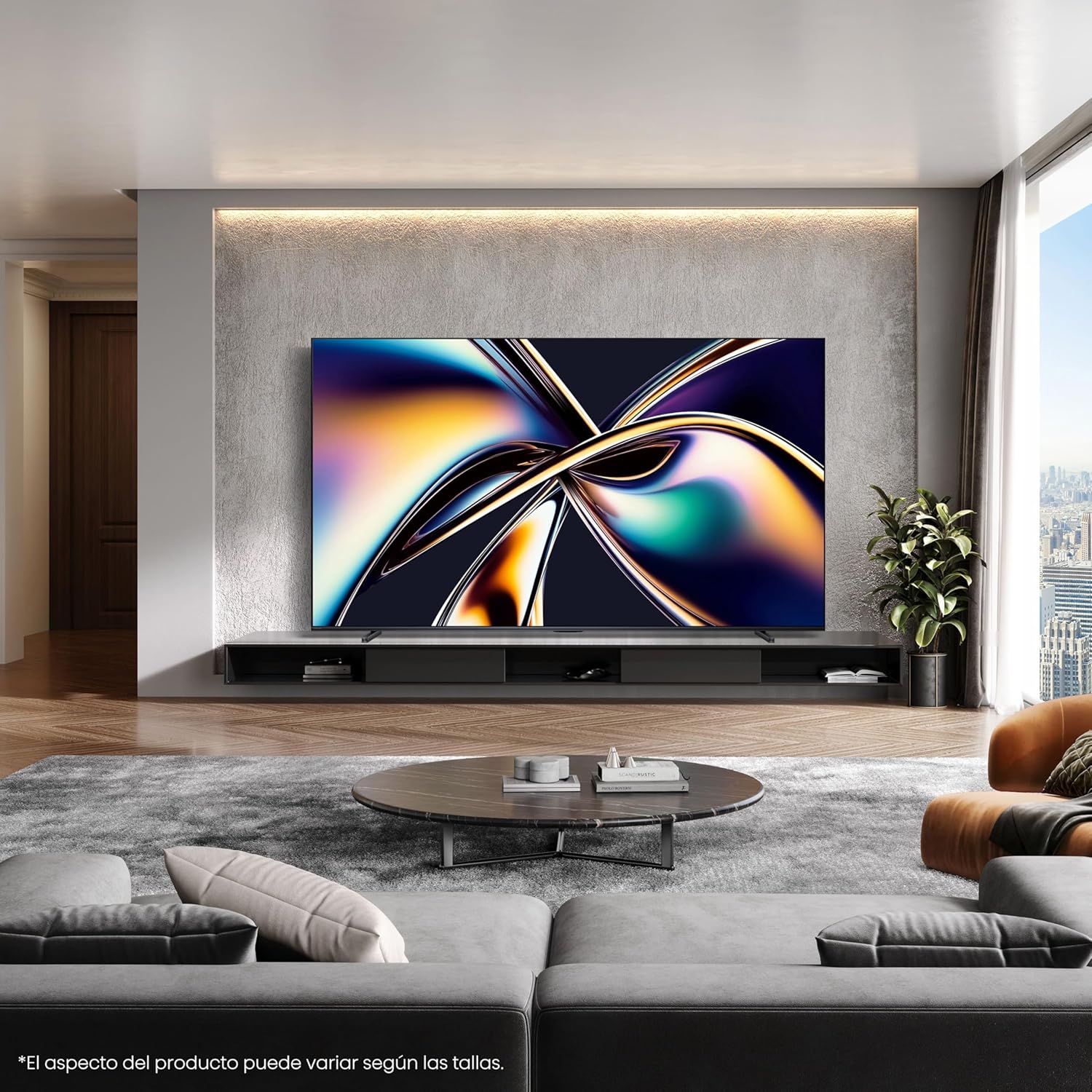
Выява: Крупны план view of the Type-C port on the side of the Hisense 100U8Q TV, highlighting its modern and versatile connectivity option.
3. Пачатковае ўключэнне і падключэнне да сеткі
Plug the TV into a power outlet. Follow the on-screen instructions to select your language, connect to your Wi-Fi network (or use Ethernet), and complete the initial setup process.
Інструкцыя па эксплуатацыі
1. Функцыі дыстанцыйнага кіравання
The included remote control allows you to navigate the TV's interface, adjust settings, and access smart features. The remote is solar-powered and can also be charged via USB-C.

Image: The Hisense TV remote control, featuring dedicated buttons for popular streaming services like Netflix, YouTube, and Disney+, voice control capabilities, a solar panel for charging, and a USB-C charging port.
- Кнопка харчавання: Уключае/выключае тэлевізар.
- Навігацыйная панэль (Уверх/Уніз/Улева/Управа/ОК): Для навігацыі па меню і выбару.
- Павялічыць/паменшыць гучнасць: Рэгулюе ўзровень гуку.
- Кнопка галасавога кіравання: Activates voice commands (e.g., "Alexa built-in", "VIDAA Voice").
- Кнопкі хуткага доступу: Прамы доступ да папулярных струменевых сэрвісаў.
2. Функцыі Smart TV (VIDAA OS)
Your Hisense 100U8Q runs on the VIDAA OS, offering a user-friendly interface for accessing apps, streaming services, and smart home integration.

Image: The Hisense Smart TV home screen, displaying various streaming applications and content recommendations. It highlights integration with Apple HomeKit, Apple AirPlay, ConnectLife, Alexa built-in, and VIDAA Voice.
- App Store: Спампуйце і ўсталюйце дадатковыя праграмы.
- Галасавое кіраванне: Use voice commands for navigation, content search, and smart home control.
- Даступнасць кантэнту: Note that content and application availability may vary by region.
3. Gaming Mode (Ultra 165Hz)
For an optimized gaming experience, activate the Ultra Game Mode 165Hz. This mode reduces input lag and provides smoother graphics.
Video: This video demonstrates how to use the Game Bar feature on a Hisense TV. It shows connecting a gaming device, launching the Game Menu, checking FPS and HDR status, selecting Game Picture Mode for optimized visuals, adjusting screen ratio and position, and enabling FreeSync, Aim Point, and Map Zoom for enhanced gaming. This feature is crucial for utilizing the 165Hz refresh rate effectively.
- Connect your gaming device to an HDMI 2.1 port.
- Access the Game Menu to view FPS, HDR status, and adjust settings like Game Picture Mode, Screen Ratio, and AMD FreeSync.
- Utilize features like Aim Point and Map Zoom for competitive gaming.
Video: This video showcases Hisense TV technology, focusing on features like Mini-LED PRO for pure blacks and stellar brightness, Hi-View AI Engine PRO for intelligent scene recognition and remastering, 165Hz Ultra Game Mode for smooth gaming, 4.1.2 Multi-channel Surround Sound for immersive audio, and Anti-Reflection PRO for minimal light intrusion. It also highlights the TV's QLED colors and AI-powered energy saving.
4. Audio Settings (4.1.2 Multi-channel Sound)
The TV features 4.1.2 multi-channel sound with lateral speakers, rear subwoofers, and upward-firing speakers for an immersive audio experience with Dolby Atmos support.
- Access audio settings through the TV menu to customize sound profiles.
- Ensure Dolby Atmos content is played for the full immersive effect.
Тэхнічнае абслугоўванне
1. Ачыстка экрана
Акуратна працярыце экран мяккай, сухой тканінай без ворса. Для выдалення ўстойлівых плям злёгкуampпрацярыце тканіну вадой або спецыяльным сродкам для чысткі экранаў. Пазбягайце агрэсіўных хімічных рэчываў.
2. Чыстка пульта дыстанцыйнага кіравання
Wipe the remote with a soft, dry cloth. For the solar panel, ensure it is clean and exposed to light for optimal charging.
3. Абнаўленне праграмнага забеспячэння
The TV may receive automatic software updates. Ensure your TV is connected to the internet to receive these updates, which improve performance and add new features.
Ліквідацыю непаладак
| праблема | Магчымае рашэнне |
|---|---|
| Няма сілы | Праверце, ці шнур сілкавання надзейна падключаны да тэлевізара і разеткі. Паспрабуйце іншую разетку. |
| Няма выявы/гуку | Verify correct input source. Check HDMI/audio cable connections. Restart connected devices. |
| Пульт не працуе | Ensure the remote is charged (solar or USB-C). Check for obstructions between the remote and TV. |
| Дрэннае злучэнне Wi-Fi | Move the router closer to the TV or use a wired Ethernet connection. Restart the router. |
If problems persist, consult the full online user manual or contact Hisense customer support.
Тэхнічныя характарыстыкі
| Асаблівасць | Дэталь |
|---|---|
| Нумар мадэлі | 100U8Q |
| Памер экрана | 100 цалі |
| Тэхналогія адлюстравання | Міні святлодыёд |
| дазвол | 4K |
| Частата абнаўлення | 165 Гц |
| Асаблівасці | Game Mode, Hi-View AI PRO Processor, 4.1.2 Multi-channel Sound, Anti-Reflection PRO |
| Сувязь | Bluetooth, HDMI, Wi-Fi, Type-C |
| Памеры (з падстаўкай) | 223.9 х 128.1 х 4.3 см (прыблізна 88.1 х 50.4 х 1.7 цалі) |
| Вага (з падстаўкай) | 73.2 кг (прыбл. 161.4 фунта) |
| Насценнае мацаванне VESA | 1000x600 мм |
| Рэйтынг энергаэфектыўнасці | F |
For detailed energy information, refer to the EU EPREL database: https://eprel.ec.europa.eu/qr/2378016

Image: The EU Energy Label for the Hisense 100U8Q TV, showing its energy efficiency class F, power consumption (127 kWh/1000h for SDR, 380 kWh/1000h for HDR), and screen dimensions.
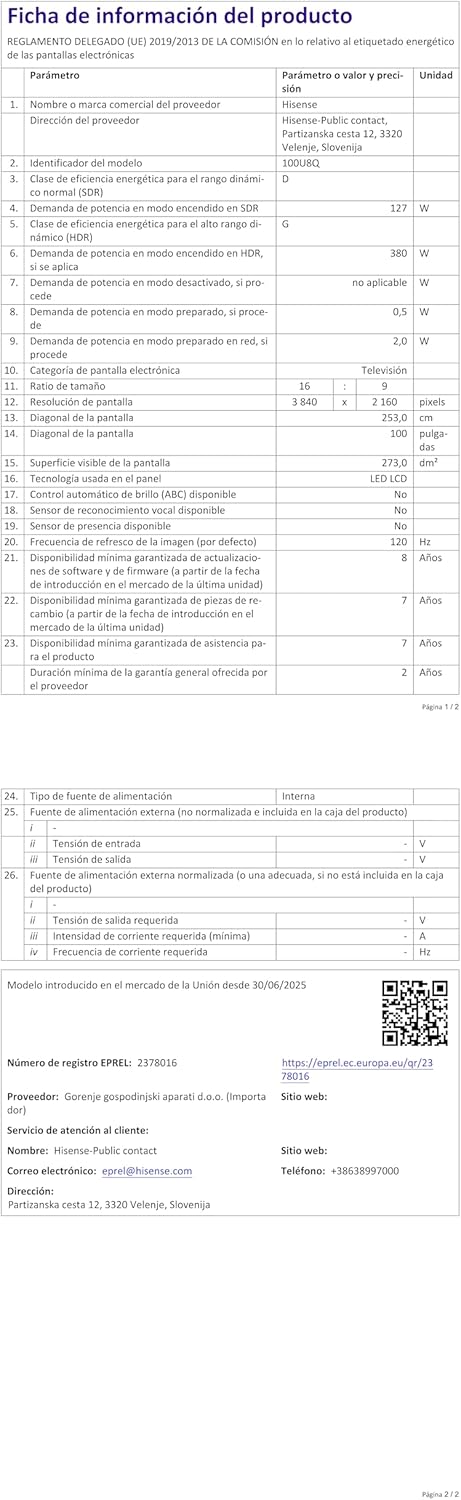
Image: The product information sheet for the Hisense 100U8Q TV, detailing various technical specifications, energy consumption, and warranty information in a tabular format.
Гарантыя і падтрымка
Hisense provides a standard warranty for its products. Please refer to the warranty card included with your TV or visit the official Hisense webсайт для падрабязных умоў.
- Гарантыйны тэрмін: Typically 2 years for parts and labor.
- Абслугоўванне кліентаў: For technical assistance or service requests, contact Hisense customer support. Contact details can be found on the product information sheet or Hisense's official webсайт.
- Інтэрнэт-рэсурсы: Наведайце ст Hisense Brand Store для атрымання дадатковай інфармацыі аб прадукце і падтрымкі.


