Уводзіны
This manual provides essential information for setting up, operating, maintaining, and troubleshooting your HP Elite Mini 800 G9 Desktop Computer. This compact and powerful mini PC is designed for business environments, offering high performance in a small form factor.
The HP Elite Mini 800 G9 features an Intel Core i5-12500T processor, 16 GB DDR5 RAM, and a 256 GB SSD, running on Windows 11 Pro. Its small size allows for flexible deployment options, including mounting behind a monitor or discreet placement on a desk.
Што ў скрынцы
Праверце наяўнасць усіх прадметаў ва ўпакоўцы:
- Настольны ПК HP Elite Mini 800 G9
- Адаптар пераменнага току
- Клавіятура
- Мышка
Настройка
Follow these steps to set up your HP Elite Mini 800 G9 Desktop Computer:
1. Распакаванне і размяшчэнне
Carefully remove the mini PC and all accessories from the packaging. Place the mini PC on a stable, flat surface with adequate ventilation. Ensure no vents are obstructed.
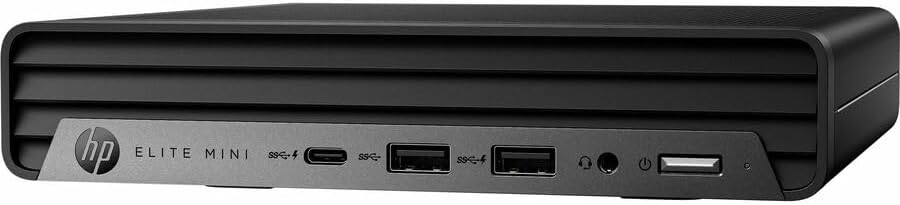
Выява: спераду view of the HP Elite Mini 800 G9 Desktop PC, highlighting the accessible front ports including USB-C, USB-A, and a headphone jack.
2. Падключэнне перыферыйных прылад
- Падключэнне манітора: Connect your monitor to one of the available video output ports (e.g., DisplayPort, HDMI) on the rear of the mini PC.
- Падключэнне клавіятуры і мышы: Plug the included keyboard and mouse into the USB ports on the mini PC.
- Падключэнне да сеткі (неабавязкова): For a wired internet connection, connect an Ethernet cable from your router or network switch to the Ethernet port on the mini PC. Wireless connectivity (Wi-Fi 6) is also available.
- Падключыце харчаванне: Connect the AC adapter to the power input port on the mini PC, then plug the power cord into a wall outlet.
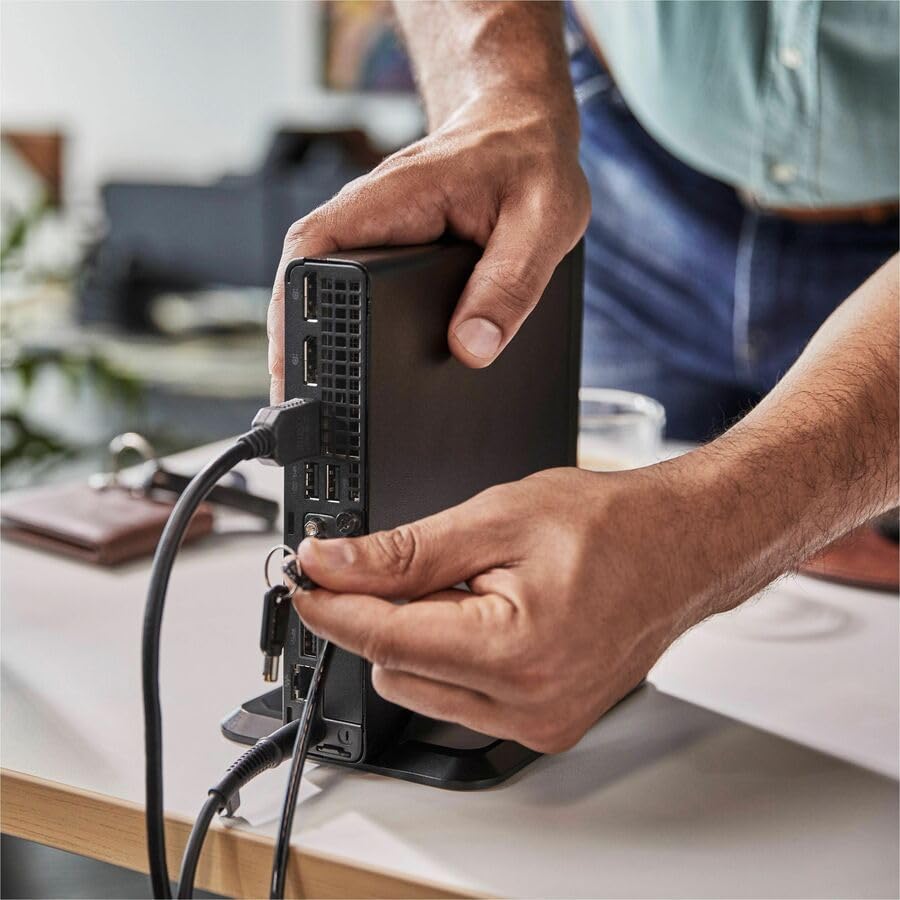
Image: A user connecting various cables, including power and display, to the rear ports of the HP Elite Mini 800 G9. This illustrates the typical connection process for peripherals.
Інструкцыя па эксплуатацыі
Once your HP Elite Mini 800 G9 is set up, follow these steps for basic operation:
1. Уключэнне
Press the power button located on the front of the mini PC. The power indicator light will illuminate, and the system will begin to boot up. The operating system (Windows 11 Pro) will load automatically.
2. Initial Setup (First Use)
Upon first boot, you will be guided through the Windows 11 Pro setup process. This includes selecting your region, language, accepting terms, and setting up a user account. Follow the on-screen prompts to complete this process.
3. Выключэнне
To properly shut down the computer, click the Пачаць button in Windows, then select Магутнасць > Закрыць. Avoid powering off the system by holding the power button, as this can lead to data loss or system corruption.

Image: A professional working at a desk, demonstrating the compact integration of the HP Elite Mini 800 G9, which is mounted discreetly behind a monitor.
Тэхнічнае абслугоўванне
Regular maintenance helps ensure the longevity and optimal performance of your HP Elite Mini 800 G9 Desktop Computer.
1. Абнаўленне праграмнага забеспячэння
Keep your operating system and drivers updated. Windows Update automatically handles OS updates. For driver updates, visit the official HP support webсайт для вашай мадэлі.
2. Уборка
- Знешні выгляд: Выкарыстоўвайце мяккую безворсовую тканіну, злёгку dampвадой або мяккім мыйным растворам для ачысткі вонкавых паверхняў.
- вентылі: Periodically use compressed air to clear dust from the ventilation grilles to prevent overheating. Ensure the system is powered off before cleaning vents.
3. Рэзервовае капіраванне дадзеных
Regularly back up important data to an external drive or cloud storage to prevent data loss in case of hardware failure or other issues.
Ліквідацыю непаладак
У гэтым раздзеле разглядаюцца распаўсюджаныя праблемы, з якімі вы можаце сутыкнуцца пры выкарыстанні HP Elite Mini 800 G9.
Няма сілы
- Ensure the AC adapter is securely connected to both the mini PC and a working power outlet.
- Праверце працаздольнасць разеткі, падключыўшы да яе іншую прыладу.
- Check the power button for any damage or obstruction.
Няма адлюстравання на маніторы
- Confirm the monitor is powered on and correctly connected to the mini PC's video output port.
- Пераканайцеся, што на маніторы выбрана правільная крыніца ўваходнага сігналу.
- Try connecting the mini PC to a different monitor or using a different video cable if available.
Павольная прадукцыйнасць
- Зачыніце непатрэбныя праграмы, якія працуюць у фонавым рэжыме.
- Праверце і ўсталюйце ўсе чакаючыя абнаўлення Windows або абнаўлення драйвераў.
- Запусціце ачыстку і дэфрагментацыю дыска (для жорсткіх дыскаў, звычайна не патрабуецца для SSD).
- Праверце наяўнасць шкоднасных праграм або вірусаў з дапамогай надзейнага антывіруснага праграмнага забеспячэння.
Тэхнічныя характарыстыкі
Detailed technical specifications for the HP Elite Mini 800 G9 Desktop Computer:
| Асаблівасць | Дэталь |
|---|---|
| Нумар мадэлі | AS1F8AT#ABA |
| Працэсар | Intel Core i5-12500T (12th Gen, Hexa-core, 2 GHz) |
| АЗП | 16 ГБ аператыўнай памяці DDR5 |
| Захоўванне | 256 ГБ SSD |
| Графіка | Інтэграваная відэакарта Intel UHD Graphics 770 |
| Аперацыйная сістэма | Windows 11 Pro |
| Бесправоднае падключэнне | Wi-Fi 6 (802.11ax), Bluetooth |
| Памеры (ДхШхВ) | 6.9 х 7 х 1.4 цалі |
| Вага | 3.13 фунта |
| Парты (спераду) | USB-C, USB-A, Headphone/Microphone Combo |
| Парты (ззаду) | Multiple USB-A, Video Outputs (e.g., DisplayPort, HDMI), Ethernet, Power Input |
Гарантыя і падтрымка
Your HP Elite Mini 800 G9 Desktop Computer comes with a standard manufacturer's warranty. For specific warranty terms and conditions, please refer to the documentation included with your product or visit the official HP support webсайт.
Каб атрымаць тэхнічную дапамогу, спампаваць драйверы або атрымаць дадатковую падтрымку, наведайце сайт падтрымкі HP webсайт: