1. Уводзіны
Welcome to the ACwO DwOTS Fire user manual. These innovative earbuds offer a unique dual-style design, providing both in-ear and half-in-ear options within a single charging case. Designed for versatility and high-quality audio, the DwOTS Fire earbuds feature advanced connectivity, extended battery life, and intuitive controls to enhance your listening experience.

Image: ACwO DwOTS Fire earbuds showcasing both half-in-ear and in-ear styles from a single case.
2. Што ў скрынцы
Калі ласка, пераканайцеся, што ўсе прадметы прысутнічаюць у вашай упакоўцы:
- 2 x Set of Wireless Earbuds (one in-ear, one half-in-ear)
- 1 х кабель для хуткай зарадкі Type-C
- 4 x Extra Earmuffs (for in-ear style)
- 1 х гарантыйны талон
- 1 x Scan Me Card

Image: The ACwO DwOTS Fire earbuds and charging case.
3. Налада і спалучэнне
3.1 Пачатковае спалучэнне
- Пераканайцеся, што навушнікі зараджаны.
- Адкрыйце зарадны кейс. Навушнікі аўтаматычна пяройдуць у рэжым спалучэння.
- На вашай прыладзе (смартфоне, планшэце і г.д.) уключыце Bluetooth.
- Пошук available devices and select "ACwO Fire" or "ACwO DwOTS Fire" to connect.
- Пасля падключэння вы пачуеце гукавое паведамленне, а індыкатар на навушніках зменіцца.
Падвойнае падключэнне 3.2
The ACwO DwOTS Fire earbuds offer unique dual connectivity options:
- Connect Each Pair to Two Different Devices: Ideal for sharing your listening experience.
- Connect Both Pairs to a Single Device: Perfect for watching movies or listening to music together with a loved one. This feature is available only for devices with dual audio connectivity (e.g., certain Android devices).

Image: Illustration of the dual connectivity feature, showing two pairs of earbuds.
Steps for Dual Sharing (Connecting Both Pairs to a Single Device):
- Connect both 'ACwO DwOTS Fire' and 'ACwO Fire +' with your device's Bluetooth.
- Once both pairs are connected, scroll down your device's notification panel and click on 'Media Output'.
- One pair will already be selected. Select the other pair to enable dual audio.
- You can now listen on both pairs of your earbuds simultaneously.

Image: Visual guide for setting up dual sharing on a compatible device.
4. Інструкцыя па эксплуатацыі
4.1 Інтуітыўна зразумелае сэнсарнае кіраванне
The earbuds feature intuitive touch controls for easy management of music, calls, and voice assistants. Refer to the included 'Scan Me Card' for a detailed diagram of touch functions.
- Прайграванне/Паўза: Адзін націск на любы навушнік.
- Наступны трэк: Двойчы націсніце на правы навушнік-ўкладыш.
- Папярэдні трэк: Двойчы націсніце на левы навушнік-ўкладыш.
- Адказ/завяршэнне выкліку: Адзін націск на любы навушнік.
- Адхіліць выклік: Доўгае націсканне на любы навушнік.
- Актываваць галасавы памочнік: Тройчы націсніце на любы навушнік.
4.2 рэжыму эквалайзера
Customize your audio experience with 3 preset EQ modes, offering a total of 3+3 EQ options across the two earbud styles. Switch between modes to suit your preference for deep bass, balanced sound, or enhanced treble.
- Гульнявы рэжым: Optimized for immersive gaming audio with low latency.
- Тэатральны рэжым: Enhanced soundstage for movies and videos.
- Збалансаваны рэжым: Provides a neutral and clear audio profile для агульнага праслухоўвання.

Image: ACwO DwOTS Fire earbuds with a visual representation of available EQ modes.
4.3 Галасавы памочнік
Easily access your device's voice assistant by triple-tapping either earbud. Compatible with "Ok Google" and "Hey Siri" for hands-free control.
5. Зарадка
5.1 Earbuds and Case Charging
The ACwO DwOTS Fire earbuds provide up to 52 hours of music playtime with the charging case. The case supports both wired and wireless charging.
- Правадная зарадка: Connect the provided Type-C fast charging cable to the charging port on the case and a power source.
- Бесправадная зарадка: Place the charging case on a compatible wireless charging pad (wireless charger not included). The indicator light on the case will show charging status.

Image: ACwO DwOTS Fire charging case highlighting 52 hours of playtime.

Image: 'One On, One Charging' feature for extended use.
6. Тэхнічнае абслугоўванне
6.1 Воданепранікальнасць і потаўстойлівасць
The earbuds are IPX5 water and sweat resistant, making them suitable for workouts and outdoor activities. This rating protects against low-pressure water jets from any direction. Do not submerge the earbuds in water.

Image: ACwO DwOTS Fire earbuds demonstrating IPX5 water and sweat resistance.
6.2 Ачыстка
Regularly clean your earbuds and charging case with a soft, dry, lint-free cloth. Avoid using abrasive materials or harsh chemicals. For the in-ear style, gently remove and clean the earmuffs with water and mild soap, ensuring they are completely dry before reattaching.
7. Тэхнічныя характарыстыкі
| Асаблівасць | Дэталь |
|---|---|
| Назва мадэлі | Агонь DwOTS |
| Тэхналогія падлучэння | Бесправадная сувязь (Bluetooth версіі 5.3) |
| Тып аўдыё драйвера | 13mm Real Drivers |
| Кантроль шуму | AI-ENC with Quad Mics, Passive Noise Cancellation |
| Час гульні | Да 52 гадзін (з зарадным футлярам) |
| Затрымка | Up to 45ms (Ultra-low) |
| Узровень воданепранікальнасці | IPX5 (воданепранікальнасць) |
| Зарадка | Type-C Fast Charging, Wireless Charging Capability |
| Метад кантролю | Touch Controls, Voice Assistant (Ok Google, Hey Siri) |
| Форма навушніка | In-Ear, Half-in-Ear |
| Вага прадмета | 43 г |
| Памеры прадукту | 5.6 х 5.6 х 1.8 см |
| Матэрыял | Пластыкавыя |
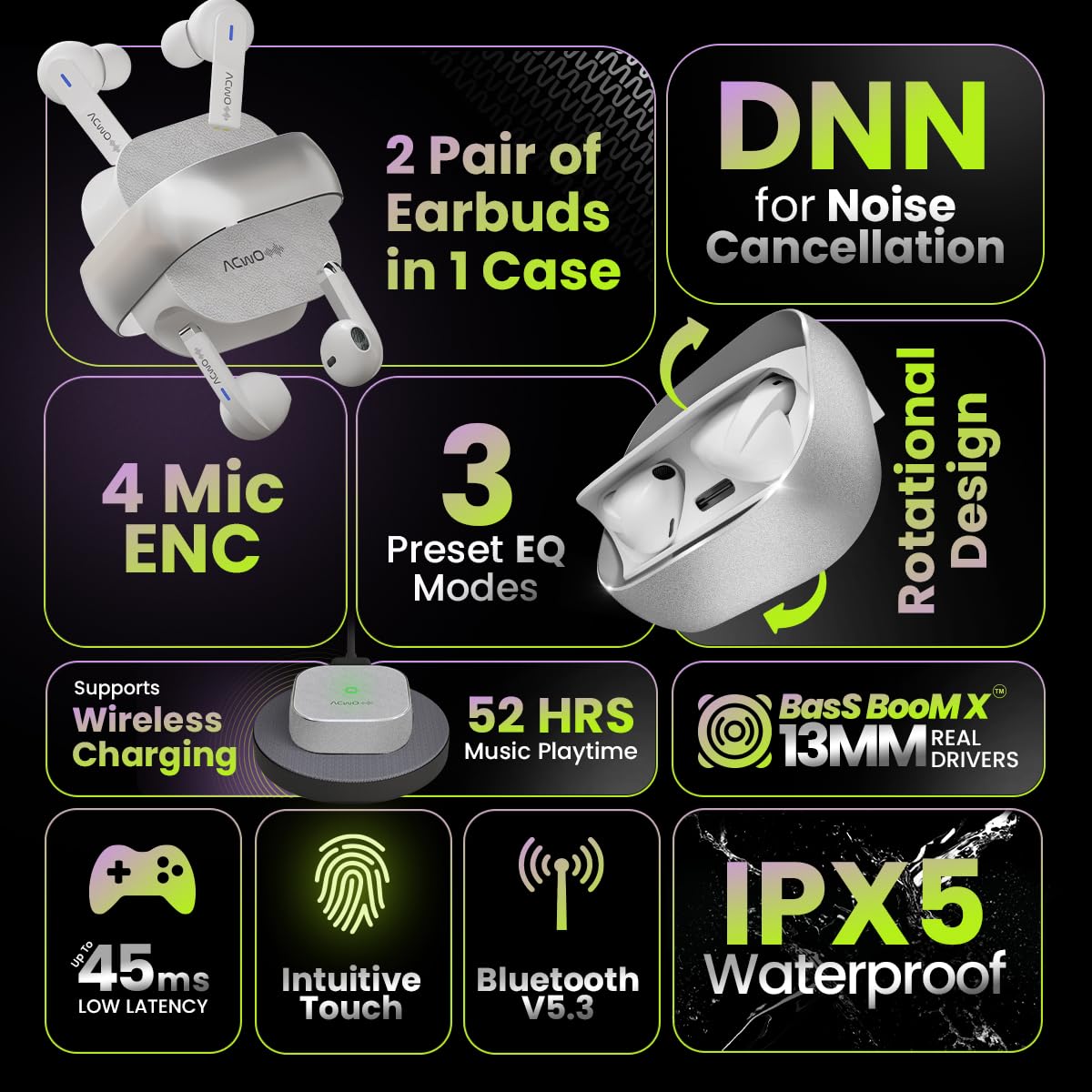
Image: Summary of ACwO DwOTS Fire key features.
8. Выпраўленне непаладак
8.1 Навушнікі не спалучаюцца
- Пераканайцеся, што навушнікі зараджаныя, а вечка кейса адкрыта.
- Выключыце і ўключыце Bluetooth на прыладзе.
- Забудзьце прыладу са спісу Bluetooth і паспрабуйце зноў падключыць прыладу.
- Reset the earbuds (refer to the 'Scan Me Card' for specific reset instructions).
8.2 Няма гуку або нізкі ўзровень гучнасці
- Праверце ўзровень гучнасці як на прыладзе, так і ў навушніках.
- Пераканайцеся, што навушнікі правільна размешчаны ў вушах.
- Ачысціце дынамікі навушнікаў і зарадныя кантакты ад смецця.
- Зноў падключыце навушнікі-ўкладышы да прылады.
8.3 Праблемы з зарадкай
- Пераканайцеся, што зарадны кабель надзейна падключаны як да корпуса, так і да крыніцы харчавання.
- If using wireless charging, ensure the case is correctly placed on a compatible wireless charging pad.
- Check for any obstructions on the charging contacts of the earbuds and inside the case.
- Паспрабуйце іншы кабель для зарадкі або адаптар харчавання.
9. Гарантыя і падтрымка
The ACwO DwOTS Fire earbuds come with a standard brand warranty. Please refer to the included Warranty Card for specific terms and conditions.
Падтрымка кліентаў:
For any queries, technical assistance, or warranty claims, please contact ACwO customer support:
- электронная пошта: help@acwo.com
- тэлефон: +91 9320420001
- вытворца: ACWO LIFESTYLE PRIVATE LIMITED, Borivali, Mumbai, Maharashtra - 400092, India


