Уводзіны
Welcome to the GOBOULT UFO True Wireless Earbuds user manual. These earbuds are designed to provide a superior audio experience with features like extended playtime, low latency gaming, advanced noise cancellation, and robust bass drivers. Please read this manual carefully to ensure proper use and optimal performance of your device.
Што ў скрынцы
- GOBOULT UFO True Wireless Earbuds
- Чахол для бесправадной зарадкі
- Кабель для хуткай зарадкі Type-C
- Дадатковая пара амбушюр
- Кіраўніцтва карыстальніка
- Гарантыйны талон
Прадукт скончаныview
The GOBOULT UFO earbuds feature a distinctive design with integrated breathing LEDs on both the earbuds and the charging case. They are equipped with 13mm drivers for rich bass and Quad Mic ENC for clear calls.

Image: GOBOULT UFO Earbuds and Charging Case. This image highlights key features such as Bluetooth 5.3 connectivity, 48 hours of playtime, Quad Mic ENC, 13mm drivers, 45ms low latency, and Type-C fast charging.
Дыхаючыя святлодыёды
The breathing LEDs on the case and earbuds provide visual feedback for various actions, including opening/closing the case, charging, and when buds are connected.

Image: The GOBOULT UFO charging case and earbuds displaying their distinctive breathing LED lights, which indicate various operational states.
Якасць гуку
Experience high-fidelity sound with precision-tuned 13mm drivers, ensuring clear audio across all frequencies and rich bass. The Quad Mic ENC (Environmental Noise Cancellation) system ensures crystal-clear, interference-free calls.
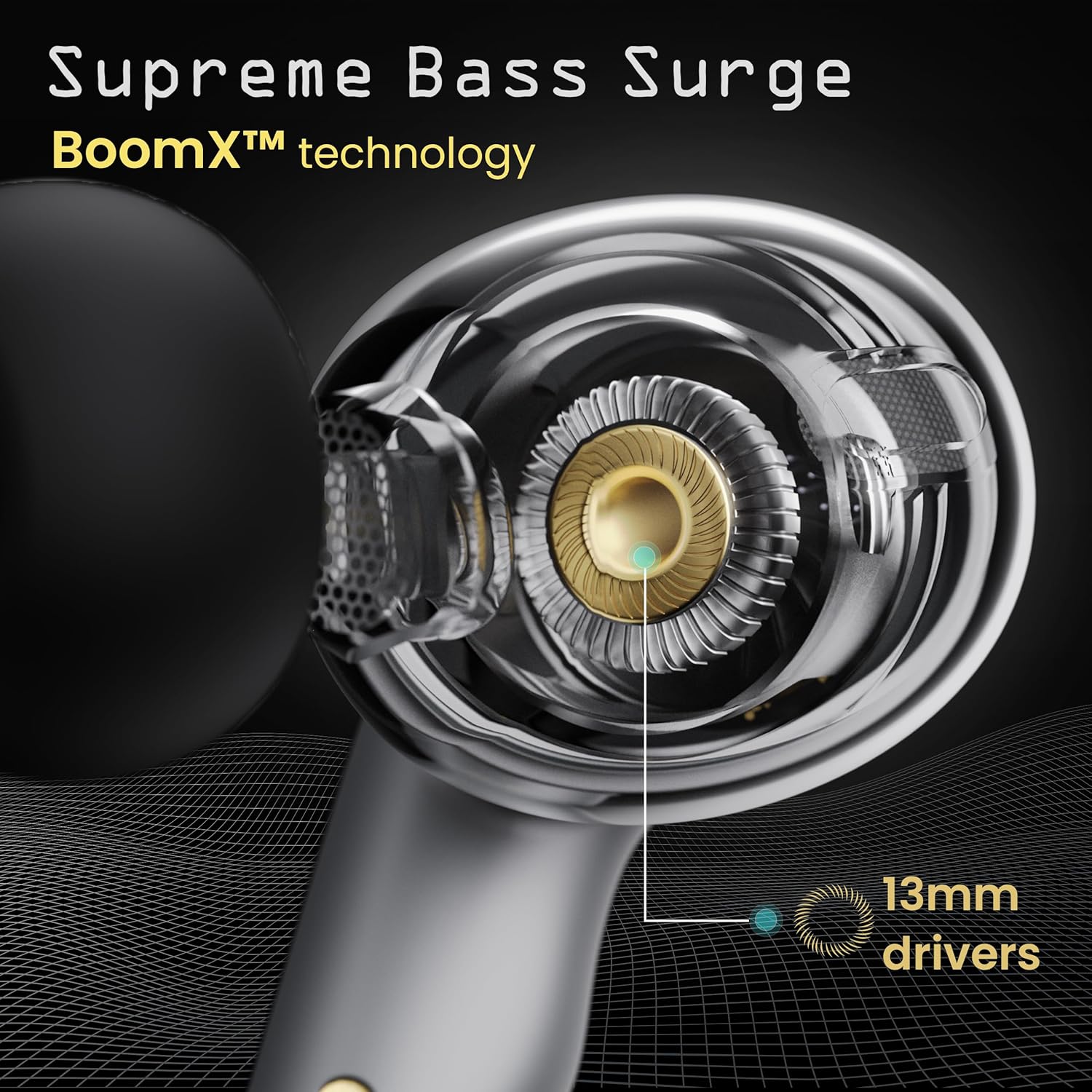
Image: A close-up of a GOBOULT UFO earbud, highlighting the 13mm drivers responsible for supreme bass surge.

Выява: Падрабязны view of a GOBOULT UFO earbud, showcasing the AI-powered Quad Mic AI-ENC technology for high-definition call clarity and Zen™ mode for silence.
Настройка
Першапачатковае спалучэнне
- Адкрыйце зарадны кейс. Навушнікі аўтаматычна пяройдуць у рэжым спалучэння.
- На вашай прыладзе (смартфоне, планшэце і г.д.) уключыце Bluetooth.
- Пошук "GOBOULT UFO" in the list of available Bluetooth devices and select it to connect.
- Once connected, you will hear an audio prompt, and the LED indicators on the earbuds will change.
The earbuds utilize Bluetooth 5.3 for stable and efficient connection, featuring Blink & Pair™ technology for fast pairing.

Image: GOBOULT UFO Earbuds illustrating stable connectivity with Bluetooth 5.3 and fast pairing technology.
Падтрымка прыкладанняў
Enhance your experience by downloading the dedicated GOBOULT app. The app allows you to:
- Switch between 6 Equalizer Modes.
- Наладзьце сэнсарнае кіраванне.
- Перайменуйце свае навушнікі.
- Доступ да дадатковых налад і функцый.
Інструкцыя па эксплуатацыі
Сэнсарныя элементы кіравання
The GOBOULT UFO earbuds feature intuitive touch controls on each earbud.
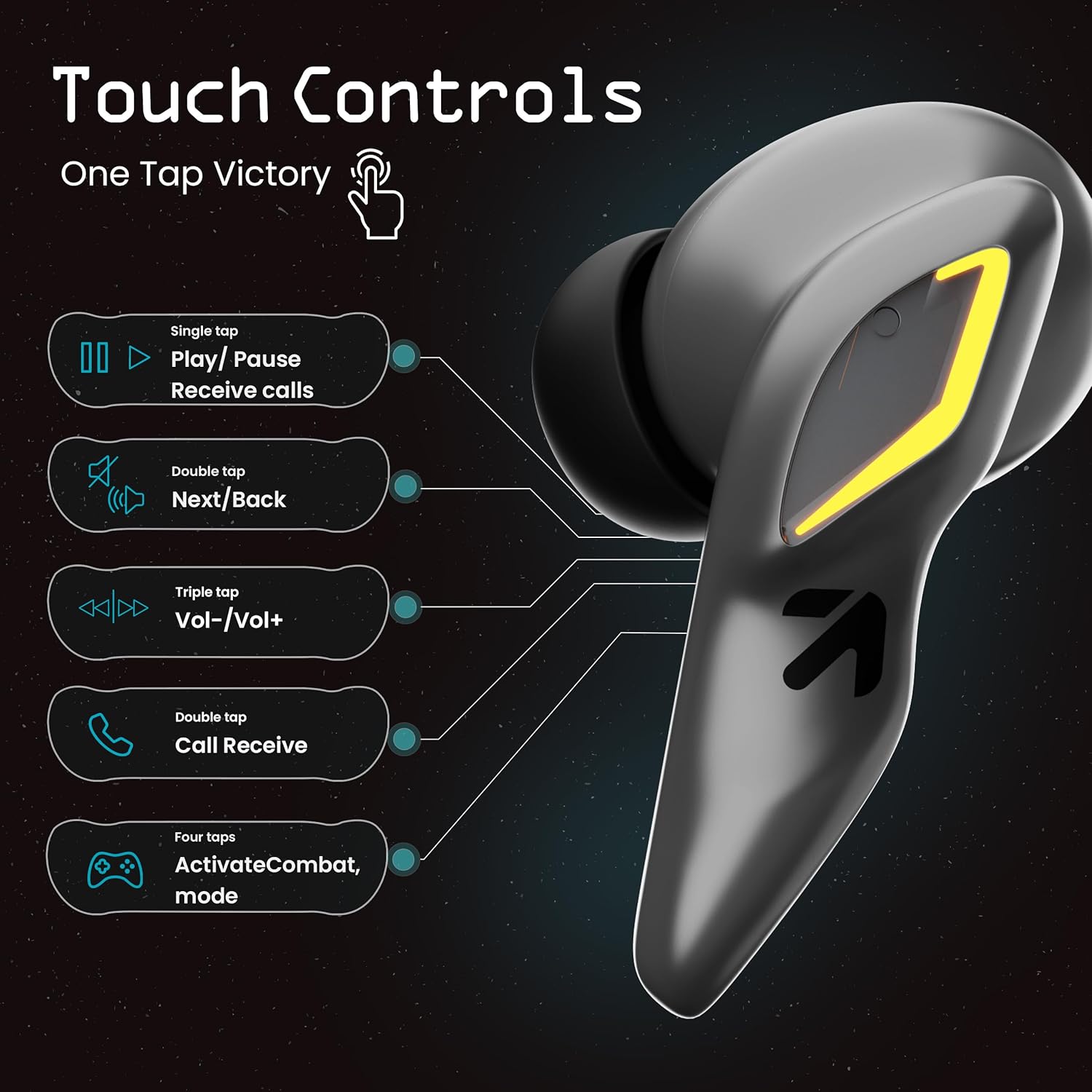
Image: A visual guide to the touch controls on the GOBOULT UFO Earbuds, detailing single, double, triple, and four-tap functions.
- Адзін націск: Play/Pause music, Receive calls.
- Двойчы націсніце: Next/Back track.
- Трайны кран: Павялічыць/паменшыць гучнасць.
- Чатыры націсканні: Activate Combat Mode (Gaming Mode).
- Доўгі націск: Activate Voice Assistant (Google Assistant, Siri).
Gaming Mode (Combat Mode)
Activate Combat Mode for an ultra-low latency experience of 45ms, ideal for gaming. Tap the earbud four times to toggle this mode.

Image: The GOBOULT UFO Earbuds case open, highlighting the Combat Gaming Mode with 45ms ultra-low latency, activated by four taps.
Галасавы памочнік
Long press the touch control area on either earbud to activate your device's voice assistant (e.g., Google Assistant, Siri).

Image: GOBOULT UFO Earbuds demonstrating the long-press gesture to activate the voice assistant feature.
Зарадка
The GOBOULT UFO earbuds offer up to 48 hours of total playtime with the charging case.
Зарадка кейса і навушнікаў
- Змесціце навушнікі ў зарадны футляр. Пераканайцеся, што яны правільна ўсталяваныя.
- Connect the Type-C fast charging cable to the charging port on the case and to a power source.
- Святлодыёдныя індыкатары на корпусе будуць паказваць стан зарадкі.
- A full charge for the earbuds and case takes approximately 100 minutes.
- With Type-C fast charging, a 10-minute charge can provide up to 1.5 hours of playtime.
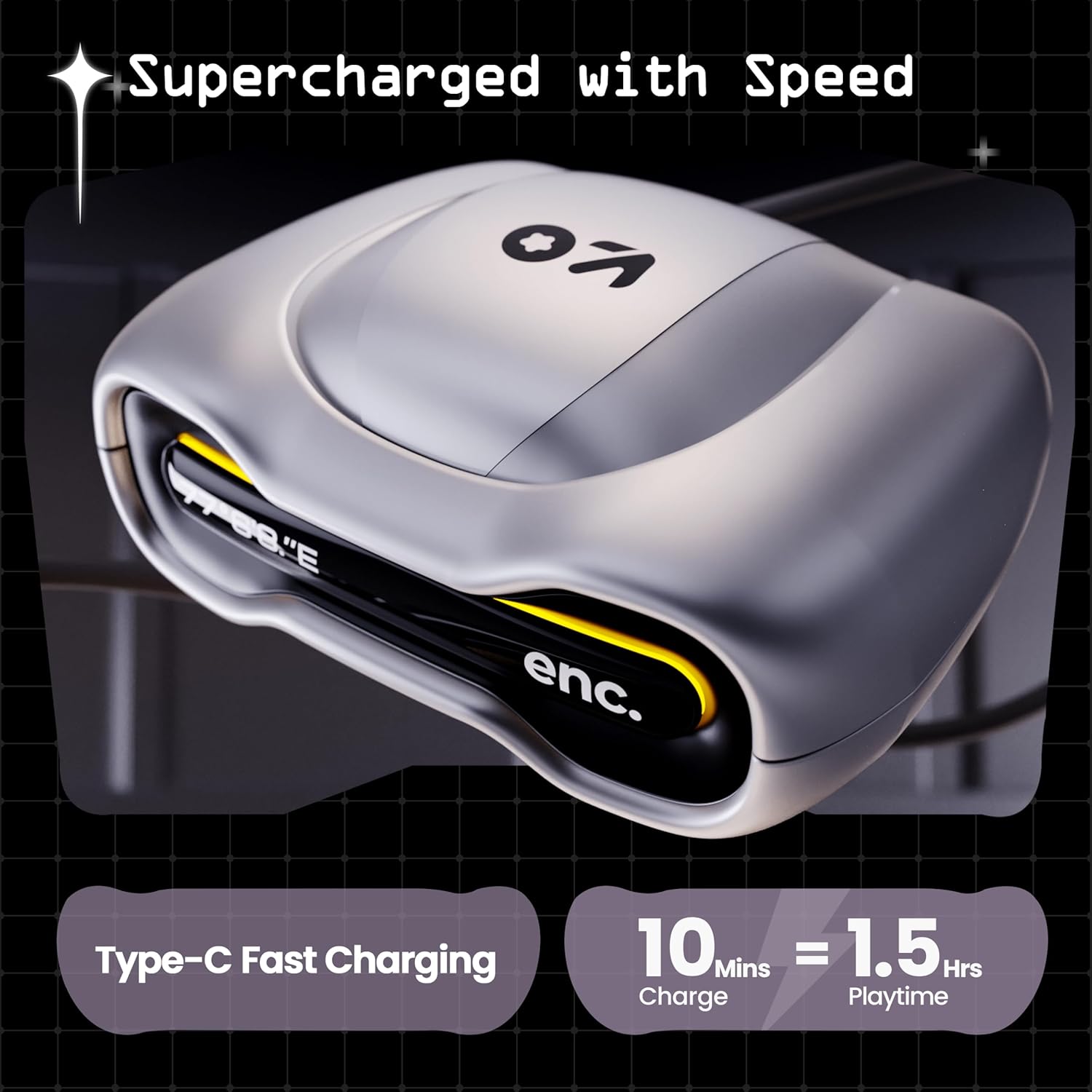
Image: The GOBOULT UFO charging case, illustrating its Type-C fast charging capability, providing 1.5 hours of playtime from a 10-minute charge.
Тэхнічнае абслугоўванне
Воданепранікальнасць
The GOBOULT UFO earbuds are IPX5 water-resistant, making them sweatproof, rainproof, and splashproof. This protection allows for use during workouts or in light rain.

Image: GOBOULT UFO Earbuds on a metallic surface, indicating their IPX5 water resistance, making them suitable for sweat, rain, and splashes.
Уборка
Каб падтрымліваць аптымальную прадукцыйнасць і гігіену, рэгулярна чысціце навушнікі і зарадны футляр.
- Выкарыстоўвайце мяккую, сухую тканіну без ворса, каб праціраць навушнікі і чахол.
- Для ўстойлівага бруду злёгку ачысціцеampпрамыйце тканіну вадой. Пазбягайце выкарыстання агрэсіўных хімічных рэчываў або абразіўных матэрыялаў.
- Пераканайцеся, што кантакты зарадкі на навушніках і ў футляры чыстыя і без смецця.
- Allow all components to dry completely before placing earbuds back in the case or charging.
Ліквідацыю непаладак
If you encounter any issues with your GOBOULT UFO earbuds, please refer to the following common solutions:
- Няма гуку: Ensure earbuds are charged and properly connected to your device. Check device volume.
- Праблемы спалучэння: Пераканайцеся, што на вашай прыладзе ўключаны Bluetooth. Паспрабуйце забыць прыладу ў наладах Bluetooth і зноў падключыць яе. Пераканайцеся, што навушнікі цалкам зараджаныя.
- Адзін навушнік не працуе: Place both earbuds back in the case, close it, and then open it again. This often resets the connection.
- Дрэнная якасць выкліку: Ensure microphones are clean. Check for strong Bluetooth connection.
- Сэнсарныя элементы кіравання не рэагуюць: Пераканайцеся, што вашы пальцы чыстыя і сухія. Паспрабуйце перазапусціць навушнікі, паклаўшы іх у чахол і выняўшы.
Каб атрымаць дадатковую дапамогу, звярніцеся ў службу падтрымкі кліентаў GOBOULT.
Тэхнічныя характарыстыкі
| Асаблівасць | Дэталь |
|---|---|
| Назва мадэлі | UFO (Airbass Earbuds) |
| Версія Bluetooth | 5.3 |
| Час гульні | Да 48 гадзін (з зарадным футлярам) |
| Затрымка аўдыя | 45 мілісекунд (гульнявы рэжым) |
| Вадзіцелі | Дынамічныя драйверы 13 мм |
| Мікрафоны | Quad Mic ENC (Environmental Noise Cancellation) |
| Воданепранікальнасць | IPX5 (абаронены ад поту, дажджу і пырскаў) |
| Порт для зарадкі | Хуткая зарадка Type-C |
| Час зарадкі | Прыблізна 100 хвілін |
| Дыяпазон Bluetooth | 10 метраў |
| АЧХ | 20 Гц |
| Адчувальнасць | 115 дБ |
| Імпеданс | 32 Ом |
| Вага прадмета | 60 грам |
| Памеры прадукту | 4.7 х 9 х 10 см |
| Матэрыял | Метал |
Гарантыя і падтрымка
Інфармацыя аб гарантыі
The GOBOULT UFO True Wireless Earbuds come with a 1 гады гарантыі вытворцы from the date of purchase. Please retain your proof of purchase for warranty claims. The warranty covers manufacturing defects. It does not cover damage caused by misuse, accidents, or unauthorized modifications.
Падтрымка кліентаў
For any questions, technical support, or warranty claims, please contact GOBOULT customer service.
вытворца: Exotic Mile Pvt. Ltd.
Адрас: B67 Wazirpur Industrial Area, New Delhi 110052, India.
Please refer to the warranty card included in your product packaging for specific contact details and procedures.


