1. Уводзіны
The XIAOMI Redmi Note 13 Pro 5G is a feature-rich smartphone designed for global use, offering advanced camera capabilities, a vibrant display, and robust performance. This manual provides essential information to help you set up, operate, and maintain your device effectively.
Key features include a flagship-level 200MP OIS anti-shake main camera, a 1.5K 120Hz AMOLED display, and support for 5G and 4G LTE global bands. The device is powered by the Snapdragon 7s Gen 2 Mobile Platform, ensuring smooth and efficient operation for various tasks.

Figure 1: Xiaomi Redmi Note 13 Pro 5G in various color options, showcasing its front display.
2. Што ў скрынцы
Upon unboxing your XIAOMI Redmi Note 13 Pro 5G, you should find the following items:
- XIAOMI Redmi Note 13 Pro 5G Smartphone
- Хуткая зарадная прылада для аўтамабіля
- Выцягвальнік латка для SIM-карты
- Кабель USB
- Насценны адаптар
3. Фізічны канецview
The Redmi Note 13 Pro 5G features a sleek design with a comfortable grip. Its dimensions are approximately 3.58 x 7.32 x 2.36 inches, and it weighs about 1.19 pounds (0.54 kilograms).
3.1 Дысплей
The device is equipped with a 6.67-inch AMOLED display, offering a refresh rate of up to 120Hz and a peak brightness of 1800 nits. The resolution is 2712x1220 pixels (446PPI), providing sharp and vibrant visuals. It features 12-bit color depth, a 5,000,000:1 contrast ratio, and 100% DCI-P3 color gamut. The screen is protected by Corning Gorilla Glass Victus and supports Dolby Vision.
3.2 Модуль камеры
The rear camera system includes a triple camera setup:
- Асноўная камера 200 Мп: Features OIS (Optical Image Stabilization), f/1.65 aperture, 1/1.4” sensor size, and 7P lens for high-resolution photos and improved low-light performance.
- 8-мегапіксельная звышшырокавугольная камера: With f/2.2 aperture for capturing broader scenes.
- 2-мегапіксельная макракамера: With f/2.4 aperture for detailed close-up shots.
The front camera is designed for selfies and video calls.
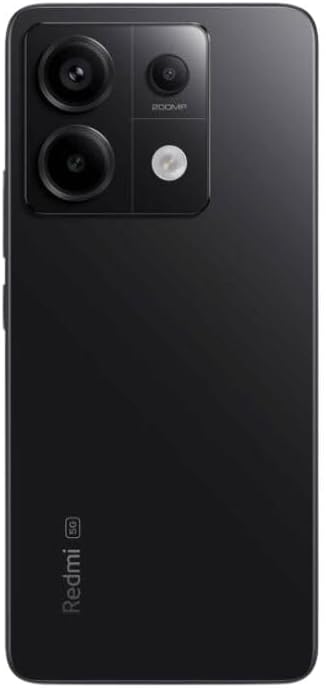
Малюнак 2: Задняя частка view of the Xiaomi Redmi Note 13 Pro 5G, showing the 200MP triple camera setup.
3.3 Ports and Sensors
The device includes a USB-C port for charging and data transfer, and a 3.5mm headphone jack. Integrated sensors include an in-screen fingerprint sensor, AI Face Unlock, ambient light sensor, accelerometer, electronic compass, IR blaster, and gyroscope.
4. Настройка
4.1 Усталёўка SIM -карты
- Знайдзіце латок для SIM-карты на бакавой частцы прылады.
- Устаўце інструмент для выкідання латка SIM-карты ў невялікую адтуліну побач з ім і моцна націсніце, пакуль латок не выскочыць.
- Place your nano-SIM card(s) into the designated slots on the tray. Ensure the gold contacts are facing down. The device supports Dual SIM (nano SIM + nano SIM or nano SIM + eSIM).
- Асцярожна ўстаўце латок для SIM-карты назад у тэлефон, пакуль ён не зафіксуецца на месцы.
4.2 Пачатковае ўключэнне і майстар налады
- Націсніце і ўтрымлівайце кнопку харчавання (звычайна з правага боку), пакуль не з'явіцца лагатып Xiaomi.
- Follow the on-screen instructions to select your language, region, and agree to the terms and conditions.
- Падключыцеся да сеткі Wi-Fi, каб завяршыць працэс налады і загрузіць неабходныя абнаўленні.
- Sign in with your Google account and/or Xiaomi account to access services and restore backups.
- Set up your preferred security methods, such as PIN, pattern, password, fingerprint, or AI Face Unlock.
5. Эксплуатацыя прылады
5.1 Навігацыя па дысплеі
Navigate your device using intuitive touch gestures. Swipe, tap, pinch, and zoom to interact with apps and content. The 120Hz refresh rate ensures a smooth and fluid user experience. Unlock your device quickly and securely using the in-screen fingerprint sensor or AI Face Unlock.
5.2 Выкарыстанне камеры
Open the Camera app to capture photos and videos. Utilize the 200MP main camera for highly detailed images, the ultra-wide lens for expansive landscapes, and the macro lens for close-up photography. The camera supports 4K video recording at 30fps, 1080p at 30/60fps, and 720p at 30fps. Slow motion video is available at 1080p (120fps) and 720p (120/240fps).
5.3 Прадукцыйнасць
The Redmi Note 13 Pro 5G is powered by the Snapdragon 7s Gen 2 Mobile Platform, built on 4nm process technology with an octa-core CPU up to 2.4GHz and Adreno GPU. This configuration, combined with 8GB of RAM and 256GB of internal storage, provides strong performance for multitasking, gaming, and demanding applications.
5.4 Аўдыё
Enjoy immersive audio with dual speakers and Dolby Atmos support. The device also retains a 3.5mm headphone jack for wired audio connections.
6. Тэхнічнае абслугоўванне
6.1 Абнаўленне праграмнага забеспячэння
Рэгулярна правярайце наяўнасць абнаўленняў праграмнага забеспячэння і ўсталёўвайце іх, каб пераканацца, што ваша прылада мае найноўшыя функцыі, патчы бяспекі і паляпшэнні прадукцыйнасці. Перайдзіце па спасылцы Налады > Аб тэлефоне > Версія MIUI каб праверыць наяўнасць абнаўленняў.
6.2 Сыход за акумулятарам
The 5000 mAh battery provides extended usage. To prolong battery life, avoid extreme temperatures, use the provided 67W fast charger, and manage background app usage. Avoid fully discharging the battery frequently.
6.3 Ачыстка
Use a soft, lint-free cloth to clean your device. Avoid harsh chemicals or abrasive materials that could damage the screen or finish. Do not expose the device to excessive moisture.
6.4 Кіраванне сховішчам
З 256 ГБ убудаванай памяці ў вас ёсць ample space for apps and media. Regularly review ваш files and uninstall unused applications to optimize performance and free up space.
7. Выпраўленне непаладак
Калі ў вас узніклі праблемы з прыладай, паспрабуйце выканаць наступныя асноўныя дзеянні па ліквідацыі непаладак:
- Прылада не адказвае: Націсніце і ўтрымлівайце кнопку харчавання каля 10-15 секунд, каб прымусова перазагрузіць кампутар.
- Праблемы з падключэннем да сеткі: Check if your SIM card is properly inserted. Toggle Airplane Mode on and off. Restart your device. Verify Wi-Fi settings and router connection.
- Збой/завісанне праграмы: Close the app and reopen it. Clear the app's cache and data (Settings > Apps > Manage apps > [App Name] > Clear data). Update the app to its latest version.
- Разрад батарэі: Праверце выкарыстанне батарэі ў наладах, каб вызначыць праграмы, якія спажываюць шмат энергіі. Зменшце яркасць экрана, адключыце непатрэбныя функцыі, такія як GPS або Bluetooth, калі яны не выкарыстоўваюцца.
- Нізкая прадукцыйнасць: Clear cache, uninstall unused apps, and ensure sufficient free storage space.
- Скід да заводскіх налад: As a last resort, if issues persist, you may perform a factory reset. Папярэджанне: Гэта сатрэ ўсе дадзеныя на вашай прыладзе. Перад тым, як працягнуць, зрабіце рэзервовую копію важных дадзеных. Перайсці да Налады > Аб тэлефоне > Скід да заводскіх налад.
8. Тэхнічныя характарыстыкі
| Асаблівасць | Спецыфікацыя |
|---|---|
| Назва мадэлі | Redmi Note 13 Pro 5G |
| Нумар мадэлі тавару | 2312DRA50G |
| Марка | XIAOMI |
| Аперацыйная сістэма | Android 13.0 |
| Мадэль працэсара | Snapdragon 7s Gen 2 Mobile Platform |
| Хуткасць працэсара | Да 2.4 Ггц |
| Памер усталяванай аператыўнай памяці | 8 ГБ |
| Ёмістасць памяці | 256 ГБ |
| Памер пастаяннага экрана | 6.67 цалі AMOLED |
| дазвол | 2712x1220 (446PPI) |
| Частата абнаўлення | Да 120 Гц |
| Пікавая яркасць | 1800 ніт |
| Асноўная камера | 200 МП оптичная стабілізацыя выявы |
| Звышшырокавугольная камера | 8 МП |
| Макракамера | 2 МП |
| Намінальная магутнасць батарэі | 5000 Міліamp Гадзіны |
| Зарадка | Хуткая зарадка 67 Вт |
| Аўдыёраз'ём | 3.5 мм |
| Аператар бесправадной сувязі | Unlocked (USA Market: T-Mobile, Mint, Tello or any under T-Mobile network) |
| Памеры прадукту | 3.58 х 7.32 х 2.36 цалі |
| Вага прадмета | 1.19 фунта (0.54 кілаграма) |
9. Гарантыя і падтрымка
Your XIAOMI Redmi Note 13 Pro 5G is covered by a manufacturer's warranty. For detailed information regarding warranty terms, conditions, and duration, please refer to the warranty card included in your product packaging or visit the official XIAOMI support webсайт.
For technical support, service requests, or further assistance, please visit the official XIAOMI webна сайце або звярніцеся ў службу падтрымкі кліентаў. Трымайце пад рукой пацвярджэнне пакупкі для любых гарантыйных прэтэнзій.