1. Уводзіны
This manual provides essential information for setting up, operating, maintaining, and troubleshooting your HP EliteOne 800 G5 24-inch All-in-One Touchscreen PC. Please read this guide thoroughly before using your device to ensure proper functionality and longevity.

Figure 1: HP EliteOne 800 G5 All-in-One PC with included keyboard and mouse.
2. Змесціва ўпакоўкі
Праверце наяўнасць усіх прадметаў у камплекце:
- HP EliteOne 800 G5 All-in-One PC
- USB-клавіятура HP
- HP USB Mouse
- Шнур харчавання
- Дакументацыя (гэта кіраўніцтва, інфармацыя па тэхніцы бяспекі)
3. Прадукт скончыўсяview
3.1 фронт View

Малюнак 2: Спераду view of the HP EliteOne 800 G5, showing the 24-inch touchscreen display and integrated speakers.
- 23.8-inch FHD IPS WLED-backlit Touchscreen Display: Main interactive display area.
- 2 MP FHD Pop-up Webкамера: Located at the top center, retracts when not in use.
- Інтэграваны лічбавы мікрафон з двума масівамі: For clear audio input during calls or recordings.
- Bang & Olufsen Speakers: Located below the screen for high-quality audio output.
3.2 бок View (справа)

Малюнак 3: правы бок view illustrating the optical disk drive and audio ports.
- Optical Disk Drive: For reading and writing CDs/DVDs.
- Disc drive eject button: To open the optical disk drive tray.
- Standard lock slot (10 mm): For security cables.
- Universal Audio Jack with CTIA headset support: For connecting headsets with a microphone.
- Раз'ём для навушнікаў: Для падлучэння навушнікаў.
3.3 Ззаду View і парты
Малюнак 4: Падрабязная задняя частка view showing all available ports and connections.
- USB 3.1 Gen 2 Type-A port: High-speed USB connection.
- USB 3.1 Gen 2 Type-A port (charge support up to 5V/1.5A): High-speed USB with charging capability.
- Audio line-out connector: For connecting external speakers or audio systems.
- USB 3.1 Gen 1 Type-A ports (2): Стандартныя USB-злучэнні.
- RJ-45 (network) jack: Для праваднога падлучэння да Ethernet.
- Раз'ём харчавання: Для падлучэння шнура харчавання.
- USB 3.1 Gen 2 Type-A ports (2) wake capable: High-speed USB ports that can wake the system.
- Dual-Mode DisplayPort™ 1.2 (DP++): Для падлучэння знешніх дысплеяў.
- HDMI 2.0a connector: Для падлучэння знешніх дысплеяў.
- SD card reader 4.0 (NOT INCLUDED on all models): Для чытання карт памяці SD.
- USB 3.1 Type-C™ Gen 2 port (charge support up to 5V/3A): Reversible USB-C port with charging capability.
- Dual-state power button: To power on/off or put the system to sleep.
- Вядома View Button (optional): Activates HP Sure View integrated privacy screen.

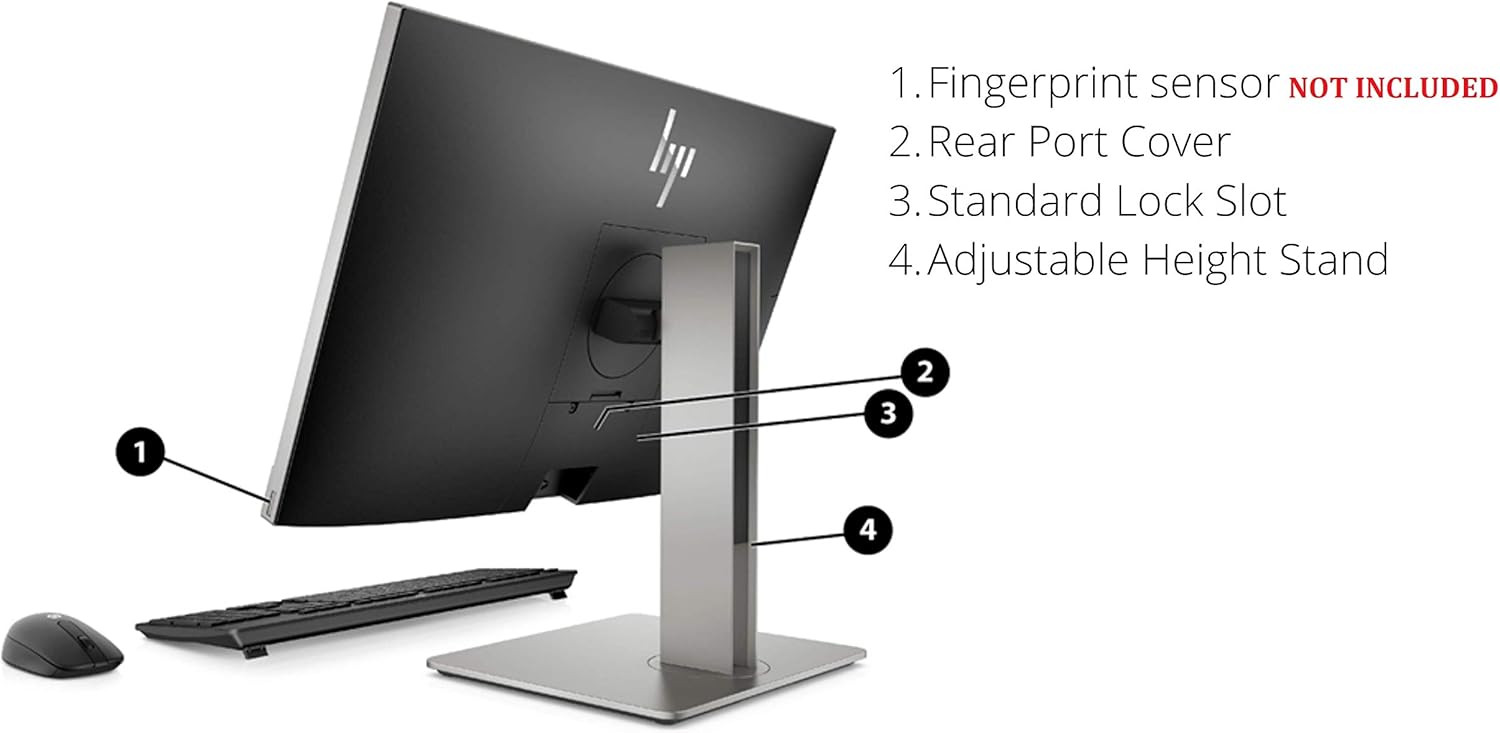
Малюнак 5: Задняя частка view highlighting the adjustable height stand and other features.
- Fingerprint sensor (NOT INCLUDED on all models): Для біяметрычнай аўтэнтыфікацыі.
- Rear Port Cover: Conceals and protects rear ports.
- Стандартны слот для замка: For security cables.
- Падстаўка з рэгуляванай вышынёй: Allows for ergonomic positioning of the display.
4. Настройка
Follow these steps to set up your HP EliteOne 800 G5 PC:
- Распакуйце ПК: Акуратна дастаньце ўсе кампаненты з упакоўкі.
- Размясціце ПК: Place the All-in-One PC on a stable, flat surface. Ensure adequate ventilation around the device.
- Падключэнне клавіятуры і мышы: Plug the USB keyboard and mouse into any available USB Type-A ports on the rear of the PC.
- Падключыце харчаванне: Connect the power cord to the power connector on the rear of the PC, then plug the other end into a grounded electrical outlet.
- Падключэнне да сеткі (неабавязкова): For a wired internet connection, connect an Ethernet cable from your router or modem to the RJ-45 (network) jack on the rear of the PC.
- Уключэнне: Press the dual-state power button, located on the rear of the PC, to turn on the system.
- Першапачатковая ўстаноўка: Выконвайце інструкцыі на экране, каб завяршыць наладу Windows 10 Pro, у тым ліку мову, рэгіён, падключэнне да сеткі (калі не правадное) і стварэнне ўліковага запісу карыстальніка.
5. Інструкцыя па эксплуатацыі
5.1 Кіраванне харчаваннем
- Уключэнне: Press the power button on the rear of the PC.
- Рэжым сну: Briefly press the power button or select 'Sleep' from the Windows Start menu.
- Выключыць: Абярыце «Завяршыць працу» ў меню «Пуск» Windows.
- Перазапуск: У меню «Пуск» Windows абярыце «Перазагрузка».
5.2 Выкарыстанне сэнсарнага экрана
The 24-inch display supports multi-touch gestures. Common gestures include:
- Націсніце: Эквівалентна кліку мышшу.
- Двойчы націсніце: Эквівалентна падвойнаму кліку.
- Націсніце і ўтрымлівайце: Эквівалентна пстрычцы правай кнопкай мышы.
- Зцісканне/Расцяжэнне: Павялічыць або паменшыць.
- Правядзіце пальцам: Пракручвайце змест або перамяшчайцеся па ім.
5.3 Webкамера і аўдыё
- Webкамера: The 2 MP FHD pop-up webcam automatically extends when an application requires it (e.g., video calls). Gently push it down to retract when not in use for privacy.
- Мікрафон: The integrated dual array digital microphone is active when the webcam is in use or when voice input is required.
- Дакладчыкі: The Bang & Olufsen speakers provide audio output. Volume can be adjusted via Windows settings or keyboard shortcuts.
5.4 Optical Disk Drive
To use the DVD+/-RW SM DL 9.5mm slim tray:
- Press the eject button on the right side of the PC.
- Place a CD or DVD onto the tray, ensuring it is seated correctly.
- Gently push the tray back into the PC until it clicks shut.
6. Тэхнічнае абслугоўванне
6.1 Ачыстка
- экран: Выкарыстоўвайце мяккую безворсовую тканіну, злёгку dampвадой або растворам для ачысткі экрана. Не распыляйце вадкасць непасрэдна на экран.
- Шасі: Працірайце мяккай сухой тканінай. Пазбягайце абразіўных ачышчальных сродкаў.
- Вентыляцыя: Пераканайцеся, што вентыляцыйныя адтуліны чыстыя ад пылу і перашкод, каб прадухіліць перагрэў.
6.2 Абнаўленне праграмнага забеспячэння
Рэгулярна абнаўляйце аперацыйную сістэму і драйверы, каб забяспечыць аптымальную прадукцыйнасць і бяспеку:
- Абнаўленні Windows: Перайсці да Налады > Абнаўленне і бяспека > Цэнтр абнаўлення Windows каб праверыць і ўсталяваць абнаўленні.
- HP Support Assistant: Use the pre-installed HP Support Assistant software to check for driver and firmware updates specific to your HP EliteOne PC.
7. Выпраўленне непаладак
| праблема | Магчымая прычына | Рашэнне |
|---|---|---|
| ПК не ўключаецца | Няма харчавання, дрэннае злучэнне | Check power cord connection to PC and outlet. Ensure outlet is functional. |
| Няма адлюстравання на экране | PC in sleep mode, display settings issue | Press any key or move mouse to wake. If connected to external display, check display input source. |
| Сэнсарны экран не рэагуе | Software glitch, dirty screen | Restart the PC. Clean the screen with a soft, lint-free cloth. |
| Няма гуку з дынамікаў | Volume muted, incorrect audio output device | Check volume levels in Windows. Ensure 'Speakers (Bang & Olufsen)' is selected as the default playback device. |
| Webкамера не працуе | Webcam retracted, privacy settings, driver issue | Забяспечыць webcam is extended. Check Windows privacy settings for camera access. Update webcam drivers via HP Support Assistant. |
8. Тэхнічныя характарыстыкі
Key technical specifications for the HP EliteOne 800 G5 24-inch All-in-One PC:
| Асаблівасць | Дэталь |
|---|---|
| Нумар мадэлі | 2D9S5UW#ABA |
| Дысплей | 23.8" diagonal FHD IPS widescreen WLED-backlit touch screen (1920 x 1080) |
| Працэсар | Intel Core i5-9500 (9M Cache, up to 4.40 GHz) |
| Графіка | Інтэграваная відэакарта Intel UHD Graphics 630 |
| АЗП | 8 ГБ DDR4-2666 SDRAM |
| Захоўванне | 256 GB M.2 2280 PCIe NVMe TLC SSD |
| Аперацыйная сістэма | Windows 10 Pro |
| Webкамера | 2 MP FHD pop-up webкамера |
| Аўдыё | Bang & Olufsen Speakers, Integrated Dual Array Digital Microphone |
| Аптычны прывад | DVD+/-RW SM DL 9.5mm slim tray |
| Парты (ззаду) | USB 3.1 Gen 2 Type-A (x3), USB 3.1 Gen 1 Type-A (x2), USB 3.1 Type-C Gen 2 (x1), DisplayPort 1.2 (x1), HDMI 2.0a (x1), RJ-45 (x1), Audio line-out (x1), Power connector (x1) |
| Ports (Side) | Universal Audio Jack (x1), Headphone connector (x1) |
| Памеры (ДхШхВ) | 18.4 х 7.1 х 21.2 цалі |
| Вага | 19.24 фунта |
9. Гарантыя і падтрымка
Your HP EliteOne 800 G5 PC comes with a standard manufacturer's warranty. Please refer to the warranty card included in your package for specific terms and conditions, including coverage duration and service options.
Каб атрымаць тэхнічную падтрымку, спампаваць драйверы і атрымаць дадатковую інфармацыю пра прадукт, наведайце афіцыйны сайт падтрымкі HP. webсайт:
When contacting support, have your product model number (2D9S5UW#ABA) and serial number ready.