Уводзіны
This manual provides detailed instructions for the setup, operation, maintenance, and troubleshooting of your Perixx PERIDUO-606 Wireless Mini Ergonomic Keyboard and Vertical Mouse combo. Please read this manual thoroughly before use to ensure optimal performance and longevity of your devices.
Змест пакета
- 1 x Perixx PERIDUO-606 Wireless Mini Ergonomic Keyboard
- 1 x Perixx Wireless Vertical Mouse
- 1 x Adjustable Palm Rest Stand
- 1 x Movable Magnet (for height adjustment)
- 1 x Nano USB Receiver (located in the keyboard's battery compartment)
- 1 х Кіраўніцтва карыстальніка

Прадукт скончаныview
The Perixx PERIDUO-606 is a compact wireless ergonomic keyboard and vertical mouse combination designed for comfort and efficiency. It features a split-key design and a vertical mouse to promote natural wrist and hand positions.
Асаблівасці клавіятуры:
- Split-Key Design: Separates keys into two groups to reduce wrist deviation.
- Кампактны памер: Measures approximately 13.82 x 8.94 x 2.56 inches, suitable for smaller workspaces.
- Adjustable Palm Rest: Integrated palm rest with an adjustable stand for varied wrist positions.
- Membrane Low Profile ключы: Забяспечвае камфортны вопыт набору тэксту.
- 4-Way Scroll Navigation: Integrated scroll wheel for enhanced navigation.


Асаблівасці мышы:
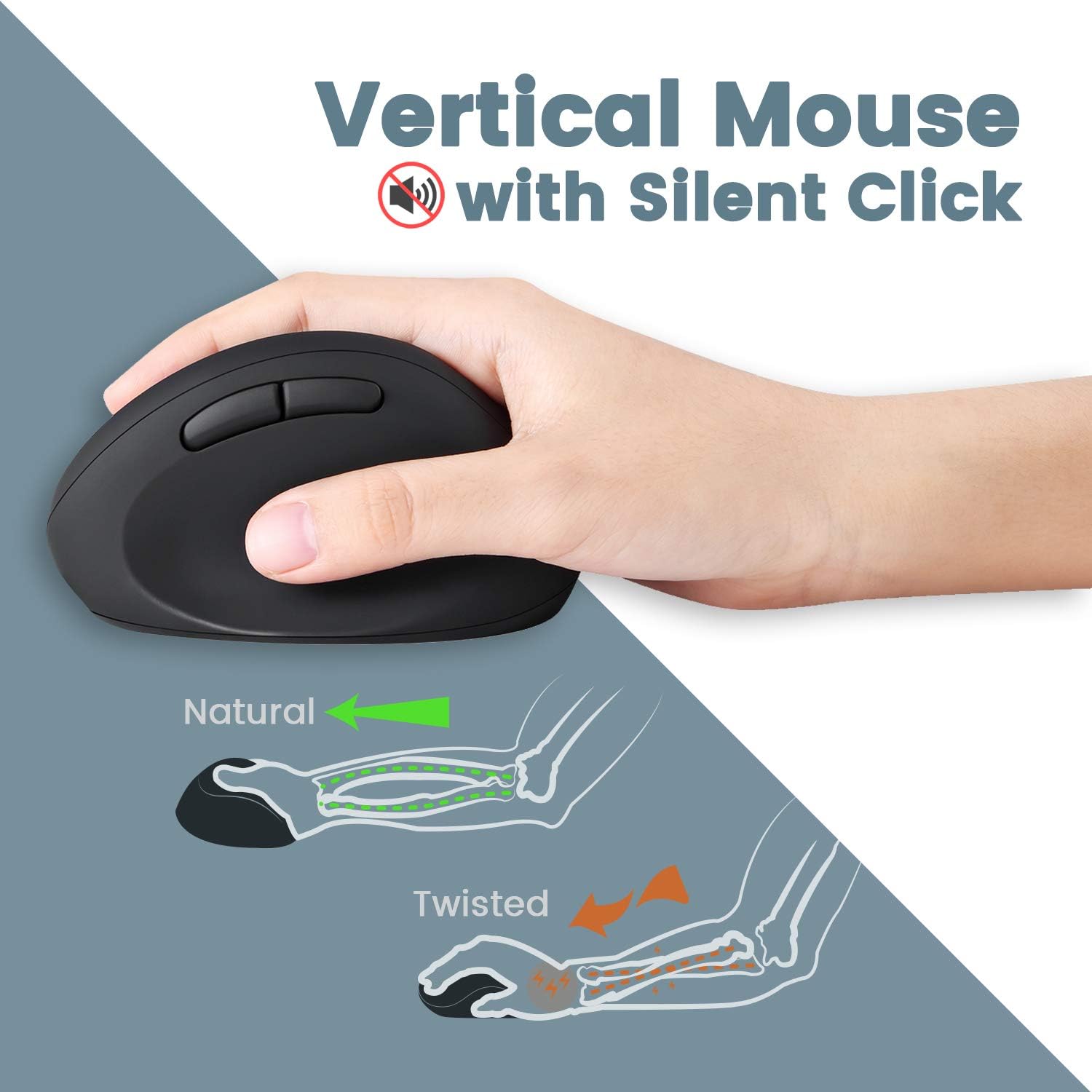
- Vertical Ergonomic Design: Positions the hand in a natural handshake posture to reduce wrist strain.
- Бясшумны клік: Зніжае шум пры працы.
- Рэгуляваны DPI: Offers 800 / 1200 / 1600 DPI settings for customizable cursor speed.
- Дызайн з 5 кнопкамі: Standard left/right click, scroll wheel, and two thumb buttons.
Бесправаднае падключэнне:
- 2.4 GHz Wireless Technology: Provides a stable connection up to 33 feet (10 meters).
- Single Nano USB Receiver: One receiver connects both the keyboard and mouse.
Інструкцыя па наладзе
- Усталюйце батарэі:
- For the keyboard: Open the battery compartment on the underside of the keyboard and insert two AAA batteries (not included).
- For the mouse: Open the battery compartment on the underside of the mouse and insert one AA battery (not included).
- Знайдзіце USB-прыёмнік: The Nano USB receiver is stored in a dedicated compartment on the backside of the keyboard. Carefully remove it.
- Падключэнне прыёмніка: Падключыце прыёмнік Nano USB да даступнага порта USB на вашым кампутары.
- Уключэнне: Ensure both the keyboard and mouse are powered on (check for an ON/OFF switch, usually on the underside). The devices should connect automatically via Plug and Play.
- Прымацуйце падстаўку для рук (неабавязкова): The adjustable palm rest stand attaches magnetically to the front of the keyboard. Use the movable magnet for height adjustment as desired.

Інструкцыя па эксплуатацыі
Выкарыстанне клавіятуры:
- Увод: Position your hands naturally over the split-key layout. The design is intended to reduce wrist bending.
- Функцыянальныя клавішы: Use the F1-F12 keys for standard functions. Some keys may have secondary functions accessible via the 'Fn' key (refer to keycap legends).
- Кола пракруткі: Utilize the central scroll wheel for vertical and horizontal scrolling in compatible applications.
Выкарыстанне мышы:
- Захоп: Hold the mouse in a natural handshake position.
- Рэгуляванне DPI: Press the DPI button (usually located near the scroll wheel or on the top) to cycle through 800, 1200, and 1600 DPI settings. Select the sensitivity that best suits your preference.
- Бясшумныя клікі: The main left and right click buttons are designed for quiet operation.
Тэхнічнае абслугоўванне
- Уборка: Выкарыстоўвайце мяккую, сухую тканіну для чысткі паверхняў клавіятуры і мышы. Для выдалення ўстойлівага бруду злёгкуamp можна выкарыстоўваць тканіну з мяккім мылам, сачыце за тым, каб вадкасць не трапляла ўнутр прылад.
- Замена батарэі: Замяняйце батарэйкі, калі прадукцыйнасць пагаршаецца або прылады перастаюць рэагаваць. Пры ўстаўцы новых батарэек пераканайцеся ў правільнай палярнасці.
- захоўванне: When not in use for extended periods, turn off the devices to conserve battery life. Store the USB receiver in the keyboard's compartment to prevent loss.
Ліквідацыю непаладак
| праблема | Рашэнне |
|---|---|
| Клавіятура/мыш не рэагуе |
|
| Keys are sticky or not registering consistently |
|
| Mouse cursor freezes or moves erratically |
|
| Часта абрываецца бесправадное злучэнне |
|
Тэхнічныя характарыстыкі
| Асаблівасць | Дэталь |
|---|---|
| Нумар мадэлі | 11660 |
| Сувязь | 2.4 GHz Wireless (Nano USB Receiver) |
| Дыстанцыя дзеяння | Да 33 футаў (10 метраў) |
| Памеры клавіятуры (ДхШхВ) | 13.82 х 8.94 х 2.56 цалі |
| Памеры мышы (ДхШхВ) | 4.5 х 2.64 х 2.28 цалі |
| Вага клавіятуры | Прыкладна 1.6 фунта |
| Налады DPI мышы | 800/1200/1600 |
| Акумулятар клавіятуры | 2 x AAA (не ўключаны) |
| Акумулятар мышкі | 1 x AA (не ўваходзіць у камплект) |
| Сумяшчальныя аперацыйныя сістэмы | Windows 7, 8, 10, 11 |
Гарантыя і падтрымка
Your Perixx PERIDUO-606 comes with a 12-месячная абмежаваная гарантыя з даты пакупкі. Гэтая гарантыя распаўсюджваецца на вытворчыя дэфекты і гарантуе, што прадукт будзе функцыянаваць належным чынам пры нармальным выкарыстанні.
Каб атрымаць тэхнічную падтрымку, гарантыйныя прэтэнзіі або дадатковую дапамогу, наведайце афіцыйны сайт Perixx. website or contact their customer service department. Contact information can typically be found on the Perixx brand store page or included documentation.
Інтэрнэт-рэсурсы: Perixx Brand Store on Amazon


