1. Уводзіны
Дзякуй за пакупкуasing the SHARP XL-B512 Stereo Sound System. This micro sound system offers a rich 45-watt sound experience with versatile connectivity options including Bluetooth, CD player, USB, and FM radio. Its elegant design with a wooden speaker housing and LED display complements any living space. This manual provides essential information for setting up, operating, and maintaining your device to ensure optimal performance and longevity.
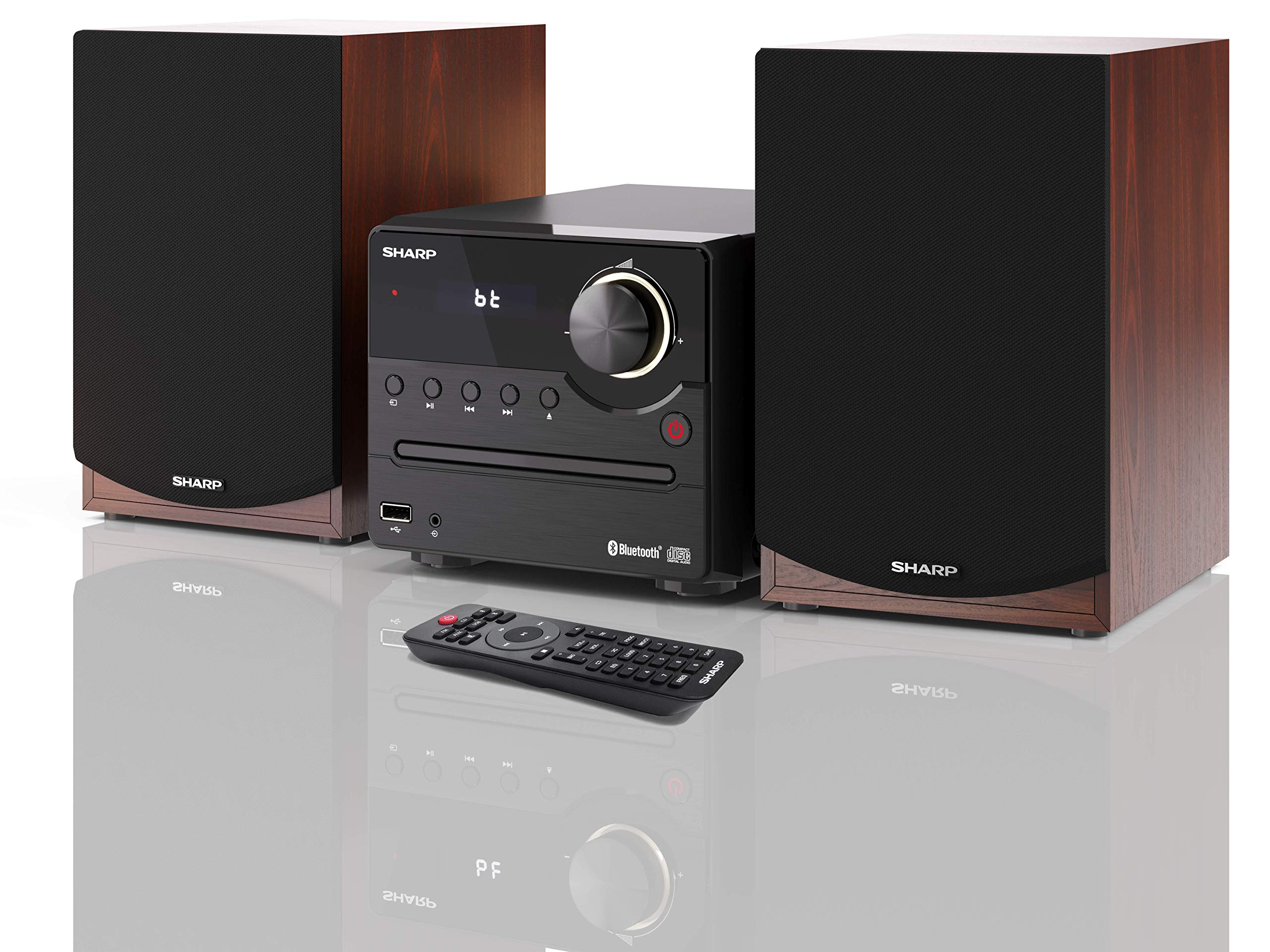
Малюнак 1: SHARP XL-B512 Stereo Sound System. This image shows the central unit flanked by two wooden-cased speakers, reflecting on a polished surface.
2. Інфармацыя па бяспецы
Калі ласка, уважліва прачытайце ўсе інструкцыі па тэхніцы бяспекі перад выкарыстаннем прадукту. Захоўвайце гэтую інструкцыю для далейшага выкарыстання.
- Крыніца харчавання: Выкарыстоўвайце толькі пазначаную крыніцу сілкавання. Пераканайцеся, што гучнасцьtage адпавядае вашай мясцовай крыніцы харчавання.
- Вентыляцыя: Не блакуйце вентыляцыйныя адтуліны. Пакіньце дастатковую прастору вакол прылады для належнай цыркуляцыі паветра.
- Вада і вільгаць: Не падвяргайце прыладу ўздзеянню дажджу, вільгаці або кропель/пырскаў вадкасцей. Не стаўце на прыладу прадметы, напоўненыя вадкасцямі, такія як вазы.
- Цяпло: Трымайце прыладу далей ад крыніц цяпла, такіх як радыятары, абагравальнікі, пліты або іншыя прыборы (у тым ліку ampLifiers), якія вырабляюць цяпло.
- Уборка: Перад чысткай адключыце прыладу ад разеткі. Выкарыстоўвайце толькі сухую тканіну.
- Абслугоўванне: Не спрабуйце самастойна абслугоўваць гэты прадукт. Звярніцеся да ўсіх абслугоўванняў кваліфікаванага абслуговага персаналу.
3. Змесціва ўпакоўкі
Праверце, ці ўсе пералічаныя ніжэй прадметы ўваходзяць у вашу ўпакоўку:
- SHARP XL-B512 Micro Sound System (Main Unit)
- Two Speakers (with wooden housing)
- Сілавы кабель
- Пульт дыстанцыйнага кіравання (з батарэйкамі)
- Інструкцыя па эксплуатацыі (гэты дакумент)
- Кароткае кіраўніцтва
4. Настройка
4.1 Падключэнне калонкі
Connect the two speakers to the main unit using the provided speaker cables. Ensure correct polarity (positive to positive, negative to negative) for optimal sound quality.
4.2 Падключэнне харчавання
Connect the power cable to the AC IN port on the rear of the main unit, then plug it into a wall outlet.

Малюнак 2: Rear panel connections. This image displays the back of the central unit with ports for speaker wires and the AC power input, alongside the rear of the two speakers.
4.3 Першапачатковае ўключэнне
Press the Power button on the main unit or the remote control to turn on the system. The LCD display will illuminate.
5. Інструкцыя па эксплуатацыі
5.1 Элементы кіравання пярэдняй панэлі

Малюнак 3: Front panel controls. This close-up shows the central unit's display, volume knob, and various control buttons for playback and source selection.
- Кнопка харчавання: Уключае або выключае прыладу.
- Кнопка крыніцы: Cycles through available input sources (CD, FM, Bluetooth, USB, AUX).
- Рэгулятар гучнасці: Рэгулюе агульны ўзровень гучнасці.
- Элементы кіравання прайграваннем: Play/Pause, Stop, Skip Forward/Backward for CD and USB modes.
- Порт USB: For connecting USB storage devices for music playback.
- Уваход AUX: 3.5-мм раз'ём для падлучэння знешніх аўдыёпрылад.
5.2 Прайграванне кампакт-дыскаў
- Націсніце Крыніца button to select 'CD' mode.
- Open the CD tray by pressing the Eject button.
- Place a CD (CD/CD-R/CD-RW/MP3 format) with the label side up into the tray.
- Close the CD tray. The system will read the disc and begin playback automatically or display track information.
- Выкарыстоўвайце элементы кіравання прайграваннем (Прайграванне/Паўза, Стоп, Прапусціць) для кіравання музыкай.
5.3 FM -радыё
- Націсніце Крыніца button to select 'FM' mode.
- The system will automatically search for available stations or you can manually tune.
- Каб захаваць станцыю ў якасці прадусталяванай налады, наладзьцеся на патрэбную станцыю, а затым націсніце і ўтрымлівайце кнопку Прадусталяваная button (if available on remote) or follow on-screen instructions. The system supports 40 preset memories.
- Выкарыстоўвайце Прадусталяваныя ўверх/уніз кнопкі для навігацыі па захаваных станцыях.
5.4 Спалучэнне па Bluetooth
- Націсніце Крыніца button to select 'Bluetooth' mode. The display will show 'bt' and flash, indicating it's in pairing mode.
- На мабільнай прыладзе ўключыце Bluetooth і знайдзіце даступныя прылады.
- Select 'SHARP XL-B512' from the list of devices.
- Once paired, the 'bt' indicator on the system's display will stop flashing. You can now stream audio from your device.
5.5 Прайграванне з USB
- Устаўце USB-назапашвальнік у USB-порт на пярэдняй панэлі.
- Націсніце Крыніца button to select 'USB' mode.
- The system will automatically detect and play compatible audio files (MP3).
- Выкарыстоўвайце элементы кіравання прайграваннем для навігацыі па трэках.
5.6 AUX ўваход
- Connect an external audio device (e.g., smartphone, MP3 player) to the AUX IN jack on the front panel using a 3.5mm audio cable (not supplied).
- Націсніце Крыніца button to select 'AUX' mode.
- Play audio from your connected device. The sound will be output through the SHARP XL-B512 system.
5.7 Налады эквалайзера
The system features 6 preset equalizers with independent treble and depth control. Use the EQ button on the remote control or main unit to cycle through the presets and adjust sound to your preference.
6. Тэхнічнае абслугоўванне
6.1 Чыстка прылады
Wipe the unit with a soft, dry cloth. Do not use abrasive cleaners, waxes, or solvents as they may damage the finish. Ensure the unit is unplugged before cleaning.
6.2 Сыход за кампакт-дыскамі
Handle CDs by their edges. Keep them clean and free of scratches. Store CDs in their cases when not in use.
6.3 Speaker Care
The wooden speaker housing can be cleaned with a soft, dry cloth. Avoid placing heavy objects on the speakers or exposing them to direct sunlight or extreme temperatures.
7. Выпраўленне непаладак
If you encounter any issues with your SHARP XL-B512 system, refer to the following table for common problems and solutions.
| праблема | Магчымая прычына | Рашэнне |
|---|---|---|
| Няма ўлады | Power cable not connected securely; Power outlet not active. | Праверце падключэнне кабеля харчавання; паспрабуйце іншую разетку. |
| Няма гуку | Volume too low; Incorrect source selected; Speaker cables disconnected. | Increase volume; Select correct input source; Check speaker cable connections. |
| Bluetooth не спалучаецца | System not in pairing mode; Device too far; Bluetooth disabled on device. | Ensure system is in Bluetooth pairing mode; Move device closer; Enable Bluetooth on your device. |
| Кампакт-дыск не прайграваецца | CD inserted incorrectly; CD is dirty or scratched; Incorrect format. | Reinsert CD correctly; Clean CD; Ensure CD is a supported format (CD/CD-R/CD-RW/MP3). |
| Пульт дыстанцыйнага кіравання не працуе | Батарэйкі разраджаныя або няправільна ўстаўленыя; паміж пультам дыстанцыйнага кіравання і прыладай ёсць перашкода. | Замяніце батарэйкі; пераканайцеся ў правільнай палярнасці батарэек; выдаліце ўсе перашкоды. |
Калі праблема не знікне пасля выкарыстання гэтых рашэнняў, звярніцеся ў службу падтрымкі кліентаў.
8. Тэхнічныя характарыстыкі
Below are the technical specifications for the SHARP XL-B512 Stereo Sound System:
- мадэль: XL-B512
- Агульная выхадная магутнасць: 45 ват
- Рэжым вываду гуку: Стэрэа
- Speaker Output Channel Quantity: 2
- Падтрымліваюцца аўдыяфарматы: MP3, CD, CD-R, CD-RW
- Тэхналогія цюнэра: FM PLL Tuner
- Частотны дыяпазон FM: Ад 87.5 да 108 МГц
- FM Preset Memory: 40 станцый
- Падключэнне: Bluetooth, USB, дапаможны (3.5 мм)
- Асаблівасці: 6 Preset Equalizers, LCD Display with white backlight
- Sound System Dimensions (W x H x D): 17 х 22 х 15 см
- Speaker Dimensions (W x H x D): 14.5 x 17.7 x 22.3 cm (each)
- Вага прадмета: 4 кг
- Крыніца харчавання: Правадная электрычная
- Пульт дыстанцыйнага кіравання: Так (батарэі ўваходзяць у камплект)
9. Гарантыя і падтрымка
Your SHARP XL-B512 Stereo Sound System comes with a standard manufacturer's warranty. Please refer to the warranty card included in your package for specific terms and conditions, including the warranty period and coverage details.
For technical support, service inquiries, or further assistance, please contact your local SHARP customer service center. Contact information can typically be found on the manufacturer's webна сайце або ў гарантыйнай дакументацыі.


