Уводзіны
This manual provides comprehensive instructions for the setup, operation, and maintenance of your Perixx PERIBOARD-612 Wireless Ergonomic Keyboard. The PERIBOARD-612 features a split ergonomic design and offers dual-mode connectivity via 2.4 GHz wireless and Bluetooth 4.0, compatible with both Windows and Mac operating systems. Please read this manual thoroughly to ensure proper use and to maximize your keyboard's functionality.

Выява: Уверсе view of the Perixx PERIBOARD-612 Wireless Ergonomic Keyboard, showcasing its split design and integrated palm rest.
Змест пакета
Праверце, ці ёсць усе прадметы ў вашай упакоўцы:
- Perixx PERIBOARD-612 Wireless Ergonomic Keyboard
- USB 2.4 GHz Receiver (stored in the keyboard's battery compartment)
- 4 Extra Mac Keycaps (Option, Command)
- Здымальнік клавішнай шапкі
- Кіраўніцтва карыстальніка
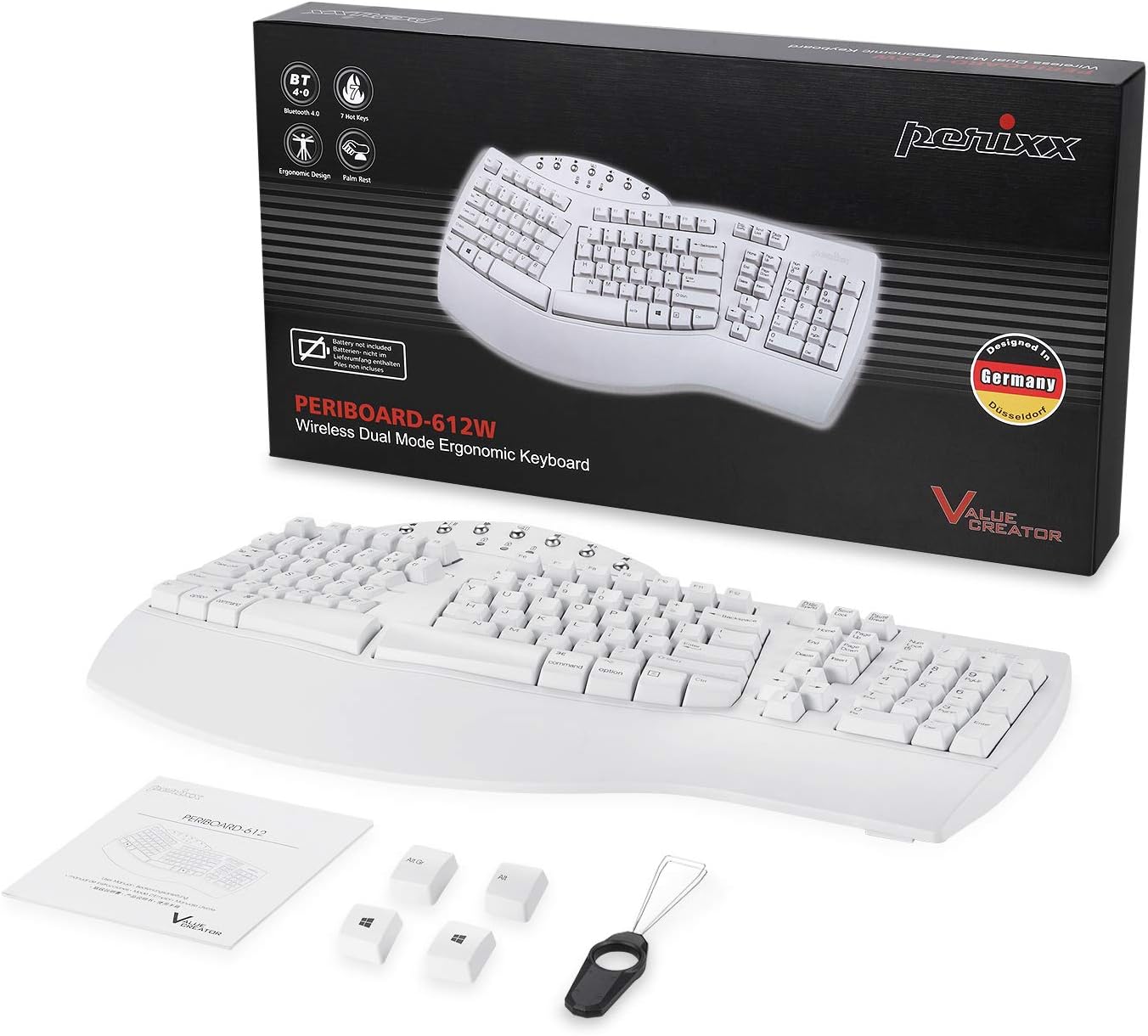
Image: Contents of the Perixx PERIBOARD-612 retail package, showing the keyboard, manual, USB receiver, extra Mac keycaps, and keycap puller.
Асноўныя характарыстыкі
- Ergonomic Split-Key Design: Features an integrated palm rest to support wrists, reduce median nerve pressure, and minimize forearm tension. Promotes natural arm and hand positioning to reduce the risk of Repetitive Strain Injury (RSI) and carpal tunnel syndrome.
- Wireless Dual Mode Connectivity: Seamlessly switch between 2.4 GHz wireless and Bluetooth 4.0 connections. The nano receiver for 2.4 GHz is conveniently stored in a compartment at the bottom of the keyboard.
- 7 мультымедыйных клавіш: Dedicated function keys provide quick access to multimedia controls, including browser, email, volume up/down, mute, sleep mode, and search functions. Optimized for both Mac and Windows operating systems.
- Long Travel Distance Keys: Tactile and responsive keys offer a satisfying typing experience with a comfortable key travel distance.
- Dual System Compatibility: Compatible with Windows (8/10/11) and Mac OS X. An OS switch located at the bottom of the keyboard allows for easy switching between systems.

Image: Hands positioned naturally on the split ergonomic keyboard, illustrating comfortable typing posture.

Image: Close-up of the keyboard keys, highlighting the full key travel distance for comfortable and responsive typing.
Настройка і падключэнне
1. Powering On and OS Selection
- Locate the power switch on the bottom of the keyboard. Slide it to the "ON" position.
- Identify the OS switch (labeled "WIN" and "OS X") on the bottom of the keyboard. Slide it to match your operating system (Windows or Mac).
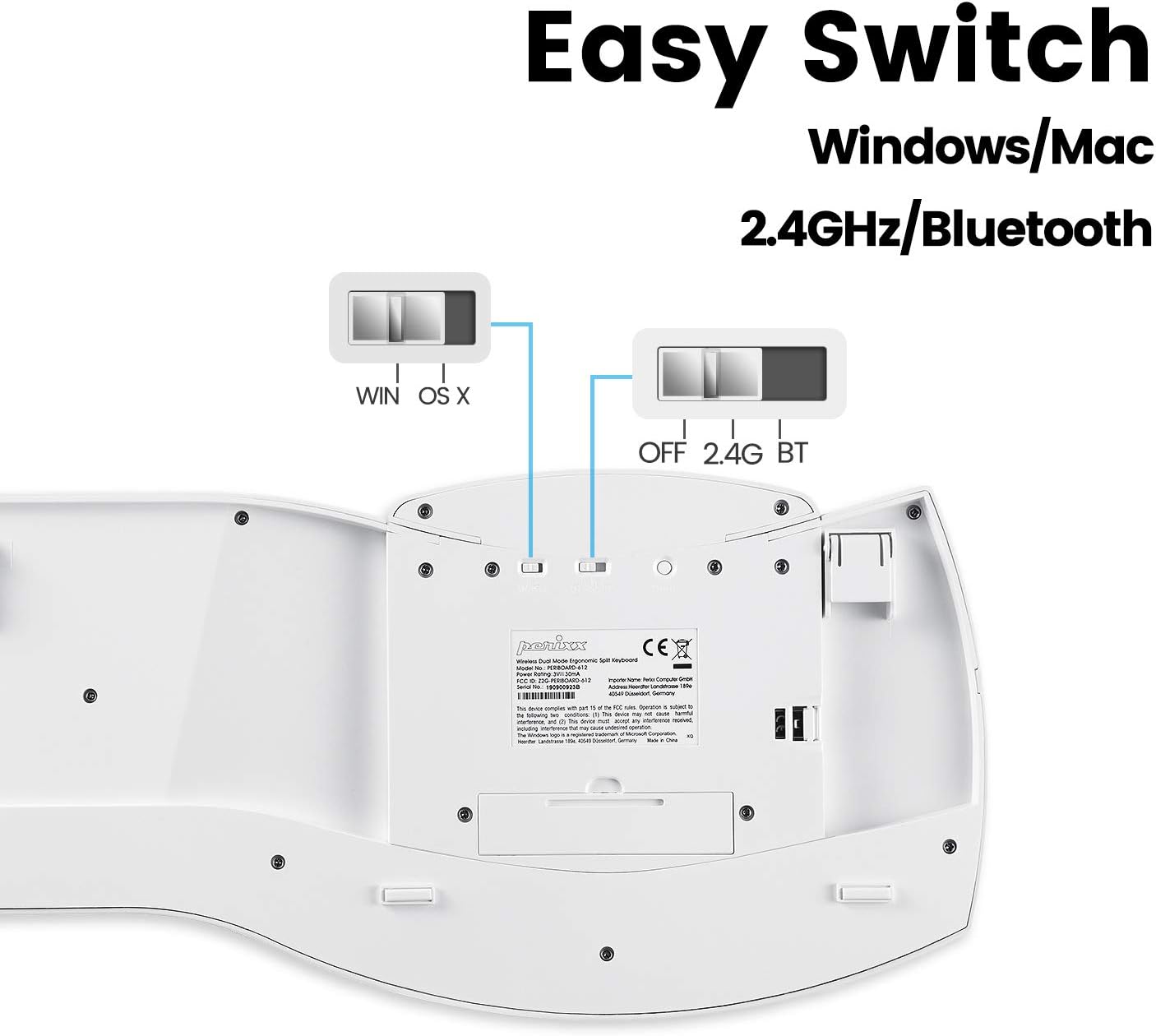
Image: Underside of the keyboard, showing the power switch, OS selection switch (WIN/OS X), and the 2.4G/BT connectivity switch.
2. Бесправадное злучэнне 2.4 ГГц
- Ensure the connectivity switch on the bottom of the keyboard is set to "2.4G".
- Remove the USB nano receiver from its storage compartment on the bottom of the keyboard.
- Падключыце нанапрыёмнік USB да даступнага порта USB на вашым кампутары.
- The keyboard should automatically connect. If not, ensure the keyboard is powered on and the receiver is securely plugged in.
3. Падключэнне Bluetooth 4.0
- Ensure the connectivity switch on the bottom of the keyboard is set to "BT".
- На вашым камп'ютары або прыладзе адкрыйце налады Bluetooth.
- The keyboard should appear as "PERIBOARD-612" in the list of available devices. Select it to pair.
- Выконвайце любыя падказкі на экране, каб завяршыць працэс спалучэння.

Image: Diagram illustrating the dual wireless connectivity modes (Bluetooth and 2.4GHz) and compatibility with Mac and Windows.
мультымедыйныя клавішы
The PERIBOARD-612 includes dedicated multimedia keys for enhanced control. These keys are located above the function row (F1-F12).
- Папярэдні трэк: Go to the previous audio/video track.
- Паўза/прайграванне: Toggle play/pause for media.
- Наступны трэк: Go to the next audio/video track.
- Mission Control (Mac) / Task View (Windows): Access system overview.
- Паменшыць гучнасць: Паменшыць гучнасць гуку.
- Павялічыць гучнасць: Павялічыць гучнасць гуку.
- Адключэнне гуку: Выключыць або ўключыць гук.
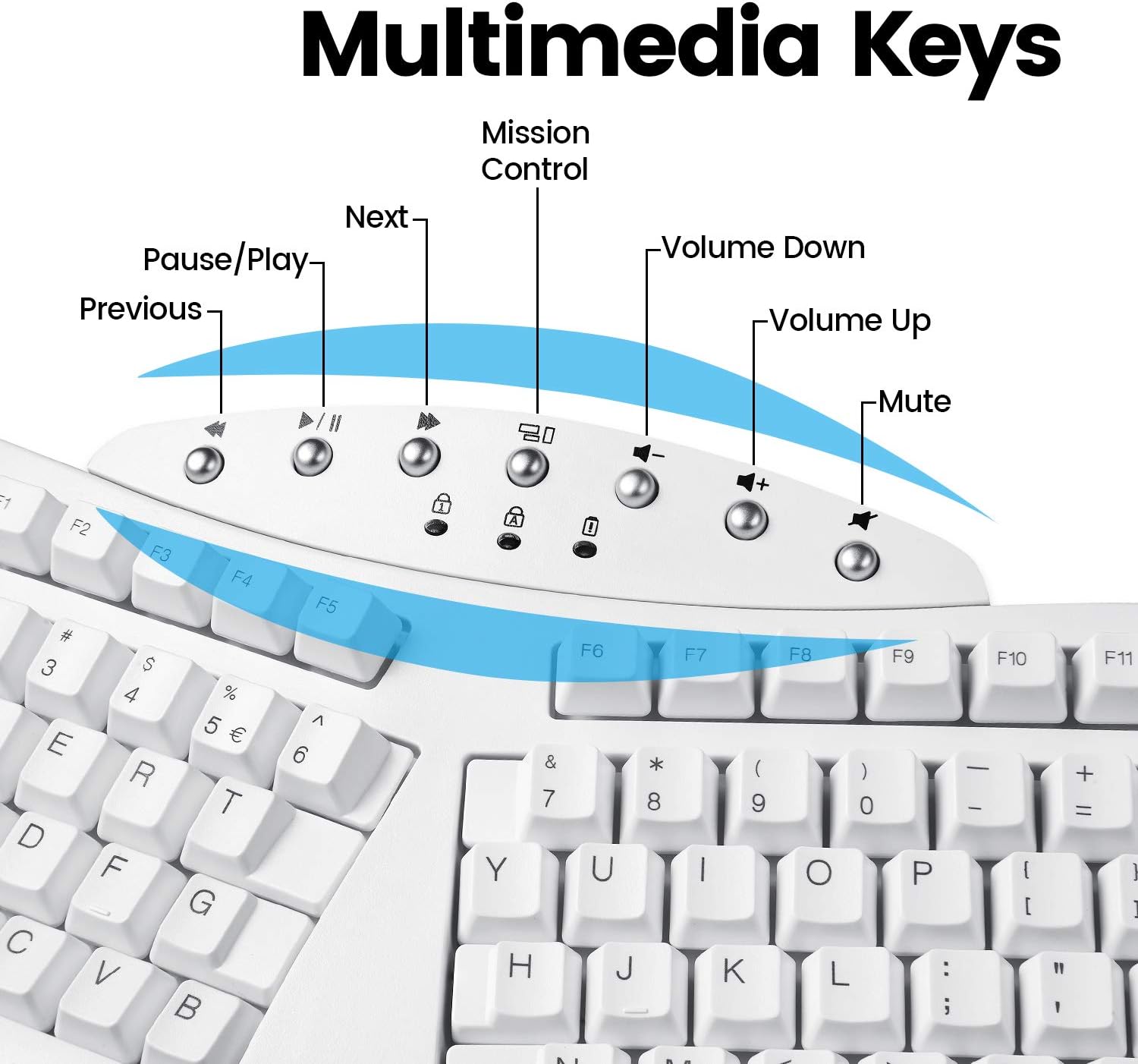
Выява: Падрабязная view of the multimedia keys located at the top center of the keyboard, with their respective functions labeled.
Інструкцыя па эксплуатацыі
The PERIBOARD-612 functions as a standard full-size keyboard with the added benefit of its ergonomic split design. For optimal comfort and to prevent strain, ensure your wrists are relaxed and your fingers are curved over the keys. The integrated palm rest is designed to support your wrists in a neutral position.
- Замена каўпачка клавіш: If you are a Mac user, you can replace the default Windows keycaps (Alt, Windows key) with the provided Mac keycaps (Option, Command) using the included keycap puller. Gently pull the keycap straight up to remove it, then align and press down the new keycap.
- Тэрмін службы батарэі: The keyboard is battery-powered. Replace batteries when performance degrades or the low battery indicator (if present) illuminates.
Тэхнічнае абслугоўванне
Regular maintenance helps prolong the life of your keyboard:
- Уборка: Выкарыстоўвайце мяккую безворсовую тканіну, злёгку dampened with water or a mild cleaning solution to wipe the surface of the keyboard. Avoid harsh chemicals or abrasive materials. For cleaning between keys, use compressed air to remove dust and debris.
- захоўванне: When not in use for extended periods, store the keyboard in a dry, cool place. If using 2.4 GHz wireless, store the USB receiver in its designated compartment to prevent loss.
- Сыход за батарэяй: If the keyboard will not be used for a long time, remove the batteries to prevent leakage.
Ліквідацыю непаладак
If you encounter issues with your PERIBOARD-612, refer to the following common solutions:
- Клавіятура не адказвае:
- Пераканайцеся, што клавіятура ўключана.
- Праверце ўзровень батарэі і пры неабходнасці заменіце яе.
- For 2.4 GHz: Ensure the USB receiver is securely plugged into a working USB port and the keyboard switch is set to "2.4G".
- For Bluetooth: Ensure Bluetooth is enabled on your device, the keyboard switch is set to "BT", and the keyboard is paired correctly. Try re-pairing if necessary.
- Verify the OS switch on the bottom of the keyboard matches your operating system.
- Keys Not Functioning Correctly (e.g., sticking, multiple inputs):
- Clean around and under the affected keycap using compressed air.
- Gently remove the keycap with the keycap puller and inspect for any obstructions. Reinstall the keycap securely.
- Layout Issues (e.g., incorrect symbols when typing):
- Ensure your computer's operating system keyboard layout settings are configured for a US English keyboard.
- Перарывістае злучэнне:
- Move the keyboard closer to the receiver (for 2.4 GHz) or Bluetooth device.
- Пазбягайце размяшчэння клавіятуры побач з іншымі бесправаднымі прыладамі, якія могуць выклікаць перашкоды.
Тэхнічныя характарыстыкі
| Асаблівасць | Дэталь |
|---|---|
| Нумар мадэлі | PERIBOARD-612 (Item model number: 11615) |
| Тэхналогія падлучэння | 2.4 GHz Radio Frequency, Bluetooth 4.0 |
| Апісанне клавіятуры | Ergonomic, Split Keyset Design |
| Сумяшчальныя прылады | Ноўтбук, ПК |
| Аперацыйная сістэма | Mac OS X, Windows (8/10/11) |
| Вага прадмета | 2.2 фунта (прыблізна 1 кг) |
| Памеры прадукту (ДxШxВ) | 19.09 х 8.98 х 1.57 цалі (прыблізна 48.5 х 22.8 х 4 см) |
| Колер | Белы |
| Крыніца харчавання | Харчаванне ад батарэі |
| тtage | 4.25 В (пастаянны ток) |
Гарантыя і падтрымка
Perixx products typically come with a manufacturer's warranty. For specific warranty terms and conditions, please refer to the official Perixx website or the warranty card included with your product. In case of technical issues or support inquiries, please contact Perixx customer service.
A digital version of this user manual and other support documents may be available on the Perixx webсайце або па наступнай спасылцы: Perixx PERIBOARD-612 User Manual (PDF)
Інфармацыя аб адпаведнасці
Гэта прылада адпавядае частцы 15 правілаў FCC. Эксплуатацыя залежыць ад наступных дзвюх умоў: (1) гэта прылада не можа выклікаць шкодных перашкод і (2) гэта прылада павінна прымаць любыя перашкоды, у тым ліку перашкоды, якія могуць выклікаць непажаданую працу.
For detailed compliance certificates, please refer to the official Perixx documentation or webсайт.


