1. Уводзіны
Thank you for choosing the Hama EWS-3200 Wireless Weather Station. This device provides accurate indoor and outdoor temperature and humidity readings, weather forecasts, moon phase display, and a radio-controlled clock with alarm functions. Please read this manual carefully to ensure correct setup and operation.
2. Інструкцыі па тэхніцы бяспекі
- Беражыце выраб ад бруду, вільгаці і перагрэву.
- Не выкарыстоўвайце выраб у непасрэднай блізкасці ад абагравальнікаў або іншых крыніц цяпла.
- Не кідайце выраб і не падвяргайце яго моцным ударам.
- Do not open the product and do not operate it if it is damaged.
- Захоўвайце гэты прадукт, як і ўсе электрычныя вырабы, у месцах, недаступных дзецям.
- Неадкладна ўтылізуйце ўпаковачны матэрыял у адпаведнасці з мясцовымі правіламі.
- Батарэі неабходна ўстаўляць з захаваннем правільнай палярнасці.
- Remove batteries from the product if it is not to be used for an extended period.
3. Змесціва ўпакоўкі
- 1 Hama EWS-3200 Weather Station (Base Unit)
- 1 Бесправадны вулічны датчык
- 3 AA Mignon Batteries (for Base Unit)
- 2 AAA Micro Batteries (for Outdoor Sensor)
- 1 Інструкцыя па эксплуатацыі
4. Асаблівасці прадукту
- Indoor and Outdoor Temperature/Humidity Display: Shows current conditions for both locations.
- DCF Radio Clock: Automatic time setting for the most accurate time display.
- Прагноз надвор'я: Icons for sunny, partly cloudy, cloudy, rainy, and stormy conditions.
- Air Pressure Trend: Displays rising, stable, or falling air pressure.
- Дысплей фаз месяца: Паказвае бягучую фазу месяца.
- Функцыя сігналізацыі: Two adjustable alarms, including a weekday alarm.
- Тэмпературны сігнал трывогі: Individually adjustable alarm for outdoor temperature.
- Функцыя затрымкі: For temporary alarm interruption.
- Сіняя падсветка: For improved readability in low light.
- Max/Min Data Memory: Records highest and lowest temperature/humidity values.
- Дысплей ёмістасці батарэі: For both base station and outdoor sensor.
- Варыянты мантажу: Can be wall-mounted or freestanding.
5. Настройка
5.1 Устаноўка батарэі
The base station and outdoor sensor require batteries for operation. Ensure correct polarity when inserting batteries.


- Знешні датчык: Open the battery compartment on the back of the outdoor sensor. Insert 2 AAA Micro batteries, observing the polarity markings (+/-). Close the compartment securely.
- Базавая адзінка: Open the battery compartment on the back of the base unit. Insert 3 AA Mignon batteries, observing the polarity markings (+/-). Close the compartment securely.
5.2 Размяшчэнне датчыка
Place the outdoor sensor in a location protected from direct sunlight and rain to ensure accurate temperature and humidity readings. The maximum wireless range is 50 meters. Avoid placing the sensor near large metal objects or other electronic devices that may cause interference.
5.3 Пачатковая сінхранізацыя
After inserting batteries into both units, the base station will automatically search for the outdoor sensor and the DCF radio signal. This process may take a few minutes. Once synchronized, the outdoor temperature and humidity will appear on the base station display, and the time will be set automatically.

6. Інструкцыя па эксплуатацыі
6.1 Дысплей скончыўсяview
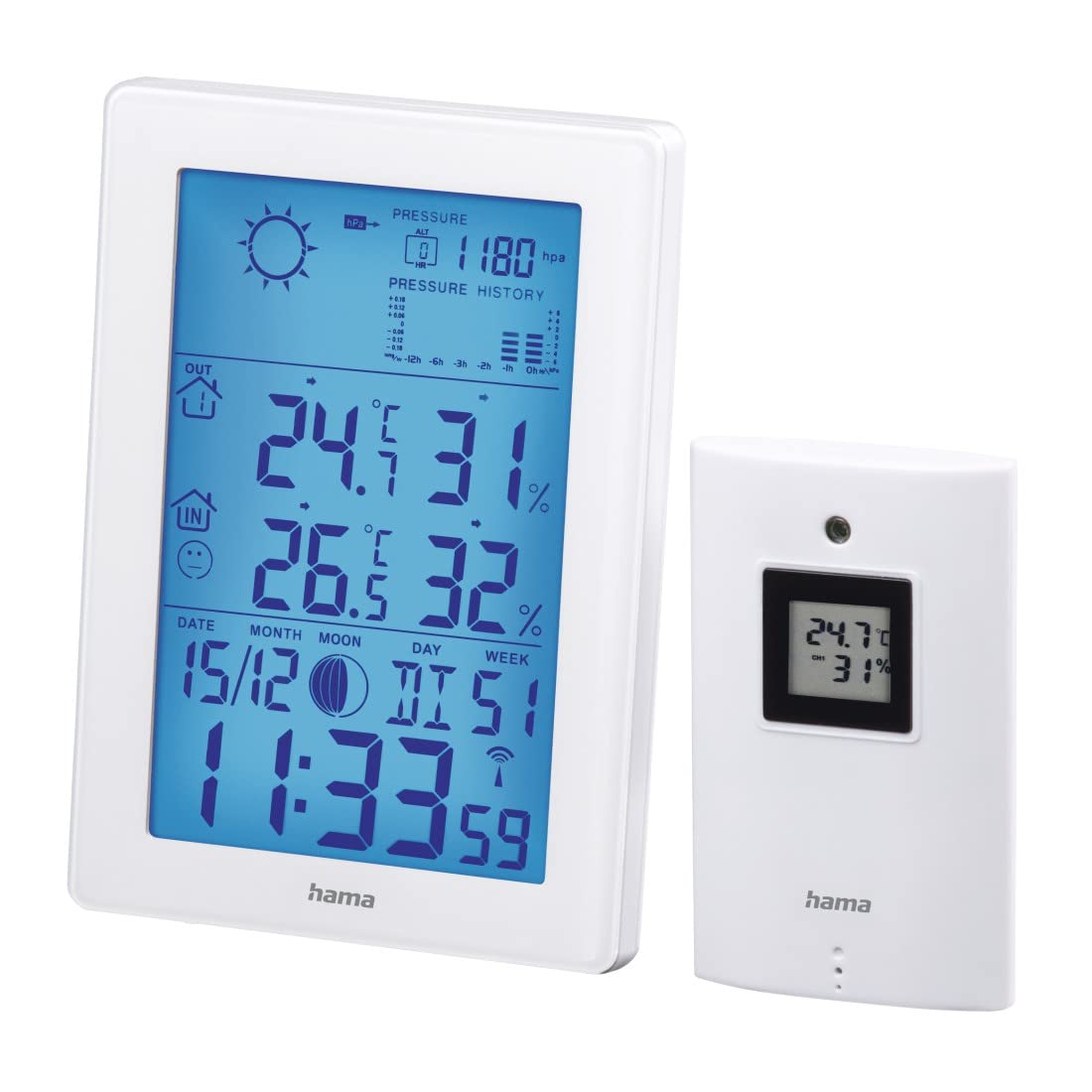
The main display of the base unit shows various information at a glance.

- Час і дата: Displays current time (12/24h format) and date.
- Тэмпература і вільготнасць у памяшканні: Current readings inside.
- Outdoor Temperature and Humidity: Бягучыя паказанні бесправаднога датчыка.
- Значкі прагнозу надвор'я: Indicates predicted weather conditions.
- Air Pressure History: Bar graph showing pressure trends over the last 12 hours.
- Фаза Месяца: Graphic representation of the current moon phase.
- Індыкатары батарэі: Shows battery status for both units.
6.2 Налады часу і даты
The weather station automatically sets the time via the DCF radio signal. If manual adjustment is needed (e.g., for different time zones):
- Націсніце і ўтрымлівайце РЭЖЫМ кнопку для ўваходу ў рэжым налады часу.
- Выкарыстоўвайце + і - кнопкі для рэгулявання значэнняў.
- Прэса РЭЖЫМ again to confirm and move to the next setting (e.g., 12/24h format, time zone, year, month, day, weekday language).
6.3 Адлюстраванне тэмпературы і вільготнасці
- Выбар адзінкі: Націсніце - button to switch between Celsius (°C) and Fahrenheit (°F) for temperature display.
- Max/Min Values: Націсніце РЭЖЫМ button repeatedly to cycle through current, maximum (MAX), and minimum (MIN) temperature and humidity readings. To clear MAX/MIN records, press and hold the ГІСТОРЫЯ button while MAX/MIN values are displayed.
6.4 Прагноз надвор'я
The weather station predicts weather conditions based on air pressure changes. The forecast icons (sunny, partly cloudy, cloudy, rainy, stormy) indicate the expected weather for the next 12-24 hours. The bar graph shows the air pressure trend over the last 12 hours.
6.5 функцый сігналізацыі
- Налада будзільнікаў: Націсніце РЭЖЫМ button until the alarm time is displayed. Press and hold РЭЖЫМ каб увайсці ў рэжым налады будзільніка. Выкарыстоўвайце + і - to adjust the hour and minute, and РЭЖЫМ to confirm. You can set two separate alarms, including a weekday alarm (Monday-Friday).
- Функцыя затрымкі: Калі гучыць будзільнік, націсніце кнопку SNOOZE / LIGHT button to activate the snooze function. The alarm will sound again after a few minutes.
- Тэмпературны сігнал трывогі: An individually adjustable temperature alarm can be set to alert you when the outdoor temperature reaches a certain threshold (e.g., for frost warning). Refer to the manual for specific steps to set the temperature alarm.
6.6 Падсвятленне
Націсніце SNOOZE / LIGHT button to activate the blue backlight for a few seconds, improving display visibility in dark conditions.
7. Тэхнічнае абслугоўванне
- Ачысціце гэты прадукт толькі злёгку damp, тканінай без ворса і не выкарыстоўвайце агрэсіўныя якія чысцяць сродкі.
- Сачыце за тым, каб у выраб не трапляла вада.
- Замяніце батарэйкі, калі на дысплеі з'явіцца індыкатар нізкага зараду батарэй.
8. Выпраўленне непаладак
| праблема | Магчымая прычына | Рашэнне |
|---|---|---|
| Няма дысплея на базавым блоку | Батарэйкі разраджаныя або няправільна ўстаўленыя. | Check battery polarity and replace if necessary. |
| Outdoor readings not displayed | Sensor out of range, interference, or dead batteries. | Move sensor closer to base unit, check for interference, replace sensor batteries. Initiate manual synchronization if needed. |
| Няправільнае адлюстраванне часу | DCF signal interference or manual time zone setting needed. | Relocate the base unit away from electronic devices. Manually set the time zone if the DCF signal is received but the time is incorrect. |
| Недакладны прагноз надвор'я | Weather forecast is based on air pressure trends and is an estimation. | This is normal. The forecast is a prediction and may not always match actual conditions perfectly. |
9. Тэхнічныя характарыстыкі
- Нумар мадэлі: 00186307
- Тып дысплея: LCD, Digital
- колер: Белы
- матэрыял: Metal or Plastic
- Крыніца харчавання: Працуе ад акумулятара
- Base Unit Batteries: 3 x AA Mignon (included)
- Outdoor Sensor Batteries: 2 мікрабатарэі тыпу AAA (у камплекце)
- Тэмпературны дыяпазон у памяшканні: Ад 0 °C да +50 °C (ад 32 °F да 122 °F)
- Дыяпазон вонкавай тэмпературы: -20 °C да +60 °C
- Wireless Range (Outdoor Sensor): Да 50 метраў
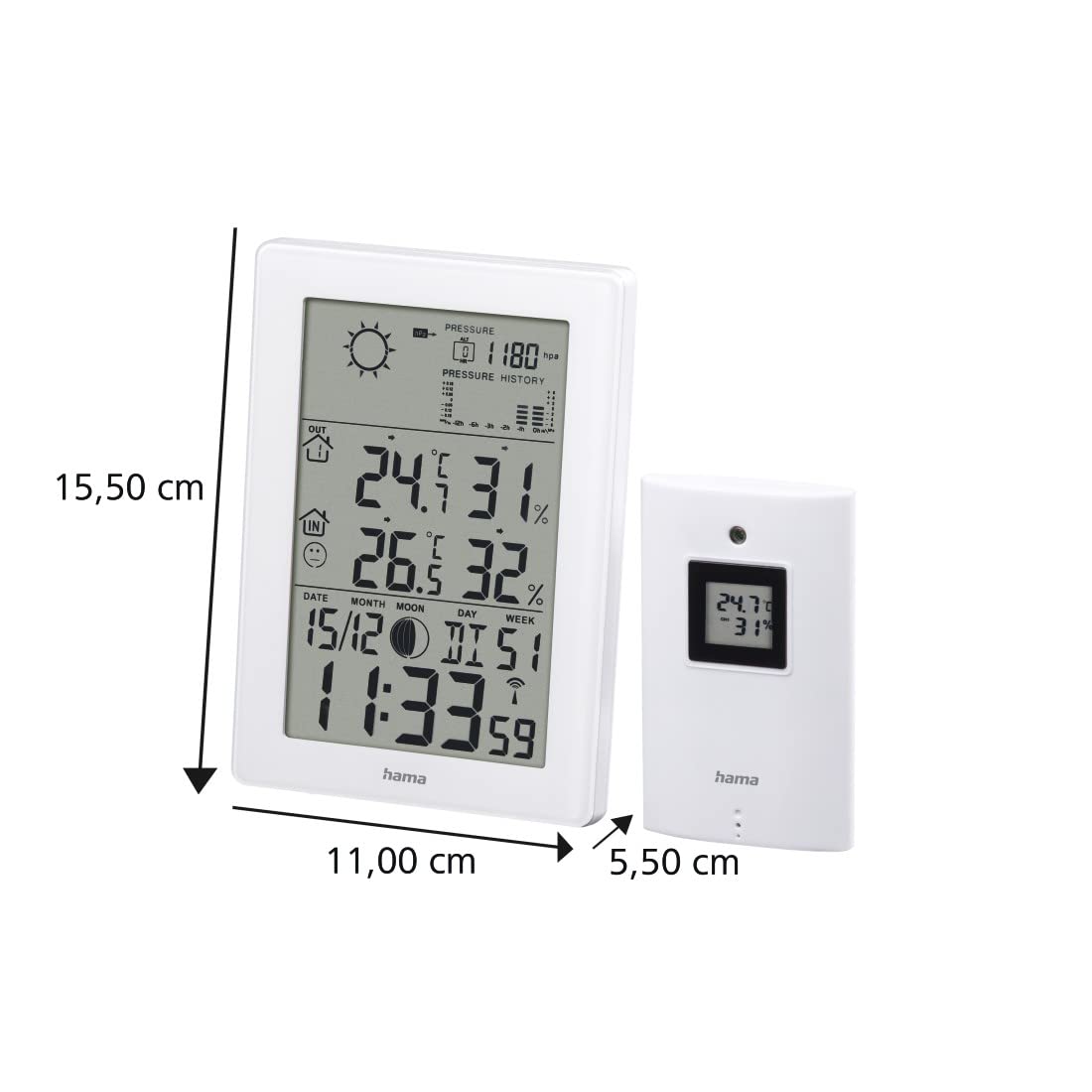
- Base Unit Dimensions (L x W x H): 15.5 х 11 х 5.5 см
- Вага: 530 грамаў
- Тэхналогія падключэння: радыёчастотныя
- Асаблівасці: Temperature Alarm, Snooze Function, Moon Phase Display, Backlight
10. Гарантыя
Hama GmbH & Co.
11. Падтрымка
Каб атрымаць тэхнічную падтрымку або прэтэнзіі па гарантыі, звярніцеся ў мясцовую службу падтрымкі кліентаў Hama або наведайце афіцыйны сайт Hama. webсайт для атрымання дадатковай інфармацыі.
Webсайт: www.hama.com


